Buy anything from 5,000+ international stores. One checkout price. No surprise fees. Join 2M+ shoppers on Desertcart.
Desertcart purchases this item on your behalf and handles shipping, customs, and support to Denmark.
🖨️ Print Anywhere, Impress Everywhere — Your Mobile Office Just Got Smarter!
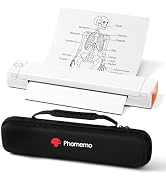
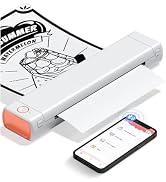
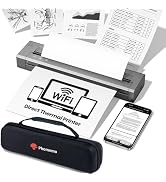
The Phomemo M08F Portable Thermal Printer delivers high-resolution 203x203 DPI monochrome prints on standard letter-size (8.5" x 11") thermal paper. Featuring wireless Bluetooth connectivity via the dedicated Phomemo app, it supports iOS and Android devices for seamless mobile printing. Its inkless thermal technology eliminates the need for cartridges, reducing printing costs and maintenance. Compact and lightweight at 715 grams, it includes a protective carry case and USB-C charging cable, making it ideal for professionals, students, and travelers who demand reliable, on-the-go printing.


| ASIN | B0BLHN22SF |
| Additional Printer Functions | Print Only |
| B&W Pages per Minute | 4.25 ppm |
| Best Sellers Rank | #4,137 in Office Products ( See Top 100 in Office Products ) #9 in Portable Thermal Printers |
| Brand | Phomemo |
| Built-In Media | 10 sheets Letter thermal paper, Instructions, M08F-Letter portable printer, Portable Printer Hard Case, USB-A to USB-C charging cable (80cm) |
| Color | Black |
| Color Depth | 24 bpp |
| Compatible Devices | Laptops, PC, Smartphones, Tablets |
| Connectivity Technology | Bluetooth, USB |
| Control Method | App |
| Controller Type | printer |
| Customer Reviews | 4.3 out of 5 stars 3,984 Reviews |
| Display Type | printer |
| Dual-sided printing | Yes |
| Duplex | simplex |
| Hardware Interface | USB |
| Ink Color | Black |
| Is Electric | Yes |
| Item Dimensions D x W x H | 4"D x 13.7"W x 3"H |
| Item Type Name | portabel printer |
| Item Weight | 715 Grams |
| Manufacturer | Phomemo |
| Maximum Copy Resolution Black and White | 203x203 DPI |
| Maximum Copy Speed Black and White | 4.2 ppm |
| Maximum Media Size | 8.5 x 11 inch |
| Maximum Print Resolution Black and White | 203x203 DPI |
| Maximum Sheet Capacity | 140 |
| Maximum print Resolution Color | 203x203 DPI |
| Model Name | Phomemo M08F |
| Model Number | M08F-BG |
| Model Series | M08F |
| Number of Drivers | 2 |
| Number of Trays | 1 |
| Other Special Features of the Product | Gift for Christmas, No inkless, Portable, Printer for Home Use, Printer for school students |
| Output sheet capacity | 140 |
| Paper Size | 8.5x11 inches Inches |
| Print media | Thermal Paper |
| Printer Connectivity Type | Bluetooth, USB |
| Printer Output Type | Monochrome |
| Printer Type | Thermal printing (using thermal paper only) |
| Printing Technology | Thermal printing (using thermal paper only) |
| Processor Count | 1 |
| Resolution | 203x203 DPI |
| Scanner Type | Portable |
| Special Feature | Gift for Christmas, No inkless, Portable, Printer for Home Use, Printer for school students |
| Specific Uses For Product | Printer for travel |
| Total Usb Ports | 1 |
| Unit Count | 1.0 Count |
| Warranty Description | Portable Printer |
| Warranty Type | Portable Printer |
A**R
Good Printer
I bought this as a gift for my boyfriend, and he absolutely loves it. The printer is fast, reliable, and produces clear, high-quality pictures. It was easy to set up and connects smoothly via Bluetooth. I’d definitely give it a 5-star rating!
J**.
Great no-mess ultraportable thermal letter printer
Disclaimer: I was compensated for the cost of the printer by the manufacturer without any request other than to provide feedback directly to them on what would make this printer better which I also offer here. Phomemo M08F Letter Size Thermal Printer Straight-to-the-Point Overall Usability Great portable printer for the times when you absolutely must have a hard copy a non-intricately detailed document. Works well for text and line art in non-permanent things like tickets or event signage which I happen to print often enough. Since this printer uses thermal paper, I would not recommend it for long-term legal documents (Quick Guide states 7-10 year print viability if kept dry, at room temperature, and out of sunlight) but if you need a semi-permanent document, it completely fits the bill. You will likely want to purchase additional thermal paper to do any appreciable printing Likes • Compact • No ink - no mess • Easy to use hardware • Easy to use Android app • Easy to print on Windows with driver installation • Relatively quick for a non-industrial thermal printer • Great quality prints for the right use-cases • Great battery life Dislikes • Paper can get misaligned on insertion every now and again • Difficult to cancel or know if a print job has been cancelled • Noisy prints if on a resonant surface Things to consider • Prints can be expensive at 15¢ to 26¢ per page • Photos and very small text are not the intended use for the printer • Color graphics should be converted to grayscale before printing In the Box • Printer carefully supported in foam • Two Quick Start Guides (one more graphical and the other more text laden) • 2 ft. USB-A to USB-C for computer connectivity and charging • USB flash drive of computer drivers • Velvet carry bag • 5 sheets Phomemo thermal letter paper which are creased in thirds from being packed in the box and best to flatten a bit before use Build Quality As with all the Phomemo products I own, the quality is tops. There is no wasted space in the case and the entire printer feels sturdy if not a bit heavy (721g / ~1.6lbs). The hinge and hinge opening buttons, which allow for paper release or roller and thermal head cleaning, have a good feel without any play. The printer has two rubber feet which do a good job of preventing printer movement but they do little to address one of my few complaints about printing. Phomemo App (Android) I have used and generally like the Phomemo label printer Android Apps ‘Print Master’ and ‘Labelife’. The eponymously named ‘Phomemo’ App is no different. In app, it is easy to connect the printer with Bluetooth or the QR code on the printer’s top sticker, change settings (Auto Shutdown – I recommend setting to at least 30 mins.), and print all or individual pages from various sources of documents (browse the filesystem or Share to ‘Phomemo’ from an open document. There is even an available library of line art drawings over a range of categories for simple sign or coloring sheet printouts. The one thing that wasn’t entirely clear with the app was the best method for cancelling a multi-page print and what I found to work for me was powering off the printer and force stopping the app. Windows 10 Driver The ‘Phomemo’ App, Quick Start Guides, and the printer’s top sticker all make it easy to locate the drivers form Windows and MacOS. I only have Windows machines and had no issues finding, downloading, and installing the M08F driver. Printing was as simple as connecting the printer to the computer with the USB-A to USB-C cable and choosing the printer by name in any print dialog. Printing My test prints were done from a 100-sheet pack of Phomemo branded letter thermal paper that was on-sale for $20.99 (21¢ per sheet, a 200-sheet pack is available for $29.99 for 15¢ per sheet). Inserting paper and getting it to be properly aligned in the printer can be tricky if done too slowly. Make sure the thermal paper is oriented with the correct side up (‘This side should face up.’ is labeled on one side) and insert it as straight and swift as you can until it butts up against the roller bar inside. An improperly aligned sheet will print but the page can be skewed and the page edges torn ragged (only 2 of 20 printed sheets). If a sheet is inserted incorrectly, it is possible to open the printer and re-insert the sheet again. I printed using both Medium and Heavy darkness settings and observed a minimal difference in quality for most documents. If you have very small details or text (8pt or less) the Heavy darkness setting will make those parts more legible. Be warned that 6pt or smaller font can be spotty or illegible. All linear bar, Data Matrix ,and QR codes on tickets that I printed scanned with ease using my cellphone. The average time for a full sheet print was ~25 seconds. Battery Usage and Charging When unboxed, the printer had 97% charge. I printed 20 sheets, 18 at Heavy darkness, and that only took the charge to 84%. I cannot envision many scenarios that would have this printer use more than 25% charge. Charging back to 100% took about 30 minutes and, as stated in the text heavy Quick Start Guide, had to be done using the 5V 2A power which I had on my computer’s USB hub. Neither my Samsung Fast or Super Fast phone chargers nor my Anker 20W or 45W chargers would charge the printer. Recommendations to Phomemo to Improve the Printer • Adding pop-out or fold-out paper guides could ease proper paper alignment on insertion • Adding thicker or more dampening rubber cushions on the bottom of the printer could reduce the amount of resonant sound generated by the printer • Depending on the desired typical usage per charge, the battery size could be halved and still allow for 50+ pages per charge while likely taking the weight of the printer to less than a pound
P**H
Handy portable printer
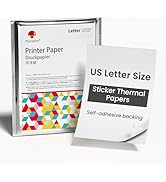
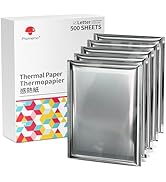
If, like me, you have ever needed to print something but you weren't at home, this printer might come in handy. I sometimes find myself at a friends, and they don't have a printer, or perhaps they do, but it's impossible to print to it from my iPhone. Well this printer can save you. It's even small enough to take when you travel. It came with a very nice little travel pouch for easy storage, and with a quality USB-C to USB-C connector as well as a nice adapter connector to allow you to connect to USB-A if needed for charging. I was pleasantly surprised with the easy to follow quick start on the label right on the printer, although it has a more extensive paper guide as well. After downloading their app, it walks you through setup, which is a breeze. Then, I was pleasantly surprised that the app allows you access to graphics and things the ladies will love to make creative stuff. They thoughtfully include a bit of thermal paper to get you started. In addition to paper, you can order sticker paper to print graphics and make endless sitckers. A plus for the kids. On a printer like this, loading paper can be tricky, but it was surprisingly easy to get it to feed well. They do offer continuous paper to eliminate having to feed it sheet by sheet, if you do a lot of printing, or just have it a home. Definately built well, and will last. Might be handy for a student that needs to print out some notes too. If you are looking for a good thermal printer, where you don't have to spend a fortune on ink (it requires none), I recommend this one.
A**R
Great printer for the price!
Awesome printer. I'm writing this review over a year of owning this and it's over of the best investments I've ever made. It's lightweight, portable, and prints quality documents. If your constantly on the go with work and need to be able to print wherever this is the product!
R**X
Buy it only if you like being locked into a single vendor's app ecosystem with no exit strategy.
The hardware is fine. Compact, decent print quality on thermal paper, battery lasts long enough. The problem is everything around it. There is no standard printer driver. On a phone you are locked into the Phomemo app, which is very spammy, requires an account, requests excessive permissions, and phones home constantly. Spyware. On a PC you get a proprietary driver that only works over USB, not Bluetooth. There is no IPP, no CUPS integration, no way to print from arbitrary applications the way you can with any normal printer. You cannot select this device from a system print dialog on any platform. What is the point? The printer does not accept text. At all. It is raster-only, meaning every page must be pre-rendered as a full-width bitmap image (1680 pixels across for A4) and transmitted over Bluetooth Low Energy one row at a time. A single A4 page is roughly half a megabyte of image data pushed through a BLE connection. This is SLLLOOOOWWW... and there is no way around it without their app or writing your own BLE driver from scratch using reverse-engineered protocol documentation. YEAH, nope. There is no open protocol specification from Phomemo. Everything known about how to talk to this printer has been figured out by clever hardware hackers sniffing Bluetooth packets. The command set is a nonstandard dialect loosely related to ESC/POS but incompatible with any existing ESC/POS library or tool. Seriously. It's like they tried really hard to design a hostile product. What this means in practice: you are completely dependent on the horrific Phomemo spyware app for the life of this device. If they drop support for your phone OS version, change their backend, or shut down, you have a nice paperweight brick. There is no fallback. No generic thermal printer driver will work. No third-party app can print to it without reimplementing the entire proprietary protocol. If you need a portable thermal printer that works as a normal printer -- one you can print to from any app on any device -- THIS IS NOT IT. Buy it only if you are comfortable being permanentlylocked into a single vendor's app ecosystem with no exit strategy.
A**A
Fast, portable, and easy to use.
Disclaimer: The manufacturer compensated me for the cost of the printer, with the only expectation being that I provide direct feedback. Box comes with: 8.5 x 11" Thermal Printer, USB-C to USB-A adapter, USB-C to USB-A chord, 10pc of Sample Thermal Paper, Soft suede fabric cover, and instructions. The printer is compact and small right out of the box. I tested the connection using the Phomemo app, and it worked smoothly without any issues. However, the box included sample thermal paper that was creased, and I noticed that the thermal "ink" tends to smear around those creased areas. Other than that, the quality of the print is pretty good. I wouldn't create a whole painting on it due to the print only being semi-permanent. Over time the ink will fade due to UV, heat, or how it's been stored. Since my box did not come with a USB, I had to go to their website to install the driver. It did take me awhile to realize that it doesn't turn on automatically when plugged in. You do have to hold the power button to turn it on and it will connect via Computer. After it's connected, it will read that you have an available printer to use. Printing works well on the computer and had no issues whatsoever. The box only came with 10pc of sample paper and you would need to invest in purchasing thermal paper, which is about $0.12/p if you purchase one from Amazon. You can tell which side based on the material. The "Print" side feels more glossy and soft while the side facing up is more matte. If you rub the two sides together you can feel it. Overall, I feel like it is pretty useful if you are in a hurry and need to print something very quickly. I would say to not use it to store important information that needs to be printed. I would just a laser or inkjet. Just remember that thermal ink has a shelf life of about 3 years.
S**E
Easy to Carry
I have used this printer so much. It is easy to set up anywhere. I carry it with me on trips. The print quality is really clear. It did take long to print some to at all.
R**B
Works well and ZERO ink, just purchase the correct paper.
I’m an OTR trucker with limited space and limited patience, but this little thermal printer always makes me smile. Prints clear and paired easily with my iPhone 17 Pro Max and my Samsung Z Flip 7. Just used it this morning to print a three page Bill of Laden.
V**A
Ottima stampante,uso intuitivo,veloce e pratica
Ho acquistato questa stampante da circa 1 mese e devo dire che è stato l' ottimo acquisto che prospettavo.Facile da usare,non ci sono ricariche da applicare...solo fogli da acquistare.Va benissimo x chi ha bisogno di stampare ovunque e rapidamente, non tantissimi fogli insieme.Ma x uso domestico è top. Consigliatissimo
Y**N
Excelente producto
a mi hija le encantó, la impresora es pequeña, fácil de transportar en la mochila, obviamente no ocupa tinta es térmica y se pone fácil el papel
B**R
Praktisch.
Sehr gut.
E**E
Camionneur à vos imprimantes !!!
Parfaite pour placer dans un camion longue distance Canada - US. Plus de cartouches à prix exorbitants. L'imprimante, 200 feuilles et c'est parti sans problème.
R**E
Facile à utiliser
Facile à utiliser, prend peu de place, il faut du papier spécial qui coûte cher, c'est le seul inconvénient
Trustpilot
2 weeks ago
1 month ago