We remain fully operational. Our teams are working around the clock to ensure your deliveries continue safely.

DOWNLOAD THE APP


Copyright © 2025 Desertcart Holdings Limited
DOWNLOAD THE APP
Buy anything from 5,000+ international stores. One checkout price. No surprise fees. Join 2M+ shoppers on Desertcart.
Desertcart purchases this item on your behalf and handles shipping, customs, and support to Denmark.
🌟 Upgrade your iMac’s heart with silent, smart cooling — because your SSD deserves the best!
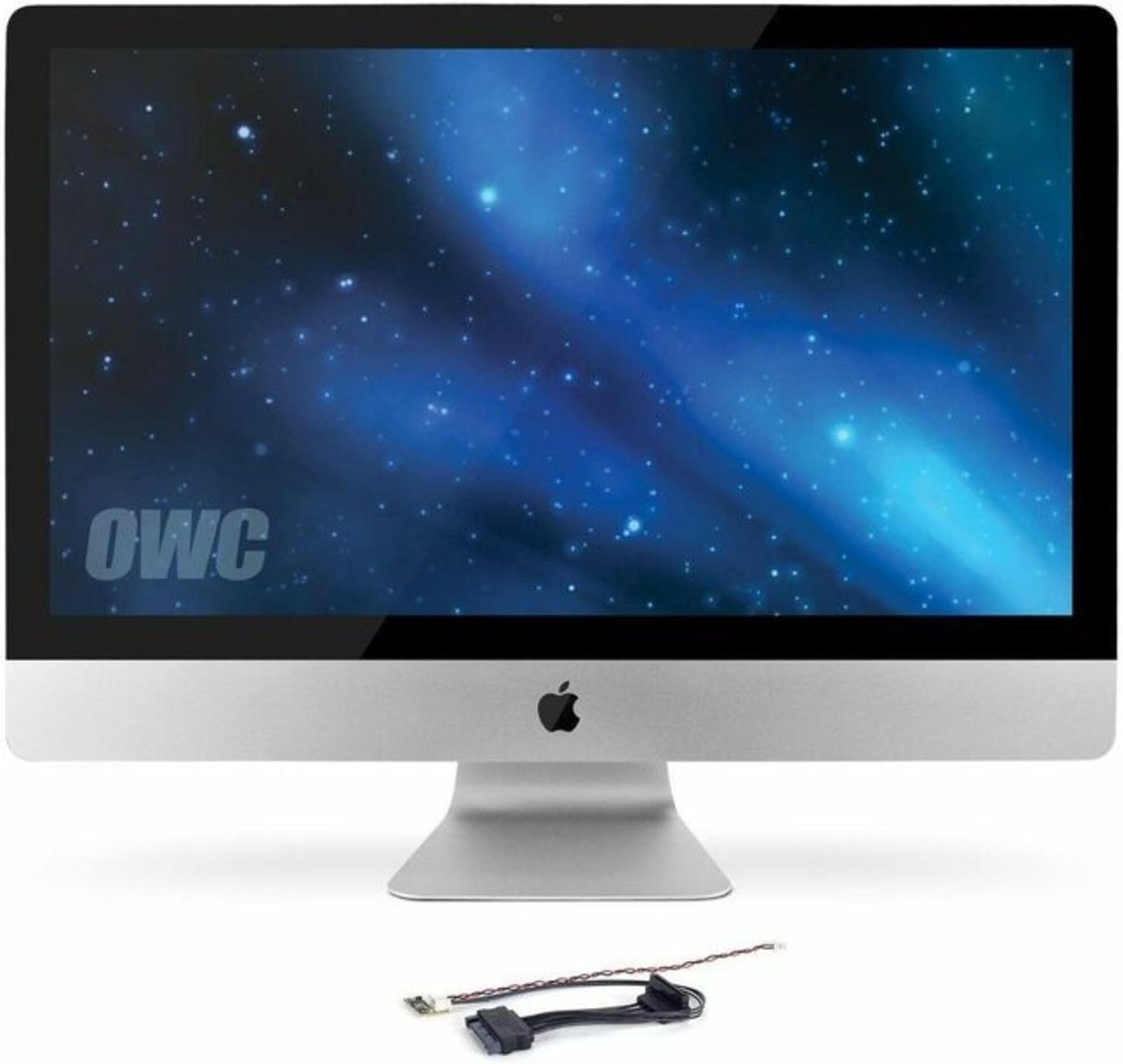
The OWC In-line Digital Thermal Sensor Cable is the only hardware solution that enables third-party SATA drives to communicate temperature data to your 2009-2010 iMac, ensuring silent, efficient fan control without software hacks. Designed for seamless compatibility with Apple diagnostics, it prevents noisy fan overdrive and protects your SSD investment with precise thermal monitoring.


| ASIN | B017OEQKV2 |
| Best Sellers Rank | 37,329 in Computers & Accessories ( See Top 100 in Computers & Accessories ) 195 in Internal Solid State Drives |
| Brand | OWC |
| Cable Type | SATA |
| Colour | Schwarz |
| Compatible Devices | Desktop |
| Compatible Phone Models | No Compatible Phone Models |
| Connectivity Technology | SATA |
| Connector Gender | Male-to-Male |
| Connector Type | Sata Data Connector |
| Country Of Origin | China |
| Customer Reviews | 4.5 4.5 out of 5 stars (739) |
| Global Trade Identification Number | 00812437021110 |
| Indoor Outdoor Usage | Indoor |
| Item Shape | Round |
| Item Weight | 0.03 Pounds |
| Manufacturer | Other World Computing |
| Maximum Voltage | 5 Volts |
| Model Name | In-Line Thermal Sensor HDD |
| Model Number | OWCDIDIMACHDD09 |
| Number of Items | 1 |
| Number of Pins | 7 |
| Other Special Features of the Product | In-line Solution |
| Product Warranty | 1 year limited warranty |
| Recommended Uses For Product | Discs |
| Specification Met | Unknown (Likely Meets Some Industry Standards) |
| UPC | 812437021110 |
| Unit Count | 1.0 Count |
I**N
Works!
This was used specifically to allow the successful replacement of a conventional HDD with a SSD in a late 2009 iMac computer. One end attaches to the standard SATA data connection on the drive and the other to it's complementary socket on the connector from the motherboard. Emerging from between them is a thermal sensor, which you stick to the SSD and the fine pair of wires that are then plugged into the appropriate small socket (labelled HDD TMP on my Mac) near the mounting bay. These should carry thermal information to the OS so that the fan can be kicked into action if the drive becomes warm. Not that an SSD runs hot enough (usually) to need much cooling, but you certainly don't want the "emergency default" of a full-speed fan running madly inside your computer. This is what happens if the OS isn't getting any thermal information, which is why you need this little piece of genius. Worked a treat. Not merely recommended but essential.
Y**I
Works perfect on my iMac 2009 27" screen
I have bought nearly 10 of these as I repair 2009-2010 27" imacs and replace their internal hard drives to SSDs. However one think I found out is that you do not really need these as most recent SSDs have thermal sensors built inside them and the mac sees them. The only problem is that the software does not associate the internal hard drive thermal sensor with fan control so HDD fan runs at almost full speed despite being able to monitor HD temperature! If you do not upgrade for a customer and keep the imac for yourself, you can save some money by just connect the SSD as normal with standard SATA cable, then download Macs Fan Control for free and set the HDD fan to "sensor-based value, then choose from the list your SSD hard drive. That will work!!
C**.
Does the job
Works as intended on my iMac after hdd upgrade to ssd to keep fans running at normal speed without having to resort to a software hack
D**S
It did take me a couple of hours to change the disk but my iMac is now running very much faster and I am very pleased. This part does seem expensive but I have ...
Used this so that I could upgrade the HDD in my 2009 27" iMac to a SSD. It did take me a couple of hours to change the disk but my iMac is now running very much faster and I am very pleased. This part does seem expensive but I have not had any problems since swapping the disks so assume that it is working well.
G**E
Ok
Ok
B**E
Required
Required when upgrading from a spinning HDD to an SSD for interconnection and thermal sensing. Good quality and easy to install.
L**S
Do not try to skip buying this cable.
I tried to get away with not buying one of these. I upgraded the internal HDD if my iMac to an SSD. When I rebooted the fan came on at full speed, really noisy. I've never heard my iMac make so much noise. I order this cable, opened up the iMac one more time and installed it. Brilliant. iMac now back to same quiet volume and the SSD works like a charm. Do not try to skip buying this cable.
L**3
Well worth it
This is a cable which works (arrived in 2 days from orddering) and resolves the firmware fan issue when replacing a 3.5 HDD to 2.5 SDD on a mid-2010 imac. All completed in 30 minutes while watching the installation OWC video, I feel this is a far better solution than installing software to modulate the fan. I have given this 5 stars as although it is expensive it’s better when combined with the SSD install and caddy (1tb SSD) it’s less than a third of the price of Apple were completing the install...all in all I highly recommend.
I**T
Veramente fantastico!!!!!!!
M**A
Einbau ging nach dem Installationsvideo einfach. Das Teilfunktioniert. Neustart und RUUUUHE. Kein Lüfter mehr der nervt. So muss das sein. Kann das Teil nur weiterempfehlen.
A**M
Ce câble m'a permis d'installer très aisément un disque dur SATA en lieu et place de l'ancien disque d'un iMac 27" mid 2010 (Prévoir l'achat d'un adaptateur 2,5 pouces sur emplacement 3,5 pouces). Maintenant sous Linux Mint, ce vieil iMac a retrouvé une nouvelle vie.
R**C
Vervangen , werkt prima nu de Macbook
K**.
Works well - OK product - good value
Trustpilot
1 day ago
1 month ago