Buy anything from 5,000+ international stores. One checkout price. No surprise fees. Join 2M+ shoppers on Desertcart.
Desertcart purchases this item on your behalf and handles shipping, customs, and support to Denmark.
โ๏ธ Elevate your flight sim game with cockpit precision and style!
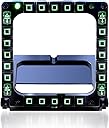
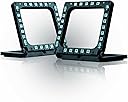
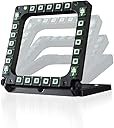
The Thrustmaster MFD Cougar Pack delivers an authentic flight simulation experience with two USB cockpit panels featuring 20 programmable buttons and 4 switches each. Designed for plug-and-play compatibility on PC and Mac, these panels include customizable LED backlighting and are fully programmable via Thrustmasterโs T.A.R.G.E.T software. Built with solid, weighted bases for stability, this pack offers professional-grade control and immersive realism for serious flight sim enthusiasts.


| ASIN | B002HH9TRY |
| Best Sellers Rank | 10,878 in PC & Video Games ( See Top 100 in PC & Video Games ) 19 in PC Flight Controls |
| Department | Electronics |
| Guaranteed software updates until | unknown |
| Item model number | 2960708 |
| Language | English, French |
| Manufacturer | Thrustmaster |
| Product Dimensions | 32.99 x 6.5 x 15.01 cm; 1.17 g |
M**D
Highly recommended
With delivery I bought these for ยฃ46. That's ยฃ23 per unit. When you think of it in those terms these bezels are amazing value. As soon as you take them out of the box you can't but be impressed with the build quality. They are not just solid, but chunky, and as a consequence they felt somehow larger than I expected. There's a definite sense here that you're getting more than you paid for. In a unpowered USB hub these light up brightly, and impressively, when connected. The light can be tuned from dazzling to barely perceptible to completely off through the Windows interface. In use the buttons have barely perceptible feedback, there is no definite click. But that is apparently how the real thing feels, according to those that have used them in reality. The bases are weighted and grip adequately. There can be a little back and sideways movement when clicking buttons along the top and inparticular in the corners, but with just a reasonable amount of force applied the bezels are stable. With regard to button assignment, I have tested these units with Falcon 4 BMS and they were set up simply through the setup interface, and recognised in sim without an issue. If you'd like to free yourself up a little from mouse clicks in the virtual cockpit, or if you'd like to add to the immersion, I would highly recommend these MFD bezels.
J**N
Excellent kit
Good quality kit from Thrustmaster. There is enough info in the other reviews for this - works straight out of the box on Win7 64bit without need for any drivers etc to be manually installed. Have set it up for Falcon 4 bms and it works flawlessly.If you want MFDs with screens, you can buy small TFT displays and the relevant software to use these for that, too (not from Thrustmaster, though). Some others here have stated that the description is incorrect in that the MFD buttons are not fully programmable, but this is incorrect - they are both easily assignable in-game and are fully programmable in all the usual ways, including using scripts. This is possible by using Thrustmaster's own TARGET software, which can be downloaded from their website, along with templates for making your own label cards. Not only do Thrustmaster provide this fantastic programming software, they also provide a comprehensive guide on how to write scripts for it, in pdf form. People should really check these things before they make statements in reviews that may sway people's decision on whether to buy. I really like the fact that the lighting on the buttons can be dimmed to the user's taste, and that the identifier LEDs, which are very bright, can be switched off. This item is worth every penny, imho, and comes with a 2 year warranty.
M**S
Great value - if you play Elite Dangerous or fly any flight simulator
Great value - if you play Elite Dangerous or fly any flight simulator then this pack of two items will be a really useful addition. At this price you can't go wrong and you can find lots of tips how to add active screens in place of the printed inserts if you want. Yes it is just a couple of backlit frames with a load of buttons but they don't need drivers, are recognised in Elite Dangerous and flight sims, they add great functionality, are well made and the appearance adds a lot to "immersion".
A**R
Magic bit of kit
Received the mfd's for the DCS-A10, and agree with the comments above, with a head tracker and a decent stick the A-10 is brilliant. No more chasing the mouse key around the MFD on the panel when in a turn and trying to look back at the target or the ground. You do need to get them well in you field of view, but they look great, all lit up and they are very 'tactile' you have to press the buttons, and you get a soft click response . Also tried them on fsx and they are already programmed - if you look at the cards provided and I will be programming them to do more for me. They are also recognised by Cliffs OF Dover, so now I have enough buttons to go for full engine managament on the Hurricane and Spitfire ..Magic
A**R
Yet more hardware to support DCS A10c - but worth the investment
The trouble with study sims such as DCS A10c or Falcon 4 is that they are so detailed and complex that having the right hardware really does make a difference. Investing in products such as the Thrustmaster Warthog, Track IR and these Cougar flight panels involves expenditure which dwarfs the initial purchase price of the software itself, but they really do add to the immersion. I've got these Cougars set into a panel which I fabricated so that they have small monitor behind them, with the size of the extended displays calibrated for an exact match. Of course you can display the contents of the MFDs on a monitor without using the Cougars, which I did previously - and set the display to a larger size, which is handy - but that means having to use the mouse to click the OSBs. Taking your right hand off the joystick every few seconds is a pain and thoroughly unrealistic, but with the Cougars you can use the fingers of your left hand, which is so much more convenient. It's also much faster, so setting up weapons profiles takes a fraction of the time previously required. For DCS A10 - the Cougars are truly plug and play. So, in short, if you're an enthusiast for sims like DCS A10C or Falcon 4, and have the budget available, get a set of these - they're worth it. Why 4 stars rather than 5? Nitpicking perhaps, but since many people will be mounting these in panels of some sort a template for cutting an appropriate hole would have been handy.
M**Y
Works perfectly but what to use them for.....?
Full confession, I play Elite Dangerous (normally in Oculus) and have dual TM5000 joysticks ('coz I'm left handed and the FCS is pants for me), and I even tried the rudders as well as this. They all work VERY, VERY well - no issues at all. But the downside is nothing to do with TM at all! SO what's my beef? Well, with the T.H.R.U.S.T software it is easy to map three (or more, but for me three) controls to one button so even the dual joystick buttons aren't fully populated. I was thinking of doing away with the keyboard as one of these would fit on the board the joysticks are screwed to, but overall I rarely use the keyboard So TM (AKA Guiullemot or something - good French company making what seems like quality stuff) get the five stars, but my brain only gets 4 because of the above.
K**N
Quality addition to any mil sim
You can change backlight brightness using TARGET software. Really usefull if youre flying military sims like DCS. Absolutely love mine. Just wish they did them with LCD screens built in already.
M**R
Great option to expand your DCS setup
Really easy and straightforward setup, plug and play although you'll have to do the usual button binds in DCS to configure each button but once it's done it works really well. Worth noting that this is only the frames and not the screens themselves and not all that easy to find in VR since all the buttons have the same 'feel' so trying to find the right button in VR is a bit tricky but doable.
Trustpilot
1 day ago
3 days ago