๐ Stay Connected Anywhere, Anytime โ The Ultimate 4G WiFi Powerhouse
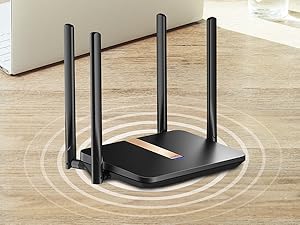
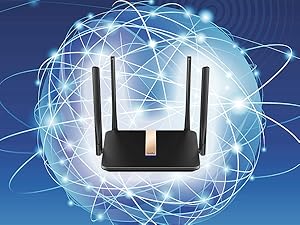
The Cudy New AC1200 LT500D is a versatile unlocked 4G LTE modem router featuring Qualcomm EC25-AFX chipset, dual-band WiFi up to 1200Mbps, and detachable antennas for enhanced signal. Designed for North American carriers, it supports multiple VPN protocols and DNS encryption, making it ideal for remote locations, RVs, or backup internet with easy SIM card activation and robust security.


| ASIN | B0B8M5F3VR |
| Antenna Type | Retractable |
| Best Sellers Rank | #126,674 in Electronics ( See Top 100 in Electronics ) #846 in Computer Routers |
| Brand | Cudy |
| Built-In Media | cable |
| Color | Black |
| Compatible Devices | Personal Computer |
| Connectivity Protocol | Cellular |
| Connectivity Technology | Wi-Fi |
| Control Method | Remote |
| Coverage | 5 GHz Wi-Fi coverage |
| Customer Reviews | 4.2 out of 5 stars 1,033 Reviews |
| Data Transfer Rate | 1200 Megabits Per Second |
| Frequency | 5 GHz |
| Frequency Band Class | Dual-Band |
| Global Trade Identification Number | 06971690792060 |
| Has Internet Connectivity | Yes |
| Has Security Updates | No |
| Is Electric | Yes |
| Is Modem Compatible | Yes |
| Item Dimensions L x W x H | 5.48"L x 1.42"W x 9.84"H |
| Item Type Name | 4G LTE Router |
| Item Weight | 700 Grams |
| LAN Port Bandwidth | 100Mbps |
| Manufacturer | Shenzhen Cudy Technology Co., Ltd. |
| Maximum Upstream Data Transfer Rate | 50 Megabits Per Second |
| Mfr Part Number | LT500 |
| Model Name | LT500D |
| Model Number | LT500D |
| Number of Antennas | 4 |
| Number of Ports | 4 |
| Operating System | RouterOS |
| Other Special Features of the Product | WPS |
| RAM Memory Installed | 128 MB |
| Router Network Type | wireless |
| Security Protocol | WPA2-PSK |
| Smart Home Compatibility | Smart Home Compatible |
| Special Feature | WPS |
| Unit Count | 1.0 Count |
| Voltage | 12 Volts |
| Wireless Communication Standard | 802.11ac |
| Wireless Compability | 802.11ac |
K**N
Works! Verizon 5g sim from my phone.
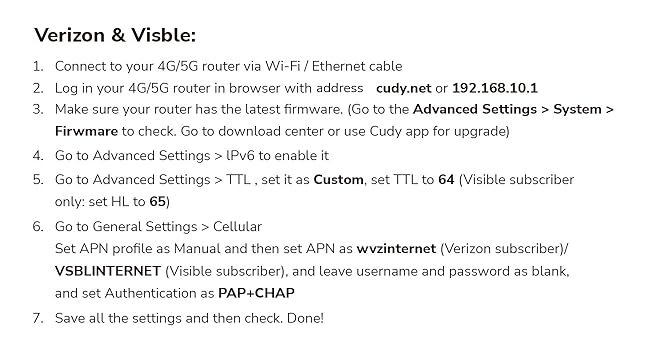
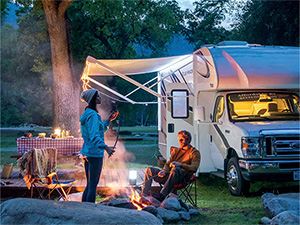
Followed " Alex's comments and got 30mbs down. "So I use this for internet on the road with our RV. I grabbed a sim card from visible and was able to activate it without having to put it into a phone. The listing on Amazon says to set the TTL to 64 and HL to 65, but you want to set them both to 65. It'll be seen on the network as a phone instead of a hotspot. The other thing with visible in the listing, it says to set the apn to vsblinternet but use vzwinternet instead. vsblinternet didn't work getting the sim to connect, but it did with vzwinternet. The other big difference is to set the MTU to 1428 and it increases the speed greatly. The removable 4g lte antennas are nice in case you need to run those antennas outdoors for better reception. The admin interface is normal for people used to work inside of routers. It has all the functionality you want. Only had it for the set up period and will give it a more thorough test soon. 25 people found this helpful"
F**9
Works with Claro and Tigo in Nicaragua
Works with these two companies in Nicaragua. I configured this at a location in which no ISP had coverage with barely getting cellphone from one carrier. This was enough for me to work from there without an issue as standalone Fast forward to 3 weeks and isp put fiber, so i acquired their service and now i have it configured with fiber as primary and if it goes out, itll failover to lte from CLARO. Has some nice additional features such as openvpn which i succesfully configured as site-to-site and have access to all my home network equipment and viceversa. Only con i have is the lack of a nicely detailed instruction manual that would explain all the additional parameters within the router as things are not straightforward.
D**S
Works but weak after 30ft
ALMOST 5 stars but a slight thing they are not telling you. Long story short... I use this for a portable wireless/Cellular station for file transfers when I'm taking sports images for clients for live updates. The long story short is it's a very weak signal after merely 30 feet! Just testing through one wall(Inside concession that was 100ft from the field and where I was with a clear window view of my box), I was having a hard time hitting it and transferring a file from the camera to the ftp was pretty much a goner. When it's right next to me yea it works flawless but when we are shooting sports, we can't just all meet up at the router, hit the button on the camera and split back off... the signal is weak as ever. (QUICK NOTE): i'M WELL AWARE THIS IS NOT THE INTENT but in the end, it's still a router, i should be able to walk around and it hits signals every time. Great router no doubt by all means it does exactly what it's supposed to do however, I suggest doing what I did and running a custom sma to the cellular and extender with the cellular atenna facing so you can hit a tower better... for the WIFI side, I'm probably going to take those weak cheap plastic antennas off and do an sma conversion on those and run better quality antennas. For NOW ($100.00)... it's just not worth it. It as like $85 and it barely met the minimal for me. Find a better router if you need to rely on it at distances. My ol blue Linksys router outshines this still and I have another router that's like $35 and it works farther than this but no worries. It's totally buildable if you are technical. If not, find better.
G**H
It does work, though just ok, almost plug and play
The product does work, it's just doesn't speedtest as fast as a phone does in the same location. It's almost plug and play, it depends on your carrier. If you're one of the big three carriers or whoever this router is compatible with, then it should auto config. My carrier is not one of the big three, it's a MVNO third party so if that's the circumstances, the settings will have to be manually entered for the APN. Luckily it's kind of easy to find the APN settings online on the carrier website. There are only a couple setting needed to get it to work. That's the only hold up I ran into and it's not the fault or the product. The reason I give I give it 3 stars is because it's not as fast as it should be. My phone in the same exact location will speedtest about 80+ mbps down. The router while connecting to it on 5Ghz on the same phone, will speedtest to about 15-20 mbps. The phone is right next to the router doing these speeds. I'll be doing more testing in other areas, but this was tested with what a typical signal strength would be, 3/5 bars, which isn't bad. Last time I checked, 4G LTE are pretty fast and this router has large antennaes to receive the cellular signal, a phone doesn't. I guess you get what you pay for so now I see why people spend hundreds to over 1k dollars to get higher speeds for this market. Overall though, considering the low price compared to the competition, this isn't a bad product. The software logging into the router looks pretty good, I like the options and features. It even has WPA3 for wifi and 5Ghz. For casual users or people that don't need blazing fast speeds, this works. My use case is RV travel and perhaps some other types of travel so I'll be moving a lot with this. Multiple devices will be connected, phones, roku tv, streaming services such as jellyfin, plex, netflix, etc. For 4k content, I don't see this being reliable. For 1080p HD content, I think this works fine. For typical internet usage, this is fine. Just keep in mind that this will not be pulling the same speeds a phone can get from a sim card. For something inexpensive, this is a decent product. For something faster, gotta look at another product and pay more, probably way more.
W**.
Works better than expected
We have a mountain cabin that has poor cell service and no internet. I can make a cell call from outside, but not inside the cabin. I bought this to see if the larger antennas would bring in cell service and if not I could use an external antenna. I received the router and installed a sim card from an extra phone I had. WiFi worked great, but not internet. I contact our provider, Consumer Cellular, and was told they would sent a new sim card that would work. I installed the new sim card and it worked without any other setup. I then took the router to our cabin, set it by a window, and we now have WiFi and internet at the cabin. I can remotely look at cameras and adjust the temperature. Very satisfied. Update: I have been using this router for about one and a half years now and am still satisfied with it. I did put up a nice external antenna to get a better signal. I also changed carriers from Consumer Cellular to Google Fi. Part of the reason for the change was that I got a free data SIM so an extra line is no longer required for the router. The Fi data SIM was inserted into the router and all worked without any other setup.
M**C
Great cellular modem and router
I got this router to use at a campground with my RV. The WiFi here is slow and unreliable so we needed a backup solution. I got this to go with a consumer cellphone SIM. Weโre in an area with weak cell coverage so I also put up a yagi antenna with 9db gain. I pointed it at the nearest tower 2.4 miles away. With my iPhone alone I was only getting a RSRP in the mid to high 120โs - essentially a dead zone. With the yagi and this router my first try improved RSRP to 114-118. Then the magic happened. After disconnecting the router and then reconnecting it I got a 99 RSRP reading. It had switched from the B2 band to the B12 band. Fortunately this router allows you to manually select the bands to use. The B12 band is great for rural areas like mine as the longer wavelength passes through trees easily and the waves flow with hilly terrain better than 5g frequencies. So I have the router set to use bands B12, B14, and B2. This gets my RSRP to the upper 90โs and RSRQ to 10. Itโs a nice, stable connection. Sure, the top speed wonโt be as great with this setup but itโs way better than the nearly nothing we had before.
B**E
Simply didn't work as advertised
It gives me no joy to report that after many months of struggling with this router I could not get it to work properly for the basic tasks. I've been using it with one SIM chip, two SIMs and even installed a 'beta' version of the embedded software but it regularly drops the signal to the internet interrupting downloads, streaming, VOIP, video calls, etc. The drops can come as often as once an hour but seemingly random. (We use the exact same chips in our phones and other brand routers without this problem) In addition the router never failed over to the 2nd chip in order to pick up the slack when the first slot failed to connect. (Kind of the reason to have the 2nd chip, or so I thought) Finally the customer/tech support was not helpful - ignoring emails for weeks at a time, constantly asking for the exact same information over and over again and never offering any useful information or suggestion leave alone solution after 5 months of communication.
B**R
WORKS WELL
AC1200 works well. Device location and antenna positions take a bit to get optimizes but I live a good distance from any towers. I get better than -100 dB and 6 dB SNR and 10-40 Mbps depending on weather ect.
Trustpilot
2 months ago
2 months ago