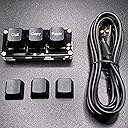


⌨️ Elevate your workflow with the ultimate mini macro pad!
The BTXETUEL Mini 3-Key RGB Macro Pad is a sleek, ultra-compact mechanical keyboard designed for professionals and gamers alike. Featuring three fully programmable keys with default cut, copy, and paste functions, it offers plug-and-play convenience plus advanced macro customization via software (Windows) or web (Mac/Linux/Windows). Its detachable 5-foot USB cable and customizable RGB lighting make it a stylish, space-saving productivity booster compatible across major operating systems.
| ASIN | B0BBW89CRY |
| Antenna Location | Gaming |
| Best Sellers Rank | 28,459 in PC & Video Games ( See Top 100 in PC & Video Games ) 1,032 in PC Gaming Keyboards |
| Box Contents | USB Cable |
| Brand Name | BTXETUEL |
| Button Quantity | 3 |
| Colour | Black |
| Compatible Devices | PC |
| Connectivity Technology | USB-C |
| Customer Reviews | 4.3 4.3 out of 5 stars (151) |
| Enclosure Material | Acrylonitrile Butadiene Styrene |
| Generation | 1st Generation |
| Hand Orientation | Ambidextrous |
| Item Dimensions L x W x H | 6.9L x 2.8W x 2.8H centimetres |
| Keyboard Backlighting Color Support | RGB |
| Keyboard Description | Multi Functional |
| Keyboard Layout | QWERTY |
| Manufacturer | BTXETUEL |
| Mechanical Keyboard Switch Model | [Standard Mechanical Switch] |
| Model Name | Black 3-Key Keyboard |
| Model Number | BTXETUEL-3K |
| Number of Keys | 3 |
| Number of Sections | 1 |
| Power Source | Corded Electric |
| Product Features | Backlit |
| Switch Type | Mechanical |
| Theme | Video Game |
| Unit Count | 1.0 Count |
| Water Resistance Level | Not Water Resistant |
T**R
No set up required
If all you want are the cut, copy and paste functionality then this is plug-in and go. No software to be installed. However in this configuration the LEDs continuously change colour but that isn't a big deal. I can't comment on use of the software to change the key mapping or change the colour of the LEDs.
西**未
めちゃくちゃ使い勝手最高です! ネットでいつでもキーの割り当て変えれるし押し心地も軽いから使いやすいです!
G**A
Könnte weniger hoch sein, sonst alles sehr gut.
R**K
This works perfectly and I find quite useful. Yes, I can (and was up to now) pressing CTRL+C and CTRL+V with my left hand (my right hand is on the mouse), but having this next to my keyboard area, all I do is reach over and press a button (no finger gymnastics required)... it's fast and convenient. While I do not do much cutting and pasting, should I need to, that too will now be a single button press as well. The only **possible** negative is the cable that goes from the unit to the pc... I didn't measure it, but I think it is 4 feet long... my computer is on my right, and the unit is on the left, making the cable just barely long enough... a 5 (or better yet 6) foot cable would have been welcome for my particular set up.
T**Y
Poder copiar, cortar y pegar con la mitad de los clics acelera el trabajo y pone menos presión en la mano.
T**M
Very happy, it works exactly as described, is super easy to set up and adjust through the online portal and works great with the muilti-press shortcuts (such as 'control-shift-copy', as well paste normal 'copy' and normal 'paste'). Can't fault it so far!
Trustpilot
5 days ago
2 months ago