Desertcart purchases this item on your behalf and handles shipping, customs, and support to Denmark.
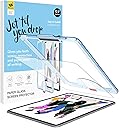
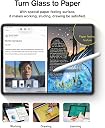
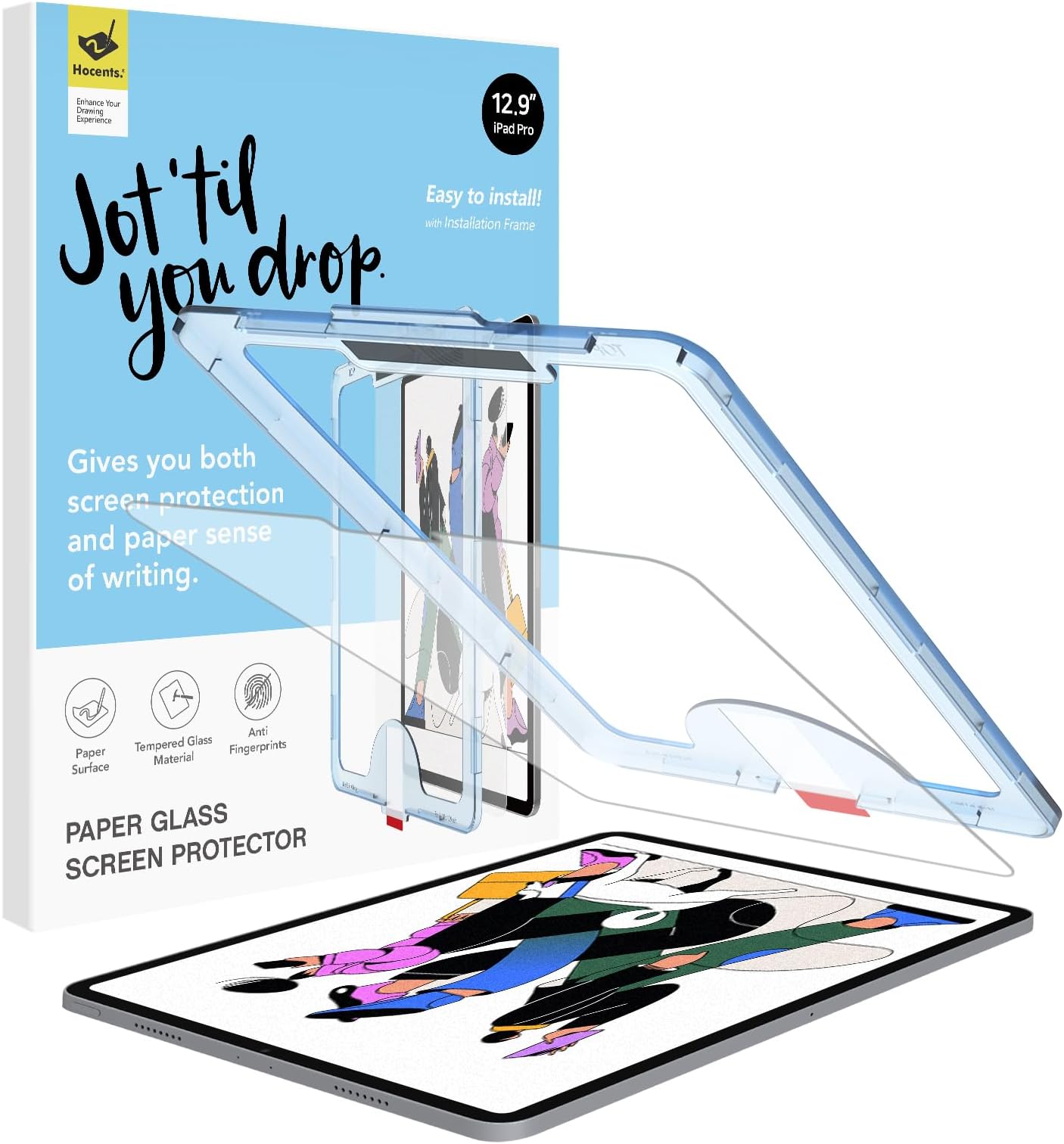
🖋️ Elevate your iPad workflow with the screen protector that feels like real paper!
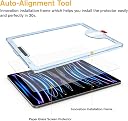
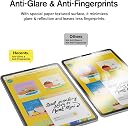
The Paperfeel Glass Screen Protector for iPad Pro 12.9 (2018-2022) combines a 9H tempered glass layer with a Japanese-imported paperfeel coating, offering superior impact resistance and an authentic writing experience. Featuring an innovative auto-alignment installation kit, anti-glare matte finish, and anti-fingerprint surface, it’s designed for professionals and creatives seeking flawless note-taking and drawing on their iPad Pro.


| Asin | B0B2RKQTT4 |
| Best Sellers Rank | #168 in Tablet Screen Protectors |
| Brand Name | Hocents. |
| Clarity | 10 |
| Compatible Devices | Tablet |
| Compatible Phone Models | iPad Pro 12.9 3rd generation, iPad Pro 12.9 4th generation, iPad Pro 12.9 5th generation, iPad Pro 12.9 6th generation |
| Compatible Tablet Computer Models | Apple iPad Pro 12.9-inch (3rd generation), Apple iPad Pro 12.9-inch (4th generation), Apple iPad Pro 12.9-inch (5th generation), Apple iPad Pro 12.9-inch (6th generation) |
| Customer Reviews | 4.2 4.2 out of 5 stars (2,825) 4.2 out of 5 stars |
| Finish Type | Matte |
| Item Dimensions L X W | 10.88"L x 8.29"W |
| Item Hardness | 9H |
| Manufacturer | Hocents. |
| Material | Tempered Glass |
| Model Number | A2589 |
| Number Of Items | 1 |
| Screen Size | 12.9 inches |
| Screen Surface Description | Matte |
| Special Features | Anti Glare, Anti-Fingerprint |
| Unit Count | 1 Count |
| Upc | 774980472897 |
| Water Resistance Level | Waterproof |
User
Smooth and Precise
I recently installed the **Hocents Paperfeel Glass Screen Protector** on my **iPad 9th Generation 10.2-inch**, and it has quickly become a must-have accessory for enhancing my iPad experience. This screen protector not only offers **protection** but also provides a unique **paper-like texture** that makes drawing and writing on the iPad feel more natural. With the added bonus of an **EZ Kit** and **Auto-Alignment Tool**, installation was easier than ever. Here’s my detailed review based on installation, usability, and overall performance.### **Paperfeel Texture for Writing and Drawing**One of the standout features of this screen protector is its **paper-like texture**, which is perfect for those who use their iPads for **drawing, writing**, or **note-taking**. As an artist and note-taker, I found that the **Paperfeel** surface offers just the right amount of friction, giving me more control over the Apple Pencil. It replicates the sensation of writing on paper, making it feel less slippery compared to a traditional glass screen.The texture makes it easier to create precise strokes and control line thickness, which is perfect for digital artists or students who prefer handwriting their notes on the iPad.### **High-Quality Glass Protection**In addition to its unique texture, the screen protector provides excellent **protection** for the iPad’s screen. It’s made from **tempered glass**, which offers a **scratch-resistant** surface and protects against daily wear and tear, accidental drops, or bumps. Even with the Paperfeel texture, the screen protector is **clear and responsive**, so it doesn’t interfere with the touch sensitivity of the iPad.After using it for several weeks, I’ve noticed no decrease in display clarity or responsiveness, which is essential for both everyday use and more detailed activities like drawing or gaming.### **Easy Installation with Auto-Alignment Tool**One of the best aspects of this screen protector is the **EZ Kit** that includes an **Auto-Alignment Tool**. Installing a screen protector can often be a tricky process, especially when it comes to lining it up perfectly without bubbles. However, the auto-alignment tool made the installation process smooth and hassle-free.The tool fits snugly around the iPad, ensuring the protector aligns perfectly with the screen. I had no issues with bubbles or misalignment, and the entire process took just a few minutes. For someone who usually struggles with installing screen protectors, this was a huge bonus.### **Fingerprint and Smudge Resistant**The **oleophobic coating** on this screen protector helps to reduce **fingerprints and smudges**, keeping the screen looking clean and clear even after extended use. While it’s not 100% fingerprint-proof, it does a great job of minimizing the appearance of smudges, which is especially important for those who use their iPads frequently.Cleaning the screen is easy as well—a quick wipe with a microfiber cloth keeps it looking fresh.### **Perfect Fit for iPad 9th/8th/7th Generation**The screen protector is designed specifically for the **iPad 9th/8th/7th Generation (10.2 inches)**, so it fits perfectly with the device’s dimensions, including the cutouts for the front camera and home button. It doesn’t interfere with any of the iPad’s functionality, and it sits seamlessly on the screen, giving a smooth, uninterrupted experience.### **Pros**- **Paperfeel texture**: Provides a realistic paper-like feel for drawing, writing, and note-taking, offering more control over the Apple Pencil.- **High-quality glass**: Made from durable tempered glass that offers excellent scratch resistance and protection from everyday damage.- **EZ Kit with Auto-Alignment Tool**: The auto-alignment tool makes installation easy and precise, with no bubbles or misalignment.- **Fingerprint and smudge-resistant**: The oleophobic coating reduces fingerprints and smudges, keeping the screen looking clear.- **Responsive and clear**: Maintains the touch sensitivity and clarity of the iPad screen, with no interference in display quality.- **Perfect fit**: Designed specifically for the iPad 9th, 8th, and 7th generations (10.2 inches), with proper cutouts for the home button and camera.### **Cons**- **Slight reduction in smoothness**: The Paperfeel texture may not be ideal for those who prefer the slick, glassy feel of the iPad’s original screen, as it adds a bit of friction.- **Not completely fingerprint-proof**: While the oleophobic coating helps, it’s not completely resistant to fingerprints, so occasional cleaning may still be needed.### **Final Thoughts**The **Hocents Paperfeel Glass Screen Protector** is an excellent choice for anyone who uses their **iPad for writing, drawing**, or **note-taking** and wants a more natural paper-like feel. The **auto-alignment tool** makes installation a breeze, and the screen protector itself offers the perfect balance between protection and usability. It’s a game-changer for artists, students, and anyone looking for added control with the **Apple Pencil** while keeping their iPad safe from scratches and damage.If you’re looking for a **high-quality screen protector** that enhances your iPad experience while providing superior protection, I highly recommend the **Hocents Paperfeel Glass Screen Protector**. It’s a great investment, especially if you frequently use your iPad for creative or academic purposes.
User
Great install great screen protectors great feel great all around
The most easiest install. I’m horrible at screen protectors. They always end up crooked or there is dirt under it or I crack it. I even managed to screw up the ones that you place in a book like device and pull the film from the top. No problem this time. Placed the frame on top and that’s it. It basically does everything for you. As for the protector it’s self. It’s a different feel different look and take time to adjust but overall a great screen protectors that does give the feel of drawing on paper. More friction so less sliding on a smooth screen. Perfect fit no bubbles. Great price. I highly recommend.
User
.
These are nice and durable protective screen protectors. The fit is nice and they stick very well. It also has easy installation and decent price for them.
User
Easier installation than most, nice texture, too bad about the waste
Incredibly easy installation, which is what I'd hoped for. After the initial install, I had a medium-sized bubble in the middle and a small one near the edge of the protector which didn't seem to want to be squeegeed out with the provided tool. However, with some patience I was able to completely get both bubbles out completely.I've used other matte protectors in the past, including Paperlike, and have found this one to have more of a "tooth" than anything else I've used before. For the first time, I've switched over to the ballpoint pen-like nib on my apple pencil and kept it on; this texture's added enough resistance that I like having a smaller surface on the nib. I expect that this protector will get scratched up as have all the other ones I've used in the past, but will update once I'm ready to swap it out.One major downside to this cover is the plastic waste. It's unfortunate that the installation frame is single-use. When my initial efforts to get the bubbles out weren't working, I looked up Hocent's products to see if they sold only the protector in case I had messed it up and needed to start over. But it seems like they only sell the 12.9 version with the installation frame included. Kind of a bummer! If a reusable innovation came along, I'd swap over in an instant.Great product despite the single-use installation frame. If you're looking for something a little rougher that doesn't require so much fussing, I recommend it.
User
Not for the perfectionist - UPDATE: Not worth the money
UPDATE from below: Not even 24 hours from the review below, it got worse. It was a complete waste of money. As a one time shot, not worth the money.---------As an iphone (yes I know this is for an ipad) user since 2007, I have been fighting screen protectors for a long time. I need them to be straight, no bubbles, etc. So I always look for the alignment frame for help. I also want more than one protector in a package, because I almost always end up not getting it perfect the first time.So to find an ipad protector, that feels like paper and has the frame was much harder. But the reviews for this were pretty glowing. However, I knew not everyone probably is as picky as I am as far as wanting it perfect. And I just wasn't thrilled with the fact it came with only one. But I took a chance and also ordered two other kinds with out alignment frames in case this didn't work out.Well it almost worked out. A couple bubbles, that I was able to smooth down to nearly the sides. The alignment wasn't 100% onto the center. Which may be fine, except I was putting it back into its case. Well as soon as I did that, the screen protector lifted right back up on the side that was moved to far over.I took it out and had to readjust. Using the squeegee thing, its already scuffed up. I had to rethink about how I was putting back into its case. It's not at all perfect. But it will due for now, but I wont buy again. It's too expensive for this one shot thing only.
User
Impressive
This is probably the easiest screen protector I ever had to install. Considering the size (12.9"), I was worried about trapping air bubbles and ended up with non.The screen protector comes pre-installed in the fixture and the steps are fairly easy. You can't skip any, other than maybe the proper cleaning. For that, the included "wet" towel turned out to be useless and I moistened it with lens cleaner. The (also included) microfiber towel is a bit small but turned out to be sufficient to clean off the solution. The dust picker strips are helpful and I simply dabbed around a bit to make sure I didn't miss a particle.Then the big moment. Remove the first foil to set the protector on the clean screen. Note the marking where to press and where not. This helps for the film to evenly expand and greatly reduce trapped air. In the end, i had very few that were easily eliminated with the included squeegee.The matte finish of the protector greatly reduces glare, but also a bit of brilliance in bright rooms. (Outdoor is difficult with or without the matte finish. The paper feel is a bit of a gimmick to me, but it turns out to be a good choice. It does reduce normal finger prints (unless you had some oil on your fingers).
User
Okay for price, not for professional use
The screen protector was good for the price. Installation was easy. I’ve had this protector on for about 6 months and have had zero issues with lifting, however I have noticed a few significant issues with this particular brand. I have several scratches and chips that are highly noticeable and kind of distracting. I went an entire year with nothing on my screen and received less scratches than I have with this on. The texture is very rough compared to other’s I’ve felt from my friend’s ipads. At first I liked it a lot but then I noticed when I draw the surface creates uneven lines. I used my ipad primarily for drawing so this is a bit of an issue. My brother who has some texture issues absolutely hates touching my ipad because he says it feels grimey. Overall I probably would recommend one of the more expensive options for someone using their device for more professional use.
User
pen is steadier
i couldn't get used to the pen (tapping) on the glass experience- I'm sure some people learn to control it, but I didn't enjoy the feel so I didn't pursue it. Finally after years of seeing these things available, I took a chance on this paper-like surface, and I'm so glad I did. First off I was surprised that it looks clear like a regular screen protector. But the pen is wonderfully easy to use for drawing now and I can more easily get my whole arm into a line. With only a few minutes of practice, I found I could easily draw long strait or curved lines across the entire screen (in Procreate) and it promises to be as enjoyable as it always has been with charcoal pencil on drawing paper with some tooth. I think it's easier to use my whole arm now as I would with real paper- at least as much as one can with this size of the ipad pro 12.9.I did try to be so careful with dust but that seems to be tough in the normal (invisible) dust of a room with fibers around. i got a tiny speck near a corner, but I haven't noticed it at all when the screen is lit so it will be acceptable. Putting on an iPad screen protector (unlike the phone) is much more demanding not only for initial cleaning. but keeping it clean throughout the process. They certainly give you everything in this kit you will need. Its just the process of any screen protector. Maybe I should have done it in the kitchen rather than the living room with various fibers from fabrics around? Any how, if you have been wondering about trying a paper screen protector, I would encourage you to go for it! At least I am very glad I finally did.
User
Works perfectly
NO glare and no fingerprints. Very durable. Touch screen still works great. Very easy to install. Will order again if needed.
User
Paperfeel and protection
Feels like a paper and it actually sounds like a paper with apple pencil. Also it’s thick enough to protect the screen.
User
Fácil de aplicar
Textura agradable al tacto y al escribir, no se quedan las huellas.Lo recomiendo, es una buena opción si quieres proteger la pantalla y a la vez mejorar la experiencia de escritura.
User
Aspecto y sensación de papel
Es el primero en su tipo que pruebo, pero me gustó mucho. Realmente cambia la experiencia de escribir en el iPad. Algo que agradezco bastante son todas las herramientas que tiene para una correcta aplicación, algo que siempre me suele poner nerviosa.
User
Protector de pantalla
Excelente material y muy fácil de instalar gracias al kit que viene en el paquete.
Trustpilot
3 weeks ago
5 days ago