Desertcart purchases this item on your behalf and handles shipping, customs, and support to Denmark.
๐ฑ๏ธ Stay active, stay ahead โ the silent productivity booster you didnโt know you needed!
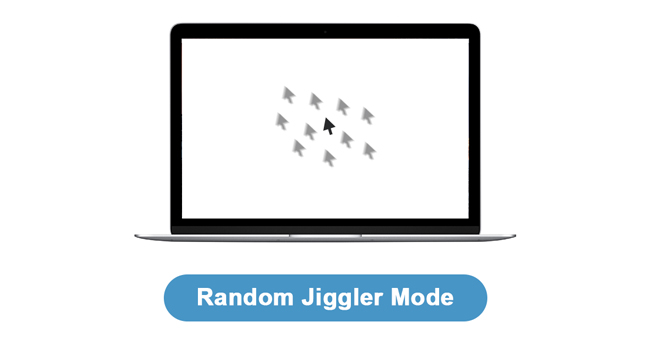
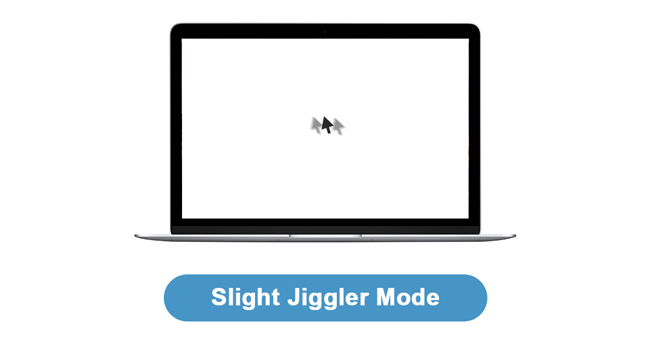
The AUEDROT Mouse Jiggler is a compact, aluminum alloy USB device designed to keep your computer awake by simulating mouse movement. Featuring two selectable jiggle modesโsubtle and randomโit operates undetectably as a trusted USB composite device. Plug-and-play with no software required, itโs compatible with all major operating systems and ideal for professionals who want to maintain active status during long meetings, presentations, or remote sessions.


| ASIN | B09YTB1DSB |
| Additional Features | Ergonomic Design, Lightweight, Portable, Wireless |
| Antenna Location | Office |
| Best Sellers Rank | #37 in Computer Keyboards, Mice & Accessories |
| Brand | AUEDROT |
| Button Quantity | 1 |
| Color | Black |
| Compatible Devices | Laptop, Personal Computer |
| Connectivity Technology | USB |
| Customer Reviews | 4.7 out of 5 stars 8,997 Reviews |
| Enclosure Material | Aluminum,Metal,Plastic |
| Hand Orientation | Ambidextrous |
| Hardware Platform | Linux |
| Item Dimensions L x W | 0.87"L x 0.43"W |
| Item Type Name | computer-mice |
| Item Weight | 3 g |
| Manufacturer | Shenzhen Paisheng Technology Co., Ltd. |
| Mfr Part Number | AUB09YTB1DSB |
| Minimum Required Operating System Version | Android 4.4 KitKat, ChromeOs 134, Linux Mint 1, Mac OS 10.12 Sierra, Windows 10 |
| Model Number | AUB09YTB1DSB |
| Movement Detection | Optical |
| Movement Detection Technology | Optical |
| Number of Buttons | 1 |
| Operating System | Android, Chrome OS, Linux, Mac OS, Windows |
| Power Source | Corded Electric |
| Range | 3.0 meters |
| Special Feature | Ergonomic Design, Lightweight, Portable, Wireless |
| Style Name | 1 PCS |
| UPC | 747165910934 |
| Unit Count | 1 Count |
| Warranty Description | 1 Year Manufacturer |
P**O
Perfect for TEAMS presentations and long meetings
I bought this UEDROT Mouse Jiggler mainly for work, especially during long Microsoft Teams meetings and presentations, and it works exactly as expected. What I liked: +Very useful during presentations: It keeps the computer active without having to constantly touch or move the mouse while presenting, sharing screens, or reading documents during meetings. +Plug-and-play: Super simple setup โ just connect it to the USB port, and it starts working immediately without installing software. +Undetectable operation: Since it behaves like a regular USB input device, it works smoothly without triggering security warnings or requiring additional permissions. +Convenient switch button: The physical on/off switch is surprisingly useful because you can quickly enable or disable it without unplugging the device. +Compact and discreet: Small enough to leave connected permanently without cluttering the desk. What stood out most: For remote work and Teams calls, this became one of those small accessories that make daily work noticeably easier and less distracting. Overall: If you spend a lot of time in virtual meetings, presentations, webinars, or training sessions, this is a simple but very effective tool. Reliable, easy to use, and especially convenient when you need to stay active during long work sessions without constantly moving the mouse manually.
N**Y
Excellent and Easy to Use!
Easy to useโjust plug it in, and it works perfectly. The two jiggle modes are a nice feature, and it keeps my computer awake without any issues. Compact, reliable, and definitely worth the price!
C**M
Keeps your monitor from going to sleep and keeps your status available on messenger apps
I have multiple PCs that I work with throughout the day, and corporate policy requires screen locks after 15 minutes of inactivity. This makes the PC I use as a dashboard display a challenge. This solution is a simple way to keep the monitor from going to sleep throughout the day while still keeping the dashboard data refreshed. It can also keep your Teams or Slack status as Active, but only if the screen's focus is on that window or application. Before you use it, make absolutely sure of your company's policy. These present as Human Interface Devices the same way a USB mouse or keyboard would so they are generally not blocked by most company's laptop and computer settings, but any organization monitoring productivity will notice the non-human mouse movement patterns, so it won't work to fool your boss into thinking you're actually productive, but for office displays, welcome screens in reception areas, or other approved places where an exception to PC policies are warranted, this is a very handy device.
E**U
Small form factor - works flawlessly
Simply plug-n-play operation. Simple illumination to show which mode is on (or off) without a distracting bright light. No drivers, just simple power and works with or without a mouse. Keeps a subtle movement of your cursor so your computer doesn't go to sleep. A great solution for work computers where setting adjustment or executable files aren't an option. Item is small and unobtrusive. Great value!
J**Z
It does the work
It does the work. Just what it is supposed to do. Has two modes: single/short moves of the mouse-pointer that are kind of un-noticeable and a more active settings (that moves the mouse-pointer a lot). It has a small form factor which is nice compared to other jiggler brands
J**R
It works good, Iโm glad it has 2 speeds
Pro: it has an activation switch so I donโt have to pull it out to get it to stop. It has 2 speeds. Very, very, very slow. The prefered one. Con: the other mode moves around the screen, and heads to the lower right. It keeps bringing up windows that activate when hovering over the icon. In this case itโs the weather screen. I donโt want to attract attention but the screen opens and closes. The photo shows the screen the mouse keeps opening and closure.
T**A
Works even on Teams
This mouse mover has been a game changer for me. I work in a fast paced environment, and my manager tends to monitor Teams status closely. I donโt always want to announce every short break or quick step away, especially when I just need a few minutes to reset or handle something quickly. This device gives me the flexibility I need. It keeps my status showing as Available on Teams consistently, and it works reliably without randomly shutting off. Itโs simple, effective, and does exactly what itโs supposed to do. Itโs also very affordable, which makes it an easy purchase. The only downside is that it doesnโt last forever. Mine worked for about a year, before I needed to replace it. That said, since itโs inexpensive, buying a new one isnโt a big deal. Overall, I definitely recommend it if youโre looking for a simple way to keep your status active without interruptions.
N**E
Awesome little device
I bought this to help my computer from going to sleep to fast on me. This thing works amazing! I would highly recommend for anyone looking to get a tool like this. It has two different modes, one where your mouse pointer moves slightly or the other where your mouse pointer moves back and forth across the screen. It is very easy to switch between modes and you just hold the button down to turn it off. I would definitely buy this again!
R**O
Sirve super bien
Justo lo que necesitaba para el trabajo, solo que al encebder la computadora automaticamente se activa, hay que estar al pendiente pero funciona al 100
I**K
This is good and it works for office laptops
Perfectly works for my laptop
M**Y
Keeps your screen alive
No need to keep repeat signing in. This beauty means that you can do a side task and come back to live screen. No inconvenience when your machine has been set to snooze after just a few minutes
G**M
Effective
Really effective
S**A
Excellent
Very good product
Trustpilot
1 day ago
3 weeks ago