Desertcart purchases this item on your behalf and handles shipping, customs, and support to Denmark.
🔗 Bridge the old and new—connect with confidence!
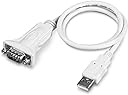
The TRENDnet TU-S9 USB to Serial 9-Pin Converter Cable is a compact, NDAA-compliant adapter that enables seamless connection of RS-232 serial devices to USB ports. Supporting USB 1.1 through 3.0 with a 6Mbps data rate, it features a flexible 21-inch cable and broad OS compatibility (Windows and Mac). Backed by a 2-year manufacturer warranty and reliable tech support, it’s the go-to solution for professionals needing legacy device connectivity in modern setups.


| ASIN | B0007T27H8 |
| Best Sellers Rank | #17 in Serial Cables |
| Brand | TRENDnet |
| Built-In Media | CD-ROM (Driver and User’s Guide), Quick Installation Guide, TU-S9 |
| Color | White |
| Compatible Devices | Gateways, Laptop, Modems, PLC controllers, POS systems, Printer |
| Connector Type | USB Type A |
| Customer Reviews | 4.6 out of 5 stars 3,200 Reviews |
| External Testing Certification | CE, FCC |
| Finish | White |
| Global Trade Identification Number | 00710931303209 |
| Input Voltage | 5 volts_of_direct_current |
| Item Dimensions | 2.56 x 1.38 x 0.39 inches |
| Item Weight | 40 g |
| Item dimensions L x W x H | 2.56 x 1.38 x 0.39 inches |
| Manufacturer | TRENDnet |
| Mfr Part Number | TU-S9 |
| Model Number | TU-S9 |
| Nominal Power | 2.5 watts |
| Number of Items | 1 |
| Number of Ports | 3 |
| Package Quantity | 1 |
| Power Plug Type | No Plug |
| Specific Uses For Product | Serial Devices |
| UPC | 710931303209 |
| Unit Count | 1 Count |
| Warranty Description | 2 year |
G**N
Works Fine and a Problem Solver
I'm trying to get a 20 year old microcomputer back up again. It requires a serial terminal interface which I no longer have (because I stupidly gave away the VT100 type terminal I used to communicate with it). Rather than buy one that would be expensive and of little future use, I started looking for a more modern solution. Having been working in electronics for many years, I have learned that one can get lucky and everything works okay the first time. Failing that, troubleshooting digital hardware can be difficult and time consuming. As a learning experience with new hardware and to simplify getting the basic RS-232 communication link back up, I purchased an Arduino processor board and an RS-232 "shield" to go with it. The shield simply converts the digital levels from the Arduino to RS-232 levels. These Arduino products are great, very flexible, and relatively cheap. Programming software is free and the language used is more or less "C". Plenty of programming examples are in existence. So, I was able to get the Arduino's RS-232 output going (looping output data) which I first looked at with a scope. Next, I brought up an old tower PC running XP. I started using this computer because it had a DB-9 RS-232 port and a terminal program known as "Hyperterminal". After XP, Hyperterminal has to be purchased separately. Hooking up to the PC and Hyperterminal worked just fine. Next, I wanted to get rid of the tower PC and run things from a small ACER netbook portable. This is where the Trendnet product comes in since the ACER doesn't have a DB-9 port. I was hoping the driver for this device would install automatically but it didn't so I had to use the supplied CD. Since the ACER didn't have an internal CD drive, I hooked up and external one through a USB port and loaded the driver without incident. If you don't have an external drive, I imagine you could use another computer to load and then send the file over your LAN. The next stumbling block was that Hyperterminal was NOT installed on my ACER. Rather than try to figure out why, I looked on line and found another (free) terminal program called RealTerm. Hooking the Trendnet to the Arduino DB-9 and an ACER USB port worked fine. The only thing I noticed, which could be a problem for some, was that no "thumbscrews" were provided on the Trendnet DB-9 end. This end stays mated okay with the DB-9 end on the Arduino, but I don't particularly like to leave DB connectors unsecurred to each other. One could use a short jumper cable, but who needs extra work and cost. Over the years, I have purchased several other Trendnet products and found that they generally did what was advertised and were of good quality for the price.
N**R
Lynx6 AL5B robot arm now works beautifully in Ubuntu (Karmic RC) Matlab 2009b
We're using Lynx6 AL5B robot arms for class, controlled using Matlab. The Karmic RC of Ubuntu I'm using supports this adapter very well; I plugged it in and by the time I could type "sudo chmod a+wrx /dev/tty" and press the tab button, ttyUSB0 already existed and was ready to use (so yes, I ran the command "sudo chmod a+wrx /dev/ttyUSB0" to give the "other" group read/write access.) From there it was just a matter of changing the baud to match the jumpers on the robot arm's controller (sudo stty -F /dev/ttyUSB0 115200), then using "man stty" to read up on the rest of the possible flags and change them until "sudo stty -a -F /dev/ttyUSB0" would give an output including the following: "-parenb -parodd cs8 hupcl -cstopb cread clocal -crtscts -ignbrk -brkint -ignpar -parmrk -inpck -istrip -inlcr -igncr icrnl ixon -ixoff -iuclc -ixany -imaxbel -iutf8 opost -olcuc -ocrnl onlcr -onocr -onlret -ofill -ofdel nl0 cr0 tab0 bs0 vt0 ff0 isig icanon iexten echo echoe echok -echonl -noflsh -xcase -tostop -echoprt echoctl echoke" (It's possible it'll work even if not all the flags match the above exactly; I just know that this is how I have mine set.) I have to thank my professor for pointing out the stty command's usefulness, and I won't post any of his matlab code. But the point is that this thing works, and didn't require any crazy linux know-how or compiling anything. I'm assuming it would work just as well in Windows or Mac.
M**K
Does what it needs to do with simplicity
One of my few 5 star reviews, but definitely worth it. I needed to connect a VERY old Windows XP laptop to a piece of audio gear that seemed to be failing, and the only access was via an old DB9 com port using the vendor's no-longer-supported software. This cable comes with a driver CD and a simple set of instructions: 1) insert the CD, 2) click on "Install Driver", and 3) plug in the cable. The driver installation was very fast and completed without any problems. The old (and slow) Windows XP laptop immediately recognized the device and loaded the drivers when I plugged in the cable, giving me the "hardware ready to use" message in about a minute. It installed the connection as COM6, so I just needed to swap that with COM1 (which the audio-gear software needed to see) and the software connected with the device and I was able to restore operations. The DB9 end is male, so if you need something longer than 2 ft, a standard DB9 male to female cable connects securely, since this cable has the connection nuts on the DB9 connector which the standard cable can screw into to hold them together. For less than $10 US, this was a bargain and helped me save a church several thousand dollars since they didn't have to replace the hardware. The worst thing about the product was the molded plastic packaging that you have to cut to get to the product.
P**C
Device okay, support not so much (Macintosh)
This is for use on Macintosh; I haven't tried to use this on Windows PCs or other types of systems. Pros: Cheap, works fine when it works. Cons: Unhelpful support if it doesn't work, somewhat questionable future-proofing. Summary: Cheap enough to buy and throw out if it stops working. As of today, this works fine on most Macs but not on some: any Mac running a 64-bit kernel will not see the device at all. TrendNet does not seem to think this is a problem. There is a work-around (see below) if you're technically inclined, but this doesn't fill me with confidence in TrendNet's Macintosh support. This device is half the price of its main competition. If you know what you're doing, it's money well saved. If you want "just works" on a Mac, you may want to consider alternatives. On the upside, it actually provides enough power for serial-port-powered devices (such as the GC-IRL) to work reliably. The Technical Detail: The official TrendNet device driver for Mac does not have a 64-bit version. This means that any Mac that runs a 64-bit kernel will simply not see this device. TrendNet support will give you the run-around and tell you it's all your fault (system too old, system too new, whatever they can think of) but apparently won't understand what "64-bit driver" actually means. It turns out that they simply re-package the driver from their chipset manufacturer; if you're lucky, they will finally point you at prolific.com.tw, which has a perfectly fine 64-bit driver for Snow Leopard that works without problems.
O**Y
Works Well With Win 10.
My old adapter ceased to operate on my Win 10 machine. A friend tested the cable on his air-gapped several year old Win 10 machine - and it worked. Since that computer had received zero Windows updates, Microsoft had not had the chance to rifle through the old drivers and delete them. He had an adapter which did work on a Win 10 machine with the latest updates. That was this one. I bought a couple and am pleased. I have had many products made by TRENDnet and is one of a few go-to names I buy without hesitation. I'll add that my old adapter worked for many months after support for Win 10 ended. It is my personal belief that Microsoft is somewhat degrading Win 10 to encourage people to move to Win 11. I have noticed other loss of functionality and erratic behavior.
B**Z
Item as described. Excellent so far.
I purchased this to use with a Uniden Radio Scanner for programming as my new Laptop doesn't have a serial port. I could have purchased a $30 USB cable directly from the manufacturer, but money is tight right now, especially with the current state of the economy. I saw this as a way to save more than $15. I have Windows Vista Ultimate OS. I read in prior reviews that there may be issues with the Trendnet driver that comes with this product but, so far I have had NO PROBLEMS. I followed the instructions, which were extremely simple, inserted the installation disk and the program did the rest for me. After plugging the adapter into a USB port, it even searches and finds the correct port number for you. It couldn't have been easier to install. I plugged my Uniden Scanner into the adapter and everything worked perfectly, right out of the box. In conclusion, I definitely recommend this product. As for me, I saved over $15.00 by purchasing it and it performs just as good as a USB cable would by itself. I don't normally write reviews but, I wanted to assist others in their decision of whether or not to purchase this product. I was a little skeptical at first but, by taking a chance on this product, everything worked out to my advantage. I am totally satisfied with this product and I would certainly recommend it to others as it was a totally positive experience.
P**E
Good chipset at a good price
The TRENDnet TU-S9 USB to Serial converter worked perfectly to configure my network and Fibre Channel switches, as well as a KVM console from a Gen-9 HP server. The newer Gen-9 HP servers come standard without serial ports as they are an optional "add-on", so I was left with no other way to configure my equipment. Since the adapter is built with the well known and reliable Prolific PL2303 chip, I used the driver directly from the Prolific web site to install the device on my system. The adapter presents the standard identifier of VID_067B&PID_2303, which makes it compatible with drivers across many operating systems without having to resort to tweaks. Some vendors change the VID and PID, even though their adapter is built with the Prolific chip. When they do that, it sometimes means that you must use their driver, or start mucking about with the driver installer files to get the standard driver to work with the adapter. It's refreshing to not have to deal with that headache for this adapter.
P**P
Works well, but has practical problems.
This would normally get 5 stars, because it just works with Windows 10. No messing around with drivers for random chip sets from anonymous websites with poor English. However, two drawbacks knock off two stars. First: The cable really is too short to do anything with. You are going to need an extension cable, either USB or DB9 - see below before going and buying a USB extender cable. The second problem is that it has captive nuts on the DB9 connector. Now, there is no standard to define whether it should have nuts or screws, but the practical reality is that almost invariably it is the socket fixed to a device, on a bulkhead, that has nuts. So this is a nuts to nuts connector in practice, which means IT DOESN'T FIT, because the nuts get in the way. The nuts are captive. You can't remove them. Typically, the nuts on the device you are connecting to hold the socket in place, so you can't really remove them either. I don't think that whoever designed this configuration has really ever used RS232/DB9 connectors seriously. So what you need is a straight through DB9 extender cable, male to female, with screws on both ends. That solves both problems, but adds another $5 or so to the total price and a few days waiting for it to arrive. Previous experience with random Chinese converters and their non-standard chipsets has been enough frustration to make this tolerable. But be forewarned and order the extension cable at the same time.
A**N
Good active converter.
Using this to communicate with PIC micro-controllers using a CCS serial port monitor that is built into their compiler and it is working perfectly. Install the drivers and the program detects the comport properly. The only thing that I don't like about it is that it needs to install the drivers every time you plug it into a different usb port and each usb port is then a different comport, so if you switch usb ports remember to change the setting in you serial port monitor to make sure that you are reading the correct port. Other than that it is solid for a solid price.
D**E
good USB to Serial cable
Have been using this Serial to USB device for a good few years now and has served me well . I think i recall once or twice having issues with the drivers over the 4 or 5 years but it was easily solved by going to the TRENDnet website and updating the drivers. no complaints and a solid product.
X**Z
Excelente
Para el que puso que no sirve es porque no instaló los drivers que se requieren, a menos que tengas tu PC lista para su uso. Me sirvió muy bien, el precio es realmente nuevo ya que eso cuestan aquí con una calidad muchísimo menor.
R**O
Finalmente un adattatore di qualità
Dopo anni di continui problemi di connessione con il mio tornio Mazak, finalmente ho trovato questo adattatore che fa il suo dovere anche in ambienti industriali con interfacce che pretendono precisione nei livelli di tensione dei segnali. Il tutto ad un prezzo incredibilmente basso. Facile da installare, testato con WINDOWS 7 su notebook, collegato con CNC Mazak, Fanuc, Siemens, Heidenhain e Yasnac tutti senza problemi. Consigliatissimo!
C**N
Fonctionne parfaitement
Utilisé entre un vieux macbook et des serveur
Trustpilot
2 months ago
4 days ago