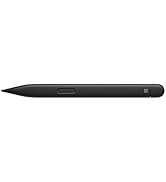
✒️ Write your future, erase the past—Surface Pen Platinum, where precision meets power.
The Microsoft Surface Pen Platinum Model 1776 is a premium digital stylus designed for Surface devices, featuring 4,096 pressure sensitivity levels, ultra-low latency for real-time ink response, and Bluetooth 4.0 connectivity. It offers natural writing and drawing experiences with tilt shading and a dual-function eraser, magnetically attaches to compatible Surface models, and integrates seamlessly with popular creative and productivity apps like OneNote and Adobe Suite.


| ASIN | B072K5TXGT |
| Batteries | 1 CR2 batteries required. (included) |
| Battery Type | Alkaline |
| Best Sellers Rank | #32 in Digital Pens |
| Brand | Microsoft |
| Color | Platinum |
| Customer Reviews | 4.6 4.6 out of 5 stars (8,699) |
| Date First Available | June 15, 2016 |
| Department | Male |
| Hardware Platform | Microsoft |
| Is Discontinued By Manufacturer | No |
| Item Dimensions LxWxH | 5.75 x 0.38 x 0.38 inches |
| Item Weight | 0.64 ounces |
| Item model number | EYU-00009 |
| Manufacturer | Microsoft Input |
| Product Dimensions | 5.75 x 0.38 x 0.38 inches |
| Series | EYU-00009 |
R**Z
Enhances Utility of Surface
This review applies to the Platinum Surface Pen in use with a Surface 2017 model. The official Surface Pen has proved excellent in use. It is comfortable in my hand, feels natural against the touch screen, writes with no lag, has flawless palm rejection and attaches firmly to the magnetized side of the device. My only problem with the hardware was that it failed to pair automatically with my Surface as the enclosed instructions stated it would. Though far from expert, I'm comfortable with technology and was able to pair it manually in seconds. I suspect my experience was atypical so I did not subtract any stars because of this. Although I use my Surface primarily as a laptop with the Type Cover, adding this Surface Pen definitely expands its functionality. When precision mousing is required, such as in photo editing or using OneNote's drawing tools to make a garden plan, I can be more accurate using the pen's mouse buttons than using the track pad or a conventional mouse. Thanks to the programmable eraser button, with one click I can open a OneNote page to quickly jot something down without hunting for pen and paper even if I'm in the middle of doing something else with my computer. I am no artist, but I have poked around in my amateurish way with drawing apps that support direct on-screen inking and the conventional kind of program that would be used with a graphics pad and stylus. In my non-expert opinion, the Surface Pen would be an invaluable tool for any real digital artist. Finally, a tip for the thrifty: the platinum pen, the least expensive color option, matches the metal casing of the Surface. It won't match your Type Cover, but it won't clash with it either. So unless you're bent on making a fashion statement, pick the platinum model and save a few bucks.
J**H
Probably the best stylus on the market
I love my surface pen. It always works and you can tell it is made to last. It is made of metal and has a very good weight to it. The tip is also very good in that it feels like you are writing with an actual pencil. It creates a friction as you write which gives it a more natural feel compared to others on the market. It also HAS AN ERASER on the top like a normal pencil. If you are writing and need to erase something you literally just flip it over and erase like you would a normal pencil. Many styluses do not have this feature and I really appreciate Microsoft for including this. I use it for taking notes in class and I know people who buy the 30 dollar styluses and they have had to replace them because they break multiple times in only 2-3 years. Save yourself the trouble and money this stylus has lasted me 3 years and still looks and works like new. After having to replace cheap styluses a couple times you would have spent the same if not more than just buying one of these styluses. If you have a Surface Pro this stylus is a no brainer. It has a magnet on it and ATTACHES TO THE SIDE OF THE SURFACE PRO. I cannot tell you how useful this is. I know people that are always loosing their styluses and have to buy new ones this feature has saved me from ever loosing my stylus. I really cannot recomend this stylus enough
B**K
Compatible
Greta pe. For my i pad. Works great with it.
D**L
From the perspective of an HP Spectre owner - Big win over the HP Tilt pen
Had to retire my old tilt pen which I used on the daily for note taking on my Spectre aw0xxx, because a soft drop from my desk caused the tip to break and bricked the pen. Just experienced a much harder drop of my new surface pen on the floor and this time the initial impact was straight on the 2H tip, not a scratch! The fragility of the HP tilt pen (and the rest of the hp pens that carry a similar design) is it's main flaw, and the surface pen has nothing of that! Some more advantages I noticed: + No more battery anxiety because a single AAAA battery will last me over 2 semesters easily with Bluetooth features enabled. That is compared to around 10 days a charge for the hp tilt pen w/o Bluetooth or 8 hours with Bluetooth on. A rechargeable pen isn't for everyone, certainly not for me. Add the peace of mind of having a rechargeable battery degrade on me over the next 10 or so years which the pen could easily outlive, the AAAA is countering this planned obsolescence and is pro consumer in that regard. + High quality nibs are abundant and affordable. Found a 3-pack of high quality uogic nibs (survived a 1m drop onto my floor) cost me the equivalent of 7 USD on Ali (couldn't get a set shipped to me from amazon because I'm not from the US). That is the opposite of the case with my former hp tilt pen, 0 official replacement nibs and the only ones that I could fit on it (surface pro 3 pen nibs) eventually broke inside of it effectively breaking it entirely. Another point towards being pro consumer compared to HP. + The magnets in the pen can latch onto my spectre laptop in about 8 different spots, it's not designed to do that on a non surface device per se but it's definitely nice because it's harder to lose/drop from the desk this way. HP pens have no magnets. + The better weight balance over the HP pen makes the flip-to-erase function (which the hp pen also has) actually practical. I had to shift my entire hand to a different position on my old hp pen but that isn't the case with the surface pen which actually feels like a slightly heavier pencil that is still easy to flip over to erase with. + Still fits in the pen pocket of the oem Spectre laptop sleeve - No clip means it rolls slightly more easily on my desk than the HP pen but being able to magnetically attach to my spectre counters that. - No dark coloured optioned, only light blue/silver/red. I don't find it a big deal since at the end of the day I used it as a tool and not a fashion accessory but I slightly miss my Tilt pen completely matching my Logitech mouse's colour scheme. Considering the surface pen and the HP Tilt pen have similar MSRPs where they're sold, The only reason i could see any HP convertible owner buying an hp pen is either blind brand loyalty or needing a rechargeable battery.
C**S
I bought a $5 one and a $30 one for my windows surface wanting to save some money , they just don't do the job. Very high quality, uses AAAA battery that is easy to find. Very good build quality and feels good to write on. Perfect weight and feels nice in the hand. A must have for artists to get the 4000 pressure points. You can make nice shades and really acts like a pencil when drawing. In terms of the style, I really like how it looks. Looks very nice with the windows surface and matching. I also like how it attaches well to the side of the windows surface. This works by magnets and it works on both the right and left side of the surface which is very nice. You feel like you are writing on a very smooth surface with the nice pen tip material. It doesn't come with any case but I just put it in the pen pocket of my surface bag which is very common in surface bags. Order the AAAA batteries from Ebay 2 months before you need it, its cheapest there.
T**Q
Excellent product and fast delivery
S**N
I don't know why I got myself one - the darn thing is so pricey, and the only thing I can draw is a Coconut Tree that somehow ends up looking like Bin Laden' beard... Got myself one just to complete my Surface Pro though - I got mine (the SP4) without the Pen, but with the Type Cover... Simple but effective packaging by Amazon, though it took its own sweet time to arrive. The Surface Pen Platinum does not work with all the features (for example, Tilt and all 4096 Pressure Levels) on the SP4, as it does on the SP 2017 Edition... Having never used a Digital Pen all my life, I need to now use it! So far, I have just put in about 30 Minutes usage! Initial impressions are therefore that; - Its a Magnificent piece of Architecture - The Weight and Grip are just sooo right - Snaps Strongly onto the SP, yet, easy to grab out and work with it too! - It GLIDES over the SP's Screen, making a slight Ssss sound - feels Great! - Works as my finger, works as a Pen too - More than losing it, I am mortally scared of dropping it on its Tip... Shudder!! - Where do I get cheap, long-lasting AAAA Batteries from, next year, for the Surface Pen??? Edit after a year plus of using the Surface Pen: the Batteries are still over 50%, so I can put off buying replacement Batteries for another year! Batteries cost a small fortune too... And err. although I haven't suddenly turned into an Artist, I do love having the Pen around, to sign Digital Documents or just to wow people! 😁😎
K**E
Great product and services
R**O
Excelente, es compatible con mi Surface Pro 4.
Trustpilot
4 days ago
1 day ago