Buy anything from 5,000+ international stores. One checkout price. No surprise fees. Join 2M+ shoppers on Desertcart.
Desertcart purchases this item on your behalf and handles shipping, customs, and support to Denmark.
🚀 Elevate your WiFi game—never settle for slow again!
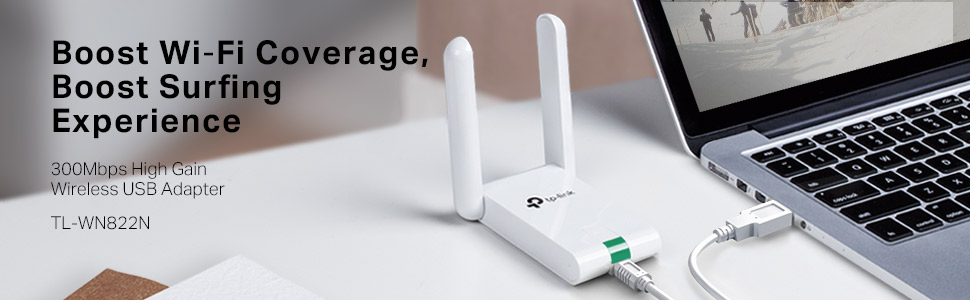
The TP-Link TL-WN822N USB WiFi Dongle delivers up to 300Mbps wireless speed with dual external high-gain antennas for extended range and stable connections. Compatible across Windows, Mac, and Linux, it features one-touch WPA security setup and comes backed by 24/7 technical support and a 2-year warranty—perfect for professionals demanding reliable, fast internet on any PC or laptop.


| ASIN | B00416Q5KI |
| Best Sellers Rank | #1,144 in USB Computer Network Adapters |
| Brand | TP-Link |
| Built-In Media | 1.5 Meter Extension Cable, Quick Installation Guide, Resource Cd, Wireless Adapter Tl-Wn822N |
| Color | Old Version |
| Compatible Devices | Desktop, Laptop |
| Compatible Operating System Family | Linux, MacOS, Windows |
| Customer Reviews | 4.2 out of 5 stars 11,321 Reviews |
| Data Link Protocol | USB |
| Data Transfer Rate | 300 Megabits Per Second |
| External Testing Certification | CE, FCC, RoHS |
| Hardware Interface | USB |
| Item Dimensions L x W x H | 3.5"L x 2.7"W x 0.7"H |
| Item Part Number | TL-WN822N |
| Item Weight | 50 Grams |
| Manufacturer | TP-LINK |
| Mfr Part Number | TL-WN822N |
| Minimum Required Operating System Version | Windows XP |
| Model Number | TL-WN822N |
| Product Dimensions | 3.5"L x 2.7"W x 0.7"H |
| UPC | 777004581483 777304566319 141086617123 777004581063 132018353783 351895906701 851905159856 777005000006 736159053450 112840003162 749276119879 809385674109 160921437061 731215277030 807320172031 191120005515 767531561188 565264157452 806293535102 163120466931 012300426794 845973050542 745449833986 320127553099 102931029461 719040108071 777104569275 809186279268 |
| Unit Count | 1.0 Count |
| Warranty Description | 2-year warranty |
D**F
An absolutely amazing product!!! See Update at the end.
This thing is amazing! I honestly hadn't expected much, but was VERY pleasantly surprised. We have a wifi network in our house. It works well, except for my wife's computer which is only about 60 feet from our router, but with three walls between the router and her computer. It would hang up when loading websites, and sometimes would never load the page at all. I blamed the problem on the computer or browser; probably the computer, as I was not having a problem with mine, nor did she if she moved it much closer to the router. This antenna arrived about a week ago, so we've had plenty of time to test it. Installation was simple. Plug the unit in, run the enclosed CD, click on to the network, enter the pass code, and that was it. My wife's computer problems are gone! All websites snap right up. Not one problem with any of them. We have a custom program on her computer that we use to run our business. Running it on my computer from hers, over the network was always slower than running it on her computer. That was to be expected. Now it runs about 50% faster across the network. I installed this antenna on my computer (Windows 8.1) just to see what would happen. Amazingly, it sped page loads up dramatically, even though I'm within about 30 feet of the router (albeit the signal still has to go through two walls), and did not have nearly as many problems as she did. I have just ordered a second one to go on my computer for that reason, and because I expect our in-house program will run even faster across the network using one on each computer. I will update this review after I find out. Given the results with this antenna on our two computers, I enthusiastically recommend it so anyone who suspects a internet connection problem, even if it's only a small one. I simply cannot believe the results, especially at this price. Amazing! 01/15/15: I received my second antenna about a week ago. As expected (hopes for!), it did speed interaction across the network between our computers. No more hung pages on the internet. I can't wait to see how it works in hotels when we travel.
J**O
Wow. . .it really WORKS!
I'm always a little skeptical of claims made by inexpensive wireless devices but the TP-Link really did exceed my expectations. Here's the whole story... We recently upgraded to FiOS Quantum internet service but the wireless router supplied by Verizon didn't come close to supporting the transfer speeds the new connection was capable of. I added a TrendNet dual-N access point, TEW-637AP (highly recommended, BTW, and also purchased from Amazon TRENDnet 300 Mbps Wireless Easy-N-Upgrader (TEW-637AP) ), and doubled the wireless speed. However, signal strength was so low that speed often dropped by 50% or more and the 58Mbps maximum wasn't close to the best. Now it appeared that the wireless USB adapter, a single antenna TrendNet TEW-644UB, may have been part of the problem. I was intrigued by the dual antennas on the TL-WN822N, thought it could be a better match for the dual antenna wireless access point and, given the low price, was certainly worth a try. The adapter arrived quickly and installed easily. (Be sure to follow the instructions to cancel Windows offer to search for or install the driver and run the TP-Link driver and setup utility **after** plugging in the adapter.) The adapter activated as soon as the software installation completed and opened the configuration utility. After selecting the TrendNet access point and entering the WPA security code, the TL-WN822N connected immediately. The first thing I noticed was the signal strength - Windows 7 wireless network connection status now shows signal quality of 80%. Even more impressive was the speed, now at a steady 130Mbps, a 225% increase. Don't hesitate if you're looking for higher wireless speeds but keep in mind that you will also need a dual antenna, dual-N (300Mbps) wireless access point to make the most of the TP-Link TL-WN822N. This was undoubtedly the best $20.00 I've ever spent on a computer.
D**F
Software might take a bit to load
I got this wireless adapter based on the reviews, and the extremely reasonable price (though lots of others are the same price or less). I decided I really wanted a good one, and ratings factored in heavily for my decision. The router arrived quickly. I am the go-to person in my house for computer repair - swapping out hardware, installing software, running anti-virus, etc. I have a pretty good idea of what I am doing for this kind of thing. When I originally tried to install the software for this piece of equipment, it seemed to install just fine. But when I checked the icon to see if it was working, the list of available connections indicated "Connected," but at the top of the list where it says if your PC is connected or not said, "Disconnected." Say what? How can I be both simultaneously connected and disconnected? And by the way, I didn't have internet access, so it was clearly disconnected. I uninstalled the software, then reinstalled it. I'm not sure what was different, though I did notice that after I clicked the correct button to install it, there was a very long delay of a good 10 to 15 seconds before the next screen popped up. I didn't recall that happening the first time (though I'm sure I installed it properly). In any case, be patient as it installs. I have a refurbished Windows 7 machine that is less than 6 months old so it should have gone quickly, but had that long wait. Once re-installed, it worked perfectly, and has been on our computer for a good week or so now with no issues. Our younger daughter watches a fair amount of YouTube and Hulu content, and it seems to work okay for that so far. The wireless adapter is a good 20 feet away from the wireless router, which is one full floor lower as well, and it has full five-bar connectivity. I gave it four stars due to the installation issues, and the fact that the instructions did not have a Q&A section that addressed the problem I had, so hopefully others will find this useful if they have a similar problem. But overall, now it's working well, and I'm fairly satisfied with it; just not the initial frustration.
E**Y
Works great every time with mine getting 300mb/s connection to the ...
Works great every time with mine getting 300mb/s connection to the router. Additionally, this device can simultaneously receive a wireless connection and act as a wifi hot spot. Both the main computer it is connected to can browse the web like normal but there is a program which lets you also make the device a hotspot to connect other wireless internet devices through it. I wondered when I first got it if it would do one or the other but like I said it is simultaneous, you just have to leave the computer it is connected to on the whole time. I never tried to connect my computer to an Ethernet wire (not receiving internet through wifi) and trying to use this device as a wifi hotspot, but I imagine it should still work that way. It can be nice if your using internet from someone else but want to connect your other devices through your own wifi (with its own password and all). You can even set up your own subnetwork for your own personal devices which would still make those devices inaccessible (an virtually invisible) to the main wifi your receiving your internet from. I like it since I have roommates and share my internet between them all. I allows all my devices to connect to my own network within the main network giving me virtually a private network, the main router only picks up the main computer this device connects through. Please note however, this device does not hide or make any more secure your personal internet surfing activity on any device which is connected through this wifi hotspot. The main network, as in any instance, can still track your web usage and possibly obtain personal information. This is a nice tool for using public wifi or wifi in a hotel for instance, but since it still requires to connect to another router to get internet, that router can track your web activity. In conclusion, it is a nice wireless router since you can double it as a hotspot, it has been very fast and always dependable (for the last 6 months I have owned it) and you can control your own mini wireless network through it.
M**2
good connection speed, but a number of annoying problems
I bought this antenna (TL-WN822N High Gain Wireless-N USB Adapter or N300 High Gain) a while ago to connect from 2nd floor to a router on first floor. As long as the connection is established, the speed is very good and the range also. However, it takes several attempts to connect in the first place, and the connection is frequently lost, or the router just disconnects for no apparent reason. I started to tether my desktop to my mobile to use its wifi connection, which connected without problem to the same router and was much more consistent. Furthermore, the driver is not automatically updated and windows (7) is unable to detect the most recent version of the driver, insisting that the 2010 version is up to date. It is possible to download the most recent version from the website and install it manually after uninstalling the old version (install with the setup.exe). I don't know if this is a Windows problem or if the problem is with TP link, but as the most recent driver is supposed to fix the disconnect issues, there should be an easier way to install it. Update: The new driver has stopped the problem with connecting initially, but not the random disconnects. Sometimes the antenna works fine for hours, sometimes it disconnects every five minutes ten times in a row. UPDATE: Since the antenna never really worked for me, I decided to buy a different one, the TL-WN821N Wireless-N USB Adapter (or N600 Standard). After doing this, I noticed that Amazon pools all the reviews for those devices together and you cannot see which review is for which. So: The N600 works like a charm. Installs without issues, great signal and amazing speed of 105 Mbps(the signal of the N300 High Gain is a tiny bit better, but the speed is still much slower and it frequently disconnects). I wish I would have known this before buying the first antenna, which was a waste of money. Three stars - the average of the two. Take care when reading these reviews. I'm sure most of the good ones are not for the N300 HG.
S**D
Unbelievable Signal Strength
I must say that I am really impressed with the performance of this device. Initially I was not going to write a review but after seeing how great this was working I just had to share. Firstly, if i am to honest the included driver CD did not work AT ALL on WIN8, it actually crashed my computer and forced it to reboot. I had to download the drivers from TP LINK website and only then did it work. Before installing I had a Linksys PCI WIFI card with Speed Booster that worked pretty good for me over the past few years but I had to upgrade because I was upgrading my machine which didn't support the old PCI Card. That's why I decided to try a USB solution. Now generally I would get about 2 Networks when I search for available networks, which include mines. immediately after installing this device I picked up 5 networks I didn't even know was around. and generally my old card would have about 3-4 bars signal strength at any given time, sometimes 5 but quickly drop back to 4 bars. With the TP-Link its been a steady 5 bars, I even noticed that the video stream quality improved a great deal. For the price its really not bad, its light, small and if you don't mind the white colour then this may just be right for you. I also haven't been getting much heat emitting from the device which is a good thing because the room I have it in does not have AC and it seems to be keeping that temperature steady all day because I have also been streaming movies and downloading all night and there was not a big difference how hot the device got. Thus far I have nothing negative to say about the TP Link, my only issue was the driver CD but that was easily resolved by getting the updated drivers online.
D**E
Very Fast, Easy Setup, Long Cord, Blinking Green Light Lets You Know It's Working.
This Wireless N USB Adapter is the best one i've ever used. I used to own the TP-LINK TL-WN710N, which was a N150 USB adapter, and this N300 TL-WN822N blows that out of the water. It has dual antennas (3dbi each), and they actually do a lot. The speed increases exponentially when you have the antennas up. It comes with a install disc for the driver, or you can get it from the TP LINK website. Once you install the driver, it works immediately, and the little green thing on the front blinks fast when data is traveling through at a fast rate, and blinks slow when it's going through at a slower rate. The cord it comes with to plug into your Wireless N adapter from your laptop is real long, i would guess about 5 feet, so you can move the adapter closer to the router, to get even a better signal. So far, this thing has performed flawlessly, and has given me very fast speeds. I did an Ookla Speed Test using my old TL-WN710N, and got maybe 7Mbps as the fastest download speed, no matter what Wi-Fi I was on. With the TL-WN822N, I got almost triple my download speeds, going up to 20Mbps on one of the same Wi-Fi connections that I had tested with the TL-WN710N. This thing highly exceeded my expectations, and works great, giving me fast speeds when other USB N adapters failed to. This thing synced Dropbox(along with 23 new files) in under two minutes. That impressed me. I use a travel N300 router, so this thing pairs perfectly with it, giving me fast speeds and a reliable data connection to my computer. I would highly recommend this to anybody who needs a Wireless N USB Adapter for their laptop/desktops, It will not fail you.
T**!
Works, but had to download latest driver
Well, I got this to work, but had to go to the TP-Link website and download the latest driver to do so. At first, I thought I had gotten a faulty unit (like the Kingston memory I also ordered with this product). However, after installing and uninstalling the driver and utility 3 times that came with the adapter's installation disc (and running CCleaner registry cleaner and then restarting the computer after each uninstall/reinstall), I tried one last gasp before starting the return process with Amazon (as I had to do with the DOA memory). I downloaded and manually installed the correct driver (in my case, Windows 7 64-bit driver) and the first signs of life were finally seen from this adapter, the neat little blinking green LED activity light that had refused to illuminate until that point. This also cleared up the exclamation point next to the adapter within Device Manager. I did not install the utility that came with it, but fired up my AT&T Communications Manager for my USB aircard and the new wifi adapter was immediately recognized. I then turned on the wifi on my Samsung GS2 and once I entered my password it connected to the Internet without a hitch via Communications Manager's wifi console. I am writing and submitting this review over my phone's wifi hotspot and the new TP-Link TL-WN822N, so yes, it is working and working fast. But, 4 stars instead of 5 because others not as familiar with computers would have probably given up and been more frustrated than I was initially. Update: The driver I downloaded from the TP-Link site crashed my computer so badly on restart I had to reinstall using the Acer Recovery console because Windows refused to start or repair itself, and System Restore was no help either in the Repair menu. Granted, Windows threw up the Not Digitally signed message before I installed the driver, I've never had a problem with a driver that is not digitally signed, but evidently this driver does not like my system or is poorly written. How do I know this? After 2-3 hours of recovering the system because Windows would not start, repair or restore, as soon as I installed the TP-Link driver again, the computer immediately blue screened, restarted, informed me it had experienced a serious problem, it again would not repair, etc. as before, so once again back to the Acer Recovery console (on a computer that is not a week old!). Luckily, Acer's Recovery console does give the option to back up personal files, so all my pictures and downloads were saved as a backup. I'm sending this adapter back to Amazon with my DOA Kingston memory tomorrow.
L**N
Sehr guter WLAN Adapter
Ich habe vor meiner Bestellung die Rezessionen durchgelesen und dabei festgestellt, dass sehr viele Kunden das neue Modell und den neuen Chipsatz bemängeln. Da es aber auch sehr viele positive Rezessionen hatte, habe ich mir ihn einfach mal bestellt. Als 1. habe ich einen vergleich zwischen LAN und dem Adapter gemacht. Ich konnte nur ganz minimale Unterschiede feststellen, die sich aber noch im Rahmen der Toleranz bewegen. Als nächstes habe ich einen kleinen Belastungstest gestartet und ein Spiel bei Steam gedownloaded. Ich konnte keine Abbrüche feststellen und auch die Geschwindigkeit war identisch mit der LAN Verbindung. Das beste kommt aber zum Schluss: Die Installation Die Installation ist unter Windows 10 unkompliziert und einfach. Einfach das Gerät anstecken, Windows installiert dann kurz die Treiber und schon kann man sich mit dem WLAN verbinden. Da gibt es echt ein großes Lob an TP-Link für diese einfache Installation innerhalb von Sekunden! Wenn man jetzt noch einen Kritikpunkt nennen müsste, würde ich folgendes bemängeln: Ich finde der Mini USB Anschluss ist auf der falschen Seite. Er ist vorne am Gerät, es wäre aber besser, wenn er hinten ist, denn da Stört das Kabel nicht so sehr. Mein 1. Test fällt somit sehr positiv aus und ich kann den Artikel nur jedem empfehlen, der einen WLAN Adapter sucht.
A**O
Inmejorable
El tiempo de recepción menor al estimado,así que perfecto por me urgía bastante. Embalado y estado del pedido perfecto también. Muy pequeño cabe el la palma de la mano, el cable parece resistente. La instalación es muy sencilla. incluye un mini CD con los drivers y en menos de 2 minutos está funcionando. Lo he instalado y probado en un portátil HP en otro Samsung y en un ordenador sobremesa en el que finalmente se ha quedado fijo. En todos los casos ha sido instalado en Windows 7. Lo quería por que el router me quedaba bastante lejos como para tirar un cable hasta el pc de sobremesa, ya que esté está algo escondido. Desde el primer momento el funcionamiento y el rendimiento perfecto. En los test de velocidad, hechos un sábado por la mañana, obtenía el 100% del servicio que me ofrece ONO: 50 mbps. Realicé una descarga importante de más de 40 gigas en descarga directa de un juego cuando lo instalé hará ya un mes y he de decir que es muy estable y no se me ha colgado en ningún momento. Y he llegado a alcanzar tasas de descarga de mas de 6MB/s lo que me parece increíble con más dispositivos conectados al wifi de casa (2 iphone y 2 ipad obviamente no funcionando a pleno rendimiento a la vez ). El ping también es aceptable, mejor desde luego que el de la tarjeta de mi portátil HP. El resumen muy recomendable. Calidad/precio inmejorable. Estoy por pedir otro para las zonas de la casa con menos cobertura.
R**J
Very good.
This product is very good and working fine. Speed is very fast. Wifi range is good
R**N
Its fine.
Description is pretty accurate. It has been working fine for years, the range however isn't that good.
W**E
Worked well.
I am in the building next to my landlord. Prior to getting this device I could only rarely see the wi-fi signal. Now I get a reliable signal. I did have to hang it from my ceiling and made sure the pair of antennae point toward his router.
Trustpilot
2 weeks ago
5 days ago