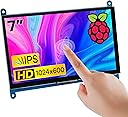
🚀 Elevate your mini PC setup with a sleek touchscreen powerhouse!
The Hosyond 7 Inch IPS LCD Touch Screen Display offers a sharp 1024×600 resolution with a vibrant 16:9 aspect ratio and 5-point capacitive touch. Designed for seamless compatibility with Raspberry Pi models, Banana Pi, BB Black, and Windows PCs, it supports plug-and-play functionality with free drivers. Its independent backlight control optimizes power use, making it a versatile, portable secondary monitor for professionals seeking efficient multitasking and enhanced interactivity.


| ASIN | B09XKC53NH |
| Additional Features | Touchscreen |
| Aspect Ratio | 16:9 |
| Best Sellers Rank | #6,289 in Electronics ( See Top 100 in Electronics ) #219 in Computer Monitors |
| Brand | Hosyond |
| Built-In Media | HDMI cable, micro USB cable |
| Color | Black |
| Compatible Devices | Desktop, Gaming Console, Laptop, Raspberry Pi |
| Connectivity Technology | HDMI |
| Contrast Ratio | 1000:1 |
| Customer Reviews | 4.4 out of 5 stars 583 Reviews |
| Display Resolution Maximum | 1024 x 600 Pixels |
| Display Technology | IPS |
| Display Type | LCD |
| Hardware Connectivity | HDMI |
| Has Color Screen | Yes |
| Image Contrast Ratio | 1000:1 |
| Is Electric | Yes |
| Item Dimensions D x W x H | 0.6"D x 6.5"W x 5"H |
| Item Weight | 0.4 Kilograms |
| Manufacturer | Hosyond |
| Model Name | 10 |
| Model Number | 10 |
| Native Resolution | 1024x600 |
| Number of Component Outputs | 1 |
| Power Consumption | 3.1 Watts |
| Refresh Rate | 60 Hz |
| Resolution | HD |
| Response Time | 10 Milliseconds |
| Screen Size | 7 Inches |
| Shape | rectangular prism |
| Total Number of HDMI Ports | 1 |
| Total Usb Ports | 1 |
| UPC | 761325160724 |
| Viewing Angle | 178 Degrees |
| Voltage | 5 Volts |
| Warranty Description | NO |
F**O
inexpensive, easy to set up, functional and expendable.
fantastic, sharp, easy to set up screen. 10 years ago, i was "screw Chinese crap". I 've changed my tune, because they can't be beat when they produce affordable and effective products like this little screen. I hook it up to comp systems to test basic stuff w/o a regular monitor. IT uses this stuff all the time. This screen is sharp, the little speakers adequate, and it's built very well. Meantime, in the US, we have a dictator who wants to bring back coal and the 1950's. We' ve already lost to China and we're in their rearview because WE CAN'T COMPETE. Our arrogance and ignoance have won. We great yet? buy this.
S**Y
Solid Display for Various Uses—With Caveats
This 7-inch IPS LCD touch screen has proven to be a solid choice for my various computing needs, but it's not without its limitations. The picture quality is commendable, and the touch response is accurate, making it a pleasure to use for both coding and casual browsing. It connects well with multiple devices, from Raspberry Pis to PCs, which enhances its versatility. One major drawback is the lack of built-in speakers. While I usually connect external audio devices, it would have been convenient to have audio integrated into the display. Additionally, the absence of a power button means you'll need to manage power through your device, which can be a hassle. Despite these issues, it’s a great monitor for the price, and I recommend it to those looking for a reliable secondary display.
H**L
Works well with Raspberry pi 4
A very good screen, nice picture and touch works well. A control wheel to change brightness for the screen and volume for the built in speakers. Cable free installation with adapters for my raspberry pi 4, nice!. I remove a star for the outdated installation guide on Internet. These instructions are for an old version (Buster) of the Rpi Linux and doesn't work on the newer version (Bookworm). When I powered up Rpi, I got a picture but with the wrong resolution 1600x900! To get the native 1024x600 resolution, I had to ( with Linux help from knowledgeable people) force the resolution during boot in an autoexec file.
L**S
Perfect for custom builds
This Hosyond 7-inch touchscreen is a great size for Raspberry Pi projects and looks sharp with the 1024×600 IPS display. Touch response is accurate, and it works easily over HDMI without driver headaches. Colors and viewing angles are surprisingly good for a small monitor. It’s a reliable, well-priced option for dashboards, kiosks, or compact builds.
D**S
So far so good
Just unboxed it and connected my Raspberry Pi Zero 2W running RetroPie. I got this during the Big Spring Sale for $45, but even the $53 regular price is a good deal - 1024x600 touch with speakers AND headphone jack! Out of the box the speakers are not attached, but that's ok since I will primarily be using headphones. Headphones and volume control work and the sound is good but not loud. I haven't tried the touch display yet as I don't expect to use it. And instead of the included stands I am using a foldable wire bookstand from my local library. For my brief initial test I plugged the micro usb power cord into a computer's usb 2.0 port and it works well. It did not work from a usb hub on the Pi, though. Maybe a more powerful Pi running from AC power would do it. The linux console text is too small to read, but EmulationStation and games look good. I will have some fun tweaking to do for console font size and aspect ratio for games, but so far I am very satisfied.
S**M
So far so good!
Out of the box it was great, with super quick and easy setup. The tutorial instructions were slightly confusing but I was able to figure it out quickly. It took me only a few minutes to update the config.txt file on my Raspbian image, and both the screen and touch are working perfectly on the first try! That said, it didn't take very long for the touch input to stop working, seemingly completely. So, still working great as a monitor and working with my Pi, but docking two stars since it's no longer a touch-screen which is what it's billed as. Others have complained about the strength of the PCB around the mounting holes, but I haven't had issues so far.
E**E
Great display.
Crisp display, takes very little power. I only whish the HDMI and power connectors were more inboard to help keep the overall footprint smaller.
S**N
Worked first time with Raspberry Pi 4B
Pros: * Easy setup with either a Pi3, 4 or 5 - Very clever design with the little connectors on a PCB. Very neat with no wires or long cables protruding. * Clear and crisp display on all resolutions athough 1920 x 1080 on a small screen like this is an eye chart. I have been using 1024 x 576 and 1152 x 648 for my applications. At this resolution the touch screen is very usable even with my fat fingers. * Colors are bright and saturated. Black is as expected for a modern TFT display. No issues. * Worked instantly, no driver issues, no editing config files to get working. Tested with the 2025 version of Raspberry PI 64 Bit OS. * No USB Sound Dongle needed for sound (as the sound comes over the HDMI connection). This saves a USB dongle and amplifier(s) + speaker(s) that would be needed otherwise. * Sound from included speakers is really pretty good and plenty loud. No driver issues at all. * There is a nice little combined brightness / volume control on the side. Works fine. * Multiple possible resolutions (see attached picture). * A little dimmer than the Official Raspberry Pi display and about the same brightness as the Raspberry Pi Display 2. Still plenty bright in an office environment. As good as your average office laptop. * Seems to use the same power as an official Raspberry Pi display. Cons: * Not as easy to mount as the official Raspberry Pi Display screens. * I didn't notice this at first, but this display has a blue color cast to it when placed next to the Official Raspberry Pi displays which seem to have a slightly warm color cast. Again I didn't notice this until I compared the two displays. * Display surface is reflective, but they all are - a limitation of touchscreens. Wishes: * I wish someone would make a good Acrylic bezel / mount for the screen like the Pimorni ones so panel mounting was easier. Bottom line: I would buy this again for sure. Especially if I wanted to try different resolutions.
Trustpilot
2 months ago
2 weeks ago