Desertcart purchases this item on your behalf and handles shipping, customs, and support to Denmark.
🚀 Upgrade to the future of WiFi — fast, smart, and everywhere you need it!
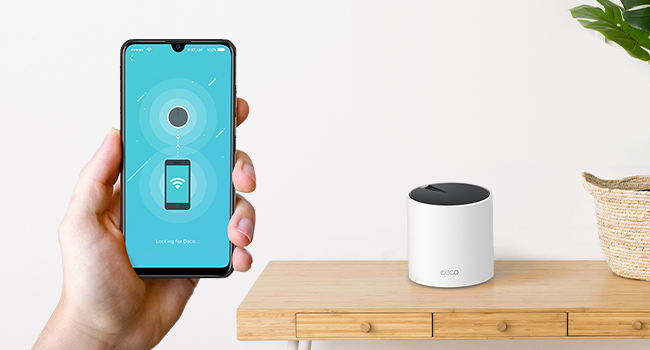
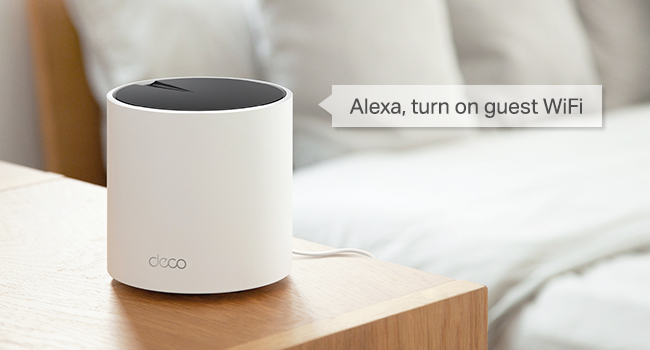
The TP-Link Deco X55 AX3000 Mesh System delivers blazing WiFi 6 speeds up to 3000 Mbps and covers up to 2500 sq.ft. with a single unit. Featuring 3 Gigabit Ethernet ports and Ethernet backhaul support, it ensures stable wired and wireless connections. Its AI-driven mesh technology intelligently optimizes your network for seamless device handoff and zero dead zones. Easy to set up and manage via the Deco app, it also includes advanced security features and parental controls, making it the ideal upgrade for modern homes craving reliable, high-performance WiFi.


| ASIN | B09VJ5CSD6 |
| Antenna Location | Home |
| Antenna Type | Internal |
| Best Sellers Rank | #6 in Computers & Accessories ( See Top 100 in Computers & Accessories ) #1 in Whole Home & Mesh Wi-Fi Systems |
| Brand | TP-Link |
| Built-In Media | 1 x Deco X55 unit, 1 x Power adapter, 1 x Quick Installation Guide, 1 x RJ45 Ethernet cable |
| Compatible Devices | Personal Computer |
| Connectivity Protocol | Ethernet, Wi-Fi |
| Connectivity Range | 2500 square_feet |
| Connectivity Technology | Ethernet, Wi-Fi |
| Control Method | App |
| Controller Type | App Control, Voice Control |
| Coverage | 2500 square feet |
| Customer Reviews | 4.4 out of 5 stars 1,624 Reviews |
| Data Transfer Rate | 3000 megabits_per_second |
| Frequency | 5 |
| Frequency Band Class | Dual-Band |
| Item Dimensions L x W x H | 4.33"L x 4.33"W x 4.49"H |
| Item Type Name | Mesh WiFi |
| LAN Port Bandwidth | 10/100/1000 Mbps |
| Manufacturer | TP-Link |
| Maximum Upstream Data Transfer Rate | 3000 megabits_per_second |
| Mfr Part Number | Deco X55(1-pack) |
| Model Name | Deco X55(1-pack) |
| Model Number | Deco X55(1-pack) |
| Number of Ports | 3 |
| Operating System | Tenda OS |
| Other Special Features of the Product | WPS |
| RAM Memory Installed | 128 MB |
| Router Firewall Security Level | Basic |
| Router Network Type | hybrid |
| Security Protocol | WPA, WPA2, WPA3 |
| Special Feature | WPS |
| UPC | 840030702990 |
| Unit Count | 1 Count |
| Voltage | 12 volts |
| Warranty Description | 2 year manufacturer |
| Wi-Fi Generation | WiFi 6 |
| Wireless Communication Standard | 802.11ac, 802.11ax, 802.11b, 802.11g, 802.11n |
| Wireless Compability | 802.11ac, 802.11ax, 802.11b, 802.11g, 802.11n |
S**O
⭐️ Excellent coverage and consistently strong performance
I live in a two-story home and always struggled with dead zones, especially in the rooms farthest from the router and in the backyard. Since installing this device, the WiFi now reaches the entire 2,500 sq. ft. area without any issues — and even a bit beyond that. Overall, this TP-Link is absolutely worth the investment. If you’re looking to extend your coverage, improve stability, and eliminate dead zones, this model is a great choice. I would definitely buy it again. Setup was incredibly easy. The TP-Link app walks you through every step, and I had everything up and running in under 10 minutes. I really like that the system automatically manages the best band for each device, switching between 2.4 GHz and 5 GHz seamlessly. You never notice it happen, but the network stays stable at all times. The speed improvement has been significant. Before, I dealt with buffering while streaming movies or constant cutouts during video calls. Now I can have multiple devices connected — TVs, laptops, phones, and smart home gadgets — and the network doesn’t slow down. Even during peak usage hours, everything runs smoothly. Overall, this TP-Link is absolutely worth the investment. If you’re looking to extend your coverage, improve stability, and eliminate dead zones, this model is a great choice. I would definitely buy it again.
P**O
I really like and recommend it
It works very well. My wireless internet is very fast. It also has a very good "Deco" app, which allows you to configure and monitor the network, give higher priority to some devices, and also to create an IoT network for home automation (improving security and separating slower devices), very easy to use.
C**N
Simple but Effective. First ever Strong Wifi in 2-Story Home!
This was a godsend for my 2-story home. We've always, always had crappy wifi. I had to get 4 nodes for my home to really be to the level I wanted it to be, but it feels worth it, considering that some wifi routers go for around, say, 300 dollars, which is about what I spent on 4 nodes. They're easy to hook up, no gimmicks, just the app and the 'add node' button after plugging in a node for around... 1 minute of setup. I would highly recommend, if you're like me and literally in the opposite corner of a large multi-story home away from the main router; to finish your connection with a wired, direct connection to your gaming device. Otherwise, yes, you'll sometimes get maximum speeds on a mobile device just by utilizing the 'mesh functionality' aka 'roaming'. But once you get to the corner of the home, in the corner of a room, behind or next to a bunch of extra monitors, electronics, and solid walls, you may need that one extra node, or a direct connection, etc etc. To help you get the best speeds. League of Legends, for example, completely wireless with 3 nodes was acceptable, but not as smooth as my old power-adapter power-line setup. With 4 nodes and a wired connection at the end, my game was as smooth as it used to be via the power adapter. Finally, to explain why I switched from the power-adapter? Power adapters are a little finicky when it comes to the home suddenly using a lot of electricity, or when you need extra power slots in your wall and you try to connect the power adapter into any sort of extender outlet. Also, mesh wifi allowed me to also get my phone and laptop onto the stronger connections even all the way down in my bedroom. All in all, so far so good. I bought it twice! The app isn't horrible at all (I'm quite picky), and setup is easy. Cool! (Also, they don't look too bad in a modern home. The black+white aesthetic is classy and isn't too distracting in the kitchen. Looks good!)
W**M
Works well but needs a physical connection
So the one thing I didn't like about this unit is it must be physically connected to your incoming wifi device. For my application, this was/is not easy due to the location of where my wifi router is located. It is replacing a "Raylee" mesh router that had complete wireless capability. Unfortunately that system failed in less than a year, and it appears they know longer exist. Live and learn, you get what you pay for. The good news is this new tp-link does connect all of my devices and now everything works. The hard one was a blink doorbell that is on the other side of a concrete wall about 70 feet away. Currently all good after 3 weeks!
S**S
Thank goodness for live support
I got the w4500. It wasnt quite as fast as my modem so i updated to an x55 as the initial hub in the network. Set upnwas sort of easy... but then the moment I plugged in a w4500, my Deco app stopped recognizing the network. It was frustrating but then i got to a live agent on support chat. Ivan from TP Link support walked me through adding the satellites and got my network up and running.
T**H
Great way to expand your wifi.
Great way to expand your wifi. Easy to set up and reliable. No noticeable drop in speed even after adding 3 more to my network.
M**5
Questionable Advertisement / Pricy Junk
Model S4 (5) indoor nodes 1.5.2 Build 20240927 Rel. 68997 (3) S4 units originally (Purchased May 9 2024) at the time was $130. Device issues because several devices indicated a weak signal. Main in Living Room and satellites in Studio & Master Bed Room. 2.4 Iot devices were intermittent and dropping off line $130 (1) S4 additional unit (Purchased May 20 2024) Added in garage because garage door and irrigation controller as well as cameras were weak. Also glitchy coverage and continued with unstable connections $60 (1) S4 additional unit (Purchased Jan 28 2025) in 8 months added another one because the TV in bed 2 / She Cave was glitchy even though it was within 15’ from main Deco S4 one room away. $60 Model X55 is indoor main unit. Firmware 1.4.6 Build 20250211 Rel. 39448 (Purchased May 2 2025) Added this unit in hopes to enhance the stability as the S4’s obviously were not preforming as advertised. Model X50 is outdoor unit. Firmware 1.2.8 Build 20240914 Rel. 35513 (Purchased May 2 2025) Added this external one in the back yard due to weak signals to pool pump and cameras even though they were within 20’ of the S4 in the Main Bedroom. $197 total. At the time $90 for X55 & $150 for X50 Outdoor which is $240 MSRP Roughly $450 over a 1 year period trying to get this system to work and it not meeting up with advertised specifications. House is basically a 2200 sq. ft. 1 story predominantly exterior block wall construction. It is advertised that an individual S4 is capable of 2000 sq. ft. However a system of three units indicates 5500 sq. ft. So just shy of 6000. By their numbers, I have 5 which is 10,000 sq. ft. and it still had crappy coverage / stability. Lot of weak signals and drop outs. Now add into it the exterior X50 that can’t get a strong signal, in line of site of 3 cameras within 15, 30 and 90 ft. No obstruction but free air. Also added the interior X55 which states 2500 sq. ft. I have an interior S4 in in basically every room in the house and in the garage. All basically within 20, 25 to 30ft. of the X55 which is the designated Main. They all show maximum strong signal except medium for the outdoor X50 unit and the S4 in garage. The sq. ft. numbers for the interior combined for the (5) S4’s and the (1) X55 as advertised should cover 12,500 but this system struggles with 2200. False advertisement from my opinion based on the numbers. Performance must have been based on an empty glass house and not in real world applications. Think they have one to many zeros as they seem to struggle with an average less than 150 - 200 sq. feet with dry-wall walls in between. Maybe that is the spec for wired back haul. What is the point of wireless if you have to run network cable back to the main? I would not have purchased any of this crap. Frankly it’s a misrepresentation by sales and marketing that gets people to buy this junk. Currently the X55 Indicates that all is good with all nodes. However, when logged onto the WiFi it does not have internet connection. Yes, did all the trouble shooting. The ISP itself has internet, and it is working. The X55 indicates it has internet as stated, but TV's devices, phones, iPad, computers indicate no internet. Dealing with TP Link is near impossible to get anyone live that has a brain. It's all AI and they read from prompts with all the stuff that was in the manual. There is no costumer service anymore just bots and idiots. Purchase at your own risk. My opinion with ratings is most of these 5 star ratings are done by influencers or people that immediately respond with no real time use. I've been at this for a year and never had a real good opinion about this junk until the straw with the X55. It is broken. The reason I have not done a complete reset to see if that works is because you lose all your programming as it reverts to factory settings. Meaning, you have to reconnect all devices as well as rename and categorize them. Not talking about a couple of phones or lap tops. This includes over 60 devices
I**1
awesome, would highly recommend
this was easy to install and works great i would buy 1 more than you think cause to get the best result the node needs to be closer than you think and if you were to add another at a later date its more expensive. I like how easy the setup was by far the easy setup, and it will improve coverage.
A**Y
Excellent and stable network!
Much better than my BT extenders!! Was easy to set up and install and the network is much more stable now. Was recommended by a friend and can't fault the mesh network!!
J**S
Mejor de lo que esperaba
Excelente!! Lo use como principal ya que tengo otro deco S7
P**S
Wrong power supply for UK
Product contains a US 2-pin power adapter which is incompatible with a UK power socket.
S**A
Excelente calidad de señal
Aunque la App esta muy bien hecha, no esta a prueba de dummies e inexpetos. También supone la App que el DECO principal esta en planta baja, que no es mi caso esta en la 2a planta, porque ahí esta el router de Totalplay, el 2o y 3o DECO los puso en planta baja y el 3er piso de la casa, al momento de agregarlos el mapa solo me permitió simular el 2o como planta baja (en el mismo plano que el principal y el 3er DECO como 2a planta, a pesar de estar en la 3a planta, sin embargo esto no parece tan importante porque de todas maneras sigue funcionando muy bien en toda la casa hay una señal de wifi excelente
A**O
Perfecto para el Wifi 6 que usualmente NO dan los módems del proveedor de internet
Estaba dudando si usar o no una red mesh, pero realmente fue una gran decisión, el x55 me sirvió perfecto compré el nodo en buena oferta y me solucionó mis problemas de conexión, automáticamente se habilitó el protocolo wifi 6 y ahora lo puedo usar tanto para mi computadora de trabajo como para la de jugar, celulares, Alexa, cualquier cosa Es una maravilla la app, lo recomiendo para México, si tienen Telmex con fibra óptica, les va a cambiar mucho la conexión
Trustpilot
2 weeks ago
3 days ago