We remain fully operational. Our teams are working around the clock to ensure your deliveries continue safely.

DOWNLOAD THE APP


Customer Services
Copyright © 2025 Desertcart Holdings Limited
DOWNLOAD THE APP


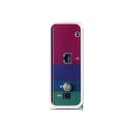


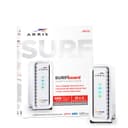

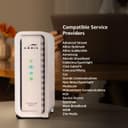
⚡ Surf faster, stream smarter, stay connected effortlessly!
The ARRIS SURFboard SB6183-RB is a certified refurbished DOCSIS 3.0 cable modem featuring 16x4 channel bonding for high-speed internet. Compact and lightweight, it offers a single Ethernet port for reliable wired connections, making it an ideal choice for professionals seeking fast, stable connectivity at a great value.


| ASIN | B01ERK1JLM |
| Brand | ARRIS |
| Color | White |
| Compatible Devices | Personal Computer |
| Connectivity Technology | Ethernet, Wi-Fi |
| Customer Reviews | 4.1 4.1 out of 5 stars (1,802) |
| Data Transfer Rate | 400 Megabits Per Second |
| EU Spare Part Availability Duration | 2 Years |
| Global Trade Identification Number | 00612572209929 |
| Internet Service Provider | Xfinity, Cox, Spectrum |
| Item Weight | 1 Pounds |
| Maximum Downstream Data Transfer Rate | 686 Megabits Per Second |
| Maximum Upstream Data Transfer Rate | 400 Megabits Per Second |
| Modem Type | Cable |
| Number of Ethernet Ports | 1 |
| Number of Ports | 1 |
| UPC | 612572209929 |
| Unit Count | 1 Count |
P**B
This Surfboard SB6 183 has not had a single problem in the time I've owned it (several months). We use it with MAC OS X, Android and whatever Roku uses. We consistently get our plan's rated speed from the cable provider (30 mBps down & 5 mBps up). Once in a while, we get over the speed we pay for (when the cable company goofs) and this modem is more than happy to oblige. Al channels bond all the time, so that's a good thing for maintaining speed. Actually this modem does a better job of maintaining speed in the evening (when the "Netfilx Effect" slows our cable) than the ISP's rental modem. We can still get 30 mBps.) I've never speed checked & got lower than what we pay for. (Good marks for Wowway and Arris) We can surf the innner-tube-web-net while both of our televisions are streaming educational documentaries on PBS. (OK- Chick flicks & monster movies) This modem doesn't even break a sweat- even in the evening. Tech support is excellent. When i first got it, it would not register on Arris' warranty registration page. Apparently it was already registered to someone else & they must have returned it. My call to tech support was answered by a real, live English speaking person in 1 minute. The technician fixed the problem in less than 2 minutes and offered to stay on the phone while I connected it, just in case I had a problem. Cool, huh? Cheerful guy, too. Connecting it was simple. All I had to do was call the ISP and they did the rest. They could see that it was registered to someone else and Arris fixed it. Once I reached a person at the ISP (20 minutes), provisioning it took about 3 minutes. Simple! The provider is Wide Open West (Also called "Wow" or "Wowway") I did have a problem with setting the Energy Saving feature. The manual's procedure didn't match what the screen said. I wrote to tech support. About an hour later I got a reply. One has to unhook it from the ISP to set this feature. The manual skipped that part. Oh well! Later, I wanted to re-boot it for a test in case the power ever goes out. It would not re-boot, following the manual's procedure. I called tech support. One minute later, a person came on the phone. He said to unhook it from the ISP cable to re-boot it. (Again- Excellent tech support. Crummy manual, however). Note that when we have had power failures, it does re-connect to the ISP with no intervention on my part. I gusee you only have to unhook the ISP cable if you are doing a software re-boot. The actual device runs cool. Very cool actually. This is probably because of two things: The venting pattern and the fact that the power supply is not inside the device. This is good & helps the circuitry run cooler. Actually, since the power supply is a (little) brick- and the brick is outside, it runs cooler too. (And can be replaced wth a generic if needed.) It plays well with my TP-Link Archer C7-AC 1750 router. There are no family feuds between them. Report Card: Performance = A+ Reliability = A+ Easy Of Connecting = B (Only because of the registration problem) Temperature = A+ Compatibility = A+ Tech Support By Phone = A+ Tech Support By E-Mail = A+ User Manual = It's Off To Summer School for Those Writers. Personally, if this ever needs replacing, I will buy Arris again. And, I will buy it on Amazon. Why Amazon? They helped me out when the first one I bought (from a private seller on Amazon) turned out to be second hand and, per Arris, possibly bootleg. (So much for cheaping-out & not buying from Amazon...) So, I do highly recommend this device. If it ever messes up & Arris can't help out, I'll update this review.
J**S
I was in an all-out panic when my cable company permanently deactivated my modem and declared it "end of line". ARRIS came to the rescue! In the past, I've always run into problems activating a new modem. This sets up like a dream and performs flawlessly. I'll sleep well tonight!
T**.
Bottom line; Arris SB6183 refurbished modem and seller 5 stars. Optimum (ISP) Technical Support 0 Stars. Got modem to work and looking forward to saving monthly rental fees + tax. Seller was very responsive to my questions and concerns about MAC being blocked due to modem being used/refurbished. Notes from my experience for Optimum users: I have Optimum as my ISP and the 100 MB/s plan. Optimum online automated assistant said most DOCSIS 3.0 modems should work but Optimum Technical Support would only confirm a 3-4 models that are listed on their website- all seem to be older and expensive models with voice support which I don't need. Optimum Technical Support refused to confirm that this modem or or any other model not on the list was compatible. I took a chance and gave it a shot. Had to call in to register new device (MAC address). I disconnected the router from the modem as suggested in various reviews and connected my laptop via ethernet cable directly to modem. Powered on Modem and after a few minutes all 4 lights lit up solid and I was able to connect to the internet - but alas, it stopped working after a few minutes. Optimum trouble shooter would pop up and keep asking me check ethernet cable and reboot modem and router. After another futile chat with Optimum Tech support. I decided to wait it out and rebooted the modem 2-3 more times. Eventually it worked. My guess is that the first couple of reboots were legit and after that the system took some time complete the registration process and recognize the modem. After about 45 minutes it stopped disconnecting and would consistently connect to the internet. At this point I switched the ethernet cable from my laptop to the router and we were back in business with all wifi devices working as before. Speed test on laptop on wifi Old ISP provided modem ~100 Mb/s download and ~30 Mb/s upload in line with the 100 Mbps plan I have. New SB6183 modem ~116 Mb/s download and ~35 Mb/s upload. So bottom line success! Next project upgrade ISP provided router! Note: This modem has no wifi built it. Better to have separate modem and router.
J**T
Are you tired of paying an additional $10-15 every month to your already greedy internet provider like I was? This modem is the secret that I don’t think they want you to know. In just a few months this item pays for itself, and in the long run can save you hundreds of dollars. A lot of cable companies don’t advertise that you can use your own modem & router many of them want you to use their equipment for a small rental fee every month. I was tired of paying their fees and then being stuck with the burden of returning the rented equipment anytime I moved. Installation and setup was easy, all it took was one call to my cable provider read them a few numbers they send signals and ask you to turn on and off the router a few times and in a matter of minutes we were up and running. I have Xfinity in my area (Comcast) and it works just fine. I pay for just about as basic high speed wifi as you can get, and I’m getting speeds well above the advertised range from my provider. This modem is small, stylish, and works well with just about any router. I have mine plugged into a Google Nest router. The white & white duo of both devices in my opinion looks a lot better than the big bulky black routers and modems of the past. Had no issues with the modem being used or showing as in service by someone else as other reviews may mention. Everything in the box looked brand new. Router runs warm, not hot, but just a little warm. I have it in a well ventilated area on a side table in my living room and haven’t had any issues.
D**D
Looked brand new out of the box. Activated without issue with Charter's Spectrum internet, used the online interface never had to call. Super Stable. The Modem I got from my ISP would crash nearly every day, after years of using my own modem I decided to upgrade my service speed and my old 4x4 modem was not cutting it. Decided to try the ISP's Modem, and that has only been hell. When it works the max DL Speed is a rollercoster, up and down. Did not handle stress very well and ended up dropping connection and crashing nearly every day. And while I could have swapped it out and tired another I figured I'd try out a quality modem if the price was right. For the cost it was hard to pass up if it worked. It was pretty much new in box from what I could tell. Speed is solid, doesn't miss a beat. No longer is my downloads causing the DL speed to dip hard. My Router is configured to do well on bufferbloat tests and now with this modem i'm back to A+ on DSL Reports. A quality modem is well worth it IMO. Its nice to have a status page to see what is going on as well. The ISP's modem is better in theory but was not stable, crashed all the time, and no status web page. I made the right call IMO.
Trustpilot
1 week ago
1 month ago