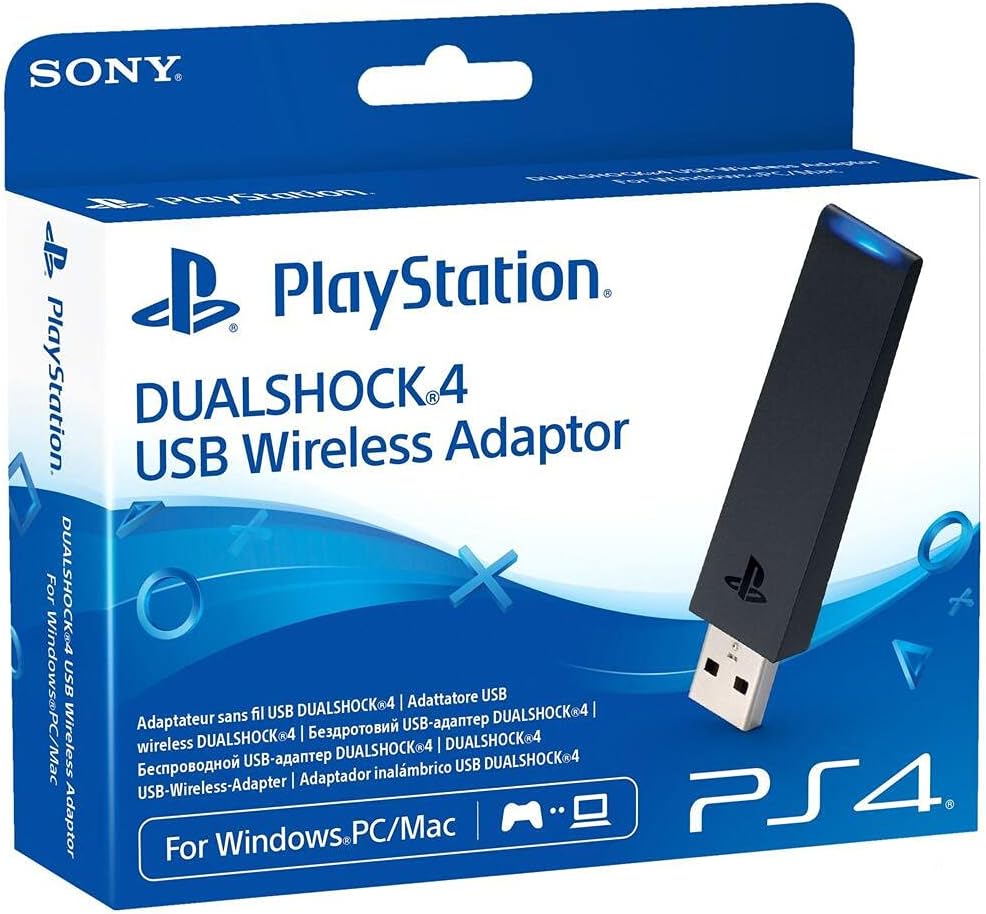
Sony DUALSHOCK 4 USB Wireless Adapter - PlayStation 4
Product ID: 39234136
🎮Full DualShock 4 feature support
📶Stable Bluetooth wireless connection
🔌Seamless USB plug-and-play
Desertcart purchases this item on your behalf and handles shipping, customs, and support to Denmark.
🎮 Elevate your PC gaming with authentic DualShock 4 wireless power!
The Sony DUALSHOCK 4 USB Wireless Adapter enables seamless Bluetooth connection of your DualShock 4 controller to Windows PCs and Macs. Supporting all controller features—including buttons, analog sticks, touchpad, light bar, motion sensors, vibration, and headset jack—this compact USB adapter delivers a true console-like gaming experience on your computer, perfect for remote play and streaming PS4 games wirelessly.
| ASIN | B01KHFIO82 |
| Customer Reviews | 3.7 3.7 out of 5 stars (619) |
| Date First Available | August 24, 2016 |
| Is Discontinued By Manufacturer | No |
| Item Weight | 4 ounces |
| Item model number | CUH-ZWA1E |
| Language | English |
| Manufacturer | Sony |
| Product Dimensions | 7.48 x 5.31 x 1.18 inches; 4 ounces |
| Release date | May 1, 2018 |
| Type of item | Video Game |
V**N
makes everything feel like a console
i virtualize windows to game, and my PS4 controller would disconnect when i let go of it, this was pretty frustrating since i had to reconnect through many steps to pass it back through qemu. anyways, this thing stays in when i let go of my controller, with the added bonus of wireless capability. it worked right away for me, i think its a pretty simple device, a little expensive but its oem so its all we get.
A**O
Overpriced, deprecated, but it works like a charm
Yes, it does look like a 32mb usb memory I had more than twelve years ago. It is discontinued and overpriced (more than a dualshock at the time of writing) but it gets the job done. My sole interest was to remote play from my PS4 and also some other games, like Destiny. My laptop computer has a built-in bluetooth adapter so the dualshock connects just fine and is recognized. However, in some games you need to do workarounds, install third party libraries, remap buttons, some applications detect this as a 360 controller. I decided to bit the bullet and this guy works amazing. Remote play is great without the usb cable across my desk, but Destiny recognized the controller (with no third party apps) with all the features and the correct mappings from the start ! Just like if it was on the console. I love the dualshock 4, hence I love this device that enables me to enjoy this controller in my pc gaming.
G**O
Does as it was designed to do.
So I got this product and I must say it works EXACTLY as it was intended to do. Many reviews talk about how its useless and not needed. IF all you intend to do is play games on steam then yes this thing is a waste of money as I'm able to connect through my laptop's bluetooth and steam picks up on the DS4 controller. HOWEVER, if you intend to play on PS Now and Remote play then no bluetooth adapter and software (DS4windows or any of the others) will work on remote play. I have tried all options it does halfway work with PS Now but gives MANY problems. So if you're looking to only play on PS Now and Remote play like myself this is a must have and worth the inflated price as sony discontinued the product so like many other products that get discontinued you are now paying the higher price. Again and I stress this if you just want to play steam games do not get this. Steam no longer needs DS4windows or any software to work. As for me I'm going to jump back on Remote play and enjoy playing my ps4 remotely with my wireless DS4 from now on. Love this product for what it was intended to do.
A**R
Great but...
To be honest I don't think sony wanted to make this. With my experience with sony programs and stuff involving PCs sony can sometimes make some wonky stuff. This by itself isn't that great. With the right program to pair with it works fine. I would of gave it a 2 star because of that. So you got this or an xbox/like controller which is bleh
L**R
Waste of Money. Never paired after hours and hours of troubleshooting
Don't waste your money on this trash. No useful troubleshooting help from PS4 to pair with Computer. I blame myself for the stupidity of purchasing this useless, closed off adapter. I'm passed the return date as well. Got burned by Playstation for the last time.
A**E
dissapointed
when i bought this adapter i was expecting perfect support on pc as my xbox one controller but this is not the case it basically only works well on steam games it has no support on origin or uplay games. Even with steam games some tweaking has to be done.If you want a controller for pc get and xbox controller it has perfect compatibility some people have used third party software to get the ds4 to work better on pc but for me just get and xbox one controller
D**G
I am finally free of my USB cable.
This product is perfect. I have been using a 10' USB micro cable for years to use my DualShock 4 controller on games such as Dead Cells and Rocket League. I have tried connecting via bluetooth with other BT antennae, but none of them provided a reliable connection. With this receiver, I was connected to my DS4 in seconds. The connection has been 100% reliable ever since (200+ hours of playtime, at least). Best of all, it functions with Windows 10's new DualShock integration features, so Windows recognizes it as a DualShock 4 and not as a generic game controller. This means most games display the correct button configurations in menus and cutscenes (i.e. No more "Press B to dodge"; it's "Press O to dodge"). The adapter is small and discreet; easy enough to be kept in whatever on-the-go case you carry your DS4 in. I have seen no noticeable input lag, but take that with a grain of salt because the only games I play at the competitive level are played with keyboard and mouse. For anything short of competitive gaming, I can confidently recommend this product.
G**E
Much better control than USB or DS4/Bluetooth
When I first bought a PS4 controller to use on PC, I was using a generic USB Bluetooth adapter with the DS4Windows software (required to make it show up as an Xbox controller, because Microsoft). That third party tool was fussy and flaky, and I was getting more and more controller d/c with that setup. A MicroUSB cable was more reliable... until the USB hole got all loose and shot out after just a week. I haven't had a single disconnect with the Sony adapter, and fine control of the analog sticks is so much better than the other options. Do controller calibration in Windows, and do the same in Steam Big Picture mode (when you're playing Steam games), and you'll be surprised how much better it works. The first page of the huge multi-language manual has the only bit of information you'll need for setup, that there is no visible pairing button on the adapter, you push the whole thing in for about 4s to put it in paring mode. Then, hold the Share button on the controller until it flashes quickly, and that's it. The only feature it's lacking is the ability to check battery charge level. There's no warning when you're running low, so just make sure you keep your controller charged.
T**O
Hola he comprado este usb inalambrico oficial de sony para hacer streaming en playstion now con mi pc combinado con el dualshock 4 via bluetooth.todabia no lo he probado por falta de tiempo lo que si he hecho es instalarlo en mi portatil muy sencillo.estoy muy contento con la compra gracias amazon.
S**E
Bonjour / bonsoir à tous ! Cela fait plus d'un an que je possède cette adaptateur sans fil pour manette PS4 et c'est vraiment un achat que je ne regrette pas. Fini le cable, place au sans fil ! C'est un vrai soulagement, la portée est d'ailleurs assez haute (je n'ai pas essayé plus que ça de m'éloigner). Seul petit bémol, une source audio s'ajoute à votre PC quand l'adaptateur est branché. Je conseille donc vivement de la désactiver. L'adaptateur fonctionne parfaitement, je n'ai à ce jour jamais eu de problème de synchronisation. (pour synchronisé il suffit d'appuyer sur le dessus de la clé sans fil afin de lancé la recherche de manette à proximité) Un excellent achat que je recommande !
M**W
Bilgisayarda 2 adet Dualshock 4 kablosuz joystiği Mortal Kombat 11 oynamak için basit bir Bluetooth USB adaptörüyle kullanıyordum fakat her iki kolda da rastgele tuş basmama sorunu oluşuyordu. Bluetooth USB adaptörünün yerine iki adet bu üründen alınca (bir ürüne birden fazla joystick atayamıyorsunuz) tuş algılamama sorunu ortadan kalkmış oldu, şu anda Steam üzerinden Dualshock joystik destekleyen tüm oyunları kusursuz oynuyorum (Steam’de joystik algılama desteği yerleşik). Güzel ürün. Kargo 2 gün gibi bir sürede elime ulaştı. Buradan satıcı Gizala ve aracı Amazon ekiplerine teşekkür ediyorum, sayelerinde kusursuz Fatality ve Brutality çekiyorum.
S**A
Prodotto perfettamente conforme alla descrizione, arrivato secondo i canoni e velocissimi tempi di spedizione tipici di amazon. Ottimo per evitare di riempire di cavi la scrivania quando in camera si decide di giocare con il joystick della playstation al computer, specie se ci sono più controller connessi. Carino ma non immediato il metodo di accoppiamento tra ricevitore e joystick: sono dovuto andare a cercare nel manuale di istruzioni rapide presente nella confezione per capire come si facesse; il fatto che si debba spingere il device dentro la porta usb per qualche secondo è utile per evitare configurazioni scomode, ingombranti o antiestetiche (come succedeva con il ricevitore del vecchio gamepad per xBox 360 che usavo), tuttavia, come ho scritto prima, senza andare a leggere le istruzioni non ci sarei proprio arrivato a capire che si dovesse fare pressione in suddetto modo. Riconosciuto perfettamente da DS4Windows, mi funziona alla grande su tutti i giochi che ho provato. L'unica cosa sulla quale si potrebbe lavorare, secondo me, sarebbe ridurre ulteriormente le dimensioni fino a renderlo simile a quei dongle usb bluetooth o wifi, i quali sporgono di circa un centimetro dalla porta usb (questo è grande più o meno come una chiavetta usb). Altamente consigliato se, come me, avete una PS4 e volete sfruttare i suoi joystick per giocare al pc senza il problema dei cavi in giro.
E**Y
This Dualshock 4 adapter for PC is basically ok, but it offers very little advantage over a bluetooth connection for most users. By all accounts, it works very well for PS4 remote play and Playstation Now, but changes very little for PC games. The controller simply is not supported by very many games. I hope that this is something that changes with time, but currently, software that fools the computer into thinking the DS4 is a XBox 360 controller is still required for very many games, meaning the advantage the adapter offers over a standard bluetooth connection is worth less than the USB port it takes up. Hopefully more robust support for the Dualshock 4 will be delivered by both Sony and third parties, over time, but at the moment, I could not recommend the adapter at its current price.
Trustpilot
1 week ago
1 month ago