
✈️ Elevate your flight game — command the skies like a pro!
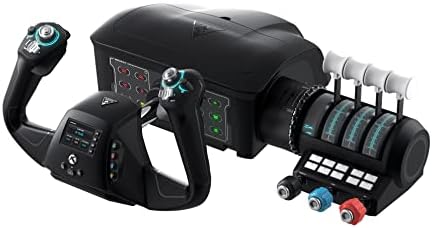
The Turtle Beach VelocityOne Flight Universal Control System is a premium, all-in-one flight sim controller designed for Xbox Series X|S, Xbox One, and Windows 10/11. Featuring a realistic 180° yoke with integrated rudder and brake controls, a modular throttle quadrant with vernier levers, and a full-color flight management display, it offers an immersive and customizable flying experience. Developed by aeronautical experts, it supports easy USB setup and extensive programmability, making it ideal for both novice and veteran virtual pilots seeking authentic control and precision.


| ASIN | B09JM8SX8G |
| Best Sellers Rank | 1,051 in PC & Video Games ( See Top 100 in PC & Video Games ) 2 in PC Flight Controls |
| Country of origin | China |
| Customer reviews | 4.1 4.1 out of 5 stars (2,286) |
| Item model number | TBS-0715-02 |
| Language | English |
| Product Dimensions | 48.29 x 18.29 x 49.53 cm; 4.54 kg |
| Rated | Not PEGI rated |
| Release date | 10 Dec. 2021 |
C**T
Nice quality. A lot of controls and just one USB cable.
Very happy, no issues, great upgrade from a Saitek yoke. Fantastic software support on the Turtle Beach website. Using this on PC with FS2020. I haven't played flight sims for nearly 8 years, so basically a newbie all over again. I had a Saitek yoke in the cupboard for those 8 years. I plugged it in and it died after powering up. Meh. So the big question was - get another Saitek (now Logitech) or "something else". There aren't many options out there for flight yokes. This VelocityOne at £330 is 3x the price of a Logitech yoke. But you get a solid yoke with brake buttons and rudder control, a really nice trim wheel, light aircraft push/pull controls, jet throttle controls, a bank of red/green status messages, a nice menu system on the yoke for changing all sorts of stuff, and really good software support. If you want to use the status panel you need to get the SIP (Status Information Panel) app from Turtle Beach. FS2020 knows all about inputs (joysticks, yokes, etc) but doesn't cater for outputs (like the status panel). The SIP software is a bridge between FS2020 (and 2024) and the panel. I've tried it and it works great, but I'm not currently using it as I've a steep learning curve as it is. The hat switches are maybe a little "clacky" but I find everything else good quality. I'm getting into VR so wont need the hat switches for "look left, look right" anyway. It comes well packaged; a brown cardboard box. Inside is another brown cardboard box. Inside is the Turtle Beach box. Inside is heavy duty "egg box" packing to protect the goods. I don't think this is overpriced at all. It has more control things than I need right now, but I can grow into it as I develop my flightsim skills. One single USB cable which covers a whole bunch of controls. Simples.
C**K
WOW
Update: I feel it shouldn't be legal to manufacture something and claim that it does X, Y and Z when only X and Y work. For example, the warning lights behind the yoke look great, but they're all permanently lit and don't seem to do anything. Chatter around the Internet is that Turtle Beach are yet to get these functions working!! So you've made a product and it doesn't do what you've marketed it as doing?? That's misleading and surely not legal. That, along with the sticky yoke (it's just not smooth moving back and forth and jerks a little, but I hear it's something that fixes itself over time)..........is the only reason I don't like this system. But there are 100 reasons I do it like also..... Original review below... I’ve wanted this for ages. It was released but sold out quick, then it came in stock yesterday so I didn’t hesitate any longer to buy! Glad I got it! Came earlier today. The set up is easy to follow but takes time because you have to find a suitable place for it to go and then you have to connect cables. Then after plugging into Xbox you’ll end up tweaking some of the controls to suit your needs. For example, on the customisable panel on the throttle quadrant you can programme around 10 buttons I think to do what you want. I set to things like flaps up/down, landing gear, auto pilot, switch from external view to cockpit view etc. so the set up took a while. The flying itself takes a little getting used to if like me you’ve just moved away from using the Hotas One joystick. It’s like learning to drive in a Mini and then buying a Porsche. So many buttons to customise and memorise. But it’s awesome and feels very much like a real plane. Makes this whole set up feel less of a “game” and more of a real flying experience. I can’t recommend this enough. It works on PC as well as my xbox series S. no hassles at all setting up or using. The mrs wanted me to wrap it up for myself for Xmas day. She’s mental! it got opened and used right away… and you will too like a kid on Christmas Day! Enjoy
C**E
Great all-in-one Xbox Series S/X rig for MSFS2020
I could easily have bought a different setup IF I was playing on PC, but on Series S/X (I have both) this really is the best option. Well packaged, colour coded cables and an excellent fitting system. No bits sticking out under the table once the built in clamps are anchored. Really neat. Smooth operation of all parts except the push/pull yoke has stiff spots. Not an actual issue, as we have assurances from the manufacturer that it beds in and smooths out, confirmed by one YouTuber yesterday after he used it for two weeks. The prop engine controls work very well (Throttle, Prop and Mixture) and feel like a real prop plane. The jet engine levers will allow you to fly a quad engined plane smoothly. On prop planes they double the other controls and add a flaps lever. For that, they feel a little “loose”, but I already have a fix in mind with a simple rubber sheath to increase the drag on them. The Trim Wheel is fantastic, closest I have seen to the real thing, just make sure you’re not on “EASY” level on all settings, because FS2020 auto trims for level flight to help beginners. Easy to find and turn it off. The many buttons, twin hats, additional 4way hats, and full set of Series X buttons are all fully configurable. There are two presets in the Flight Sim already for Prop or Jet, but you can make as many new ones as you like. I use the XBox controller or a mouse for the FS2020 menus, just because the sim is designed that way, but once in the plane, you don’t need to take your hands off the yoke rig. The initial yoke stiffness and slightly floppy levers are the only reason I took one star off an otherwise excellent rig. I may buy some pedals in the future togo with it, but coping well with the responsive triggers on the yoke. Currently working my way through the tutorials, landing challenges and so forth, with some free flights gradually learning where the default controls are before messing with them. The buttons are illuminated (your choice of colours) and stickers and spare panels are provided, with more functionality to be added in future updates. There’s also an XBox app to let you update the Firmware without a PC. I think that covers most of it. Worth the purchase price in my opinion.
F**Y
Excellent for Xbox
Not much choice for us xbox users, so this is the best you can get. I'm currently taking lessons in a Cessna so needed a yoke for some similarity and throttle, trim etc. This should help with muscle memory. I have it coupled with my already purchased thrustmaster stick and pedals, just for use of the pedals and it works great. There is that slight stickiness on flare when using single handed but not really when using both hands. But for the price like I say for the xbox it's the best you are going to get. You are not going to get simulator handling unless you pay real simulator prices (thousands in other words). Great to have a trim wheel albeit way too sensitive. So much mapping ability available and software update worked fine for me. A cheap peripheral for anyone actually learning to fly .
I**L
The device stopped functioning properly after one week of use,
The device stopped functioning properly after one week of use, which was disappointing considering the money spent on it
G**G
Plug and play no probs
great bit if kit, takes a little while to programme the buttons but very versatile when done
Q**R
Almost there...But not quite
In many ways, this is THE biz, especially for GA flying. It looks the part, is solidly built, and works out of the box on MSFS. It is not without it's niggles though. Firstly, not all the buttons work. The firmware/software is awaiting an update to make them active - how annoying, especially as there is no specified date for this to happen, so you need to 'check for updates' on a regular basis. My other niggle is that the buttons are labelled as POV2, B2, Hat-1 etc (which is as you would expect), but the enclosed leaflet, and all the training information labels them as Button 1, Button 2 etc - of course, from this designation I have no idea which is which! So lots of trial and error when I'd rather be flying. The yoke isn't any good for FS Training mode, you're better off using controller for that, as there are button assignments that need the controller, as the yoke can't use them. Also, the headphones jack doesn't work in this mode either. Once you are flying properly though, it works a dream. I didn't have any of the reported yoke stiffness, though the thruster levers are a bit floppier than I'd like, but that is relatively easy to fix Time will tell how it lasts through long-term use. Update/Edit. I've used this for a couple of weeks now, and I've regretfully reduced it from 4 stars to 3. I do still like the yoke and throttle combo, but my main gripe is that this is really an unfinished product. Yes, the thing lights up in a pretty blue colour, but, and it is a big but, the lights on the console are supposed to be useful. For example, the console is configured to show 'parking brake', 'landing gear' 'flaps down' and so on, as a warning. But they don't. I understand that there is a plan for a firmware update to fix these issues, but honestly, the product should not have been released until ALL the warning lights were able to work as they should. As it is, they are simply useless. With hindsight, I should have returned this immediately, as others have done. I'm also at a loss to understand why there is no force-feedback - there is plenty of room in the unit to accommodate the hardware. The X-Box controller has this feature and that is make 1/5 the size- another glaring omission in my opinion. That'll teach me to be an early adopter. As it is, this unit is grossly over-priced in it's present form.
M**Y
Amazing Flight Yolk
I purchased this to use with Microsoft Flight Simulator on my Xbox Series S and it is absolutely brilliant. The Velocity One was ready to use after a very quick setup and update and the device profile was already on Flight Sim. I have been using both the default and the twin jet profile and the controls are incredibly accurate and realistic. Having a throttle quadrant really makes a difference to the sim experience along with an accurate feeling yolk. The buttons are all fully programmable and there is a huge amount of stickers included to customise the buttons to your own preferences. The only criticism I have is the description talks about the status indicator panel which is curently not supported on xbox. All in all this is a brilliant bit of kit and takes Flight Sim to a whole new level on Xbox
Trustpilot
2 weeks ago
1 month ago