Buy anything from 5,000+ international stores. One checkout price. No surprise fees. Join 2M+ shoppers on Desertcart.
Desertcart purchases this item on your behalf and handles shipping, customs, and support to Denmark.
๐ผ Upgrade your gear, not your budgetโCF power meets SD flexibility!
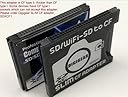
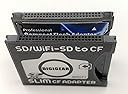
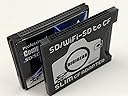
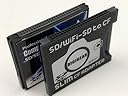
The CDA Compact Flash CF Type 2 Thick Card Adapter transforms your SD, SDHC, MiniSD, MicroSD, and MMC cards into CF Type II compatible cards, enabling seamless use in CF-only devices like Canon 7D and Nikon D300. Featuring plug & play hot-swappable design with no driver installation required, it offers a reliable, snug fit and leverages faster SDHC speeds to enhance your shooting experience. Perfect for professionals seeking cost-effective, versatile memory solutions without compromising performance.
| Best Sellers Rank | #132 in Computer Memory Card Adapters |
| Customer Reviews | 4.2 out of 5 stars 983 Reviews |
K**D
Works with Canon 7D
Works great with my Canon 7D. You will need to format any new SD memory card you use in it. (Like if you took photos with another camera, you need to format that SDHC card before using it in another camera with this adapter.) The card is thick, so it fits very snug in the Canon 7D compact flash card slot. I actually removed the back sticker label on this adapter, so it would make it slightly thinner, and it now inserts and removes better. Make sure your older camera accepts Compact Flash CF Type 2, otherwise this card will be too thick.
A**.
Great Device for those wanting to use SD/SDHC cards in their CF-only cameras!
I have a Nikon D300 and often shoot a lot of images or shoot combined jpeg and RAW and wanted to use something larger then my two 8GB CF cards. Since I own a few 16GB SDHC cards that I use between a smaller P/S camera and a SD/SDHC HD camcorder, I decided to give this adapter a try to avoid buying larger CF cards that can only be used on my Nikon D300. The adapter is well made and solid. Goes in and fits perfectly in my Nikon D300 card slot (ejects easily too). I see no degradation in performance and and fact I do see an obvious gain in writing speed, since my SDHC cards outperform my older CF cards which I've had quite a while and are of the older/slower generation of CF card. The transition to using the SD adapter with my newer SDHC cards was seamless and other then one extra step of having to remove the SD/SDHC card from the adapter to read it if you do not have a card reader capable of handling CF cards too, this adapter does the job perfectly. I in fact am considering buying a second adapter of the very same model as this one to avoid changing SD cards out in the field and to save a bit of time. Bottom line, this works like it should and I highly recommend it at only about $15. Seems SD cards have become the predominant card type for most devices now (even newer Nikons similar to mine now take an SD rather then a CF card) and as SD prices go down, this adapter is the way to go for your CF card camera. Time will tell how this adapter will hold up inside under continuous use of putting in and taking out an SD card. I do have a card reader that accepts all of the card types, so, maybe that will be the way to go (read from the adapter directly rather then remove the SD card) to save a little wear and tear over time.
J**T
SD/SDHC to Compact Flash Adapter Purchased May 19 2010
Despite a few bad reviews, I decided to take a chance and purchase this product to use in my Canon Rebel camera. I wanted to be able to use the same SD/SDHC cards that my wife uses in her compact canon so that we could exchange cards should we ever need to (sometimes one or the other of us forgets to bring an extra). Also, It's a lot easier to store SD-size cards than the much larger CFs. The adapter has worked perfectly with the three different (types and memory size) SD and SDHC cards I have tried. I had to format the cards in camera first in all cases but after that there were no problems. I think, like others have suggested, that the adapter might have caused the camera to operate slower but I have not had a chance to compare similar cards so there is no way to be certain. Also, I was using a flash when I did my only serious picture taking so far and the flash recharge determined the camera speed, not the memory card. Otherwise, just shooting test shots around the house without the flash, the adapter seems to perform very well. A nice side benefit is that the card reader I have in my computer is older and can't read SDHC cards but it can when they are in the adapter in the CF slot. If I planned on taking series of rapid shots I think I would get the fastest CF card I could and bypass the adapter, but for normal picture taking the adapter works perfectly. If you are going to use cheaper, slower cards in your camera, there's probably no point in worrying about whether the adapter is a little slower anyway.
F**R
SDHC to CF Adapter
Card came quicker than listed, which is always good. It works fine as an adapter for sd style cards. It even allows the HC cards to be read via an older CF ( 2 gigs or less) reader, so that's a bonus. I bought it to have for my Konica Minolta A-200 camera, in the event I need to use some of my SD cards. There wasn't any lag at all, in fact, using the higher numbered SDHC cards, was faster than the cf cards suggested for the camera. I'll have to do some field testing to be sure. Overall, for the price, it is a great little adapter (15 bucks with tax, shipping & shipping tax). Do keep in mind that it is CF II in size, so if your device can't take CF II, don't buy it. Your owner's manual will tell you if you need a CF type I or CF II, or both. Do keep in mind when inserting an SD card to a CF device (like a camera). It will need to "format" the card to it's format. Which (on my Minolta) was a matter of adding their folder reference. Putting the card back into the Samsung camera, it didn't even blink, but you'll want to safe guard your photos by removing them. As with any flash media, it's always better to actually format the card for a clean start. Additionally, keep in mind that you may need to flash the firmware of your device to read the higher capacity (newer) cards, before using them. Your manual (or the company's web site) will be able to guide you on this.
R**T
Tested with Nikkon D100 and Eyefi
I purchased this Eyefi in combination with Eyefi Mobi 8GB SDHC Class 10 Wi-Fi Memory Card with 90-day Eyefi Cloud Service, Frustration Free Packaging (MOBI-8-FF) to use in my old Nikkon D100. I recently reviewed this card, and I copy the review here since it might be useful. If you do not have time to read a long, useless post and just want to know hot to make it work, skip directly to the summary. -------------- I found the Compact Flash Adapter and Eye-fi while looking for a solution to transfer my ancient Nikkon D100 (Compact Flash) pictures to my smartphone during trips. At the end, what is the point to taking these awesome pictures if I cannot brag about them real-time in Facebook? I was not sure if it would work, but I decided to take a leap of faith and I purchased both Eye-fi and adapter. Did it work? If you are patient enough to read this review you might get an answer (or you can just skip to the summary at the bottom). For those that are not familiar, the Eyefi is an SD card that transmits the pictures from your camera to your phone by using Wi-fi (not your home wifi, but a Wi-fi generated by the Eyefi SD card itself). Your phone will connect to that SD card Wi-fi and copy the pictures. Now you can view them in your phone and email them, post them, etc. In theory, every time you take a picture the Eyefi will transparently setup the Wi-fi and transfer it to the phone, or so I understood. Of course, at first it did not work. Every time I took a picture, nothing happened in the phone. If I took many pictures in a row, I could see the phone connecting to the Wi-fi for a few seconds, just to lose the connection. It was only after a while that I realized - the power for the Wi-fi has to come from somewhere! Everytime the Nikkon takes a picture, it powers the Eyefi for a few seconds, but then turns it off. There is a green light that shows you when the card is being powered. I am so smart! (Although if I had been smarter, I would have just read the first review in Amazon, which explains this). Disappointed and angry, I took my hammer to crush the card, but then I had an idea. I tried to take multiple pictures and then, swift as lightning, entered the D100 menu and set it up in slideshow. And voila! All my pictures were transferred to the phone. Why? Because the slideshow has to READ from the card, and that powers it. If the interval at which the slides show is short enough, you can manage not to lose the Wifi. I now go to trips and safely take pictures with my camera. Whenever I have a break, I just leave it next to my smartphone and put it in slideshow, and then check the pictures a while later. Yeah, the range of the Wi-fi is really short, but that just gives some time for my Nikkon and my Samsung to socialize for a while. Summary: You can get the Eye-fi to work with the Nikkon D100 following these steps: 1. Set up the Nikkon camera slideshow to an interval of 2 seconds 2. Place your smartphone next to the Nikkon with Eye-fi setup (I normally select the "Import" option at this time) 3. Take a picture with the Nikkon. This will startup the Wifi. 4. IMMEDIATLY, hit Menu in the Nikkon and select the slide show. 5. Place the camera next to the phone and let the slideshow run. If it finishes, restart the slideshow (or if you missed that and the wifi has shut down, take a new picture and put the slide show again) 6. After a while, all the pictures will be available in your Eyefi folder in the smartphone I hope this helps!
J**E
Purchased 2 cards, Bent pins on my camera Second one failed also
OK, I like the convenience this card provides for me but I had an issue with it. My daughter tried to insert it into my Canon 5D with very little luck. I have never really had a problem. I would imagine she put it in with a little pressure on one side or the other. It bent one of the pins in my Camera. I was in a panic this is a $2000 camera and for sub $20 card to cause damage like that its not worth the chance. I did get the pin straight and haven't had anymore issue. Just keep in mind that the holes for the pins are not 100% precision and can cause issues. Its a great concept to convert a CF camera to a SD and its cheaper to purchase the newer smaller card designs. Not sure why CFs are so expensive except there are fewer of them made now. Overall I will give it a 3, only because of the damage. It works well other then that huge issue I had. Update, not realizing I had left this review for this card before it reminded me of the issue I had the first time. Well, guess what, I purchased another, I didn't quite learn my lesson the first time. So I purchased one for my daughter's camera. We went to put it in and it stopped she started to push on it and I stopped her. I now know why I am very ginger about putting cards into my camera. Because the first one bent pins on mine. Thank god I stopped her. I tried it on my camera same issue. Needless to say, I will not be using this card and changing them both out. Good, luck two cards two cameras and neither card worked well. Also reducing the star score from three as I gave them the benefit of the doubt to a 1. Wish I could go lower as to say do not use this product.
G**.
Works as advertised, but is slow, especially on writes
Only three stars because of the (lack of) speed and because the first unit I received was DOA. I returned it and ordered a new one. Still waiting for my refund, will update this review if I don't get it. The second unit I received worked fine on the first try. It seemed slower than expected though, so I did some testing. I also bought a Transcend SDHC 16 GB Class 10 card at the same time, and used that for these tests. I'm comparing the Transcend SDHC card mounted in the SD/SDHC/MMC to CF adapter to a SanDisk Extreme III 8 GB CF card. In my camera, a Nikon D200, when shooting RAW continuous at 3 images per second to the SDHC card in the adapter, the camera's buffer would empty as fast as the images were taken, i.e. immediately. When the buffer was empty, the camera would shoot another image every 2-3 seconds. When I switched back to my CF card, it would almost be able to keep up with the buffer and I was able to get more than twice the amount of images shot at 3/second. When the buffer finally emptied, the camera would shoot a new image about every half second. Next I performed some tests on reading the cards in my MacBook Air (late 2010, 2.13 GHz, 4 GB with 256 GB SSD). With the exact same 674 MB worth of images on the cards, I copied them to my Mac's SSD drive using the command line 'cp -R' command, in combination with the 'time' command. I flushed and filled the operating system cache with other files in between each copy. Reading from the SDHC card mounted in the SDHC to CF adapter, inserted into the CF slot of a Kingston USB 2.0 external card reader: 1m18.139s Reading from the SDHC card inserted directly into the SD slot of the Kingston USB 2.0 external card reader (so eliminating the SDHC to CF adapter): 0m38.280s Reading from the SDHC card inserted directly into the internal SD Card reader in my MacBook Air: 0m39.090s Reading from the CF card inserted directly into the CF slot of the Kingston USB 2.0 external card reader: 0m36.695s Next I performed write tests, all from my Mac's SSD drive using the 'cp -R' command and flushing/filling cache. Writing to the SDHC card mounted in the SDHC to CF adapter, inserted into the CF slot of a Kingston USB 2.0 external card reader: 3m24.019s Writing to the SDHC card inserted directly into the SD slot of the Kingston USB 2.0 external card reader (so eliminating the SDHC to CF adapter): 1m0.979s Writing to the SDHC card inserted directly into the internal SD Card reader in my MacBook Air: 0m58.174s Writing to the CF card inserted directly into the CF slot of the Kingston USB 2.0 external card reader: 0m59.106s Note: I only performed one count of each test, so please draw your own conclusions. My take: It works as advertised, but it's not much use if you need the speed of a Class 10 SDHC card. I would also imagine that the long write times will put an extra drain on my camera's battery.
A**R
Compact Flash card
Does what is expected.
Trustpilot
2 months ago
3 days ago