Buy anything from 5,000+ international stores. One checkout price. No surprise fees. Join 2M+ shoppers on Desertcart.
Desertcart purchases this item on your behalf and handles shipping, customs, and support to Denmark.
⌨️ Elevate your desk game with the ultimate minimalist powerhouse!
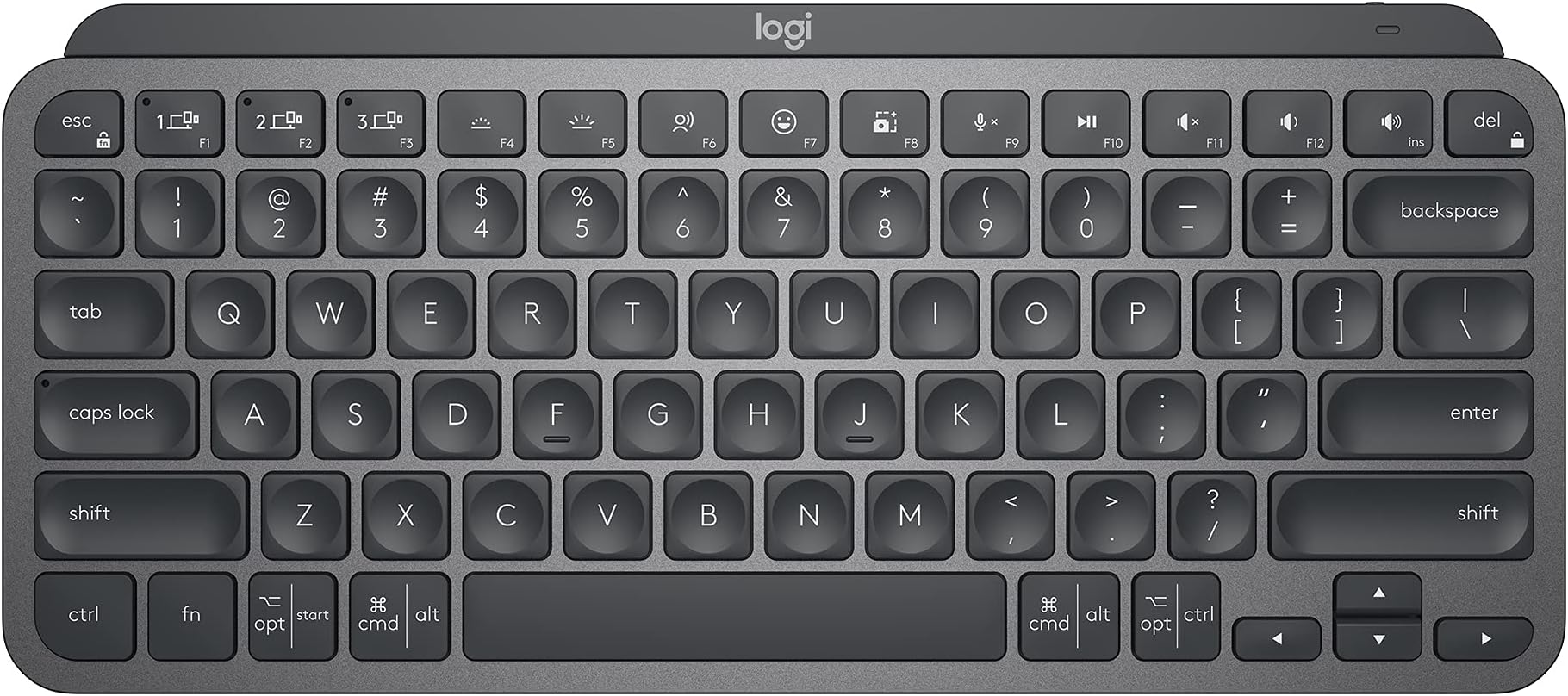
The Logitech MX Keys Mini is a premium compact wireless keyboard designed for professionals who demand precision and portability. Featuring a 34-key layout with smart backlighting, it offers up to 10 days of battery life on a single USB-C charge. Compatible with multiple operating systems, it supports seamless switching between three paired devices and integrates with Logitech Flow for multi-computer workflows. Crafted with recycled materials and a sleek graphite metal build, it combines sustainability with style and ergonomic comfort.


| ASIN | B098JPSVKY |
| Additional Features | Backlit, Rechargeable |
| Antenna Location | Business, Multimedia |
| Best Sellers Rank | #1 in Computer Keyboards |
| Brand | Logitech |
| Built-In Media | Charging cable, Important Information Document, Keyboard |
| Button Quantity | 34 |
| Color | Graphite |
| Compatible Devices | Laptop |
| Connectivity Technology | USB-C |
| Customer Reviews | 4.5 4.5 out of 5 stars (4,070) |
| Enclosure Material | Plastic |
| Hand Orientation | Ambidextrous |
| Is Electric | Yes |
| Item Dimensions L x W x H | 11.65"L x 5.19"W x 0.83"H |
| Item Weight | 1.46 Pounds |
| Keyboard Backlighting Color Support | Single Color |
| Keyboard Description | Membrane |
| Keyboard Layout | QWERTY |
| Language | Spanish |
| Manufacturer | Logitech |
| Mechanical Keyboard Switch Model | Membrane |
| Model Name | MX Keys Mini |
| Model Number | 920-010388 |
| Number of Keys | 104 |
| Power Source | Battery Powered |
| Style Name | MX Keys Mini |
| Switch Type | Membrane |
| Theme | computing, keyboards |
| UPC | 097855169570 |
| Warranty Description | Manufacturer’s warranty can be requested from customer service. |
A**R
Great keyboard for my purpose
A couple years ago I wrote a scathing review about the decline of Logitech products quality. I was having problems with the mice, the buttons where acting up, and I needed a mouse (NOW) that worked so I went to the local brick & mortar store and bought the same mouse, which had the same problems. I ended up getting hundred dollar mouse made for CAD professionals. Since then I got a Logitech mechanical keyboard, with the cherry keys, great product and I love it. I've also purchased a couple Logitech mice lately and had no problems with them. This keyboard is much nicer than what I expected, I love the solid feel of it, it is very heavy for its size. I wanted this one for the ability to switch between three different computers. I have one Windows 10 machine and two Linux ones in a corner of my man cave. I've purchased two HDMI KVM switches recently, and both where DOA, not working at all right out of the box, and from different manufacturers. My monitor has three inputs, so all I really needed was a single keyboard and mouse for all three. The Logitech MX mouse is still on the way. The set up was a bit problematic. The Windows machine set up very easy, but after a restart the keyboard was no longer paired. I had to drag out my old one to log into Windows, not so handy since Windows re-starts itself constantly. Luckily, there was a firmware update for this keyboard that fixed the problem. You can get the update through the Logitech software that can be downloaded from their website. On one Linux machine I am currently running Linux Mint. Mint came with the blueman software preinstalled, I had to make several attempts to get the pairing to stick, partly because I've only used blueman a couple of times in the past to pair BT headphones to my old laptop. You must mark the keyboard as trusted to get a connection that lasts. I had a situation where it was connecting and disconnecting constantly until I did that. Works fine now, and it pairs itself after a restart. On the third computer I am running Debian 12, and I have not been able to get the keyboard paired at all. This computer is actually part of my stereo system. It is connected to my amps by way of a DAC, but I can control it from a phone or tablet, or from a web GUI on a different computer. It would be nice if this would work on Debian, but it's not the end of the world. I almost docked this product a star because the product info is not completely accurate. On the product page it says:"Compatibility: Compatible with Logi Bolt USB Receiver (not included) . Logi Bolt wireless products will not pair with other Logitech USB receivers". OK, you don't need the Bolt USB Receiver to use this, I ordered them because it says this. The keyboard works with any Bluetooth receiver, I'm using one made by TP Link and another Knvo. The Bolt receivers are not here yet, they will be along in a couple days with the new MX mouse, even though they where part of the same order as this keyboard. When the Bolt receivers get here I will probably use them, because I had to rob the BT dongles off of my other computers to get this working right away. The limited instructions that came with the keyboard just said to pair it with Bluetooth, it does not even mention the Bolt receiver.
D**P
So Far I Like Everything About This Keyboard
I bought the pale gray MX Keys Mini keyboard to replace my Logitech K380 keyboard, not because the K380 is no longer working but because I like the keyboard feel, keyboard keys, and overall ergonomics of the MX Keys Mini over the K380. The K380 is one of the best, if not the best, compact, multi-device Bluetooth keyboard in its price range currently available on the market. I simply like the MX Keys Mini more and will move the K380 to a different workstation setup. Pairing the MX Keys Mini with my Windows 11 Pro PC and my M2 MacBook Air was a breeze. It paired just like all of the other Logitech keyboards I own, very quickly and reliably. Switching between devices is a single button press on the MX Keys Mini keyboard. It would be kind of nice if my MX Master 3 mouse could be slaved to the MX Keys Mini device selection, but both devices do switch over to the other device very quickly and with a single button press on each MX device. Since my two devices/computers are sharing the same monitor, switching the input source on the monitor takes a lot more time than does switching the two Logitech MX devices. The Logi Options+ application recognized my MX Keys Mini immediately. All of the controls, settings, and user interface workflow for the MX Keys Mini in the application were very familiar since I have used Logi Options+ with many of my other PC and Mac Logitech devices. This is my first experience using a separate keyboard with backlighting. I am relieved that the backlighting is restricted to white hues only. I often use a monitor light bar that is mounted on the top of my monitor to illuminate my workstation area, including the keyboard and mouse. I discovered that my monitor light bar and the MX Keys Mini backlight functionality are ergonomically incompatible with one another, at least for my setup. When my monitor light bar is illuminated, even at the dimmest setting, the adaptive backlight functionality on the gray/silver MX Keys Mini adjusts the backlighting based on the ambient light to the where the white backlit characters on the white keys become nearly invisible to see. I was greatly relieved to discover that I could simply adjust the brightness level of the MX Keys Mini all the way down to the point where the key characters are black. This completely solved my problem when using the MX Keys Mini with my monitor light bar. I will definitely encounter situations in the future where I do not use my monitor light bar and can simply increase the brightness level on the MX Keys Mini to take advantage of the backlighting feature. I have not encountered any compatibility issues while using the MX Keys Mini with either my PC or my Mac. The MX Keys Mini seems to be conforming very nicely to the functional and quality standards that I've come to expect with all Logitech products I've owned, dating back to my first 3-button C7 mouse. So far I am very pleased with my purchase of the MX Keys Mini.
J**M
Really awesome keyboard for developers
I've been doing software development for three decades and this is by far the best keyboard I've ever owned. The best way I can describe the MX Keys Mini is that it's... smooth. The key response is exactly what I'm looking for, with just the right amount of travel and push required. It's pretty quiet while typing - very similar in feel to what you'd get on a good laptop keyboard. The battery life is plenty good - while I can't *quite* make it two weeks on a charge (usually need a charge a day or two before two full weeks), if I charge this up every weekend I'm good for the upcoming week, and I can typically get to a full charge in less than an hour. Bluetooth setup is a breeze and connectivity has been solid. I've been using this keyboard for five months now without a single drop or connectivity issue. The delay when hitting the keyboard for the first time (I assume it "sleeps" in some fashion) is barely noticeable. The unit itself has some "heft" to it - it just feels well-made and solid. Overall, I can't think of a thing I'd actually change on this keyboard. There are cheaper keyboards out there, but in looking at this from a quality-for-price perspective, I'm ok with the expense for the quality you get. The only outstanding question is how this holds up over time - i.e. years 2, 3, 4... Overall, I highly recommend this keyboard. /** Update **/ I'm 15 months in now and this keyboard is still like new. All the keys still work as expected and there isn't a spec of wear on the letters or numbers on the keys. Can't recommend enough...
S**D
Nice product
M**S
Excelente, producto, ya andaba buscando el de ISO en inglés, así que este es SOLO con distribución en inglés. Por todo lo demás es un producto totalmente recomendable :)
C**N
« Le Logitech MX Keys Mini est un excellent clavier : compact, solide, très confortable et le rétroéclairage est vraiment agréable. Par contre, j’ai eu beaucoup de difficulté avec l’installation Bluetooth. Je l’avais configuré une première fois avec l’aide de mon fils, puis le Bluetooth a cessé de fonctionner. Après l’avoir supprimé, mon ordinateur ne le détectait plus du tout. Mon fils a finalement réussi à le réinitialiser après plusieurs tentatives, mais ça lui a pris près d’une heure. À noter aussi : le clavier a des touches en anglais (SHIFT, Caps Lock, etc.), donc il faut déjà bien connaître l’emplacement des caractères comme les slash, accents et symboles, car ils ne sont pas indiqués sur les touches. Une fois installé et pris en main, le clavier fonctionne parfaitement et j’en suis très satisfaite. »
J**G
The white keyboard isn't visible when the back-light are on. So better use it without back-light. I'm sure it would be better with a black keyboard
L**S
El teclado es la version "Bussiness", viene con su cable usb c y el receptor Logi Bolt, hasta ahotita nada de que quejarme despues de casi un mes de uso
Trustpilot
4 days ago
1 week ago