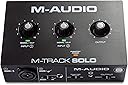
Desertcart purchases this item on your behalf and handles shipping, customs, and support to Denmark.
🎛️ Elevate your sound game—pro studio quality that fits in your backpack!
The M-AUDIO M-Track Solo is a compact, USB-powered audio interface delivering 48kHz crystal-clear recording with versatile combo inputs and zero-latency monitoring. Perfect for podcasters, musicians, and live streamers, it includes MPC Beats software and supports Mac, PC, and iOS for seamless, professional-grade audio creation on the go.


| ASIN | B08Q1NJSBQ |
| Audio Input | Mic Input Balanced XLR, Line Input Balanced 1/4" TRS, Instrument Input Unbalanced 1/4" TS |
| Best Sellers Rank | #1,295 in Musical Instruments ( See Top 100 in Musical Instruments ) #8 in Computer Recording Audio Interfaces |
| Brand | M-AUDIO |
| Brand Name | M-AUDIO |
| Compatible Devices | Guitar, Headphone, Keyboard, Laptop, Microphone, Personal Computer, Smartphone, Speaker, Tablet |
| Connectivity Technology | Headphone Output 1/4” TRS, Instrument Input Unbalanced 1/4" TS, Line Input Balanced 1/4" TRS, Mic Input Balanced XLR, RCA Outputs, USB Type B |
| Customer Reviews | 4.3 out of 5 stars 7,746 Reviews |
| Frequency Response | 20 KHz |
| Impedance | 1 megaohms |
| Included Components | M-Track Solo, USB B USB A cable, Software Download Cards, User Guide, Safety and Warranty Manual |
| Item Dimensions D x W x H | 4.46"D x 6.43"W x 2.14"H |
| Item Highlight | XLR, Line and DI Inputs, Professional Software Suite for Recording, Streaming, and Podcasting |
| Item Type Name | M-Track Solo – USB Audio Interface for Recording, Streaming and Podcasting with XLR, Line and DI Inputs, Plus a Software Suite Included |
| Item Weight | 10.6 ounces |
| Manufacturer | inMusic Brands Inc. |
| Manufacturer Part Number | MTRACKSOLOII |
| Maximum Sample Rate | 48 KHz |
| Model Number | MTRACKSOLOII |
| Number of Channels | 2 |
| Number of Items | 1 |
| Operating System | Windows, iOS, macOS |
| Supported Software | Ableton Live Lite, MPC Beats |
| UPC | 694318024980 |
| Unit Count | 1 Count |
| Warranty Description | 1 year manufacturer. |
A**M
Very good
Really, for the price, it's a good interface. For a budget-friendly device, it's not professional-grade, but it does a great job of recording. At least in my case, I use it to record my electric guitar and use distortion, overdrive, high-gain amp effects, and other things. You can get a 10ms latency with the default block size. I even have a 5ms latency on my system! That's true, by lowering the block size. I've seen a lot of people say it records very quietly, and the truth is, I don't have any problems with that. In fact, the input where my guitar is connected has the gain at 0; I haven't even turned it up. I just turn up the volume in Amplitube 5 and then add more in Reaper if I want, and it feels like a real amp. Clearly, the configurations, setup, and installation aren't for a novice, and if you're a novice, you should be very patient and read a lot. You can rely on artificial intelligence to guide you through the installation and configuration of everything. Perhaps poor user practices cause this interface to break down very quickly. Don't activate phantom power if you're not powering anything that requires it, don't turn up the input volume all the way. You can listen without using the rear outputs or the front output, just through USB via the PC's audio. I hope my interface lasts a long time.
C**U
Plug-and-Play with more than enough power for most people
After being plagued with "higher end" XLR interfaces that in next-to-no time quickly were giving out and would require frequent unplugs and replugs, this interface was a breath of fresh air after about 2 years of service with no issue. No software needed which makes this friendly for just not Windows but Mac and Linux as well, unfortunately still needs USB type-B cable rather than USB-C, oh well. Another pain point of others was audio latency. Fortunately, between both the microphone monitoring and PC-to-headphone latency, I'm happy to report that there was very little compared to the others that I had tried. Probably not the best compared to a direct sound card through a PCI slot, but still very usable. For audiophiles using their interface for running headphones off of: The interface is only rated for 50 Ohms, but I get plenty of volume on 64 and 128 Ohm headphones without sacrificing quality at about 8.5 on the output volume dial, with enough headroom to go to 9 if I need for a rather significant boost to volume, after which then above 9 gets pretty bad. It's fine for about 99.9% of people, just not the crazed audiophiles. It's a very no-nonsense, budget-friendly interface. My only chief complaint is using USB-B rather than USB-C, but otherwise this is very usable for the average PC setup enthusiast and content creator.
R**S
Stereo blues.
Being an electronic musician that samples and records music from consumer electronics, I needed a strong device that allowed me to capture clean audio from an aux source. I thought this would be hassle free but there was nothing in the description that the line in was mono only. So that's why only the three stars. Yes the audio coming from my computer is clean and loud. But to capture stereo I now have to use a splitter for the left and right channels which obviously are for input 1 and 2 which kills the idea of hooking a mic and a synth up to it unless I capture in mono. I didn't have the cables or plugs so that was an added $18 expense which I should get tomorrow thanks to amazon. I'm sure the included software is good but you have to register the product first, which requires reading the serial number from the bottom of the device. I find it odd that there was no QR code, but that's fine. So I downloaded the software but have yet to unzip and activate them because I make myown loops and already have two DAWS. I'm sure they are good but totally pointless for me. The six month Reason subscription seems kinda Sweet but once again, don't need it. I may revise this review if the quality is insufficient after finishing setup but I feel pretty confidant this will be a strong addition to my music making toybox. ------------------------------------------------------------ Addendum ------------------------------------------------------------ I've revised this review to include an extra star after acquiring the necessary cable to patch left and right to each input on the front from an AUX output. The signal is clean and strong and my DAW immediately picked up the two channels and panned accordingly. This is a great interface for bloggers who have a nice microphone but remember, if you want to capture in stereo you have to have those extra cables which I got for about $18 here on Amazon. The better quality cables with the braided insulation are ideal if you're a serious musician. I also forgot to mention I like the idea the unit is completely USB powered. No need to look for an open spot on your power strip.
M**J
Not all 1/4" plugs are the same. This only takes a MONO signal.
I got this to be able to record/monitor my drums and listen to music at the same time and it's inexpensive. Now Im not a professional musician and drumming is not gonna be my main hobby so this seemed to check off all the boxes for me. I plugged it up and it was such a huge step up from what I had. The sound through the monitor quality was so good and latency was zero. Now I plugged up my Bluetooth adapter into the 1/4" line in with a 3.5mm to 1/4" TRS adapter and the audio was absolute garbage. Again, I'm not a pro musician, I'm just a average joe while likes to bang his drums. Thinking it was the adapter, I plugged it into another adapter to hear it from my previous mixer and it sounded just fine. Great, I got a defective unit. So I got a replacement and the same "issue" was present. I realized that I didn't do my research for this and learned that not all 1/4" plugs are built the same. Turns out this only takes MONO TS plugs not STEREO TRS plugs!! So words of wisdom from the worlds okayest drummer, if you get this and want to use a device to play music through the line in, get a 3.5mm to mono TS adapter NOT a stereo TRS adapter. Other than that lesson, it's a great interface!
D**A
Excellent Entry-Level Audio Interface - Reliable and Straightforward
The M-AUDIO M-Track Solo is an outstanding choice for anyone just starting their audio recording journey or looking for a dependable, no-frills solution. Here’s what makes it stand out: Pros: • Simple Setup: Plug-and-play functionality makes it incredibly easy to get started—no complicated drivers or lengthy installations required • Solid Build Quality: Despite the compact size, it feels durable and well-constructed • Great Value: Excellent price-to-performance ratio for beginners and hobbyists • Reliable Performance: Consistent audio quality for recording vocals, instruments, and podcasts • Portable: Lightweight and compact, perfect for bedroom studios or mobile recording setups Minor Considerations: • Limited to one XLR/1/4” combo input, so simultaneous multi-track recording isn’t possible • Basic features mean no fancy extras, but that also keeps it affordable and user-friendly Bottom Line: If you’re starting your audio recording journey without breaking the bank, the M-Track Solo delivers exactly what you need. It’s reliable, straightforward, and gets the job done well. Highly recommended for podcasters, bedroom musicians, and content creators!
S**R
big thumbs down compared to old mobilepre
So I had an M-Audio MobilePre for years but I hadn't had a need to use it in about 6 or 7 years. Dug it out recently for a new project only to find that I needed drivers that no longer exist because the product was end of life'd many years and OS versions ago, sometime after Avid acquired it I assume. Ok, unfortunate, but that's technology. I did buy it, probably 12-14 years ago. A million years when it comes to tech. Ordered this as a replacement, with the side benefit that it allegedly needs no drivers so it's relatively future-proof. It is no replacement. The first thing I noticed is that it feels incredibly cheap, it feels like nothing; the old one was solid, I didn't have to worry about it skating across my desk from the weight of a cord. The second issue is the audio quality is also bad. I have to crank the gain WAY up for both XLR mics and line in to get anything, and it sounds like hot garbage when I do, prominent hiss/buzz and slight distortion. I thought maybe I was just romanticizing the old box, or audio quality was just worse across the board in the late 2000s, but I dug out an old Mac that I could install the drivers on and tried it on there, and the audio quality is amazing in comparison, with the same audio equipment. I remember people at the time complaining about the audio quality on the mobilepre, I never really heard any unless I maxed out the gain but I didn't have to, volume and clarity was fine well before that. I'll make this work, I can play with a combo of preamp and boosting it in software until I find a good balance, but it's just more work that feels annoying and unnecessary when I'm buying a product from a company with the rep it has, and it's ridiculous for the quality to take as much of a dive as it has. pros: it uses a USB class OS driver so it's plug and play, includes a ton of free software from Avid (that you have to jump through a few hoops registering to get because of DRM). usb power, so there's no power cord. cons: everything above.
J**R
Pretty much what you pay for
It’s a great starting interface for anyone wanting to get their first one but a few things I’ve noticed about it are that: 1) The gain has a point where it feels like your mic goes from 2 volume to 15 just from moving the gain a little near the max 2) The gain feels either too loud or too quiet so maybe find a cheap preamp if you’re wanting some extra gain without it being too loud 3) The maximum input audio quality is 4100Hz instead of the most common 4800Hz so the audio you’re sending isn’t as good quality as most other mics but it’s to be expected from cheaper products All things considered it’s a great interface and gets the job done for most people wanting to get into XLR mics at a low cost.
M**H
Started out OK....
I just got this and have it all set up. I've tested various inputs/outputs. Everything works. It really wasn't as much of a chore as I thought it'd be. Just had to restart my PC after hooking it up and downloading the driver. A couple of things, so far: 1) It's not aluminum. It's 100% plastic textured to look like aluminum on top. Kind of cheesy, really. There's nothing wrong with industrial black plastic, especially at this price point. No need to "hide" it. 2) Mic and instrument inputs feel low. I had to turn up the gain higher than I felt I should. This might be me, my equipment, and my inexperience too. I got OK sound, however. Probably not audiophile sound, but good enough for me right now. 3) If you have a PC and are running Windows 11, do not follow the installation instructions in the booklet it comes with. They're confusing and out of date. Just download the drivers from M-Audio's website, and install. Follow the onscreen instructions. Done. 4) When just listening to music on YT, with this thing as my "audio out" now, things sound better. Before, I was just using the aux out on the back of my PC right into my monitor speakers. Now, it's USB into the M-Track, and the M-track out to my monitors. Don't know why exactly, but everything sounds better...More dynamic. I'll edit this if it dies on me in a few months or if I have other issues...But for now, it's OK. I didn't want to splurge on the red one yet. I hope this works for me for a while. I also have not tried it with a DAW yet, but Windows 11 recognizes everything, and the basic Windows recorder app recorded audio from the mic and instrument inputs just fine. EDIT: OK, so I'm returning this. The inputs only work when the plugs are not fully inserted. They have to hang out by 2-3mm otherwise, I only get sound when the gain is up to 10 and there's a ton of hiss. It's not my cables, drivers, DAW, PC, or synth. It's this M-Track Solo. It's really a shame, as I liked the device...But plugs not fully inserted is a deal breaker. I should have listened to literally everyone when they said to get the red one.
P**I
Incrível
Melhor interface de áudio custo benefício
M**L
Tam bir F/P canavarı
Bu fiyata daha ne istenir bilemedim. İçinden yazılımlar da çıkıyor. Kolay bağlantı ve kullanımı var. Çok fazla deneyecek zamanım olmadı ama tam bir F/P ürünü.
B**T
Rewelka
Bdb interfejs
M**F
Just works. Sounds great. Well made. Simple and easy to use. Just gets the job done, no drama.
Been using this thing for a while now. Drives both my Marantz condenser mic and an Audio Technica pro broadcast headset (with built in XLR dynamic mic), perfectly. Not too much to say otherwise, it's well built, simple, basic, and easy to use. I've been running it on Mac, no fuss. Just a reliable no-nonsense bit of tech that will blend into the background and be forgotten about, just doing it's job - no drama!
A**H
أوديو إنترفيس إقتصادي
شريت الأوديو انترفيس عشان استعمل المايك والي هو RODE Podmic والأداء ماشاءالله ممتاز جدا وأنصح فيه خصوصا لسعره وسهولة الواجهة وجودة ونقاء الصوت من عيوبه هو إن رفعت صوت المايك لأعلى شيء يلقط أصوات مزعجة لذلك يفضل تخليه تحت 95%
Trustpilot
2 weeks ago
1 month ago