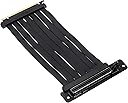
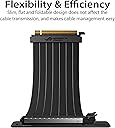
🔌 Flex your build with ASUS ROG STRIX – where power meets precision!
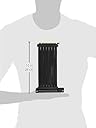
The ASUS ROG STRIX Riser Cable PCI-E 3.0 x16 is a 240mm high-speed, flexible extender designed to enhance GPU installation flexibility and airflow. Featuring patented SafeSlot metal reinforcement and EMI shielding, it guarantees stable, interference-free connections for professional-grade graphics performance across Windows, macOS, and Linux systems.


| ASIN | B082G52H1L |
| Are Batteries Included | No |
| Best Sellers Rank | #38,521 in Computers ( See Top 100 in Computers ) #261 in Computer Cases |
| Brand | ASUS |
| Color | RS200 ROG STRIX RISER CABLE |
| Customer Reviews | 4.7 4.7 out of 5 stars (6,641) |
| Date First Available | 6 December 2019 |
| Graphics Card Interface | PCI-Express x16 |
| Graphics Chipset Brand | AMD |
| Graphics Coprocessor | RS200 ROG Strix |
| Graphics RAM Type | DIMM |
| Item Weight | 209 g |
| Item model number | RS200 ROG STRIX RISER CABLE |
| Manufacturer | ASUS |
| Operating System | Windows, macOS, Linux |
| Product Dimensions | 17.15 x 2.54 x 30.48 cm; 208.65 g |
| Series | RS200 ROG STRIX RISER CABLE |
D**I
Recommended
Excellent quality. Fits e-ATX motherboards.
H**D
ممتاز و تهويه ممتازه لكن يفضل انكم تشترون مراوح اكثر لانه فيه اربع فقط
ع**د
Good quality with good cable management
Good quality
N**S
Top Lüfter von Asus mit langen Kabel .alles super
M**N
Permet de positionner un périphérique dans un emplacement différent. Par exemple, une carte graphique qui serait trop grande pour un boîtier.
A**P
Total beast in price of a mid tower... Value for money.. This cabinet is seriously big on size and features. Also, for entusiasts who want to make a complete rog build, it's a pleasing beauty. It's rugged, loaded with features and it's just too awsome. But mind the size... It's way big.. It's actually a full size tower...
R**.
One of the best PC cases in my opinion. Good for all sizes of motherboards from mini-ATX to EATX. You get 4 fans included, three of them are 120s with RGB in the front and one 140 on the rear side. You get magnetic filters for the front, top, and the bottom (below the PSU). These will protect the insides from dust. You can add 3 more 120 fans on the top. You get enough accessories for your HDDs and SSDs. Two sliding trays for 3.5” or 2.5” drives and 2 slots on the back side and two on the front side which equals to four more 2.5” drives. So the total this case can accommodate is 6 drives which is plenty. There is enough space for a large PSU. Lots of holes for cables management. The texture on the case is beautiful with a tempered glass side panel. You get a large power button on the panel, 2 HD audio ports, and 2 usb 3.0 ports. There is no Reset Button though. You won’t regret getting this. But keep one thing in mind, this case is huge, so check if you can accommodate this beast of a cabinet. I got the cabinet in perfect condition. Thanks Amazon for this.
も**し
NZXT H510Eliteで組んでいましたが、RTX3090の導入に辺り エアフローを改善しつつも見た目を損なわないケースを探してた所、このケースを発見。 いざ組み込んでみたら大正解。ちゃんと冷えるしかっちょE 【総評】 サイズ感はフルタワー並み、奥域80のデスクで丁度いい位。 パーツもガッシリしていて好印象です。但しクッソ重い。LANパーティ云々とか書いてあるけど、ASUSの中の人はどんなムキムキマッチョゲーマーを想定しているのだろうか… エアフローは前面140×3と背面140×1のみですが広さも有って良好。 マイニング時のメモリージャンクション温度がNZXT H510Eliteでは106〜108度とアッチアチだったのが、ROG Heliosでは98〜100度と許容範囲内に収まりました。 "見た目重視のハイエンドゲーミングPCだけど、使わない時はマイニングさせときたい"なんて方には相性抜群ケース。 【注意点】 マニュアルがかなり簡易的な作りでお粗末なので自作初心者向けでは有りません… ・フロントUSB3.1gen1ポートについて マニュアルの絵には"どっちか挿して"と描いてある様にしか見えないですが、L字(右2つ)とストレート(左2つ)両方挿さないと片側しか使えません。 別レビューにはこれが初期不良と書かれており"えっ俺のも!?"となりましたが、仕様です。 片側しか使えないユーザーは付属品のUSBポートカバー挿しとくか、ROGならCrosshair以上のx4に対応したハイエンドマザボを購入する必要有。E-Gaming以下はx2しか無いので片側使えません。 ・内蔵ファンコンについて 3pin対応700RPMor1400RPM固定。フロントパネル操作のみでデフォルトではPWM制御不可。回転数細かく制御したい方は別なファンコンもしくはPWMファンに換装する必要有。 ・フロントガラスaRGBについて Asrockマザボ環境(X570 Taichi)ではaRGB端子に挿してARMOURY CRATEアプリを開いてもAuraSync認識せず、UEFIorPolychromeSyncで操作する必要が有りました。 購入予定の方はご自身のマザボの互換性を確認してからご購入される事をオススメします。
Trustpilot
1 week ago
2 days ago