

๐ฉ๏ธ Elevate Your Gaming Experience!
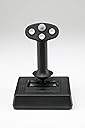
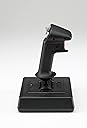
The CH Products Flightstick Pro USB joystick features a robust 3-axis control system and 12 programmable buttons, designed for both left and right-handed users. With compatibility across multiple Windows versions and MacOS, this joystick is perfect for gamers seeking precision and comfort. The included Control Manager software allows for extensive customization, making it a must-have for serious flight simulation enthusiasts.


| ASIN | B00006B84V |
| Additional Features | Ergonomic, Rumble |
| Best Sellers Rank | #61,339 in Video Games ( See Top 100 in Video Games ) #148 in PC Game Flight Controls #237 in Mac Game Controllers |
| Brand | CH Products |
| Brand Name | CH Products |
| Button Quantity | 12 |
| Color | Black |
| Compatible Devices | Mac, PC, Windows |
| Connectivity Technology | USB |
| Controller Type | Joystick, Windows |
| Customer Reviews | 4.3 out of 5 stars 122 Reviews |
| Global Trade Identification Number | 00040478205033 |
| Hardware Platform | pc |
| Item Weight | 1200 Grams |
| Manufacturer | CH Products |
| Manufacturer Part Number | 200-503 |
| Model Name | CH FLIGHT STICK PRO (PC) |
| Model Number | 200-503 |
| Package Quantity | 1 |
| Power Source | Corded Electric |
| UPC | 163120778300 040478205033 132017583464 168141474187 115971023474 022834918283 |
S**H
A nearly perfect, well designed utilitarian joystick.
I've used lots of different joy sticks over the years and have always found myself returning to the CH Flightstick Pro. It's solid, very well built and features a design that is far more concerned with actual function and utility than it is with looking like something that belongs in the cockpit of 2789's finest interstellar fighter. Which of course is to say that it works very very well. Primarily, the thing I find most useful is the *extremely* forgiving/elastic "spring" action; the Flightstick requires *very* little effort to move along the extents of it's X and Y axis' and such movement and effort needed to realize it is equally precise and unchanging throughout the full range of either axis' extents. There is no greater or lesser tension depending on where on the axis' you might be passing through. It's ridiculously smooth and even and one finds oneself giving more attention to precision and more subtle movements as opposed to trying to jam the stick back and forth or side to side as things become frenzied in game play. Again, the motion is extremely easy ... in fact, you could play any game/simulator and experience the joysticks complete range of motion on either axis using just one finger placed on the top of the Flightstick; it's literally, *that* effortless in it's motions. Some people might find this disconcerting at first but once you acclimate, you won't look at other joysticks in the same way any more. Further, this ease of movement allows the base of the joystick to stay firmly planted on the desk...with no lifting of the edges or corners as you make full sweeps of the sticks movement gamut. Since one's movements tend to become more precise and since the motion of the stick is so smooth and spring pressure so consistent throughout the sticks motions, it's very easy to tell when you are at the limits of either axis' movement. A base that moves around and lifts or slides as I attempt to game is one of the most annoying and consistently problematic aspects of just about all other joysticks I've tried. If any portion of the base actually lifts from the surface of your desk (or whatever) then the problem is with your play style and not the Flightstick...as the only thing that could make it lift is violent/fast/sudden jerks of the stick...which, by design of the thing...are obviously not necessary. It's not a cheap joystick, just speaking monetarily but it's built to last (had one for 10 years before getting another) and as mentioned already...is a near perfect bit of industrial/utlity design. I've never found any other joystick that I can use (much less remember the make of)...and I've used many. Oh yeah ... look around Amazon too ... there's usually a "USED" option for much less than the new price. FYI.
W**G
King of the Basic Joysticks
I enjoy instrument flying in MS Flight Simulator, so precision is the most important factor for me in a controller. I've tried several joysticks over the years but no other joystick can match the precision and feel of the Flightsick Pro. One reason I like the Flightstick Pro is that it's one of the only high-end joysticks that you can use with either hand. The latest flight sims let you pan around the "virtual cockpit" with the mouse, so I prefer to fly with the joystick in my left hand and my mouse in the right. You fly most real-world aircraft with your left hand anyway, another reason I prefer this configuration. Most of the fancier joysticks (including CH Products F-16-styled options) are built for right-hand use only. The Flightstick Pro works right out of the box, with no need to load drivers or other software--just plug it in and off you go. The base is solid and heavy enough that it doesn't slide around your desk, but it's still compact enough that you can move it off to the side of your desk and not have to worry about storing it when you're doing your regular computing. Although it lacks the bells and whistles and slick look of other offerings, the Flightstick Pro has a precise, solid feel that is unmatched in any other joystick I've tried. CH Products has a long-standing reputation for quality, and if a basic joystick is what you're looking for I don't think you can top this one.
A**R
well made
Nice flight sim product. Solid construction, feels right in your hand, left or right. Keep in mind though, you will have NO rudder control, that said I would purchase again if I needed one.
N**T
It is just perfect for aviasims
I used more "cocky" joysticks before, but I found that CH Flightstick Pro is the best when it comes to aviasims such as X-Plane, especially to fly a helicopter. - Nicely separated axis, so you don't needlessly disturb pitch when manipulating roll and vise versa. - Full range of motion with perfectly balanced springs - not too heavy, not too light (well, for helo it would be better to have free motion, but... you can't have it all). - Truly ambidextrous. I would say it is the only high-quality ambidextrous joystick at the end of 2019 It may look not as cool as its competitor, but you pay every penny for perfect functionality, not for cocky appearance. I've read a few reports about the problems with USB 3.0 or X-Plane 11. From my experience - it works great with USB 3.1, 3.0 and 2.0 under Windows 10 and on Asus X570 motherboard, and X-Plane 11 is what I use. The only advice would be - do NOT (I repeat - NOT) install CH control software. This is what make the joystick incompatible with X-Plane. There is only one thing I wish would be improved - the way how trimmer wheels are implemented. They adjust the joystick output instead of being reported as two additional axis (like throttle), so you cannot use them to assign aviasim trimmers that makes them more or less useless for simming.
M**N
Perfect retro flight stick with USB!
Back when, the CH Flight Stick Pro was THE stick in my group of gamers. I kept mine for years, but it had the old interface and I've moved on to computers with less archaic I/O. I was shocked to see this cheaper than I remember, and with USB. This is the most comfortable stick I've used. It is my controller of choice for classic X-Wing games because it has the controls I need and smooth operation. It weighs enough to stay on my desktop, but not so much that I'm concerned for the glass top I have. All in all, this stick is proof that gaming gadgets from years ago can still be great today. I couldn't be happier with it. 5/5
W**F
It's hard to beat yesterday's technology!
My CH Combat stick started to get pretty loose after 20+ years of intermittent use. This version was no longer available and the nearest replacement would be the CH Fighterstick. Reviews claimed it didn't seem to have the same quality components CH products once had (surprise!). I ended up with the Flightstick because reviewers maintained it still seemed to have the original CH quality. So far, I would agree with them. Differences? Mainly, the Combatstick had many more buttons, and was larger on the desk and in the hand. Outside of that it's pretty much CH-as-usual. The buttons and sliders are tight and there is no slop in the stick gimbals. the dreaded Control Manager software is still out there if you choose to use it - (It's really not that hard to learn if you apply yourself) - but you don't really have to use it - UNLESS you want to calibrate. Win 10 no longer supports any calibration function for this product. As for those who complain about the noticeable strong centering tendency of the stick, I have flown stick and rudder tail-dragger aircraft for 30 years as a private pilot and I don't really even notice the stick detent in flight sims. In real world flying pilots think more about the roll and pitch axis' and rarely ever about the 45 degree movements in between, and if they are added in it isn't something that's very conscious. The stiff center detent also serves as sort of a handy autopilot, allowing one to remove the hand momentarily from the stick. I could see how it could be an issue for those flying today's space sims though. Still a good product for those who value quality and don't want to deal with the sloppiness that seems to be evident in almost every consumer-level product currently available.
J**C
One Star
It says it operates on Mac O8. It does't- Only works on windowsOS.
R**L
I wanted to like it.
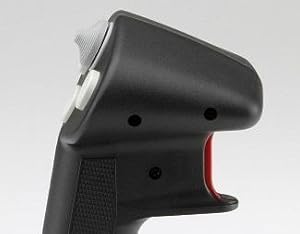
I really wanted to like the product, but the stick is weird. The top of it is huge and the grip is slim. The 3 buttons are far apart (especially the one to the right if you use your right hand) and the palm rest is so small it might as well not be there. In fact the palm rest is the biggest reason why I'm returning, it's just downright uncomfortable. It locks your palm from circulating and after a couple minutes of use (I play Elite Dangerous so I throw my stick around when in combat a lot) it just starts to hurt my hand. It's a shame really, because the built quality is great and the responsiveness of the stick is nice. I'm gonna give the combat stick a try though, that looks a bit more comfortable (hopefully).
Trustpilot
2 months ago
1 month ago