Buy anything from 5,000+ international stores. One checkout price. No surprise fees. Join 2M+ shoppers on Desertcart.
Desertcart purchases this item on your behalf and handles shipping, customs, and support to Denmark.
๐ Elevate Your WiFi, Dominate Your Digital World
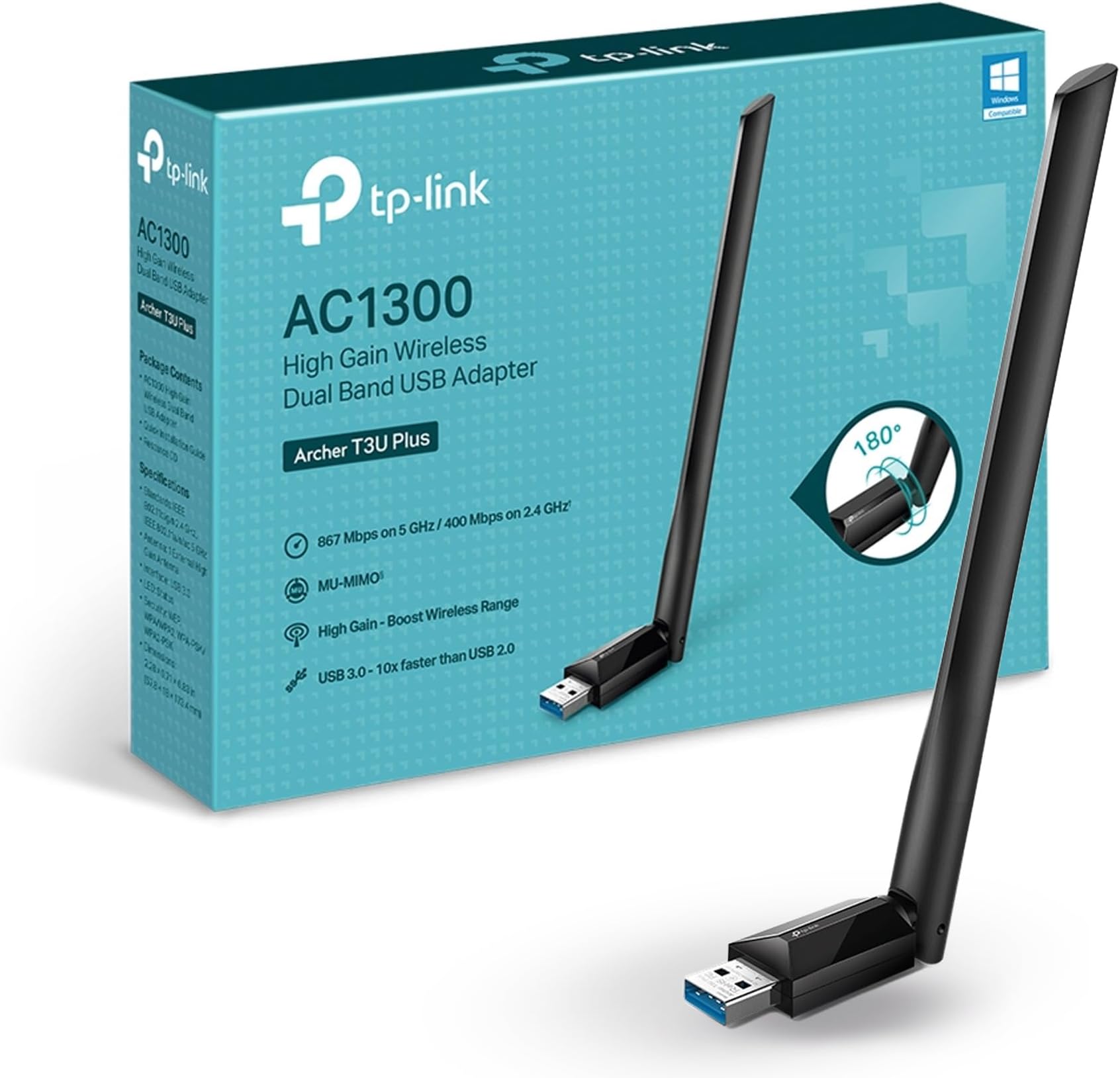
The TP-Link Archer T3U Plus USB WiFi Adapter delivers ultra-fast AC1300 dual-band wireless speeds up to 867 Mbps on 5 GHz and 400 Mbps on 2.4 GHz. Featuring MU-MIMO technology and a 5 dBi adjustable high-gain antenna, it ensures superior network efficiency and extended coverage. Compatible with a wide range of Windows and macOS versions, this USB 3.0 adapter offers easy installation and stable, high-performance connectivityโperfect for professionals seeking reliable, high-speed internet on desktop PCs.


| ASIN | B08D72GSMS |
| Best Sellers Rank | #1 in Computer Networking Antennas |
| Brand | TP-Link |
| Built-In Media | 1 x AC1300 High Gain Wireless Dual Band USB Adapter1 x Quick Installation Guide1 x Resource CD |
| Color | Black |
| Compatible Devices | Desktop |
| Compatible Operating System Family | Windows |
| Customer Reviews | 4.3 out of 5 stars 27,595 Reviews |
| Data Link Protocol | USB |
| Data Transfer Rate | 867 Megabits Per Second |
| Hardware Interface | USB |
| Item Dimensions L x W x H | 2.28"L x 0.71"W x 6.83"H |
| Item Weight | 18.14 g |
| Manufacturer | TP-Link |
| Mfr Part Number | Archer T3U Plus |
| Minimum Required Operating System Version | Windows XP |
| Model Number | Archer T3U Plus |
| Product Dimensions | 2.28"L x 0.71"W x 6.83"H |
| UPC | 840030701047 |
| Unit Count | 1.0 Count |
| Warranty Description | 2 year manufacturer |
D**G
Fast and Stable Connection
Super easy to install and worked right away on my PC. The WiFi signal is much stronger now and the connection speed feels faster and more stable, especially for gaming and streaming. The antennas also help with range. Definitely a great upgrade for desktop computers without built-in WiFi.
B**T
Made huge difference in our download speed
With this adapter, our WiFi download speeds have increased up to 10 times what we usually got before, sometimes even exceeding the limits of our Internet plan (500 mbps). I just ran an Ookla speedtest, and the download speed was 517.97 mbps. It was easy to install (and I'm not that techie). Very happy with its performance and the purchase.
B**G
Very good but takes a minute to connect
It performs well, sustaining a 350 Mbps+ connection with a stock AT&T router 30ft away and 2 walls in the way. The built-in memory with the driver on it is very nice to have. It makes installation and setup very easy. The main issue I have had is that it can take 2min+ to establish a connection, and sometimes it needs to be unplugged and plugged back in to fix it. It also takes a while to connect to the 5GHZ band. It starts off at around 80 Mbps on the 2.4 GHz band and, after a few minutes, jumps up to the 5 GHz speed. It may be related to my distance from the router, but I haven't tested that.
K**E
Good value
Just plug and play. Works well, even tho router is on the other side of the house. Works best on USB 3 port
I**L
Grrrreat
My internal Wi-Fi for my computer took a took a beating, just quit working plugged. These in didn't even have to use a disk. It took the computer, turned it on, it worked perfect.
E**E
Disconnects are too frequent, requiring driver reinstall to fix the issue
Bought this adapter since moving to my new house. My previous house was wired pretty heavily so I didn't have to rely on wifi. I got this adapter in hopes that I wouldn't have to cable much, since wifi works for all other devices in the house. At first everything seemed fine. I've used this adapter for my PC for ~4 months now, but over the last week, the disconnects started happening. When first connecting the device to my PC, it connects as a USB drive, and the install app for the driver is on the unit. This is actually pretty brilliant, since having to download a driver on a PC that doesn't have a network card can be challenging, if not impossible, unless you have another PC handy. The install goes really quick and installs v2.0.2.0 of the driver. The PC that I installed this on is ~8 feet from the wifi router. Signal is good between the unit and the router...when it's connected. The challenge I've had is that recently, the unit frequently just disappears from my devices. Occasionally, just unplugging and replugging the device gets it to show up and reconnect, but more often, I have to completely uninstall the driver, reboot my PC, reinstall the driver, then reconnect the adapter to my wifi. I've tried changing some adapter settings related to power management and that doesn't seem to make any difference. I tried different driver versions from the TP-Link support site, and I get the same behavior. I was having an even odder issue where when i tried to do any kind of high-bandwidth usage, like transferring files, or using a remote desktop tool (TightVNC), that would cause the adapter to just disappear again. That seems to have stopped after multiple reinstalls, but the disconnects continue. I've read a number of posts in forums about having to change a number of different settings on my wifi router, but to be honest, I shouldn't have to do that. I've got ~40 devices connected in my house, from smarthubs, to Amazon FireTV devices, to laptops and PCs, and a couple of Raspberry Pi units, and NONE of them required any changes on the router side. I've also seen some people compliment the "speed" of this device, but I'm not impressed. I have gigabit fiber internet, so I am not limited by bandwidth. Using other wireless devices in the house, I average ~400+Mbps download and ~330Mbps upload. The attached screenshot shows what I get when I run this with the TP-Link adapter. I ran the test several times just to make sure it wasn't an issue with any single test and the results average right around this 231Mbps mark download. The upload speed is on par with the other devices, but the download speed is just horrible, by comparison. This is really secondary to the disconnect issue though. 230Mbps isn't bad, in general, for most tasks, including streaming, so it's just by comparison to other devices that the lack of throughput shows. Lesson learned and money wasted. Still haven't decided whether to purchase another wireless adapter or to go ahead and just run the cable, but I wanted to make sure to warn others about the frequent disconnects. That has been a major pain in the butt. It's quite possible that I just got a flaky unit, but just know that this is an issue.
B**M
Excellent Adapter, My House Was the Problem
5/5 because this is genuinely a good product. It just did not work well for my specific situation. The issue was not the adapter itself. My house has older plaster walls with wire mesh in them, which absolutely destroys wireless signal strength. It basically turns parts of the house into a low-budget Faraday cage. Because of that, I ended up needing a much more powerful antenna setup for reliable performance. That said, the TP-Link adapter itself was easy to set up, detected networks properly, and seemed well made. In a normal house or apartment without my bizarre anti-WiFi wall construction, I think this would work extremely well. The dual-band support, external antennas, and WiFi 6 capability make it a great option for upgrading desktop wireless performance without opening the PC up for an internal card install. So while it was not the right fit for my environment, I still think it is a solid product and worth recommending. Sometimes physics wins.
A**R
Installation was easy. Good value for what you get.
Driver install came preloaded. Installation was easy. The cable that came with it is super robust. It probably weighs more than the device itself which compromises the stability of the base. I did notice the connection issues I saw in other reviews but believe that that's cable related not device related. Maybe it's a contact patch surface area of the cable but definitely noticed if I wiggled the cable around it would lose connection with Windows. I mounted it on the wall with some velcro command strips. The energy stored in the cable being stored coiled, kept flipping it on it's side. As far as performance goes, adjust the channel settings to match your environment and you'll be good to go. Great value purchase.
S**M
ูููุฉ ูุงุตููุฉ
ููุช ู ุญุชุงุฌุฉ ูุงููุทุนุฉ ุนุดุงู ุงูุจู ุณู ุนูุฏู ูู ุดููุฉ ููุตู ุงููุช ู ูู.. ูุฑุญุช ุฏูุฑุชูุง ุจุงูู ุญูุงุช ููููุช ูุทุนุฉ ุงูู ุฏู ุญููุง ุงูู ู ู ุฐู ุจูุซูุฑ ูููู ุณุนุฑูุง ุฏุจู ุณุนุฑ ุฐู ุงููุทุนุฉ ููุฑุฑุช ุงูู ุงุฎุฐูุง ู ู ุงู ุงุฒูู ููููุช ูุฐู ุงููุทุนุฉ ุจูุฐุง ุงูุณุนุฑ ุงูุฑุฎูุต ุฌุฏุง ูููุณุฉ ูุชูุฏุฑูุง ุชููููุง ุนูู ุงุชุฌุงู ุงูู ููุฏู
J**R
Very fast compared to others
Plug and play, it was working in seconds. It had a much better speed than a budget USB dongle I was using. I have used other TP-Link gear (Mesh and routers) for years and have had zero problems.
O**.
ู ู ุชุงุฒ
ู ู ุชุงุฒ ูููู ุฌุฏุง
ุณ**ุฏ
ุนู ูู ุฌุฏุง ูููู
ู ู ุชุงุฒ ุฌุฏุง ูุงูุงุฏูู
P**R
Consistent performance and signal range are impressive
My experience with this antenna has been generally positive. The ease of installation pleasantly surprised me, even for someone who is not a tech expert. When it comes to quality, the antenna offers solid construction and stable connectivity. Transmission speeds are fast, providing a smooth online experience, whether streaming, online gaming or working from home. Among the highlights, the consistent performance and signal range are impressive. However, the design could be more compact to avoid any clutter on the neighboring USB port. A small compromise for peak performance. For optimal use, be sure to position the adapter out of the way to avoid interference. Regular driver updates are recommended to ensure optimal performance.
Trustpilot
3 weeks ago
1 week ago