Buy anything from 5,000+ international stores. One checkout price. No surprise fees. Join 2M+ shoppers on Desertcart.
Desertcart purchases this item on your behalf and handles shipping, customs, and support to Denmark.
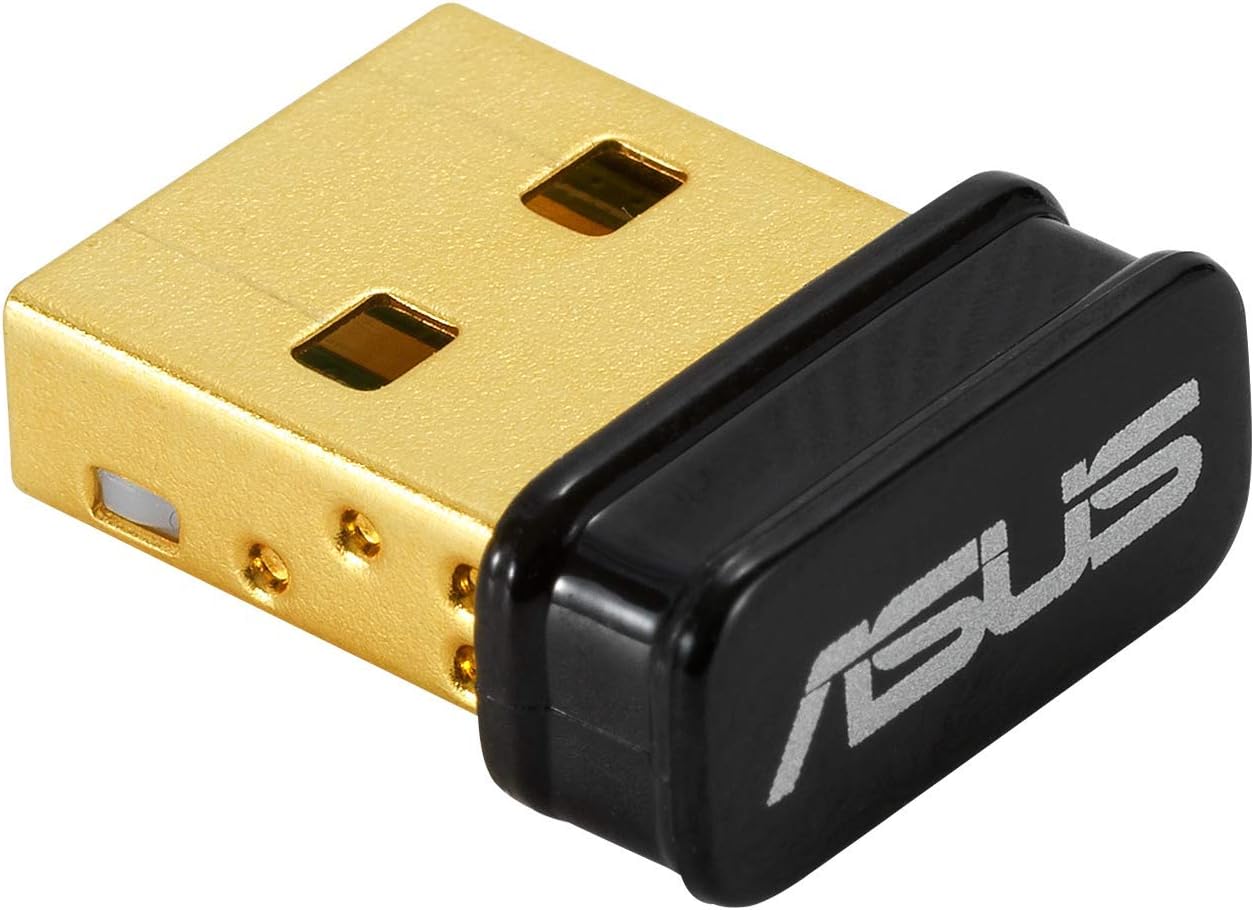
🚀 Elevate your wireless game with ASUS USB-BT500 — small size, massive reach!
The ASUS USB-BT500 is a TAA-compliant, ultra-small USB Bluetooth 5.0 adapter delivering up to 2X faster data transfer and 4X greater range than previous versions. Backward compatible with Bluetooth 2.1/3.x/4.x, it ensures broad device support and energy-efficient wireless connectivity. Ideal for professionals upgrading desktops or laptops, it offers reliable, low-latency connections for audio, peripherals, and more, backed by a 3-year warranty and strong user acclaim.


| ASIN | B08DFBNG7F |
| Best Sellers Rank | #10 in Bluetooth Network Adapters |
| Brand | ASUS |
| Built-In Media | USB-BT500 Adapter, Warranty card |
| Color | Black |
| Compatible Devices | Desktop, Headphone, Laptop, Speaker |
| Compatible Operating System Family | Windows |
| Customer Reviews | 4.5 4.5 out of 5 stars (6,379) |
| Data Link Protocol | Bluetooth |
| Data Transfer Rate | 4 Megabits Per Second |
| Hardware Interface | Bluetooth, USB |
| Item Dimensions L x W x H | 0.59"L x 0.28"W x 0.69"H |
| Item Type Name | ASUS USB-BT500 Bluetooth 5.0 USB Adapter with Ultra small Design, Backward compatible with Bluetooth 2.1/3.x/4.x |
| Item Weight | 0.01 Pounds |
| Manufacturer | ASUS |
| Mfr Part Number | USB-BT500 |
| Minimum Required Operating System Version | Windows 10 |
| Model Number | USB-BT500 |
| UPC | 192876476772 |
| Unit Count | 1.0 Count |
| Warranty Description | 3 Years |
M**R
Works great, but make sure to install official drivers for best quality!
Works great with my google pixel buds. I tried a different USB adapter that gave me more range, but terrible audio quality. This adapter on the other hand has a range of maybe 15 feet, but excellent audio quality for my wireless ear buds. And it also works on linux!
N**Z
Worth it
Had to buy after my bluetooth went out on my PC, and cords weren't cutting it. It gives great quality sound and works great. Make sure you follow the instructions and disable your old bt before plugging it in if your pc had one. When instructions are followed it works perfectly and only takes like 2 min to setup. I messed up the first try and plugged it in first and had to go back to the instructions.
F**C
Works good in Linux with some effort
I bought this to interact specifically with ble 5.0 devices from my PC and possibly some SBCs. This was a huge pain to install but here's what I did which will hopefully spare someone else the agony. The documentation on the Asus site is pretty abhorrent. It's mostly Windows oriented, and even for Windows the documentation is awful and you are pretty much on your own. It's a "plug and pray" situation with this thing until you get it setup correctly. Yes, it's supported in Linux so should work on Raspberry Pi as well. Once it's running it's actually really nice so far. Also the drivers include the source which is a win. How I got it working (old Ubuntu 18.04 with kernel version 5.4.0): First, download the driver from the Asus website. Second, blacklist all default bt drivers by creating the file /etc/modprobe.d/bluetooth-blacklist.conf then add this to it: blacklist btrtl blacklist btusb blacklist btintel blacklist btbcm This was necessary for me as the two devices were fighting for attention so to speak. It may not be needed for you (you can skip this and try it later if needed). Third, reload the kernel module settings (part of the above step): sudo systemctl restart systemd-modules-load.service Note that you will probably lose your bluetooth control panel, but you can undo this later by deleting the conf file then reloading the settings again. Fourth, install the driver after unzipping it and cd'ing to the folder: sudo make install INTERFACE=usb Fifth, you must copy the firmware to the correct location. Go into the folder /rtkbt-firmware/lib/firmware inside the driver folder and copy these two files to /lib/firmware/ on your system: rtl8761bu_config rtl8761bu_fw Now see if the device is listed: hciconfig -a the device should appear there. If not, unplug the device then turn bluetooth off then on. Depending on your distro, it could one of these (Deb/Ubuntu/fedora): sudo service bluetooth stop sudo systemctl stop bluetooth Plug it back in, run hciconfig -a again and it should be working. If still nothing, run: lsmod | grep bluetooth and see if 'rtk_btusb' is listed next to bluetooth (with some others, probably). If so then the driver is probably installed. Now let's see if your firmware is correct: Type dmesg and see if there are any errors there. If you are seeing a cryptic message in dmesg like: rtk_btusb: fw name is rtl8761bu_fw rtk_btusb: This is not 8723a, use new patch style! then the firmware has not been copied to the correct folder which will prevent it from working. Locate the correct firmware folder for your distro then redo the steps from that point again. Hopefully it should be running now. Now you can play with it in bluetoothctl. Type bluetoothctl then type scan on and see if there are any devices. Type help for a list of commands... have fun! If all else has failed, remember to register your device on the Asus website then you should be eligible for support (didn't try this, your mileage may vary).
A**E
Works great once installed correctly
Installed on Windows 10 64bit OS. Definitely had to download/install the driver but that wasn't difficult, it prompted me to do it and I just had a few clicks and it was done. I have not noticed any lag issues, but I'm not using it for audio at this time so I can't rightly speak to that. File transfers are OK and it works great for mouse & keyboard. The rest of this won't apply to like 99% of people but I'm putting it here in case anyone encounters the one gotcha I experienced with this device, which was starting up the PC cold (from being turned off). It was taking too long after I installed this device. Windows did come up, but it sat at an empty screen for a couple minutes whereas this computer used to just blast open whenever I'd start it up. I messed around a while before I found something online about similar issues. The article I found suggested that even though my motherboard did not "have" bluetooth onboard, sometimes there is something buried in the BIOS (or UEFI) related to bluetooth, and apparently some mainboard manufacturers actually ship boards with bluetooth only disabled as some arcane marketing strategy to sell the boards at a lower price (??). My mainboard definitely wasn't supposed to come with bluetooth and I had no signs of any pre-existing Bluetooth devices in Device Manager, but sure enough I entered my BIOS at bootup and there were two bluetooth items listed, one was already disabled and the other (named something like "connectivity wifi/bluetooth") was enabled. I disabled it (this computer uses an ethernet cable, not wifi) and the PC boots very quickly again. I gotta think that was it, I DON'T think you want multiple bluetooth adapters enabled like that. Weird problem that only occurred on cold boot - Standard restarts weren't affected. Anyway, I could be the only one in the world who had that problem, and I'm enjoying the bluetooth now. I'd buy it again
C**.
pretty good choice , semi limited range compared to built in
Works great, my PC can't use Bluetooth so this was a good option for using my wireless headphones. My only complaint is that the range is a little limited compared to the range I normally get from built in Bluetooth on devices. It starts to cut out once I walk more than 10 ft. from my PC. Good for a gaming pc :)
M**E
Nice and small.
Works great on my Dell rugged laptop. It even fits behind one of the doors that close off the ports.
G**C
working well, no lag , range also very good
D**A
Después de comprar más de 5 adaptadores chinos, me decidí a comprar un buen adaptador de marca. Este adaptador BT Asus es excelente. La señal es fuerte y de buen alcance, no hay Lag, no hay desconexiones. Lo utilizo para mi control 8bitDo Pro 2 y funciona de maravilla.
M**.
Super produit ! Très facile à installer et fonctionne immédiatement. La portée est excellente et la connexion est rapide grâce au Bluetooth 5.0. Parfait pour les accessoires sans fil !
A**R
صحيح أنه باهظ الثمن كقطعة صغيرة جداً لكن كأداء ومحيط ونطاق التقاط الإشارات من الأجهزة التي تمتلك Bluetooth قوية جداً. قوة ومدى الترددات والإستجابة عالية جدًا تصل حتى 10 أمتار, ولا يوجد تأخير إلا بسيط ممكن أقل من 15 مللي ثانية!! لدي جهاز تحكم للـ Playstation 4 وسرعة استجابته رهيبة! لا تبخل على نفسك من اقتنائه. شركة التايوانية Asus لن تخيب ظنك أبداً 🖤 ملاحظة: "ليس تطبيل للشركة, لكن جودة صناعتهم رائعة".
R**O
Muito bom, coloquei e não precisei configurar nada, funciona perfeitamente.
Trustpilot
1 week ago
1 month ago