Desertcart purchases this item on your behalf and handles shipping, customs, and support to Denmark.
💡 Elevate your space with smart dimming that’s as intuitive as your lifestyle.
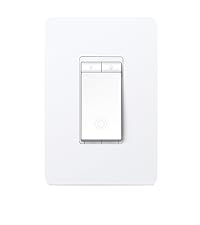
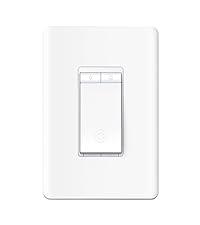
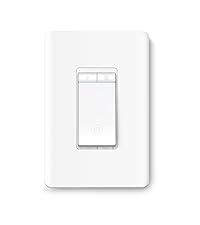
The Kasa Smart Wi-Fi Light Switch Dimmer HS220 offers 300W dimmable load capacity with smooth, flicker-free brightness control. It connects directly to 2.4GHz Wi-Fi, enabling remote and voice control via Alexa and Google Assistant without a hub. Installation is simplified through the Kasa app’s guided process, requiring a neutral wire and single-pole wiring. Advanced features include customizable fade speeds, scheduling, and an Away Mode for enhanced home security, making it a top-tier smart lighting upgrade for modern homes.


| ASIN | B079775ZZQ |
| Actuator Type | Push Button |
| Best Sellers Rank | #429,464 in Home Improvement ( See Top 100 in Home Improvement ) #2,992 in Switches & Dimmers |
| Brand | Kasa Smart |
| Brand Name | Kasa Smart |
| Circuit Type | 1-way |
| Colour | White |
| Compatible Devices | Alexa, Google Assistant |
| Connectivity Protocol | Wi-Fi |
| Connector Type | Screw |
| Contact Material | Copper |
| Contact Type | Normally Open |
| Control Method | Voice |
| Controller Type | Google Assistant |
| Current Rating | 2.5 Amps |
| Customer Reviews | 4.5 out of 5 stars 25,072 Reviews |
| Global Trade Identification Number | 00845973083724 |
| Included Components | 1 HS220 Smart Wi-Fi Light Switch, Dimmer, 1 Wall Plate, 2 Wire Nuts, Wire Label sheet, Quick Installation Guide |
| International Protection Rating | IP00 |
| Item Dimensions | 45 x 85 x 128 Millimeters |
| Item Type Name | Dimmer by TP-Link – WiFi Light Switch |
| Item Weight | 0.24 Pounds |
| Lower Temperature Rating | 32 Degrees Fahrenheit |
| Manufacturer | TP-Link |
| Material Type | Polycarbonate |
| Model Number | HS220 |
| Mounting Type | Wall Mount |
| Number of Items | 1 |
| Number of Positions | 2 |
| Operating Voltage | 110 Volts (AC) |
| Operation Mode | Automatically,Off,Smart Switch |
| Part Number | HS220 |
| Specification Met | UL |
| Switch Type | Dimmer |
| Terminal | Spst |
| UPC | 840460604987 845973083724 |
| Unit Count | 1.0 Count |
| Upper Temperature Rating | 104 Degrees Fahrenheit |
| Wattage | 300 Watts |
N**.
💡 Kasa Smart Dimmer Switch HS220: The Best Value for Customized Smart Lighting
🔌 The Core Function: Reliable Dimming After using the basic Kasa HS200 switches, I upgraded a few key areas—like the living room and master bedroom—with the Kasa Smart Dimmer Switch HS220. This switch is an immediate winner because it handles dimming with exceptional smoothness, even with my mixed bag of modern LED bulbs. The physical buttons on the switch make it easy to quickly adjust brightness, but the real power is in the app. ✨ Unmatched Customization (The App Advantage) The Kasa app truly unlocks the potential of the HS220 and sets it apart from simpler dimmers: Custom Fade: I love the ability to customize the "fade on" and "fade off" speed. I set my bedroom light to gently fade on over 3 seconds and fade off over 10 seconds, which is perfect for winding down at night. Flicker Control: You can use the app to calibrate the low-end dimming range for your specific bulbs. This eliminates the annoying flickering that often happens with smart dimmers set to their lowest levels, ensuring consistent performance. Scheduling: Setting lights to dim to 50% at 9 PM and turn off completely at 11 PM through scheduling is effortless and works flawlessly via Wi-Fi. 🛠️ Installation Notes & Reliability The installation process is similar to the HS200 and remains guided and straightforward through the Kasa app. However, two things are vital: Neutral Wire is Required: As with the on/off switch, the HS220 must have a neutral wire in the switch box to function. Be sure to check your wiring first! Bulkiness: The internal dimmer module is bulky. When installing it in a tight or shallow junction box, it requires careful management of the wires to fit the switch plate back on, which is the only real sticking point in the installation process. Once installed, the switch is highly reliable. It connects directly to the 2.4GHz Wi-Fi and responds instantly to voice commands via Alexa and Google Assistant, all without needing a separate smart hub. ⭐ Final Verdict The Kasa Smart Dimmer Switch HS220 offers features often reserved for more expensive systems, like fade customization and low-end calibration, at an incredibly competitive price. If you have a single-pole circuit that needs reliable, fully customizable smart dimming and you have a neutral wire, the HS220 is easily the best switch to buy.
A**Z
Buen producto
Buenas noches, quiero comentarles que el día de hoy revisé mi correo y dice que el producto se entrego, en el cual quiero comentarles que no tengo el producto, hasta horita no he recibido el producto todavía, tuve comunicación con la paquetería en la cual se le indico que no podía recibir el producto ya que no me encontraba en Pachuca que regresaba hasta el lunes, por lo cual les pido de la manera más atenta rastreen al operador de la paquetería ya que no tengo ningún producto, gracias. Buenos días quiero ratificar que después de unos días de la fecha que se registró como entregado el paquete ¡llegó finalmente el producto! , lo revisé y venía cerrado y en buenas condiciones, lo conecte y probé y funciona de maravilla, la aplicación es muy sencilla y practica, lo recomiendo bastante, la relación precio producto es muy buena, gracias.
P**S
Smooth Install, easy pairing. Awesome product for the price!
This is another great product from TP-Link. I am using their Smart WiFi Plug HS105 for the block heater with zero issues for three seasons already. HS220 comes with everything you need for installation but you absolutely need to check whether you have Neutral wire provided by your builder. If you don't adding it is pretty much impossible without reaping walls off. Seriously. I know a guy who sued his builder for failing to provide Neutral wire for lighting. First I would suggest to determine which wire is LINE and which is LOAD in your old light switch. I used multimeter for this purpose - you will always have 120ish volts between Line and Ground when the switch is OFF and nothing between LOAD and ground. Use Electric box as ground when you measure. I did have two LINE wires connected to the old mechanical switch - the second LINE was wired elsewhere and HS220 doesn't have any additional connectors for the second LINE. This is not an issue whatsoever - using pliers carefully make a half-loop for both LINE wires you have, completely unscrew the bolt (black in my case) on HS220 and remove small metal push plate. Lay both LINE wires the way so they wrap around the screw hole, put metal push plate back and tighten the black screw. Provided black screw is more than sufficient to tighten two 14G overlapped copper wires. Think strategically about all the wires you have in electric box since HS220 requires three times the space than you old switch. Locate all the wires in the box the way to allow enough space for the HS220 when you install it. Carefully push it in place applying pressure to the top and bottom flanges only (with Face Plate off, of course). Do NOT apply any pressure to the buttons while installing the switch. Do not panic if you don't get lights turning on fast enough with physical button or through the app. This is a well known issue which made people complain since December, 2020. This only happens because of double-tap functionality. Switch is making a delay checking whether single- or double-tap is used. Go to the TP-Link community website and download beta-firmware which works way better. Upgraded firmware from my PC and got ALMOST instantaneous switch response. The key word is almost since it doesn't look like you can get the same on/off performance from this switch as you do from a simple physical switch. Used the switch with cheap Sylvania 60W 2700K LEDs just for test. Will definitely go for brighter bulbs later. The only thing I REALLY don't like about this switch is annoying squeaking noise when on/off button is pressed. Makes entire unit feel really cheap. As per TP-link response this is working as intended and caused by the spring. UPDATE #1: Got two more switches and installed them the next day in two more rooms. Everything went smooth except of one switch with a somewhat crooked button which sticks and moves whenever the main button is pressed. There is definitely room for improvement in QC. Both switches are Hardware Version 3 and so far don't have any squeak. UPDATE #2: If you get dimmer switch wired on the same line as exhaust fan (I realized that one of my switches feeds exhaust fan in the nearby bathroom) you will get light blinking every time when the fan is turned off. Seems like this is the way all dimmer switches work. There is a solution suggested online involving the use of MOV (Metal Oxide Varistor) 270V (175VAC/225VDC) 6500A Surge Through Hole 20mm Disc. Need to try it and see if it works. UPDATE #3: Bought MOV through "Jameco Electronics" online. Just Google their web site. Ended up getting MOV-20D271K-ND equivalent. Installed it on the bathroom fan switch and IT WORKED!!! Now I do not have any more flickering caused by line noise or RF noise, generated by the switch connected to the induction motor opening (turning off). When bathroom fan wired on the same line with one of my HS220 is turned off I have zero flickering. Highly recommend this solution to those who are interested in fixing this annoyance.
K**P
No good for UK homes
It’s designed for American homes which have a 110V supply. UK homes have a 230/240 V supply so it can’t be used in UK homes
M**Z
Excelente producto, considera el espacio en tus cajas de conexión
Funciona de maravilla, compre un par para probar y después de un mes comencé a automatizar por completo la casa, en precio conviene mejor que comprar lámparas inteligentes. El único problema que veo es que no están diseñados para las cajas de conexión estándar en México, si caben pero es muy complicado acomodar los cables, por lo que deben considerar este factor antes de comprar, sobre todo si sus cajas de conexión son demasiado antiguas; resolví este problema perforando a un lado de las cajas existentes e instalando una caja mas grande que ya puedes encontar en el mercado.
Trustpilot
5 days ago
1 month ago