🎬 Elevate your virtual presence—because your image deserves the spotlight.
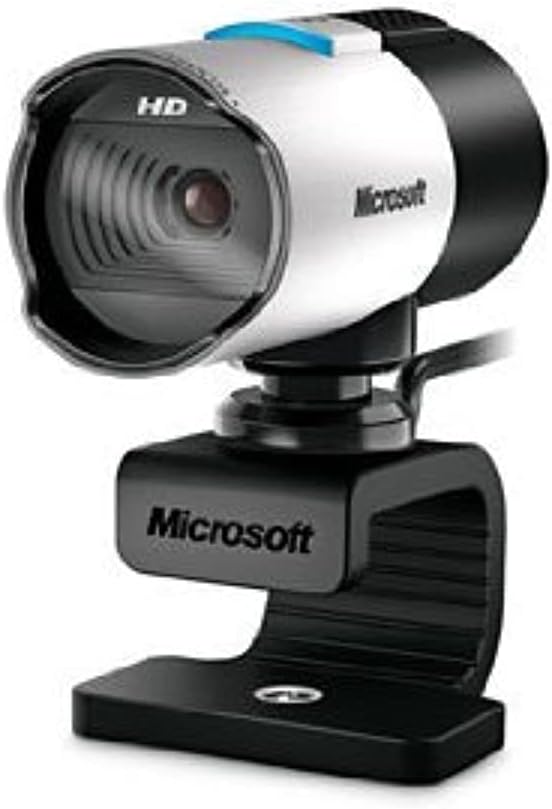
The Microsoft LifeCam Studio is a premium 1080p HD webcam featuring a widescreen sensor, advanced autofocus with a high-precision glass lens, and TrueColor Technology for vibrant video in any lighting. Equipped with ClearFrame Technology for smooth video and a high-fidelity microphone, it’s optimized for Skype and Microsoft Lync, delivering professional-quality video calls and recordings that bring you closer to your audience.


| ASIN | B0042X8NT6 |
| Best Sellers Rank | #183 in Webcams |
| Customer Reviews | 4.2 4.2 out of 5 stars (711) |
| Date First Available | September 13, 2010 |
| Is Discontinued By Manufacturer | No |
| Item Weight | 4.5 ounces |
| Item model number | Q2F-00001 |
| Manufacturer | Microsoft |
| Product Dimensions | 7.5 x 2.66 x 8 inches |
D**E
Great Webcam
Really satisfied with this webcam! Did the job and set up on Clipchamp went smoothly. So glad I made this purchase. The Solocast 2 mic was a different bad story. Returned the mic for a different one; kept the webcam.
B**S
Works terrific!
Works great! Very clear picture with even low lighting!
N**2
Great picture, great sound, need fast machine
Been playing with the LifeCam Studio for a couple weeks now. I really like the quality of the video it produces, though calling it a 1080p camera is a bit of a stretch since it doesn't do 1080p out of the box with the software it comes with. Though, it's not like Skype or Live Messenger will do 1080p video chats anyway, so it's not that big a deal, the 720p video it captures is way better than the other cameras I've seen. If you want to record in 1080p with the lifecam studio, you'll have to use something like VirtualDub (freeware). I do like that it's Microsoft's and they have a much better track record of releasing firmware/driver updates than most vendors <cough-Logitech>. My last camera I had for 3 years with no driver updates, no firmware updates and they didn't even make a Windows 7 driver for it. This camera has had 2 firmware updates and at least one driver update. That means they're serious about improving the experience with it. The camera picks up an image very well, even in super low-light situations. I turned off all my lights and just had the monitor going, it is able to lengthen the exposure or open an iris or something to make my face really clear still. The other cameras I tried didn't fare nearly as well. The camera's microphone is also very sensitive and sounds great. Which is good and bad. While chatting, every move in your chair is caught, every throat clearing heard, and yes, people can hear you belch or break wind. Farters beware, they will hear you. "Did you just fart?" "Uh, no...that was this old chair" The reason I gave it a 4 instead of a 5 is because it needs a fast machine to get the full HD video at a fast frame-rate. I have a dual-quad core computer with 12GB of RAM and a giant radeon graphics card and I get fantastic video at over 30fps. Other people have complained about how bad the refresh rate is, which I didn't see on my computer. When I moved it to my weak-arse laptop however, I did notice a slower frame-rate at the high resolutions. I guess that's to be expected until someone creates a camera that offloads all the image processing to an on-camera chip. I don't really see this as a problem with the camera though, more a problem trying to do more than the computer is able to do. Want it to go faster, use a faster machine. It's like watching full-screen HD videos downloaded from the internet with older machines. You wouldn't blame Media Player if it's choppy, you'd blame the slow processor and weak graphics card. Same principle in my mind. All in all I think it's a great camera at a great price.
S**R
Works fine with Windows 10, settings can be adjusted via Skype!
This review is for the "Microsoft LifeCam Studio 1080p HD Webcam - Gray" in case you find it under another product. I was looking for a new webcam for the frequent Zoom meetings I attend. The main requirement was the camera's viewing angle had to be narrower than the wide-angle view provided by nearly every other less-expensive webcam. This can only be obtained via optical zoom (preferable but unavailable at this price point) or some form of digital zoom effect. The reason this is important for online conferencing via Zoom and related systems is that the normal wide-angle view makes your face too unimposingly tiny, especially in "gallery" view. Imagine my surprise when I found a whole slew of camera controls in the Skype settings menu (ridiculously, they aren't even available via the Windows 10 camera app.) Among the controls that are adjustable is a digital-zoom setting -- exactly what I was looking for! How to take advantage of this in Zoom: Open Skype, adjust the settings for the camera using the Skype Audio and Video settings controls. Remember to hit the "Apply" button on both settings windows. Exit Skype and start Zoom and the camera settings will have been preserved between the two applications! Using this procedure and sitting about a foot from the camera, I was able to get my face to fill at least 3/4 of the screen height, the exact effect I was after. I've only tested this with Zoom so I don't know if it works with other conferencing or picture/video software. But it's good enough for my purposes, especially since I bought this model back in 2012, way before there ever was Zoom. BTW, this camera's image quality from the start has been extremely good and it is still competitive today.
A**N
Great webcam
Looked around for a while for a webcam for chatting with my wife while she in France, and it came down between the Lifecam Studio and the Logitech C910. I saw a couple of reviews demonstrating the Lifecam Studio and the Logitech C910 side by side. After seeing the reviews I decided to try the cheaper Lifecam Studio because it seemed to have better performance overall. I have had this camera for almost a month now, and this camera does not disappoint. This camera has better colors and adjusts its brightness in low light conditions better than the C910 seemed to. The auto focus is very responsive and the microphone is sensitive enough so that you don't have to raise your voice louder than normal speaking levels to be heard, and does an ok job cancelling out background noise. Don't let the "1080p HD" fool you. This does not record or display 1080p video. It only takes pictures in a 1080p resolution. But it does have a better output than any other camera on the market as of this review that I have seen. Overall, for the money, you won't find a better webcam with a better picture. The Lifecam Cinema has an ok picture and the microphone is almost as good, but for $15.00 more just buy the Lifecam Studio and get the top of the line. You won't have to buy another webcam for at least 5 years with this camera in my opinion.
C**E
Ya tenía una cámara como estás, y la volví a comprar, excelen, muy buena imagen, plug and play, todo muy bien, súper recomendada, y al vendedor también, recomendado
注**屋
MicroSoft 自身の商品説明の段階では、ズーム8倍、ただし公式データ・シートでは3倍、事実は後者なので、いざ争いをするならあちらに有利でしょう。が、MicroSoft 商法?の一端が見えたようです。 商品にはソフトの添付がない、一切の説明がない - 客が調べてダウンロードしなければ機械も使えない。 もし、これが MicroSoft 自身のやり方なら 「いつもの通り」。一方、私に届いたパッケージがそういう バルク製品だったとしたら、業者が詐欺に近いことをやっていると言えます。 お値段がこの程度なので、法的に争うメリットがありません。どうであれ、そういう価格帯で そういう売り方をするのは、一種のサギ、ペテンです。
J**C
Je l'aime bien!
L**.
This webcam is outdated
Trustpilot
2 weeks ago
3 weeks ago