🚀 Upgrade your Infiniti’s tech game—wireless, seamless, and seriously smart!
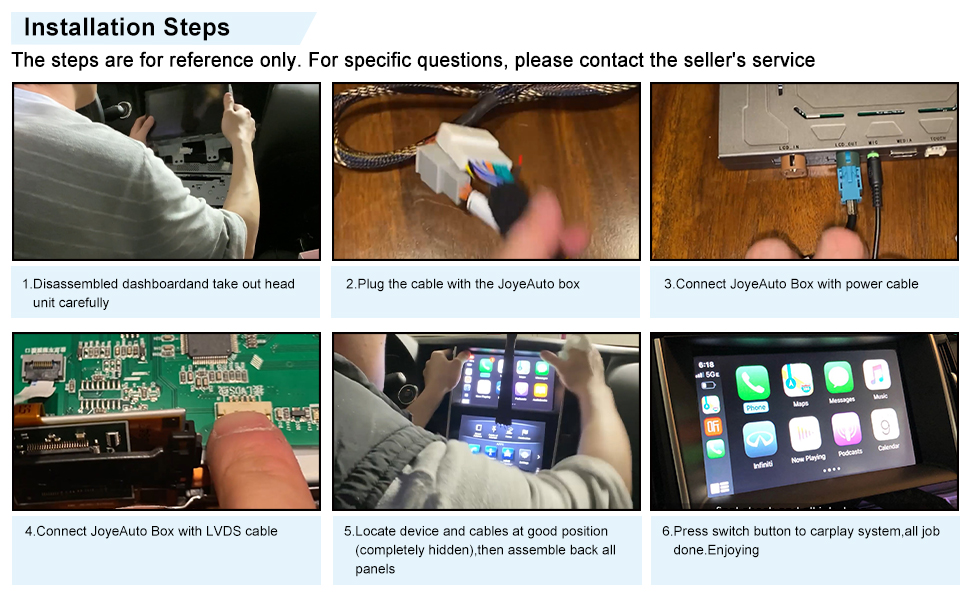
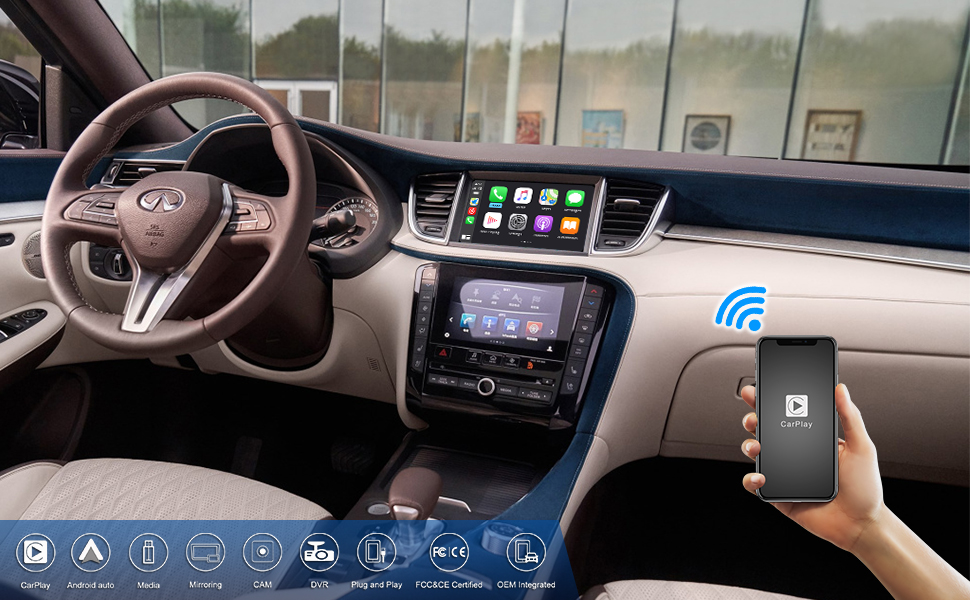
The JOYEAUTO Wireless CarPlay Decoder is a cutting-edge retrofit kit designed for Infiniti 8-inch dual screen models (2015-2019). It enables wireless CarPlay and Android Auto connectivity, supports Mirrorlink and reverse cameras, and offers a plug-and-play installation that transforms your factory infotainment into a modern, connected hub. With fast boot times and dual screen compatibility, it’s the ultimate upgrade for tech-savvy drivers seeking convenience and style.


| ASIN | B086P9446J |
| Audio Output Mode | Stereo, Surround |
| Audio Output Type | Bluetooth |
| Best Sellers Rank | #279,608 in Electronics ( See Top 100 in Electronics ) #4,969 in Car Audio Receivers |
| Brand | ZHOYITO |
| Color | Black |
| Compatible Devices | Smartphone |
| Connectivity Technology | HDMI, USB |
| Connector Type | HDMI, USB |
| Control Method | Voice |
| Controller Type | Android |
| Customer Reviews | 3.6 3.6 out of 5 stars (45) |
| Item Weight | 1.01 Kilograms |
| Manufacturer | JOYEAUTO |
| Model Number | 305de9e8-b112-48c7-b84e-c9a658e0de5d |
| Number of Channels | 5 |
| Other Special Features of the Product | Spotify |
| Output Power | 50 Watts |
| Supported Internet Services | Maps |
| Surround Sound Channel Configuration | 5.0 |
| Total Number of HDMI Ports | 1 |
| Video Encoding | RM |
| Wattage | 50 watts |
| Wireless Technology | Bluetooth, Wi-Fi |
T**S
CarPlay disconnecting
Is there a firmware update I can get for this. I had an iPhone 11 Pro and now I have an iPhone 17 pro and it keeps disconnecting. I heard once the firmware updates it will stay connected.
S**N
Brilliant, the best workaround
Update: Joyeauto sent me a brand new unit within 7 days from China (very fast!) And I got in contact with customer service via WhatsApp. Turned out it was just a faulty unit that I received and the unit works perfectly! It's not perfect because it's a workaround but I have 0 complaints and customer service worked with me the whole way to make sure I was satisfied! Thank you joyeauto :) Hello all, I don't write lengthy reviews but figured I would for this. Have a 2018 infiniti q50. Took apart dash and got my top screen out. Took it apart and installed the board underneath the OEM one (made sure everything was snug and clicked into place). Put the screen back together and tested it in the vehicle. First attempt, nothing was happening. Took it apart and reseated all wires/cables. Tested it again, lost touch screen capability. Not a problem as you can still use the supplementary controls next to the shift knob. Held the back button and still did not switch screens. Used an iPhone, android, and followed the instructions not to connect to wifi or anything. Still, no AA or apple carplay showing. Tested all the cables and double-checked to make sure I wasn't missing anything. The joyeauto box did work as the blue lights were blinking, it detected joyeauto in my Bluetooth and everything else but I could not get the carplay image to show on the top screen. I work in IT and have been building computers and the like for just about my whole life. I'm not sure any further debugging that can be done. It seems like the board underneath is to be a pass-thru but the car is not detecting it whatsoever. If anybody has anything relating to the q50 install, I'm all ears! Sam.
P**M
It's good enough that I'm keeping it
It's good enough that I'm keeping it, but I'm not happy that I have to turn off my wifi and Bluetooth, in order to have a phone call with a person. The lag between each side is at least 2 seconds, making conversation very annoying. Second, at higher volumes there is a very noticeable engine noise. I tried a ground loop isolator, but the sibd quality suffered too much to be usable. Third, the volume for the android assistant is way too low and there's no way to adjust it. So, if you want to listen to a message sje plays back, you gotta turn up your volume all the way and then quickly turn it down, so when the music plays you're not blasted... Outside of that, the unit is responsive and I love all that Android Auto offers for YouTube music, navigation, etc. Just wish they took a little time to tweak this thing more. P.s. you wint be able to use your track forward backward on the steering wheel anymore, when using android auto. Just doesn't do anything...
K**H
Did not work as expected
Installed product no issues, system is responsive with little to no lag but once I switch the the JoyeAuto screen I lose all BT related audio. AM/FM, SXM work but BT and AUX do not. Connected to USB doesn't work either. I've looked through all the settings and tried various combinations of pairing but nothing. The no audio is also true for navigation - not that I use it anyway, would be nice to have the option
A**L
Good Value but has some bugs
It works all right but sometimes it has glitches with the connection and it will reset. Installation was pretty easy to do and only took about an hour. If you don't have any experience with installing your own equipment I would go to a professional to get it done. My only big gripe was the communication with the tech support team. I had an issue where the unit kept on disconnecting from my phone as well as I was unable to use my backup cameras. It took almost a week for them to tell me to do a very simple fix action to the unit. For future reference for anyone having this unit make sure your dip switches are on OFF position except for number 8, which should be ON. The unit itself works pretty well when it wants to. It's pretty fast and never freezes up.
A**I
Great customer service!
I had this professionally installed as I do not know anything about taking a car radio apart or computers. It worked to connect to CarPlay right away but I had to contact service because phone calls weren’t working. I chatted with the service rep and they helped me very quickly fix the issue. This is a great workaround for a car that does not come with CarPlay or navigation. Great product and great service!
A**Z
GPS lag and audio is worse
This is the biggest issue it’s the fact that the GPS lags with Applecar play with any GPS app it always freezes and things your in a different location and flys around the map The audio quality is lower have to use Bluetooth to keep audio quality the best and annoying to switch to Bluetooth due to the phone wanting to switch to CarPlay Can’t use the CarPlay as a option for phone calls the other person can’t hear so have to switch to Bluetooth When it does work it’s amazing
D**E
Works pretty good. Need to tweak a few things to make it nice
It glitches sometimes. Other people complain about audio quality, mainly because you need to turn down the master volume in the device settings so it won’t sound scratchy and out blown. Other than that, it functions pretty well, and I finally have CarPlay in my Q50!
A**R
I did everything that the instruction said and even looked up on youtube on how to place it . When I started my car . Both screen were black and did not work . Super disappointed.
Trustpilot
3 weeks ago
2 days ago