Buy anything from 5,000+ international stores. One checkout price. No surprise fees. Join 2M+ shoppers on Desertcart.
Desertcart purchases this item on your behalf and handles shipping, customs, and support to Denmark.
🚀 Unlock limitless computing freedom with Ubuntu on-the-go!
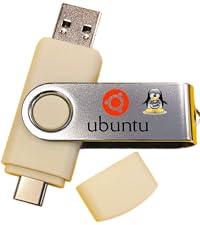
This Linux Ubuntu Bootable USB Flash Drive offers dual USB-A and USB-C compatibility, ultra-fast 450 MB/s read speeds, and supports both amd64 and arm64 architectures. Perfect for beginners and IT professionals alike, it allows you to run Ubuntu live or install it permanently, featuring a fully customizable boot environment and a complete desktop productivity suite. Built with premium hardware and backed by responsive support, it’s your ultimate portable OS solution for work, play, and advanced server management.


| ASIN | B087NJP411 |
| Additional Features | Dual-connector, Live-boot ready, Plug-and-play, Professional grade, USB-C Compatible |
| Best Sellers Rank | #781 in USB Flash Drives |
| Brand | TECH STORE ON |
| Color | Beige |
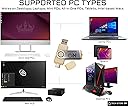
| Compatible Devices | Desktop, Laptop, PC, Tablet, mini PC |
| Connectivity Technology | USB |
| Customer Reviews | 4.1 out of 5 stars 145 Reviews |
| Flash Memory Type | USB Flash Drive |
| Hardware Connectivity Technology | USB Type A, USB Type C |
| Hardware Interface | USB |
| Item Dimensions D x W x H | 2.5"D x 0.5"W x 0.5"H |
| Item Weight | 1 Ounces |
| Manufacturer | Tech Store On |
| Memory Storage Capacity | 8 GB |
| Mfr Part Number | USBBAP05 |
| Model Name | USBBAP05 |
| Model Number | USBBAP05 |
| Read Speed | 450 Megabytes Per Second |
| Special Feature | Dual-connector, Live-boot ready, Plug-and-play, Professional grade, USB-C Compatible |
| Unit Count | 1.0 Count |
| Warranty Description | 1 year |
| Write Speed | 25 megabytes_per_second |
G**R
Easy to install
I used UNIX decades ago and resisted installing Linex on any of my computers for years. Recently another Windows problem motivated me to get a new operating system. Using the USB drive made installing easy. i’ve got several applications not installed with the OS installed and working. Lots of commands don’t work the way I remembered, but what I’ve seen so far is much better. The Command Line is still there if you need it. But the shell does everything I’ve needed so far. I was a Systems Administrator and am comfortable installing software and OS. This made it easy I was insta.led and running applications very quickly. Ubuntu does everything I needed, plus a lot more. I’m reading some books and doing tutorials to learn Ubuntu. So far, I think I’m going to like this OS. I’m a beginner, but managed to install there RTl-SDR drivers I needed for an SDR radio. I installed an app that tunes to mt SDR-RTL dongle and within a few hours I was receiving stations worldwide on my PC. This was a real confidence builder and I’m going to be adding other Amateur Radio software. System is stable and running very well.
M**.
Great Alternative
Worked great when and after installing. Times I prefer it over the alternative.Hard drive crash, reinstall 7 to fix and this gave me everything I needed without office and Edge.
L**E
As easy as ABC's!
I have a practically new computer, but it doesn't support the latest upgrade to Windows. (Imagine that). I've used Ubuntu in the past and I appreciate the security that comes with this operating system. I just inserted the USB, started the computer, and it guided me through installation. Very happy! I have a Dell. This also worked in my mom's Hewlett Packard.
2**W
Reminds me of Win95, lean and clean.
Installed Ubuntu on an Acer Aspire laptop purchased in 2010. Utube: Watch Tektoc's "How to install Ubuntu for beginner's", take notes on the setup of the program. Bios: My laptop uses F12 to enter bios manager and F2 find the USB flash drive. After starting "restart", tap the key for your computer to enter the bios. If you do not see your USB listed, restart the computer again and look for the F2 key, it will only appear for 2 or 3 seconds. Tap the key and your drive should appear in the list. This is how I found the USB drive. Ubuntu: After the initial setup appears, choose to (1) partition your hard drive and install it along side windows (2) Reformat your hard drive and do a clean install, which is what I did (3) boot from the USB drive and see If you like the operating system. When the install begins you have to make some decisions about the installation and that is why I recommended the "Tectoc" video. Ubuntu is a very lean system and will take about :30 minutes to install. It uses about 1.4 GB out of 4.0 GB of memory and out of 500 GB of hard drive space, 491 GB is available for use. The program will open windows files and corel wordperfect files in LebreOffice. This operating system has 30 apps preinstalled and you can add more (2 pages to work with). Still playing with this but I like what I see so far. s
E**B
Linux Flash Drive.
I got this to use on my Dell desktop. It will not work on this system for some reason. I have been running Linux on one of my laptops for some time and it would work on that laptop so I guess there is no problem with the flash drive but it would not do what I needed it to.
M**.
I finally gave up -- windows no more
Recently, I windows PC got all twisted up in knots from some kind of a virus (really an update, but may as well been a virus). The PC was hopelessly twisted into a windows moebius strip and there was nothing that could be done to save it. Being unsure which Linux distro would be best, this was a great find. I was able to try out different versions, and then when I selected one, installation of that OS was easy. Windows is on notice here. As windows continues to dissolve into being completely not useful, this item is sure to be used many more times. Recommend
A**R
⚠️ WARNING
These are ventoy based boot shells. Not clean ISOs. They are injected with PXE dependent GRUB environments which attempt remote provisioning by default, and alter BIOS/NVRAM values. They permanently alter your BIOS and inject PXE bootloader's into your efi. If you have a Thinkpad or Intel based BIOS, lock it down hard, because these things will alter your TPM, exploit AMT/ME firmware for remote provisioning and permanently alter or brick your rigs. They induced permanent changes, greyed out and missing options, and phantom bootloader entries like "BootAllPciLan", and even MEBx etc across multiple unicorn machines that previously had AMT permanently disabled. One Thinkpad was fully bricked because it didn't have the "bios flashing by end users" locked down yet. Two of them had the TPM remotely activated and provisioned with the option "physical presence for provisioning" completely removed from the BIOS. AMT option (which again was there and permanently disabled) completely disappeared, and new BIOS configurations that involve sharing your screen remotely appeared that were never there before and you can't disable it. You can only choose whether to do it via USBc or HDMI. Several machines are now all in questionable condition and one is bricked. This is very sad because I thought these were trustworthy and well made. This is either a supply chain attack, or the seller themselves is complicit in some kind of classified program. Either way, be careful.⚠️
S**N
Wayne
The directions could be a little more precise. It does not tell you to turn off secure boot and to turn it back on so your HP laptop will work, but it does work great even picked up my NIC so I had internet.
A**R
Doesn’t work
Well use balenaEtcher to install. Standard usb keyboard and mouse somehow not detected so at the grub menu just stuck with no input. A little disappointing!
J**U
Excelente
Me salió muy bueno y pude instalar sin problemas.
C**N
No funciono al arranque
Pedi esta USB para ahorrarme el trabajo de crearla yo mismo. Desafortunadamente no sirvió de nada. Marca un error al intentar el boot. Termine creándola yo mismo y perdiendo tiempo y dinero. No lo usen.
Trustpilot
2 weeks ago
1 month ago