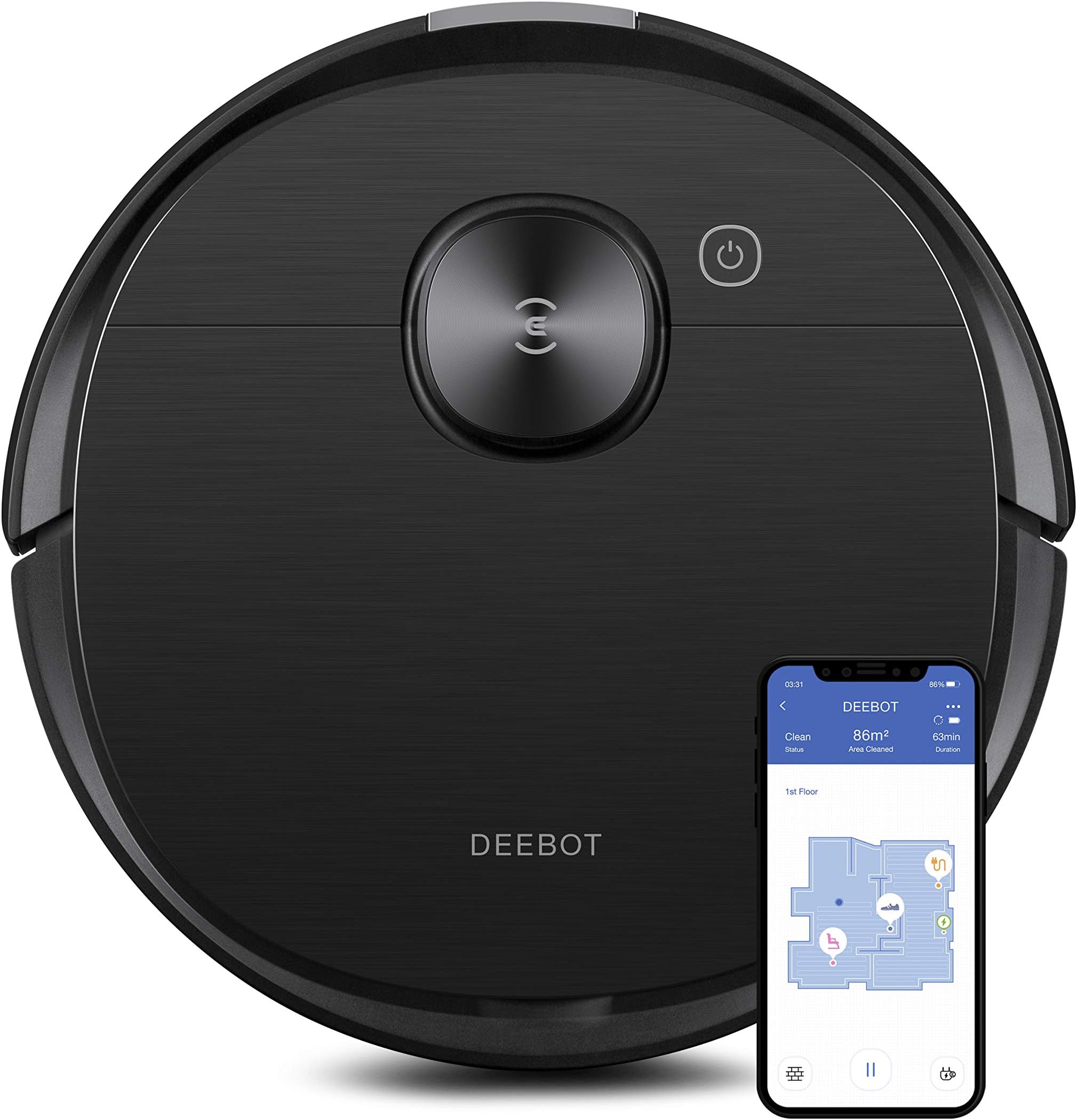
ECOVACS Deebot T8 AIVI
Product ID: 196444538
Details
- BrandECOVACS
- ColorT8 Aivi
- Model NameDEEBOT OZMO T8
- Surface RecommendationCarpet Hard
🧠AI object recognition 200% faster
🧹Simultaneous vacuum & mop
🗺️Laser mapping 4X precision
Desertcart purchases this item on your behalf and handles shipping, customs, and support to Denmark.
🚀 Elevate your clean game with AI-powered precision and hands-free luxury!
The ECOVACS Deebot T8 AIVI is a premium robot vacuum and mop hybrid featuring simultaneous vacuuming and mopping, advanced AI object recognition that identifies obstacles 200% faster, and precision laser mapping with 4X accuracy. It offers up to 3 hours of runtime to cover large homes, customizable cleaning via app control, and on-demand HD live video with two-way audio for remote monitoring. Compatible with Alexa, Google Assistant, and upgradeable with OZMO Pro and Auto-Empty Station for a truly hands-free experience.




| ASIN | B086214HTZ |
| Battery Life | 3 hours |
| Battery Type | Lithium Ion |
| Best Sellers Rank | #694,812 in Home & Kitchen ( See Top 100 in Home & Kitchen ) #349 in Robotic Vacuums |
| Brand | ECOVACS |
| Brand Name | ECOVACS |
| Capacity | 0.24 liters |
| Color | T8 Aivi |
| Compatible Devices | Alexa, Amazon Echo, Android phones, Google Home, Smartphones, iPhones |
| Control Method | App |
| Controller Type | Amazon Alexa, App Control, Google Assistant |
| Customer Reviews | 3.9 out of 5 stars 982 Reviews |
| Filter Type | Cartridge |
| Form Factor | Robotic |
| Global Trade Identification Number | 00856560007825 |
| Included Components | 1 mopping cloth and 5 disposable cloths, Charging dock, Instruction Guide, Replacement side brushes and filter, Robotic vacuum |
| Indoor Outdoor Usage | Indoor |
| Item Dimensions L x W x H | 13.7"L x 13.7"W x 3.6"H |
| Item Type Name | ECOVACS Deebot T8 AIVI Robot Vacuum and Mop Cleaner, Vacumming and Mopping in One-Go, Smart AI Object Recognition, Laser Mapping, On-Demand Live Video, Custom Clean, Auto-empty Station Compatible |
| Item Weight | 7.8 pounds |
| Manufacturer | ecovacs |
| Manufacturer Part Number | OZT8AIVI |
| Manufacturer Warranty Description | 1 year manufacturer. |
| Model Name | DEEBOT OZMO T8 AIVI Robot Vacuum Cleaner, Robotic Vacumm and Mop in One-Go, Precise Laser Mapping |
| Model Number | OZT8AIVI |
| Noise Level | 66 db |
| Number of Items | 1 |
| Other Special Features of the Product | AI Intelligent object recognition, Advanced Custom Cleaning, Advanced dTOF sensors mapping, App Or Voice Control, Carpet detection, Compatible with OZMO Pro and Auto-Empty Station (sold seperately), High efficient filters, LiDAR Navigation, Missed Area Notification, Multi-Floor Mapping, On-demand live video, Simultaneous vacumming and mopping, Virtual Boundaries, Works with Alexa |
| Power Source | Battery Powered |
| Product Dimensions | 13.7"L x 13.7"W x 3.6"H |
| Style Name | T8 AIVI |
| Surface Recommendation | Carpet, Hard floor, Linoleum |
| UPC | 856560007825 |
| Unit Count | 1 Count |
| Voltage | 14.4 volts |
S**N
Best Botvac Out There
I normally don't take the time to leave detailed reviews, but this product is worth it. To begin, I've owned a Neato Botvac Connected for about 4 years and before that a BOBSweep for about 5 minutes. Hands down "Dee", our new Ecovacs Deebot T8 AIVI botvac is the best I've owned. We've had her about (why we assign gender to a robot is beyond me) 3 weeks and it has been relatively effortless to have her. We also purchased the Ecovacs auto-empty station, which I'll include in my analysis. Conditions Dee works in: we have a 4000 sq ft ranch-style house on an acreage with 2 dogs. Our has has a variance of hardwood floors and throw rugs as well as linoleum floors in our mudroom. The one main home mess insurgent is Zeus, our 125-lb, 2 yr old Great Pyrenees pup who is a shedding machine of spun cotton-like hair, especially in the Spring. He is also a bull in a China closet. Positives of the Deebot: AI- the Deebot has an exceptional AI that allows it to navigate effortlessly in the above described environment. Dee has only gotten stuck once on a shag throw rug that looks like a reject from the 70s. Otherwise, she has not gotten stuck in the 3 weeks we've owned her. Floor Plan mapping/ Navigation- like many have commented, this took us several times to get straight. My recommendation is to follow the instructions and leave all the doors open to the rooms you want Deebot to map and let it do it's thing. We did this and now close off rooms I don't want cleaned every time due to lack of use. However, they are in the AI's map in case we need to add them in. I have not experienced Dee getting lost under couches, etc due to the lack of a flashlight on it, as some other reviewers have indicated. She navigates just fine under our couches and other impediments. Speaking of getting under things, I really like the lower profile of Dee as compared to our Neato Botvac Connected. Dee also goes over high points with no issues whatsoever. App Use- the ecovacs app is exceptional. It immediately connected to our Deebot and it's functionality is very good. I've included a pic of it to give you a sense of it. You can track in real time where your Deebot is at when working, use as it as a spy with it camera and have it go to a pre-designated room to be used in area clean mode. Scheduling your Deebot is easy and has been pain-free. I have Dee clean our upper floor every Monday, Wednesday, Friday and Saturday due to the hair insurgent I mentioned earlier. dee responds to return to base command and auto empty without hesitation. Suction- our Deebot has very impressive suction and one of big reasons I bought this model with the extensive dog hair I am up against. Dee varies her suction based on cleaning surface, which at first I thought she was malfunctioning, but I assume this conserves battery life. We're virtually hair free after each cleaning. Noise- One of the pleasant surprises, although not a key consideration in buying the Deebot was how quiet the Deebot is. I can take phone calls with Dee working in the background, or if you want no noise, it is easy to pause cleaning until you tell it to resume. Maintenance- as with any botvac you will buy, the Deebot will require maintenance. I generally clean the beating brush, vacuum out the dust bin area and wipe Dee down weekly. This is largely due to my hair insurgent dog and long haired wife, all of which their hair gets caught up in the beating brush. Your experiences may vary. I also have to physically clean out the dust bin every few days, because my dog's poofy hair gets caught up in the it and the auto empty station cannot suck it all out effectively. I believe my hair situation is an extreme one,it may work just fine if you don't have a big hairy oaf loping through your house, shedding. Battery Life- outstanding. As with many other botvacs, will head to the recharge station, which it has no problem finding, when it needs to take on juice. Just follow the instructions on placement of the recharge or auto empty station. I would highly recommend (at additional cost) the auto emptying station, despite the additional cost. It's worth it and saves maintenance, in my experience. Instructions- we very good. I am a relatively tech savvy middle aged man with previous experience with botvacs and could understand all of the instructions quite well. I cannot comment on tech support as I have not had to use it (hopefully not at all). Cost- I paid $699.00 for my Deebot and an additional $249.00 for the auto empty station in Mar 2021. Great value, based on my experience so far. My experience has been, you get what you pay for (see the BOBSweep I bought for $200.00 previously). Build/ Long Term Reliability- the design of this botvac is very good. I don't see any glaring design flaws that could impact on long term reliability. Again, the key is performing good maintenance on your system. Mopping- cannot comment on this; haven't used yet. In summary, I can give my seal of approval on this product. It actually has improved my quality of life, unlike some other products or gadgets we often shell $$ out for. If it fits into your budget, well worth your money.
G**S
Performs better than expected
We finally got into the Robot Vacuum market and Picked this model due to general reviews. After a couple of days of working with the device, I'm going with an initial rating of 5 stars. It arrived earlier than promised, it was packaged extremely well. Instructions were well written and everything functioned as stated. Assembly out of the box is quick. Pull off the protective films, pop in two brushes, check that all packing is removed, plug in the wall charger, and set the device onto the charger. Add the App to your phone, and go from there. Start to finish was about two hours for us, but over an hour was a glitch with iPhone, not the software. Once we got the iPhone set up properly, the setup took under five minutes. We allowed the device to charge for maybe four hours, then used the app to send it on a random clean. The first two times we tried, something seemed to glitch between the app and the device, but when we tried a fresh load of the app and a restart, the device slowly mapped the entire house. It marked a noted 181 obstacles (cords, sheets or blankets lying down on the floor from the bed, etc.) and showed where these were on a 'map' of your home. You have the option of clearing the obstacles and letting it run again, or closing the task. It vacuumed better than expected. The tank was disgustingly full. We erased the initial map it made and started fresh on day two, just to set the area we wanted the device to vacuum. We closed the doors to rooms we did not want on it's 'map'. On Day two its performance was again extremely good to perfect. Even after an initial vacuuming by ourselves with a high quality vac, this device filled its tank again with dust and dog hair. I can see daily vacuuming with this device will improve the dust levels in our house. Its now set to vacuum daily starting at 11:30, which is the time our dog likes to sleep. (he does not approve of the vacuum). . It's first tie out was on the minute, and it took a little over 80 minutes to vacuum all the areas we wanted cleaned. The device froze up once -- I had my recliner up and it went under the foot of the recliner, and, I hate say, the dust sensor was overwhelmed. I had to wipe the dust off , but once I did, the device finished its circuit and parked to charge. I wish I had bought this a long time ago.
R**.
Map Keeps Resetting — Years of Wasted Time
Loved these at first. Two units, one per floor. Mapping worked, hard floors cleaned well, and the room labels plus boundaries were worth the setup time. Then the map started recreating itself on its own. No moving the robot, no power cycle, no reset — it just loses position, overlays a shifted new map, and ignores the boundaries and rooms I spent hours building. Restore only brings back the raw map; every label, room, and no-go zone is gone, so I redo the whole house again. Support has pointed me at the same FAQ advice for years — don’t pick it up, don’t turn it off — even though none of that is happening. The top map FAQs are all about this exact failure, yet there’s still no map lock or full restore that keeps my settings. This is a software fault they refuse to fix. I will never buy another Ecovacs product or accessory.
B**S
Very happy overall, but there is room for improvement
I have the Deebot T8 AIVI, the Ozmo Pro mop, and the Auto Empty Bin. I've run the robot about 6 times so far. This is my first robo vac, but I did read amd watch reviews for months before deciding on this one. I have a 2600 Sq ft 1 story home, all hard flooring except for the bedrooms. Setup: Very easy. The app and instructions walk you through it step by step. Navigation: Works really well. I was very surprised at how well it can get around things, and wedge itself in and out of tight spots by backing up into them if it needs to. It will run around the edge and then section off the room and fill in rows, then it will go and try to get spots that it missed. Mapping: The LIDAR works very well, it will have 85% of the "middle" of the room mapped within seconds, then it will fill in the gaps as it edges around it. No robot will be perfect at this, but it does a good job. I did screw up the map the first time because it was about to go under my bed and I paused it, then I moved it backwards about 1 inch and put a barrier around my bed. This caused it to think it was in some other place and it started overlaying the map. Don't do what I did. I had to reset the map, start it at the charger and start over. Initial mapping took almost its entire battery life because it will "wander around" a bit, to fill in all the gaps, during that process. I think all robo-vacs have this challenge to some degree. I advise you prepare your home, keep an eye on it, and stay out of it's way,, until the initial map is done.. Once the initial map is done, you can set up all your boundaries, preferences, etc and it works quite well with much less battery. Obstacle avoidance: Personally, I choose to prepare my house, by picking up anything problematic off the floor, and moving things to give it room to get around stuff, similar to how I would if I were cleaning myself. The better you prepare the better it will do. Remeber, even with "AI" it's still a dumb machine so stay on the side of caution. That's said, it works quite well to avoid things in its way if it can see them. It's doesn't need to know what they are to avoid them. I did a bit of my own testing and it avoided flat socks about 75% of the time. Anything that sticks up more (shoes, hats, dog toys) it avoided basically every time... except for one time when it knocked over my flimsy tree lamp, which I caught before it fell. Added a "no-go" boundary and it's not a problem at all anymore. Vacuum performance: hard floor is excellent, carpet is excellent, rugs vary quite a bit. I don't chance it with bath mats, low "heavier area rugs are fine. I have one rug under my desk that it doesn't get much dog hair off of, I usually hit that with a high powered corded vac. Everything sticks to that rug though, so it's just a pain regardless. Mop performance: meh... the standard mop is just kinda silly to expect much out of, the Ozmo Pro is much better, but it's not going to get out anything that really requires some scrubbing. It performs fine on my faux hardwood, it's kinda lacking on my kitchen tile. You can tell it to go over areas twice and use max water flow, which does help more. Do not use cleaning solution in the reservoir- they warn you about this several times. It will cause damage over time. The App: I really don't like the App. It's ok I guess, but it's features are very basic. You can't make custom room names, rather they give you a small pre made list of names to choose from, or generic "A", "B", "C"... this is annoying because Alexa will allow you to make custom names for your other device groups. I find this severely disappointing. The map editing is another sad story. You can divide and merge rooms, but only within very limited parameters. I can't divide my kitchen and living room the way they are actually laid out, so for now I just have to deal with it. They did an update to fix many of the bugs from previous versions, so I haven't experienced any app crashing or anything like that... just very limited features. Customer service: in my case.. very responsive. I sent them a message in app about the room dividing issue and they got back to me within 24hrs with answers. I can't complain about that. Maintenance: I clean after every 2 runs. The more you maintain it, the longer it will perform. I think you can get away with only cleaning once a week. YMMV. They give you a really handy tool that makes cleaning the brush and filter a low effort job. Any robo-vac is going to require scheduled home maintenance. Some people say it will scratch your floors. The wheels are rubber, however... the front caster wheel is the culprit. Keep it clean and free of debris and it should be fine. It doesn't scratch my floors, but don't take my word for it.
A**E
Best Bot To Date (that I've owned)
This is the 4th robot vacuum that I've owned. Not that I'm horrible on them, I am just always on the lookout for a better one. I am the proud parent of a beautiful German Shephard, and she's an indoor puppy (9 years old). To say that this dog sheds is putting it mildly. I imagine you could build a new dog out of what she drops every couple of weeks. So, having a vacuum that can keep up with her is going to be rough. This bot is replacing a 2-year-old "Samsung POWERbot", and I will say that I am EXTREMELY glad that I did. Admittedly, the brush style on a Roomba bot is a much superior design when it comes to pet hair, but the bells and whistles on this machine sold me. I should preface this with: I've only had this bot for a day, so this may be the new car smell still working on me, but this bot is amazing. First, the sound is incredibly low. If I didn't see what it picked up I'd swear that it was not sucking as hard as they claimed. The results spoke for themselves though, and I was able to hold a normal volume conversation with my wife even as DB (yeah, you gotta name these things!) was kicking into high gear going over a rug. Amazingly low volume. Next, the mapping was phenomenal. I live in a 2200 sq ft open floor plan home and DB was able to map it all and even made some great guesses on where a room would split. If I had to lay a complaint down about this area, it'd be because of the app. You can't freely name an area and you can only pick from a small handful of predefined labels. Also, when you want to customize the areas (open floor plan, remember) to say this quarter of the room is the kitchen and this quarter is the dining and this half is the living, you can't. The best you can do is split it in half, not quarters. Minor irritant, but it's there. Finally, the AI... I can't really speak too much on this as I've only had DB for a day, but so far, not impressed. I had a few cables on the ground next to walls cause, well, that's where cables go, and DB definitely did NOT try to avoid them. I'm hoping that gets better. I also have, well my wife does, a chiweenie (chihuahua and dachsund mix) that has accidents in a certain area of the house. Yeah, the last robot definitely drug a few of those around. This is where I hope the AI part shines! Until I get the nerve to test that though, the app allows me to set up no-fly zones, so I've blocked off that area. Also, I have a mesh network. I read in a review somewhere (maybe not on Amazon) that this bot doesn't support mesh networks unless you jump through some hoops. I did not find that to be the case. DB didn't automatically connect to the network, but when I used my phone to connect to DB, then it immediately connected to my home network. I didn't have to do anything other than connect to it via my phone. It does require a 2.4ghz band though, that part is probably non-negotiable, but most networks nowadays broadcast in both 2.4 and 5.
B**G
Can't get up on wool rugs.
It was mapping the house tonight and repeatedly had difficulty getting up on wool rugs that are not particulary thick - we don't have rug pads under them. It simply could not transition from wood floor to rug. The rest of it worked fine - this is the first night - it methodically mapped the house, going over and over some areas but needing help getting up on rugs sometime - at other times it got a head of speed and got onto the rug fine. But it was nowhere near as good at getting around as the Eufy that I bought for 160.00 - if this can't get figured out it will be returned, but we'll see. Day 2 - another attempt. Moved to cradle to an open area. Had to delete the app, hit the reset on the bot and start the process over again. While trying to reach advanced settings I ran it a short time and sent it back to the cradle (you have to find this option in the app itself) to try and get access - not allowed. So now I am redoing the house again, and letting it run. Unlike yesterday I pulled all the chairs out of the rooms in addition to pulling everything small or cords off the floor, to get a map established. It's behaving the way the app predicted, running along the edges then back and forth. It cannot handle area rugs consistently - these are typical wool rugs, not small, which are not on pads, so not elevated. It struggles to get up on them each time, I don't know if this is a mapping "behavior" or not, we will see. Support was poor - called twice and was disconnected both times. The online menu support (I hate that stuff) didn't address the questions we had at all. So I emailed. We'll see. It cleans very well - the floors have never looked like this (I have 3 dogs) ever. 9/19. We are trying the mopping action for the first time. Deebot is getting stuck on the edge of the wool rugs more often - and getting hung up on the corners of rugs, telling me it is stuck. A call to support resulted in "Deebot is not made to vacuum rugs.' HUH? With more questions he said Deebot may sense the carpet is too soft to use its drive wheels...." "Create a virtual boundary." The app is cumbersome and not intuitive - we have yet to figure out how to tell if your virtual boundary is actually the right size - it's not a photographic representation. Well that's no help., In its defense, Deebot vacuums like gangbusters. The whole point of buying it was to see if we could automate the tasks of vacuuming and wiping off floors. It does both very well, but not at the same time. There is no way that I have figured out to actually tell it only to mop or only to vacuum - if there were you could create a map for mopping and one for vacuuming, but Deebot vacuums, then mops, then dries in that sequence. We'll be returning it. We may buy another one but feel like we need to keep looking at options. A vacuum that can't vacuum carpets is pretty worthless and with the mop on the back it has all sorts of problems. It also can't find the edge of braided area rugs either - I only have small ones and pull them up. But I must say, when vacuuming this thing is absolutely stellar. Clean as a whistle. Cleaner than the house has ever been. No dust in the air, nothing.
R**T
The best robot vacuum
My kids named her Lucifer, so when I say "who did this?" they say "let Lucifer clean it" O__o So I call her Lucy (short) BONUSES (appart from doing a nice job as a Robot Vacuum): BONUS 1 Google Home compatible! I can say "hey Google, tell Lucifer to clean the kitchen" and out she goes. Great when I'm coming home with guests and I've seen in my phone through her remote cam that the floor is not clean. BONUS 2 She mops! Not a thorough mop, though, as for stubborn stains, but brilliant for every day use, to keep the tile floor shiny. BONUS 3 She's my eye at home! She doubles as a REMOTE SECURITY CAMERA! The vigilance interface let's me customize "observation points" around my house, so I can check arround even when traveling. TIPS I'VE LEARNED: 1.- Wet the mop cloth! At first I thought the mopping function was not working, then I realized it takes some time to wet the pad, afterwards she mops nicely. 2.- The first time, just let it run free enough time and recharge if necessary around your house, as many times as needed, until she finishes the map. Otherwise she'll get confused and won't finish the map and many advanced functions won't work. Don't move anything while she's mapping for the first time! Afterwards, she will improve the map with each cleaning cycle. WISH LIST (room for improvement): 1.- My kids would love to have the app and control her, too, but I can't share Lucy with other family members :( ECOVACS PLEASE LET ME SHARE LUCY 2.- Since my house has an open floor plan (just two walls and then big windows encasing the living area), when editing the map, the room separation function is very limited... e.g.: I've had a hard time trying to separate the kitchen from the dining room since there's no wall in between. It won't let me break appart a single space then one of the separation points doesn't touch a wall. ECOVACS PLEASE FIX THIS. 3.- The cat has struggled to befriend Lucy, she catches his attention and he seems to have a secret crush on her, but with respect.
Y**.
Finally a robot that works like a real robot!
This DEEBOT replaces our 6-year old Roomba which was damaged beyond repair from thousands of cleaning sessions. The Roomba used to bump into things, suck up cat vomit, and generally got stuck several times during a cleaning session. The DEEBOT is a massive improvement! AND IT MOPS?! WHAT! Here are the pros and cons: Pros: 1. Easy setup, got up and running in minutes 2. Very quiet! 3. Never gets stuck 4. Actually avoids wires and other items, and seems to remember where it got stuck last time and approaches that area carefully 5. Masterfully detects rugs and increases suction while on them 6. Drives over things like a tank, even complicated places that used to always get Roomba stuck 7. LIDAR mapping is AMAZING! Very accurate, very reliable 8. Does not freak out the cats, and is very gentle around things, even if it occasionally bumps into something 9. Does not close doors on itself. Roomba used to go into an open room and trap itself after bumping into the door too many times. The DEEBOT's LIDAR mapping detects doors so they stay open 10. Tons of features in the app, Alexa integration, etc! Looks like the company actually uses the robot themselves and made it very customizable 11. Roving camera feature is just a killer cherry on top! 12. There is nothing this robot does that feels dumb or random. Cons: 1. I don't know if it's much of a con yet, but it is a little tricky to figure out how to work the maps. That being said, it does such a good job mapping an unknown area that I'm not worried about it finding its way around even if it has to re-create the map from scratch every time. 2. The LIDAR bump sticks out a bit, which I understand is a necessity, but we have a few furniture items where the LIDAR bumps into it and I worry about its longevity. I hope it was designed with this in mind. The Roomba used to have a little IR sensor that stuck out and after a few years it broke, so hopefully an expensive LIDAR sensor won't get damaged in the same way. I will set up a restricted zone around that area, but not sure if it'll decide to delete the map on me later. Just haven't used it long enough to figure out the map situation. 3. The speaker for the voice is a bit quiet, but so was the Roomba's. Not a big deal at all, and you can turn up the volume a bit via the app Overall, I did a lot of research before pulling the trigger. I have to say, I strongly believe that this is the best robot vacuum / mop combo that money can buy. It's less expensive than some high-end Roomba products, but it does a much better job and feels like a very polished device overall. I'm 100% satisfied with my purchase, and will probably be buying the self-emptying station soon!
A**W
Excellent
Excellent
G**B
8 months of use; and now a review!
I’ve owned my Deebot OZMO T8 AIVI and an Auto-Empty Station for eight months now, and I decided to use the system for quite a while before posting my review. I wanted to give an in-depth and honest opinion about it. Although there continue to be some annoying glitches, I’ve decided that the Deebot T8 AIVI and the Auto-Emptying Station are a big help to me when it comes to cleaning my house! I hope some of my comments here will help others to decide if this set-up is a good choice for their home. • Let me start by saying that ordering from Amazon was easy and fast. And, the price was as cheap as any other retailer advertising this new model in my area. At the time I wanted to order a Deebot OZMO T8 AIVI, all of the local retailers in my area were out of stock. Amazon was out of stock as well, but within a few days, the robot became available again on Amazon. But it was still not available to purchase at my local retailers. I’ve never had an issue with ordering from Amazon, so I placed my order. • Once both boxes arrived, I didn’t have any problems at all with downloading the Ecovacs app to my cell phone. That was easy. What wasn’t so easy was trying to get the app to work, and the robot to be connected to the app. I discovered that I had issues because the Wi-Fi in my house was set to 5 GHz, and not the 2.4 GHz that’s required for the robot to work. Although I have a dual-band modem/router, the 2.4 GHz network wasn’t set up for me through my Internet provider. After contacting my provider, and getting a reset of my router, I was good to go. If I want to, I can switch my Wi-Fi from 2.4 GHz to 5 GHz when the robot isn’t running. It would be so much easier, though, if Ecovacs would somehow program the robot to work on either band. With that being said, the new outdoor security cameras I recently purchased also only work on the 2.4 GHz signal with my cell phone, so this re-set was necessary anyway. • Now, the app works fine, and I haven’t had any issues. The robot has mapped two floors of my home. I’m able to schedule certain areas to be vacuumed daily [like the area rug in front of the front door]; I was able to setup some virtual boundaries in two places where OZMO tends to get stuck; and, the app lets me know when all parts of the robot and the emptying station need to be cleaned and/or emptied. • I do have one major issue with the mapping: I’d like to be able to save more maps in the app! I have a two story home with a finished basement…three floors in total. Also, my family room is located one-step below the main level of our home, and OZMO doesn’t go up or down steps. And, a new sunroom addition off of that family room has a threshold that’s too high for OZMO to climb over. If I could, I’d like to have a map for all of the areas I need to clean…a map for the main floor, a map for the second story where the bedroom are located, one for the family room, one for the sunroom, and one for the basement. So, instead of just two maps that are allowed in multi-floor mapping—which I currently have set up as one map saved for the main floor and one map saved for the second story—I’d like to have five maps. However, in the end, it really doesn’t matter, as OZMO does a great job in the mapped areas, and it also vacuums and mops in those extra spaces without needing the maps. I just move OZMO and the Auto-Empty Station to each specific area, and OZMO auto-locates in each new area, and makes it back to the station when finished [usually]. Customer Service tells me that adding additional maps will likely be coming in the future. However, I wasn’t sure if this would be possible due to an update to the app, or only with a new model of robot in the future. • Customer Support at Ecovacs told me that I could get additional Auto-Empty Stations if I don’t want to keep moving the one station that I have from one floor of my home to another. That’s something I’m still thinking about, as the Auto-Empty Stations are very expensive to purchase here in Canada. • One glitch I don’t like is that OZMO occasionally can’t find its way back to the Auto-Empty Station when it’s finished with a task. On one occasion, it roamed around the main floor of the house, and stopped a few inches in front of the station. Another time, the robot meandered around the dining room before finally locking in on a signal, and then it made its way to the station, which is actually located in the dining room. Another time, OZMO just wandered around the main floor and could not figure out where it was at all. I have no idea why this happened. However, I just called up the app on my cellphone, and ordered OZMO back to the station for recharging. And, it then crept back to where it belonged for recharging. I don’t get so worried anymore if this happens, as I just grab my cell phone and tap the Return to Charging icon. • As an update to the above, OZMO had trouble finding its way back to the station a few times last week, even with tapping Return to Charge. I notice that this is more of an issue if OZMO has not been used in a few days. When this happens, I just pick up the vacuum and return it to the charging station. • OZMO is bigger in diameter than I had expected, and the robot can’t get into all the spaces in my house that need to be vacuumed. For example, it can’t fit between the bathtub and the toilet, or the toilet and the vanity. It also can’t fit between a few end tables and the wall, or between my bedside night tables and the wall. I’ve slightly re-positioned a few pieces of furniture to maximize the area that OZMO can cover. In other spots where this isn’t possible, I use a micro-fiber dust mop in the areas that OZMO can’t reach. But I have to say that OZMO covers about 95% of the floor area in every room. And, the time I have to spend with the micro-fiber dust mop is far less than the time it would take to do all of the vacuuming and mopping on my own. • Although OZMO is able to get underneath my dining room table, and it’s able to vacuum and mop around the legs of the chairs, it can’t do this around the kitchen chairs when they’re left at the kitchen table. That’s because the cross-supports on the legs of these particular chairs are too low for OZMO to fit under. I do have to move the chairs from the kitchen table when OZMO is vacuuming the area rug there. Some days, if I don’t feel like moving the chairs, I just set up a temporary virtual border. • Another issue has been with the kick-pleats on the bottom of my living room sofa and loveseat, and on the bottom of a few chairs, and the dust ruffles around two beds. OZMO sees these as solid walls, and will not vacuum or mop under these pieces of furniture unless I tuck up the kick-pleats and skirts so that the area underneath the furniture is accessible. A bit of a pain, but at least those areas are getting cleaned on a regular basis now, as I rarely bothered vacuuming under the beds or under the furniture before I got the Deebot. And, if I don’t have time to lift up everything, OZMO just doesn’t clean under the sofa, under the loveseat, under the chairs, or under the beds that day. • When I first got the robot, I had a problem with OZMO not being able to navigate consistently from the hardwood floors onto two particular area rugs. OZMO could do it sometimes, but not other times. The robot could easily get onto two other area rugs, but these two particular rugs were sometimes a challenge. I noticed that this was more of an issue if I had removed the water tank for drying after mopping the floors. With the water tank in place, even when empty, there’s less of an issue about OZMO getting up and onto the rugs. I actually ended up trimming the under-padding of the two area rugs by about 1.25 inches all around the edges. This allowed the borders of the rugs to lie flat on the hardwood, which has made it possible for OZMO to get up onto the rugs now. • There are spots in my home where OZMO always gets stuck. One is where an area rug at the front door is close to, but not up against, a step. And, he also tends to get stuck against the oven door in the kitchen. I think OZMO is just the right height to get jammed there. OZMO getting stuck in those places happened so frequently that I setup virtual boundaries. They’re not problems any longer! However, those are now areas that I have to clean myself. The other area is where a heat-vent register sits on top of an area rug at the front door. Because this register is slightly domed on top, OZMO tends to get stuck on it. Again, I put up a virtual boundary, and it isn’t an issue any longer. I think I’ll get a flat vent-register and see if that helps. • Sometimes when I send OZMO to clean in a particular designated area, it doesn’t actually clean the whole area. OZMO will sometimes…but not always…clean only part of the area, and will then say it’s finished, and return to charging. Again, I’m not sure why this happens sometimes, but not others. I’m able to check the tracking on my cellphone app of what OZMO has cleaned, so when I see that OZMO hasn’t cleaned the whole area, my solution to this is to send OZMO back again. Some people will find this annoying. However, for me, having to do this still allows me to get other things done while OZMO is vacuuming. • I do find that OZMO needs to be cleaned frequently. I often clean underneath the unit; I wipe the Fall Sensors with a micro-fiber cloth; I wipe off the infrared sensor area and the camera; I wash the brushes; I clean off the main brush; and, I have to clean or replace the filters on the dust bin. I also replace the vacuum bags in the Auto-Empty Station. All of this needs to be done more frequently than I had expected. • I found that all of the third-party, no-name replacement parts that I ordered online—like side brushes, mopping cloths, dust-bin Hepa filters, the main floor brush, as well as bags for the Auto-Empty Station—all fit with no problem, and they were hugely cheaper than the brand-name parts. However, if you buy third-party replacement parts, make sure that they’re specifically labelled as being for the T8 AIVI. • The mopping isn’t an outstanding feature, but I do believe that OZMO mopping my floors is better than me not mopping very frequently at all! I wash out the re-useable pads immediately after use, and I let them air-dry. An issue I have, and yet to solve, is that water droplets tend to remain in the water tank after emptying it. Even when left to dry in the sunlight or over a heat register, the moisture doesn’t easily dry out in the tank. This might become a problem with mold or mildew in the future, but I’m sure that I’ll figure out something before long! I’ve had chats with Customer Support about this issue. So, to me, are the Deebot OZMO T8 AIVI and the Auto-Empty Station PERFECT solutions for not having to vacuum or mop myself? The short answer is “No,” they’re not PERFECT. There certainly are issues. But I love them anyway! I have to admit that it’s a pain to move OZMO and the Auto-Empty Station from one floor of my home to another, to pick up a few things off of the floor, to move the chairs away from the kitchen table, and to raise the sofa kick-pleats and bed skirts out of the way. However, the time it takes me to do all of this is definitely less than the time it normally takes me to get out my central vacuum, plug it in, and do the work myself. And, I can’t schedule my central vac to clean the area rug at the front door every evening at 5:30 PM after my husband has finished his daily run, and he’s tracking road grit into the house. It’s true…sometimes OZMO gets lost when trying to find its way back to the charging station. And, OZMO can’t vacuum or mop 100% of my floor space, so I do have to do a little follow-up work. However, considering everything, I really find that this robot saves me a HUGE amount of time that I can now spend doing other things. For example, as I’m writing this review, OZMO is busy cleaning and mopping my basement…the rec room, the bar area, the bathroom, the exercise room, and the laundry room. And, all I had to do was carry OZMO and the Auto-Empty Station downstairs. This robot vacuum, along with the Auto-Empty Station, is a KEEPER for me!
C**E
Well designed and better than expected with 1 cat and 2 shedding dogs.
I use a central vac, a powerful Dyson handheld but the need to vacuum in shedding season becomes a daily chore. It looks a few tries to get the software to properly map out a 2.5k sq foot bungalow (+ solarium) but once mapped and saved, what a joy that it can deep clean tiled, carpeted areas and shag rugs equally well without getting stuck or overheating. Took a chance on this model from online reviews, and they were correct. The bumper sensors are sensitive and the camera "vision" avoids chew toys, cords and most smaller obstacles. But thee best feature is watching it map out an exact floorpan using its laser scanner in no time and the fact it can crawl under my 2 sofas (where I cannot get to) getting to places next to impossible to reach. I was truly surprised by how it can grab into corners pulling debris. into its front vacuum. Another benefits is that it's easy to detangle on long hair. Forget the mopping feature as it really doesn't clean but light wipe only. Make sure too buy the optional self cleaning tower for super easy emptying.
S**A
Two robovacs in three years
When I first picked this product up in 2021, I thought it did a decent job for a few months, then the problems began. Although I purchased the self-emptying dock, it rarely properly evacuated. The roller brush would tangle every run at least once. The mopping function, despite purchasing the "pro" mop head, was thoroughly disappointing. It would get stuck in any manner of places, and the map would frequently break or reset itself. Eventually, the robovac began to simply just spin in place. After getting in touch with Ecovacs customer support, it seemed like this was a known issue, that the sensor housing of the robovac was not well dust-sealed (which seems like a thing that should be innate considering it's a vacuum). Originally they offered to repair the unit, but then sent me a brand new robovac. I received this sometime in 2023. Now, about another year and a half later, the new unit has failed in a different way. Wifi connectivity has entirely failed, rendering this once premium robovac model as effective as a basic model.
S**I
Can anybody tell me if it can stor more than 2 levels map?
Really love the Deebot T8AIVI with auto-clean station, totally suprised how effiicient and how quiet it is. However, can anybody tell me if the cellphone app can store maps more than two floors? It seems to me that when I let it scan the 3rd floor, the 3rd floor map can not be saved unless I delete one. Of course, I have a trick to deal with this eventually, but just want to check if it indeed can save two maps only. thanks! Update after one month use: so happy about this purchase, it is absolutely worth the money. It saves tons of my time for cleaning my home so that I can do something else more meaningful. I also uploaded the map that tracked how it routed through my house, as you can see, very efficient! The downside though, I confirmed that it cannot store more than 2 maps. I have made this suggestion to the manufacturer in China, hope they can improve in the next release of the cellphone app. For this reason, I give a 4-star for now. Once they update the app, I will upgrade to 5-star. 2nd Update: as you can see the tracking map, in the corridore, the Deebot goes left to right back and forth. This is not an efficient way, for cleaning and will reduce the life of the parts as it requires more turns. Instead, a better algorithm is, go up and down. For any rectangular shape room, it should use the longer dimension as the main direction the deebot goes as it requires less turning. I have provided this feedback to the manufacturer and hope they can improve soon, I don't know, in the next release of the cellphone app? Anyway, still love it. After this purchase, our bedrooms are cleaned way more often than when we vaccum manually.
Trustpilot
2 weeks ago
3 weeks ago