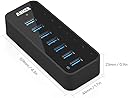
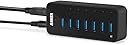
๐ Connect More, Charge Faster, Work Smarter!
The Anker 7-Port USB 3.0 Hub combines ultra-fast 5Gbps data transfer with a powerful 36W adapter, delivering seamless connectivity and rapid charging in a compact, portable design. Perfect for professionals needing to expand their laptopโs USB capabilities with plug-and-play ease and reliable performance.


| ASIN | B014ZQ07NE |
| Additional Features | Play, Plug |
| Best Sellers Rank | #307 in USB Hubs |
| Brand | Anker |
| Color | Black |
| Compatible Devices | Smartphones, USB Flash Drives, Tablets, Desktops |
| Customer Reviews | 4.5 out of 5 stars 6,482 Reviews |
| Data Transfer Rate | 5 gigabits_per_second |
| Enclosure Material | Plastic |
| Hardware Interface | USB 3.0 |
| Item Dimensions L x W x H | 4.3"L x 1.7"W x 0.9"H |
| Item Weight | 11.36 ounces |
| Manufacturer | Anker |
| Mfr Part Number | AK-68ANHUB-BV7A-0004 |
| Minimum Required Operating System Version | Mac OS X 10.2 Jaguar |
| Model Number | AK-68ANHUB-BV7A-0004 |
| Number of Items | 1 |
| Number of Packs | 1 |
| Number of Ports | 7 |
| Operating System | Mac |
| Special Feature | Play, Plug |
| Total USB Ports | 7 |
| Total Usb Ports | 7 |
| UPC | 848061071467 848061077643 |
| Unit Count | 1 Count |
| Warranty Description | 18-month warranty |
T**T
First Class Quality and Attention to Detail!
This is a very impressive little device! - The piece is very well built and obviously using high quality USB ports and other first rate materials. This USB hub also provides some nice unique touches you won't find on other brands like a numbered port display spanning 1-7 with blue LEDs sitting under each character that backlight each port's number when an active device is plugged into that position. Everything is housed in a solid, glossy white, hard plastic chassis comprising the smallest footprint of any active/charge capable 7 port USB hub I have ever seen. Much smaller than I was expecting from the product photo. The device is powered by an external AC supply (wall wart) that attaches to the hub via your typical two pole female connector. The power connector itself is located on the top end of the chassis next to the USB input/output cable that connects the hub to your computer. And Yes... as some of the whinier more anal reviewers have made abundantly clear to everyone, the AC adapter is one of the large ones and if you happen to own one of those odd power strips with the AC plugs aligned parallel to the row of female AC receptacles, then yes, this adapter is going to cover up several of the empty AC receptacles below where you plug this power supply in. My suggestion to those who consider this to be a deal busting design flaw... How about buying a better power strip? One that is designed to work with a collection of AC power supplies? They even make some strips that have swiveling receptacles to allow you to configure your power strip to suit what you are plugging into it! Amazing what technology can do eh? Problem solved and disaster averted! For whatever reason, Anker has chosen to use that specific AC power supply, so I assume there must be a very good reason for its addition to the package. So far I have been very pleased with the performance of the hub and have even done some hard drive backups through it using one of my Touro S Mini USB 3.0 hard drives just to see how the hub handled read and write to and from a 3.0 spec.hard drive. It performed just as fast as the dedicated USB 3.0 ports on my Macbook Pro do, so no complaints there. All in all, I am very pleased with this sleek little USB hub and have been very pleased to confirm that we are most definitely getting the quality and performance we are paying for here. If you are looking for a sleek, small and well built USB 3.0 hub with some nice added display features, I think you have just found what you have been looking for! And as others have said, Anker appears to be an up and coming small component manufacturing company who is specializing in first class quality devices for just a little more $$ than your typical Chinese stuff everyone else is offering these days.
P**R
A great product with an equally great company standing behind it.
After the original review, I was contacted that evening by phone and the following morning by e-mail by a concerned CSR. Anker was with no other questions than seeing the issue mentioned in my review was ready to replace a possibly defective hub. The commitment they've shown and the fact that they believe in their product as much as they do is pretty amazing. I do own several Anker products and this was the first (and after this experience, I'm fairly sure only time) I'd been disappointed by what I'd received and they worked to fix that much more readily and timely than any other company I've dealt with on Amazon. The replacement I got works flawlessly and I tested every port with each one of my cables to make sure it functioned as expected. The hub is plastic but very sturdy and does not feel cheaply made at all. I had 3 external USB 3 drives plugged into it, along with my phone charger, mouse and mechanical keyboard and everything continued to work which is more than can be said for some of the more cheaply made USB hubs. Other answers on questions for the hub state 4 and 5 1.5tb+ drives operating well and I have confidence it would support them easily. I am using the hub mainly on a macbook pro running Mac OS X 10.9 Mavericks and I've had no issues with data transfer, speed, or connectivity after receiving the replacement hub. I've also tested it on my gaming desktop running windows 7 and a small archlinux box, works flawlessly in every set up I've tried so far. The only thing I've been unable to test is longevity, but, given experience with other Anker products, I'm confident I won't be able to report back on that for a long time to come. Original Review - Updated per above! I actually really like the Anker hub I got, but, one of the ports is semi-flaky and doesn't seem to always make a good connection with several of my USB cables. It only seems to make a solid connection if I don't push the USB connector all the way in. That aside, It's one of the only powered hubs I've seen that doesn't appear to flake out when you plug more than one hard drive into it and it serves my needs well. It would be perfect if not for that one port that kinda flakes out and makes me have sad feelings.
A**A
Works pretty well just can't overload it too much
I have a living room media set up where I have a long USB cable running around the wall so I can have a remote USB hub extension next to my couch where I relax. Setting up all my stuff this hub is perfect mostly. I have zero latency issues and I play intense games hooked into this regularly without disconnects. Problem I have is if I have too many things plugged in despite being self powered it does have some connectivity issues due to running a 25ft cable around my wall. Thankfully my specific situation isn't the devices fault and it works perfectly for everything I need it for. Anker products usually deliver for me and haven't been disappointed so far.
N**F
Started to fail after 8 years - But still a good choice.
OK, This MIGHT NOT be a fair review, since I purchased this device 8 years ago to assist my docked laptop workspace at my job. I am a 20+ year veteran sysadmin for a Public School in Upstate NY, and I utilize allot of USB flashdrives. As of this week. I noted the device began to get HOT to the touch. Since then, this hub only consistently recognizes devices attached to ports 1-3. Unfortunately ports 4-7 have become hit-or-miss. All 7 ports continue to deliver power. I have tested the AC Power adapter with a multimeter, and it is still working fine. I have swapped the USB 3.0 cable for 2 known-good cables and re-tested the hub against multiple desktops/laptop computers, and found the problem follows the device. Context: This hub is normally connected directly to a free USB 3.0 port on my laptop. And it is my nature to be very careful with all my devices to ensure I get a good return on my investment. This hub has been resting comfortably on a flat piece of aluminum (for heat dissipation) on my desk. And at the end of each work day, I turn off the switch on the surge suppressor which supplies power to all the devices at my workspace. That said: A powered USB hub of this size not a terribly complex piece of equipment. And I would expect that it would last practically forever, if cared for. Is it possible I accidentally killed it from a static discharge, or potentially one of my peers tried to plug a USB-C device into it without looking, and killed it? Sure. This is possible. I guess I have to say, that for the 8 years this device has served me well. I am disappointed that it suddenly it started acting strange. I need a new one, but I am hesitant to purchase this same device considering the premium price I paid for it initially, and the fact that it eventually failed. Is this a fair review? I don't know. But it is an accurate description of my experience. THAT SAID: I do want to leave some positive feedback: While this hub was healthy, it was fast and reliable. And I have to say, I very much like that Anker decided to incorporate a USB 3.0 uplink port on this hub, rather than incorporating a "hard wired" USB 3.0 up-link cable. This enables you to utilize a shorter (or longer) uplink cable if your workspace requires it, and in the event the cable gets damaged, you can easily replace it and keep going. That design choice is a welcome one, and it actually helped simplify my troubleshoot, when it started to fail. So when I go shopping for a replacement for this device, I will make sure to purchase another hub with a removable/replicable uplink cable. I consider it a MUST-HAVE feature, and my kudos to Anker for designing this hub with that option.
K**R
Performs as intended
Works great. Was a bit smaller than I expected, but still works like a charm. If using command strips to mount on wall, use 2 so it can bear the weight of the cables that are plugged into it. Not really sure if the "fast charging"port actually fast charges, as I tried it with 8vr headset to keep it alive when both the internal and external battery were almost dead, but it still died during the game. But all in all, works as intended
M**O
Really Like It So Far (2 weeks since purchasing)
So far, so good! (Only 2 weeks of use). VERY reasonable price for a well-designed 3.0 hub. I don't use it for charging (at least, haven't yet). The seventh port delivers 1.5 - 2A for charging mobile devices, sufficient for iPhone 5 and many other devices. But, I do have a couple of external drives plugged in all the time, which I use as Time Machine backups. My machine is a MacBook Air, so there are only two USB ports available. Previously, I was just switching out the devices as needed. But, this works great! The external drives are both Lacie (one is a USB powered 1 TB Porsche mobile drive #9223; the other a larger desktop 2TB Porsche model with its own power supply, that is partitioned to function as a storage drive as well as a Time Machine drive.) The Mac just switches between the two drives automatically. So, this 7 port powered hub leaves one of the Mac's USB ports free for direct ethernet connecting (via USB adapter) or DVD drive, neither of which will work properly through a hub. I've seen no problems since beginning to use this hub about 2 weeks ago. The transfer times seem great, as I was accustomed to fast speeds before plugging into the hub, though I haven't actually clocked it. The only minor glitch I noted was that when attempting to "eject" the smaller ext. Lacie drive, the Mac stated it could not eject because the drive was "in use." It wasn't, so I wondered whether this might have to do with the connection through a powered hub. Ordinarily, this smaller drive does not have an additional power source. Anyway, I re-booted, and ejection went smoothly. Have not had the problem since, so perhaps it had nothing to do with the hub. The 'always-on' blue light mentioned by some others does not bother me at all, since I've placed the hub behind my Mac, which usually has the cover raised. I'm guessing those who don't like this could simply put a tasteful paper or cardboard "roof" over the hub. With the LED's it's nice to see at a glance that each port is actually functional. I do appreciate all the comments here, which I definitely found helpful before my purchase -- so I wanted to return the favor. Also, Anker cust. service has already reached out to assist. I've had other products of theirs, and support is a strong feature for them. So rare these days! And, definitely worth supporting!
D**N
Like it. Excellent Customer Service
16Jun14: Customer support offered to replace my defective hub without any fuss. The new hub works fine. Note however, it will not work with a Superdrive and that is not the hubs problem but only to do with Apple. All the other devices work great including iPod, external hdd and flash drives. Much better and happy with the Anker hub. - - - - 06June14: Edit to add that for some reason this hub does not work with iPods, iPhones or super drive on a Mac. Not even a non-Mac device such as Transend SD/usb card functions. No matter which port I use they are not recognized. Maybe it's the mac but I cannot find a solution online. These devices only seem to work if directly plugged into the computer...but...I don't have any free ports, hence why I bought the hub. Is this hub under powered? I don't know but just be aware your iPods and some other devices may not be recognized when they are connected through the hub. Anyway, it works for some things but not all and for the cost, it's not worth my trouble to send back. So ..two stars. - - - - Original review: There is a single powered usb port which is good for charging iPod. The other usb ports do what you expect them to. There are blue, numbered indicator lights on each port. A green power light too! The power cord has one of those side facing wall wart plugs so putting into a power strip works fine, however, on a UPS not always so good to the fitting but I got lucky with all my cords and plugs for how they are arranged on the UPS. In conclusion, the AH221 USB 7-Port Hub is good and does what I expect it to do. I have some devices plugged into the hub and they make communication to the computer. Earlier today, I listened to some music that is on a usb drive connected via USB cable to the AS221 USB hub. That hub is then connected to my computer. The music played fine without pausing and buffering which is nice.
A**L
Great Item
This hub is real quality -- slots are snug with a LED that comes on when a slot is used. I use it on my All-in-PC, making very convenient to use a USB drive. Well worth the price
J**K
Modern Design, Simple, Functional, Expectation's Met
This is a perfect solution if you use a laptop in the office. The 7th USB port is the dedicated "charging port". With a quick test on my Samsung Galaxy Note8 the 7th port does NOT provide "Fast Charging" per say (it simply says "Charging"), However, the charging speed's are noticeably faster than traditional laptop USB hub charging. For example: Within about 10-20 Minutes of charging my Note8 went from 83% to 98%. While charging quickly in the 7th USB hub the Note8 still connects to my laptop and I am able to transfer files like normal or even use SideSync to use the phone while working on my monitors. The build quality is good, it has a nice matte texture/finish on the sides and bottom (a more rubbery feel) which ensures that this Hub will not slide around your desk or set up. The usb line is good enough for a laptop office set up but may be a bit on the short side for others. The power cable that is included as well is nice and long. Total of 7 USB ports (7th being a charging port combo) is perfect for my needs. Thank's to the Hubs dedicated power outlet plug I don't need to rely on my laptop's power. I work on a lot of media content: blogging, write ups, video edits via Adobe PP/AE,and also Photoshop. My razerblade laptop become's quite hot during these sessions and so to have individually powered hubs helps me connect USB fan's and laptop coolers that help with temperatures as well as connecting a USB Ethernet adapter, my USB SD Card reader, and to quickly charge my phone all at the same time. I highly recommend this product.
R**F
A very good powered USB hub.
Very high-quality unit. Powered hub so you get full power on each port (for charging). Non-powered hubs draw their power from a single port on the computer so you're limited to 1 amp of power split between all the devices you have plugged in. Did some basic testing with a USB power meter and EACH port allowed 1A of draw. Only managed to get 1.6A out of the charging port but I think that's all my nearly-dead iPhone 6S wanted. I don't think I have any devices that would take the full power the charging port delivers. The charging port also allows data transfers, so its not charge-only but a fully functional USB3 port. Did some throughput testing as well and measured transfer rates approaching the maximums for whatever devices I had plugged in, so no noticeable slowdown over just a bare USB3 port on my PC. All in all, a very nicely built powered hub. The only con I can think of is that there aren't any rubber feet included. Its bare metal so it'll slide around a little on a smooth surface, and it'll shift due to tension on cables etc. I threw some little rubber feet on the bottom to keep it from shifting and it did the trick, but it seems something pretty minor that Anker could've included.
E**E
Not hot swap-able, good otherwise. Excellent customer service!
Hi all, bought this 7 port usb 3.0 powered hub. Works good, however, it is not hot swap-able. I mean it works, however, if you try to connect or remove another usb device while pc/mac is on, everything else disconnects for a moment. Causing hard drives to eject and reconnect. Unless I am doing something wrong, someone please tell me. Otherwise, this unit is only good for permanent/stationary setup. Not good if you need to be able to add or remove usb devices on the fly. Like adding/removing a usb stick. Same for charging phone. Works, but when I disconnect my phone, all other devices die. Hopefully I have explained my reason for poor rating. Review update: After writing this review I was contacted by Anker support. Offered quick help. Ended up sending a replacement unit right away. No charge at all. And received quickly. Excellent customer service. And new unit appears to work properly. Will continue to test and share any problems. Overall great experience. Thanks Anker!
D**Y
High quality hub. Fixed my VR issues
This is a really nice. I'm still using an old Oculus CV1 and although I still love the headset, hooking it up is a nightmare. 2 sensors and a headset and they all require USB 3. I also have the wire on a pully system meaning I also need extension cables for all of this to reach my PC. I don't know if was the length of the cables, or just not enough power coming from all of these USB ports on my PC, but I was constantly having issues. Sometimes the sensors would be seen as USB 2.0, or I'd get a blank screen all of a sudden, or sometimes my entire PC would just hard lock. Long story short this hub has solved all of these issues, it's nothing but smooth VR gaming now. I plug the 2 sensors and the headset into this hub, with just 1 extension connecting the hub to the PC which is so much cleaner. It's advised not to use a hub.. but idk this just works and fixed all my issues. Highly recommended. If I had any complaints it would just be that USB cable is pretty short, like less than 3ft long. Not a huge deal but something to note. It's also pretty expensive but it is top quality. It was also WAY less expensive than buying a nice PCIE USB card
E**G
Simple to install, essential to have
Running the Anker Hub on my ASUS A53 Series laptop has been remarkably easy; it's been a few days since I installed it, but I don't know how I got around without it before; it's small enough to not take up a lot of space on my desk (Roughly a little smaller than say, a Wii Remote), and it has no connectivity issues thanks in large part to the USB 3.0 connection. When you do plug in a device to the Hub, it lets you know it's connected by a small blue light next to the port; a handy detail. Basically, if your main device doesn't have enough ports on its own and you're looking to expand to run things such as external hard drives, USB gaming controller cables and headsets, or wireless keyboard/mouse sets, this Anker Hub will fulfill those needs and then some. I can't speak to those requiring a bit more extensive device needs, but I highly recommend at least giving Anker a look. Or not. I'm not the boss of you.
Trustpilot
1 day ago
1 week ago