🚀 Elevate your home office game with pro-level speed & smart wireless control
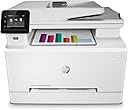
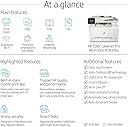
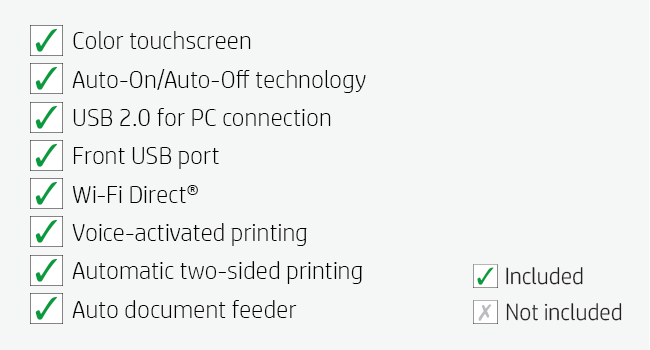
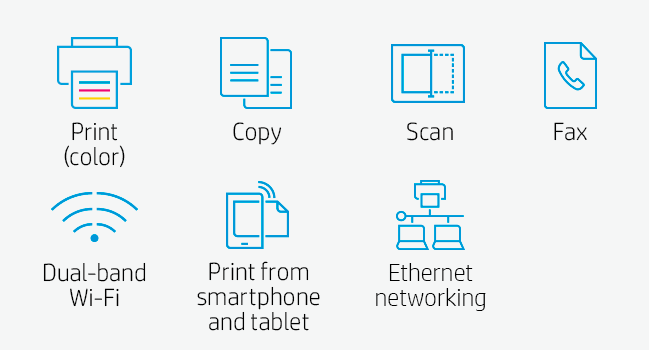
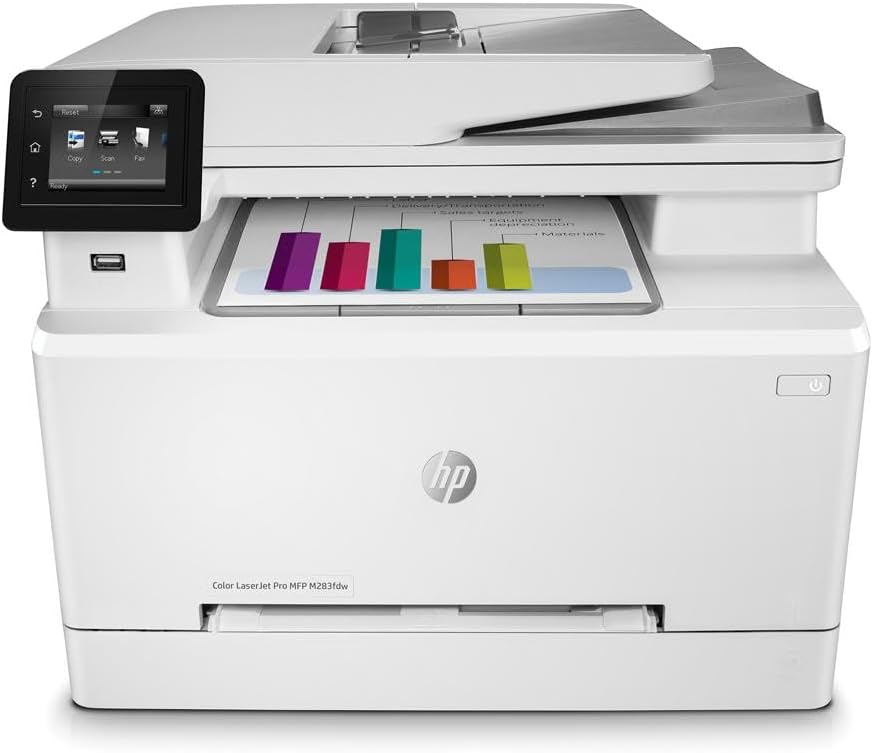
The HP Color LaserJet Pro M283fdw is a wireless all-in-one laser printer designed for busy professionals who demand fast, high-quality color printing, scanning, copying, and faxing. Featuring up to 22 ppm print speed, a 2.7" color touchscreen, automatic duplex printing, and a 50-page document feeder, it streamlines office workflows. With HP Smart app integration, users can print and scan remotely, automate repetitive tasks, and enjoy robust security features that protect against cyber threats. Ideal for home offices and small businesses seeking reliable, professional-grade performance.


| ASIN | B083ZYLGGR |
| Additional Printer Functions | Copy, Fax, Scan |
| B&W Pages per Minute | 22 ppm |
| Best Sellers Rank | #93,794 in Office Products ( See Top 100 in Office Products ) #115 in Laser Computer Printers |
| Brand | HP |
| Built-In Media | HP Color LaserJet Pro MFP M283fdw; HP LaserJet Black Introductory toner cartridge (~800 page yield); HP LaserJet Cyan Introductory toner cartridge; HP LaserJet Magenta Introductory toner cartridge; HP LaserJet Yellow Introductory toner cartridge (~700 color composite C/Y/M page yield) Installation guide; Power cord; USB cable; Phone Cord |
| Color | White |
| Color Depth | 24 bpp |
| Color Pages per Minute | 22 ppm |
| Compatible Devices | PC, Smartphones |
| Connectivity Technology | Wi-Fi, wired |
| Control Method | Remote, Voice |
| Controller Type | Amazon Alexa, Vera |
| Customer Reviews | 4.3 out of 5 stars 4,530 Reviews |
| Dual-sided printing | Yes |
| Duplex | Automatic |
| Global Trade Identification Number | 00193905486694 |
| Hardware Interface | Ethernet, USB 2.0 |
| Ink Color | Black, Cyan, Magenta, Yellow |
| Item Dimensions D x W x H | 16.5"D x 16.6"W x 13.2"H |
| Item Type Name | Laser Printer |
| Item Weight | 18.7 Kilograms |
| Manufacturer | HP |
| Maximum Copy Resolution Black and White | 600 dpi |
| Maximum Copy Resolution Color | 600 x 600 dpi |
| Maximum Copy Speed Black and White | 22 ppm |
| Maximum Media Size | 8.5 x 14 inch |
| Maximum Print Resolution Black and White | 600 x 600 Dots Per Inch |
| Maximum Sheet Capacity | 250 |
| Maximum print Resolution Color | 600 x 600 dpi |
| Model Name | LJP M283fdw |
| Model Number | 7KW75A#BGJ |
| Model Series | 283 |
| Number of Trays | 1 |
| Other Special Features of the Product | Auto-Duplex, Auto-Duplex, CD-Printing, Portable, Cloud Print Enabled, Network-Ready, Optional HP High Yield Replacement Cartridges |
| Paper Size | 4 x 6 to 8.5 x 14 |
| Power Consumption | 361 Watts |
| Print media | Paper (plain) |
| Printer Connectivity Type | Wi-Fi, wired |
| Printer Output Type | Color |
| Printer Type | Laser |
| Printing Technology | Laser |
| Resolution | 600 x 600 |
| Scanner Type | Sheetfed |
| Series Number | 283 |
| Special Feature | Auto-Duplex, Auto-Duplex, CD-Printing, Portable, Cloud Print Enabled, Network-Ready, Optional HP High Yield Replacement Cartridges Special Feature Auto-Duplex, Auto-Duplex, CD-Printing, Portable, Cloud Print Enabled, Network-Ready, Optional HP High Yield Replacement Cartridges See more |
| Specific Uses For Product | Office |
| Total Usb Ports | 1 |
| UPC | 193905486694 |
| Unit Count | 1.0 Count |
| Warranty Description | One year limited warranty |
| Warranty Type | limited warranty |
| Wattage | 7 KW |
J**W
A very solid color laser that does what is says and without hassle
I really like this color laser. It was easy to install and configure. I was up and running in approximately an hour. My only real issue was that the scanner defaulted to WIA when TWAIN is what my File Center software uses. Not a problem. This color laser supports both and HP had the driver I needed. Jut went out to their well organized support site and there it was. Printing from my iPhone and iPad was easy. As this is replacing an old Brother that didn’t have that capability, this is a big step up for me. I’m not getting rid of the Brother as it still works well, but it will mainly do black&white from here on. The print image is sharp. I needed to print some landscape designs that were made for large format printing and I easily read all but the smallest detail. For the super small detail, with the help of a magnifying glass, that print info was also very sharp. Maybe if I had my eyes from 40 years ago I could have seen it. The printer is quiet. In a room full of equipment that is important. Probably my only critique is removing printed pages. The holding surface needs a little dip to make it easier for those of us with sausage fingers. I got used to it quick enough but would have liked a little dip in the surface to make it easier. The printer comes with very old software and I tested both the wireless printing as well as the email to the printer option. As always, HP has a bunch of available forms and crafts. With land line phones almost obsolete, the mobile fax option is important. For me, it is important only one time per year. Overall this a a very solid color laser for home office use.
F**N
Not as Bad as some of the reviews, but the HP Smart software is not good.
I wanted to replace my old Multi Fuction HP ink jet with a color laser and this one and the Canon were well rated on Consumer reports but I was really put off by all the negative ratings and was seriously nervous about this machine when it arrived. First of all the instructions that came with it were minimal but turned our to be adequate to get it up and running. Right off the bat, I was able to connect it to my wifi with using the instructions and the touch screen. I have an iMac with OS 10.13 and when I went to settings, printers, add a printer, it found the new HP right away and I was able to print from my computer and air print using the wifi. I did not bother connecting the ethernet. When I went to download the HP "smart" software. the HP 123 site sent me to the App Store for the download but the download somehow hung up and had "less than a minute" to go for 15 minutes and then my computer locked up completely and I had to do a hard boot to get out of it. I was finally able to download the HP software by going direct to the app store and not through the HP web site. The HP software makes you set up an account with HP and even though it shows connected to he printer, It constantly gives a "cannot find printer" when you try to do a scan. This software is very buggy and I am not an IT person, just using it for my home office. I finally uninstalled the HP Smart software and trashed it. I found an application at the app store called HP Easy Scan that works like a champ so now I can print and scan just fine. The printer works great and copies are crisp and very presentable.
J**Y
HP Color LaserJet Pro M283fdw - A Marvel of Efficiency and Quality!
I recently upgraded my home office setup with the HP Color LaserJet Pro M283fdw, and it has been nothing short of spectacular. This wireless all-in-one laser printer combines speed, efficiency, and top-notch quality in a single device. First and foremost, the wireless setup was a breeze. In a matter of minutes, I was connected to my home network, and I could print from any of my devices, be it my laptop, smartphone, or tablet. The seamless connectivity has made printing a hassle-free experience. The print quality is exceptional. The colors are vibrant, text is crisp, and images come to life with impressive detail. This printer has elevated the quality of my documents and presentations, making them look more professional than ever. Speed is another remarkable feature of the HP M283fdw. It delivers prints and copies at a lightning-fast pace. Even large documents are processed in no time, and the automatic two-sided printing is a real time-saver. It's perfect for a busy home office or a small business setting. The scanner and copier functions are equally impressive. The scanner captures documents with remarkable clarity, and the copier produces high-quality duplicates. The automatic document feeder is a huge convenience, especially when dealing with multi-page documents. The touchscreen control panel is intuitive and user-friendly. It's easy to navigate through the settings and customize your print jobs to your exact specifications. The app support and mobile printing options only add to the printer's versatility. One of the standout features of this printer is its energy efficiency. It goes into power-saving mode when not in use and wakes up instantly when you need it. This not only reduces energy consumption but also prolongs the life of the printer. Furthermore, the build quality is excellent. The printer feels robust and well-made, and it's clear that HP has put a lot of thought into its design and durability. In conclusion, the HP Color LaserJet Pro M283fdw is a true workhorse that delivers on all fronts – quality, speed, and convenience. Whether you're upgrading your home office or equipping a small business, this printer is a stellar choice. It has become an essential part of my work life, and I couldn't be happier with its performance. I highly recommend it to anyone in need of a top-notch all-in-one laser printer. It's a five-star product that lives up to the HP reputation!
R**Y
Nice Laser printer for the price!
I had an Epson Workforce All-In-One (A-I-O) inkjet printer that finally gave up the ghost. I decided to upscale, and invest in a laser printer; not that I have a lot to print, but when I do, I'd like to be able to, like, read what I print. And it prints in duplex to save paper! Did a lot of research. Looked at Cannon and Brother printers along with this HP model. I do need the A-I-O capability (I am of a generation that still faxes stuff), and color. This printer just hit all the check-boxes and it is a bit smaller than the old Epson! Fits nicely in the cubby next to my desk! And the price-point was good. PRO - It was easy to set up. Win10 found it and installed both the drivers and control programs as soon as it came online. - Prints FAST! Well, it is, after all, a laser printer - Has it's own Email address so I can send stuff to it for printing. I also was able to lock down that Email address to only receive information from specific Email addresses. - The replacement toner is not much more expensive than the multi-pack of ink for the old printer. I remember when toner was a FORTUNE!!! CON - Somewhat louder... okay a LOT louder than the Epson. Sounded like a vacuum cleaner turning on the first time I fired it up. But only for the duration of the print, then it quiets down to nothing. - The LCD display is nearly impossible to read and operate. The screen is small and I had to be, like, right on top of it to read. The screen lacks sensitivity - I found I had to pound on the representative information a couple of times for it to register. But, okay, it's now set up and I am done, and it looks like I can now do the rest through the HP Smart App. I have not downloaded and installed the dedicated HP software for the printer - I am sure that a lot of the functions though the LCD would be duplicated there, but I don't like having a lot of extra apps on the PC if I don't need to use them frequently. As I mentioned, Win10 found the drivers and control program for me. The HP Smart Print app seems to work nicely, and I have that installed on my PC and i-Stuff devices. Being a retired IT professional, I like when the user interface is similar across multiple platforms, and the HP Smart Print app allows that - I know what to look for and where. It was nice, too, that when I was done setting up my printer, the HP user site already had the printer information (type, Email address and serial number) there, along with the warranty coverage information. Thank you! I HATE when, after setting up something, I then have to go and type all that into a corporate site for coverage! So I got almost 10 years out of the Epson - let's see if I can get the same out of this HP! All in all, pleased. Oh, and printing photos in documents... OUTSTANDING!!!! Nice to see color on paper that looks like it does on the screen! So... all in all, a good printer for the price! If that changes, I will revisit my review!
E**Y
So far so good!
I got this to replace an Epson inkjet printer that had been declining over the last few years and stopped printing most colors. This is by far the most expensive printer I've ever purchased, but I wanted a really good quality printer that would last me a long time and print reliably every time. So far, I'm really pleased. Initial Setup - I was a little concerned after reading reviews that it would take me hours and several calls to customer support to get this thing set up, but it was actually really easy. The instructions list a website to visit to download the software, so I just followed the instructions and was all set up within a few minutes. I did not need to connect the printer to any computers, I just followed the instructions and was able to get everything connected. Make sure you download the mobile and desktop apps and register on the HP Smart website, where you can manage your printer settings. Mobile App - I didn't love the idea of using a mobile app for a printer, but it is actually pretty cool. There's a lot of neat features on there, like printables, which has a bunch of free things to print, such as calendars, coloring pages, activity sheets, cards, crafts, all sorts of stuff! There's also mobile faxing and scanning, the ability to create photo books and more. I probably won't use many of these features, but I do think they are nice to have. Print Quality - I don't print a ton of stuff, but I did a few test prints and they look fantastic so far. Nice quality and clean printing. Mobile Printing - I didn't have to do anything special to print a photo from my phone. I just opened the photo on my phone, tapped the share icon, selected print, and it defaulted to the printer. It took about 30 seconds, but the quality was great on regular printer paper. You may need to keep the photo/file open until you see the print dialog on your phone show that the item is printing. Scan to Email - This was a bit challenging to set up, but I found a helpful article so I'll share how I did this. First, from the desktop HP Smart app, I added our email addresses to the address book in the scan tab. You also MUST have an outgoing email address set up in order to scan to email, so I created a Gmail account for the scanner. In the outgoing email profiles, I added this email address, used smtp.gmail.com for the server and port 465. Check the "SMTP server requires authentication" box and enter the email address & password. When I tested it, I got an email that Google blocked the attempt so I researched and found an article instructing to allow less secure apps and had a link (just add /settings/security/lesssecureapps to the Google URL to access this setting). I turned less secure apps on for the printer account, and that did the trick. Note that a copy of each scan will be saved in the sent folder of that email account. 2-Sided Printing - This was not the default setting on my printer, but I was able to select my default print settings from the HP Smart website Touchscreen - I think the touchscreen is easy to use. If setup is required for anything, it will display a message explaining exactly how to do what's needed, so that's really helpful. I've only had this printer a short time, but I'm really pleased with it so far.
B**T
Absolute junk, and I bought 2 of these worthless piles (over 4 years of updates, still garbage)
Had a couple of older Brother all-in-one machines that did a pretty good job for me at home and at my shop. Wanted to upgrade to machines with a scanner feed, so went this direction based on reviews. Now, I'm not a network engineer, and not an IT pro, but I've had no problems setting up both work and home networks and maintained them for years. At the shop I typically have 15 devices on, and at home between 30-40 depending on day and time. All devices happy, chatting with each other and the outside world, everything just works. Then comes the printer switch, and my whole world comes crashing down. This has been the most maddening, awful experience, with both printers, that I have had with a network device since WiFi was in its infancy. I truly want to go full Office Space on both of them. Today's incident sealed it. Wife home doing school finals. I'm at my shop. After 2 solid weeks of no problems, no drop-offs, no changes in our infrastructure at all, can't print or scan. Scanning is a must because she has to show work. I get home and despite seeing the printer on our local network using the Eero app, and seeing wife's PC on the same network, both connected to the same Eero, neither can see each other. I literally typed the IP address into the URL field, nope, doesn't exist. Fine, let me find one of those weird printer-only USB cables just to get her out of the woods. Connected printer to Carbon X1, scan app sees the printer, scan commences, then errors out at the end. Thousand bucks down the drain for 2 of these garbage paperweights. Now dreading getting on the phone with tech support only to likely hear "did you plug it in until it clicks?" Update: updated my Eero setup to include WPA3 authentication, and it worked! For 4 whole days. Tried to print this morning, "printer offline". Printer confirmed to be on. Checked all devices on the network. Both of our laptops, and this pile of garbage "printer" showing on the network, and both even connected to the same Eero. I type in the IP address into a browser, and the printer page comes up with all of the settings. But, can I print? Nope. Full Eero network reboot, unplug printer, plug it back in, and we can print again...from only one of our laptops. I normally have to reboot the network *maybe* 2x/year. I'll keep adding to this as needed. Again, DO NOT BUY THIS PILE OF JUNK. 6/4/21 - good news, we made it almost 7 days without having to reboot our whole world! But today, customers lined up, ready to cash out, can't print. Can't scan. Nothing changed in our infrastructure. Ten minutes rebooting our world, and everything works again. Seriously, this is probably the worst piece of tech on the market right now. 7/7/21 - just got the alert that my printer is low on all toner. I bought this printer on 4/15 for $488. It is now 7/7, and just added 4 genuine HP toner cartridges to my cart here. Total will be $432. This is the type of thing that inspires movies like Falling Down. Oh, and if I click on the handy window that shows up every damn time I print that says "ORDER SUPPLIES!", it takes me to the HP store, where all but black toner is sold out. So soon, I'll be writing again about a printer that I won't be able to use at all. Awesome. 11/13/21 - Yet another reminder of why HP might be the worst company on the face of the earth. Remember when I had to spend $432 on toner 4 months ago? So, like Kramer and the used car salesman trying to see how far they could get on the low fuel light, I kept dismissing the "Critically low" messages every time we'd print at my shop. We print roughly 15-20 pages per day. Yeah, I have yet to replace the toner, and the pages still look fine. 1/12/22 - still printing just fine. Toner message screaming at me every time I print. 3/30/22 - ditto the last update. 8/15/24 - still falls off network (both at home and at my shop), still need to reinstall software, still the worst piles of crap in the printer universe. 12/21/24 - home printer offline yet again. At home, I usually have 40+ devices connected to my Eero 6 mesh network. This is still the only device that disappears for no reason. Then some combination of unplugging it, plugging it back in, then finding the local IP address using the Eero app, then punching that into a browser window, and tweaking some settings there brings it back online. However, I have to do it differently each time. Junk. I can't wait to go full Office Space on this worthless waste of space. 8/11/25 - I must be some sort of masochist for keeping these things. It's like I'm being abused by tech every week or so.
M**R
Great printer for any home office
This printer cost a bit more than other brands, but this was an amazing upgrade from our previous black-and-white laser printer. Amazing as in being 5 times faster, prints in color, supports printing directly from our mobile phones, and has a feeder that has not jammed to date. Print quality is simply superb. But it is not all wine and roses. This printer is considerably noisier then our previous one when printing -- but only when printing (which it does very quickly!) and then it drops back to complete silence. And, while it prints double-sided, the scanner is only single-sided -- even our inkjet that we got rid of when we bought this could scan double-sided. Finally, you have to "kick-start" the printer as it goes into deep sleep quickly (although we did change it) by pressing the power button on the front before printing -- otherwise, it is off-line. If you print all day, then this last observation may not matter as deep sleep can be set to 4 hours and resets each time you print something. Despite the above "warts", we love this new printer.
H**O
An excellent laser printer!
I bought this HP Color Laser Printer to replace an older wireless Dell and I absolutely love it! I don’t use the fax so I can’t speak to that but am a medium volume printer user and this one was so easy to set up and fully connect to my WiFi network. It literally took me 15 minutes to connect, install the app and wirelessly use it on all my Apple devices, iPad, iPhone and Mac Air. The quality of the prints are flawless, straight/positioned correctly and true color. The little 3 inch screen was easy to use, although if the screen was a little bigger it would be nice. Holds a ton of paper, fairly quiet printing and very fast. So far, I couldn’t be happier! A little pricy for the printer and for the toner cartridges but I’m sure it will be worth it. It’s pretty big but very nice looking. I like the top feeder and the single sheet feeder, both I know I will use a lot. Duplex will be great when I need it. Love this one!
M**S
Excelente Custo vs Benefício
Realmente uma grata surpresa. Nunca mais uso jato de tinta.
L**N
Excellent for a home office
This printer provides the best compromise for someone who is used to the full size office printing infrastructure but doesn't want to spend 10s of thousands of dirhams on a home printer. The set up with WiFi was very easy to do, although the app can be slightly misleading if you don't check the process carefully. The printing quality is great and is more than adequate if you just need a hard copy to read instead of staring at something on a screen for hours. Colour quality is also excellent and photos come out great. Overall, it's an excellent home printer that scans and copies quickly too.
E**I
الى الان ممتازه
ممتازه
N**S
HP color, laser, printer performance
The printer was easy to set up. Wi-Fi works great with all my remote devices. Have recommended this printer to others because of the high-quality and performance of the device.
L**.
Excelente opción doméstica
Buenísima impresora, menu muy amigable
Trustpilot
2 months ago
4 days ago