🎯 Own your entertainment universe with one smart remote—because juggling multiple remotes is so last decade!
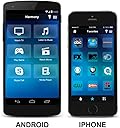
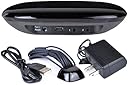
The Logitech Harmony 915-000194 Smart Remote with Harmony Hub revolutionizes home entertainment control by enabling seamless management of up to 8 devices—including game consoles, streaming players, and smart home gadgets—via RF signals that work through walls and cabinets. Compatible with over 270,000 devices and featuring a powerful smartphone app with customizable controls and Alexa voice integration, this renewed remote offers a future-proof, elegant solution to simplify your media experience.
| ASIN | B00ZYIFXSM |
| Additional Features | Universal |
| Battery Type | Lithium-Ion |
| Best Sellers Rank | #62,311 in Electronics ( See Top 100 in Electronics ) #3,486 in Remote Controls (Electronics) |
| Brand | Logitec |
| Button Quantity | 20 |
| Color | Black |
| Compatible Devices | Streaming Device |
| Connectivity Technology | Radio Frequency |
| Controller Type | amazon_alexa, android, ios |
| Customer Reviews | 3.8 out of 5 stars 538 Reviews |
| Item Weight | 1.5 Pounds |
| Manufacturer | Logitech |
| Max Number of Supported Devices | 8 |
| Maximum Number of Supported Devices | 8 |
| Maximum Range | 30 Feet |
| Model Name | 915-000194 |
| Model Number | 915-000194-RB |
| Number of Batteries | 1 CR2 batteries required. |
| Special Feature | Universal |
| UPC | 638317265265 735286129533 649906101116 |
| Warranty Description | 90 days limited warranty |
J**S
Four Time Buyer
We have purchased four of these refurbished Harmony Hubs and I am a huge fan. We use three of the hubs in our home and we gave one (including set up) to a loved one with MS who needed to be able to control her TV and components through Alexa voice commands. In all four cases the hubs are controlled through the enabled Harmony skill in the Alexa app in all cases these refurbished hubs are meeting our every expectation. There have been no issues with any of these hubs in terms of quality, missing parts or instructions, etc. Logitech support has been wonderful to work with us whenever we encountered an issue in setup that we could not figure out on our own. They really have just been terrific and I can't say enough nice things about these Logitech reps - so patient and friendly every time we have called. In our home I mentioned we have three hubs set up and we did this by setting up two hubs connected to the Amazon account we use for our ordering (it is in the Mrs. name) and the third hub is set up in the Misters (Mr.) account. The living room hub is set up with the primary Harmony skill and our master bedroom uses the secondary Harmony skill as found in the Alexa app. This secondary hub set up requires the added step of having to say, "Alexa, ask Harmony to turn on TV..." as opposed to the primary skill which is simply, "Alexa, turn on TV...". Of course this is necessary to differentiate the two hubs. In our sunroom we set up a hub connected to the Mr. account so it uses the same commands as our living room hub that is associated with the Mrs. account. Both accounts are connected in Amazon family sharing and we can easily switch between the two by saying, "Alexa, switch accounts". The only downside we have discovered in this scenario is that we cannot play our Amazon Music subscription through the hub connected to the Mr. account. We don't want to pay more for the Amazon Music family plan, nor do we need it, but this would probably solve this problem. The Amazon Music account only plays on the account where we purchased it and that is the Mrs. account. We did contact Amazon customer service and explained that the only reason we are even using our secondary Amazon account is so we can use our third Harmony hub with Alexa but rules are rules and it isn't that big a deal. We have an "Everywhere Group" of the Echo devices in our home for playing music throughout the home but the Echo device in our sunroom is in the Mr. account as it needs to be to control the Mr. Harmony connected hub. Hence, it can't be a part of our Amazon Music everywhere group. This is probably very confusing -- sorry. The four hubs we have purchased have been set up to control the following devices: Amazon Firestick Bose Wave II System with CD Changer DirecTV receiver (3) Emerson VCR/DVD Combo Kinivo HDMI Switch Polaroid TV Roku Streaming Stick (2) Sceptre TV Samsung Blu-ray Sharp TV Vizio TV Xbox One We can change channels, change activities and change volume all through voice commands to Alexa via the enabled Harmony Skills. These include: Alexa, turn on/off TV Alexa, turn on/off Roku Alexa, turn on/off Xbox Alexa, turn on/off Netflix Alexa, turn on/off Hulu Alexa, turn on/off HBO Alexa, turn on/off Starz Alexa, turn on/off Fox Alexa, turn on/off CBS Alexa, turn on/off ESPN Alexa, turn on/off SEC Alexa, turn on/off Prime This is just a sampling of things we do through Alexa as a result of these wonderful Harmony hubs and enabled skills. Now here is a list of the set up devices that were most problematic in our Harmony hubs and that required we called customer service: 1. We have an old Emerson brand combo DVD/VHS player and it was tricky getting the device itself to switch between the two functions. There is a toggle button on the device for this purpose but we long ago lost the original remote so we couldn't teach/program the skill. This was resolved with help from customer support. 2. The hub we gave as a gift has an older Sceptre TV in its configuration and the user does not have cable or satellite and instead receives over the air TV signals via a connected antenna. This required channel inputs that were complicated to do with the OEM remote. Channel numbers, for example, such as 29.4 or 51.2 had to be utilized and connected to easy names like "NBC" or "CBS". They all work now - wonderfully I might add, but this set up took more time and was a bit complicated. 3. We discovered that in setting up the Roku streaming sticks we needed to be sure to deselect some of the channels they load by default, such as CBS. Not doing so precludes the ability to set up, "Alexa, turn to CBS" as a named command for our regular CBS station as viewed through our DirecTV receiver. This is because it is already a named channel in Roku. Deselecting this in Roku fixed the issue (after rerunning the activity). 4. When we started off on this adventure we were using Amazon Firesticks but we switched to Roku because Roku has channels that allow for commands through Alexa such as "Alexa, turn on Netflix". With a Firestick it starts at a central home screen and doesn't support the channels so the remote had to be used regardless. I am guessing Amazon does this so you'll have to see their content splash screens before moving on? Roku lets us go directly to the service we wish to view. Plus, if I want to search for a certain show I worry that Amazon will pull it up by default and if it isn't free with Prime might somehow be purchased on rented. I appreciate it probably takes more steps than this to confirm a purchase, but I prefer to no have to eve think about it unless I specifically ask for Prime. 5. There is a button on our DirecTV remotes that is needed for searching and the button (it's a dash) on our Harmony remotes that is a dash didn't provide the same function. This required help from Logitech Customer service as our attempts to program the button ourselves failed. In fact, the customer service rep had trouble with this too and eventually had to use codes from a DirecTV box that don't match the model numbers on our boxes (but it now works and that's what matters). 6. The Bose Wave II CD changer system has a component attached that hold more CD's than the radio portion itself and this was tricky to get both units to power on together and switch to their correct inputs. I honestly don't think I could have done this without Logitech help as it required several steps. They got it figured out though! Bottom line is we love our Harmony Hubs and we haven't had any issues purchasing refurbished units. The Harmony app is easy to use and switches between our three hubs easily, The interface with Alexa is working wonderfully and it is so nice not to have to reach for different remotes and instead change channels and activities through voice commands.
D**Y
Fan-Freakin-Tastic!
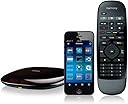
I've had three Harmony remotes prior to this Smart Remote. All three were remotes only -- no hub. The remotes always worked great, but the software was so painful, and I have a couple devices that are very particular about the direction of IR control (I have to point remotes directly at them). The hub solves that problem with flying colors. I ended up putting the hub under the couch out of sight, and it controls everything perfectly. The only connection needed was USB power. The software is SUCH a big leap forward from previous Harmonys. I think it took me less time to configure this whole system than it did to find my Harmony login for the old system. And it works flawlessly. The first-run guided test failed, but it automatically offered to adjust the timing, and now everything is perfect. I'm not a big fan of using my phone as a remote, but it's really nice to have the option if the remote is across the room and I'm feeling lazy. The included hardware remote control feels fantastic. Nice and hard but grippy rubber and the button clicks are great. Not too soft, not too hard. They're smooth rubbery buttons. So far there's no sign of wear or fading on them. There are only a couple negatives so far: 1) Since there's no screen, it's not completely obvious what the three activity buttons will do. They have icons for Music, TV, and Movies instead of an LED screen with custom text. So powering on, say, the Roku might not be completely obvious at first. 2) The button placement isn't the best. The navigation buttons are great, but play/pause/FF/Rew are up top, so I have to shift the remote around to reach them. It looks like the new versions of the remove fixed this. It's a minor negative. 3) The included remote is not rechargeable. It takes a CR2032, which is thankfully a common button cell battery, and it's very easy to replace. So again a monitor negative. I'm not sure how long a cell will last. I'll update the review when my first battery is gone. Overall, a solid A. Very impressed.
S**.
Got it working, after 2 hours... and mostly useless.
It took me two hours to get this device working. Support took two days before getting back to me. Great product? No, it has latency issues. Press the volume up button too many times? Be prepared to wait until the device is done blasting your ear drums out. Don't have line of sight between the device and the controller? Be prepared to walk over to the device and re-position it. Were you expecting to set a hotkey to jump directly to Netflix, Hulu, Amazon Prime or any number of over "apps" this product claims to support? Be prepared for disappointment, because it doesn't do this with any of the devices in our house (not the TVs, not the DVRs, not the Cable tuner, not the XBOX One, nada.. This device now collects dust. I get less aggravation from the $30 universal remote which replaced it. Would not buy again, and would not recommend to anyone, anywhere, for any use. Save yourself some hassle, buy a $10-15 replacement controller if yours has died, this certainly isn't worth the money no matter how phone-like/pretty they manage to make the remote.
J**T
Harmony with amazon echo
I bought this hub to find a way to make it work with my amazon echo and using IFTTT I was able to get it to work. So please keep in mind i'm not exactly using it as I should be.... Lets start with hardware: It has never failed on me. It always sends the signal and I have sent it three ways. (Phone, remote and IFTTT). With mine It came with one extra IR Blaster. So between the Hub and blaster it never seems to have a problem reaching all my devices. I use the hub to control my 360, PS3, PS4, Xbox One, Tv, Receiver, Wii and hue light bulbs. (and tried out my nest once but didn't see much point). I almost never use the remote. It has less features then the app and my phone is almost always closer. I think I used it once. Now the software: This is why its not a 5 star rating... The app is slow. ever time you open it there is a delay as it connects to the servers and then when your trying to set up scenes there is only so much you can program. For most devices it only know on or off... I would like to set a scenes volume or set up my sound setting if i'm watching a movie or playing music. You can change all of it from the app or remove but not in the pre-programmed scenes. There needs to be a bit more freedom in the app. There is also a glitch in the app. So I set up a scene where it only controls my xbox 360 (this is just an example) and I turn it off from the app or IFTTT and for some reason it also shuts off my tv... but the apps still things it on. So to turn it on then I have to turn that scene off... This get confusing real quick with IFTTT. So by the end of the night i'm telling Alexa to do the opposite for my tv. (Sometimes this is also true for the receiver). I can fix this by walking over and turn on the tv manually (but that defeats the purpose of the logitech...) or I can go into the app and click on the device that is wrong and fix it that way but both should not need to be done. There is one additional note. I would love to control the volume with my echo too but there isn't an option for that but after any device is turned on by the harmony there is a quick select added on my phones home screen (even when its locked) so I can make changes to volume very quickly that way. So that not the end of the world. Kind of nick picking a bit there... Overall good product but wish there was just a couple software updates to improve it (and one day there might be)
A**R
It is clunky to set up but works well once running
The software is often hinky and while they will help you set up your system on the phone, that service goes away rapidly and they require you to pay after 30 days or so. Nevertheless, when it works, there is nothing quite so pleasing. I used this hub and basic remote to hide all of the gear (cable box, appletv, blue ray) in a nearby closet. The only thing visible is the tiny IR blaster that is included in this kit. As a plus, the logitech app can be installed on your phone to provide a full featured remote (complete with channel logos etc) if you wish. I did not wish. There is always a hiccup in installing this product. I have three of them and for whatever reason, the hub rarely registers with the software the first time around. The process is clunky-- you need to plug the hub into a computer or tablet and set it up using the Harmony routine. The phone help is quite good at resolving whatever issues there are. After the hub and remote is set up and working with all of your devices, it is relatively easy to swap out one device or another and everything else works pretty flawlessly. If you are interested in setting this hub up with Alexa or other voice control, note that it is not easily possible to do so on more than one TV in the household. This is an odd limitation for a device which is clearly meant for early adopters. The workaround is that you need to have multiple Harmony accounts (one for each Hub) which creates other issues. IN sum, there aren't too many other devices which do what the Hub provides at a reasonable price.
D**G
Great solution...when wifi works.
I Have 3 of these and I have installed them for other folks as well. I purchased refurbished at a discount and find this to be appropriately priced when on sale. I love that you can customize the buttons for each function. When installing for others I spend some time with the user and make sure I understand how they want it to work so I can make it work as close to this as possible. I have reprogrammed the buttons to do what I want at home so instead of channel up/down I do page up/down. Since every button also supports a long press I can still do channel up by pressing for 1 second. I am glad that I can use my phone when I cannot get to the remote and it does not conflict with what the remote does. I also like that you dont have to aim the remote. You setup the IR blasters by the components and this is RF working from anywhere even through doors in the entertainment system. The IR blaster is behind the door with them in the base and the remote blaster works great for the TV and has a very small footprint. I have issues with how it works with my Samsung TV because there is not input buttons on the remote the unit has to try to use directional arrows to select the hdmi input amd it sometimes (maybe 1 in 20 times) will set to the TV instead of the HDMI input. This is partly the TV and partly the remote. Also when the TV updates software I sometimes have to reprogram the remote. This is the TVs fault. It is very easy to pick your equipment by putting in the model numbers into your phone. The default settings do make sense but it is nice to be able to reprogram EVERY button. It is a bit of a hassle to figure out how to do this each time but once you figure it out then it is easy to do amd you only do it a few times. I am a techie and have no issues with setting this up but I have found several folks that have needed help to make it work as it was just too difficult for them to figure out how to operate it after using the default settings (never having used harmony remotes is a problem here). I also love how this has integration with smartthings. I can turn off and on lighting based on my activity, ask Alexa or Google to watch TV or make it part of the goodnight routine to turn things off. I also am able to turn off and on the fireplace with the TV remote as well. One thing I dislike is when having trouble with my wifi router I was unable to reliably control my TV....this is NOT a good solution for poor internet connections. I removed a star for this. I wish the remote would light up but I do understand why it does not to save battery. Once you use it for a week you dont need lighting anyway. After about a year the soft touch on the remote has become pretty worn. I would get the black remote as I have both. The white remote tends to yellow where the soft touch finish remains bit it runs off on bothe the black and white but is less noticable on the black remote.
W**T
Very Good Remote - Wife happy she can change functions easily.
Very Good Remote, provides tactile button feel the Android app can't match. The FF / SKIP and RW / BACK buttons work, but for me the default press and hold for skip made no sense at all. Fortunately I was able to reassign and switch the buttons. Now a quick press skips, and a long press forwards. That makes way more sense to me. The location of the skip buttons just under the function buttons is a bit problematic because of the button spacing, but I got used to it quickly. I have managed to accidentally change functions while trying to skip a few times already. Except for the FF / SKIP default settings press and hold functions being reversed and the button placement, the out of the box default button assignments were good and intuitive. Lack of backlighting is no problem for me on the remote itself. Setup of the hub was easy, copying over my old Harmony 650 profile was simple and I was up and running very quickly using my Android phone and WIFI connections. I did not need to use the extra IR Blaster as the hub Infra Red blast signal was plenty strong enough. I have the hub pointed away from all the AV equipment, and it bounces the signal back to everything with no delay. I used the PC app to change the button assignments, and it was not necessary to connect the hub to the PC since everything was handled through the online account. The Android app worked well for me on every android phone and an Amazon Fire tablet. Having a large easy to read screen makes it easy to switch tasks especially in a dimly lit room. The response of the Android app and remote is swift. No need to point the remote, line of sight is not needed because of the commands between the remote and hub are RF. It navigates my PS3 via blue tooth just fine. Changing functions on any device automatically reassigns the appropriate function to the remote buttons. Everything stays in synch. I found myself looking for the button position a lot more often with the Android app, than I would with the included remote. I can judge by feel where the buttons are with the remote. Logitech took a stab at that issue, by including a touch pad style remote control function in the Android app. The cheat sheet is clear and simple to understand, but there was a bit of a learning curve to it for me. It was fun to mess with, and some people might just love it.
M**D
I love these devices. It's so awesome to have one controller to use for all of my devices.
I bought this Harmony hub and remote refurbished. It looks like it was never opened. I have had two others (bought new) for a few years. This one is just as good as the two I've had. I use this only for tv - I've got many devices connected to one of the three hubs - PS3, PS4, blue ray player, amazon sticks, hdmi switches, dvrs, surround sound receivers and a few more obscure devices (which surprisingly show up in the list when going to add devices). Every one of them work flawlessly (except the PS4. More on that later). When I got the first hub I set it up through my computer, online on Logitech's website. They've since moved to setting them up through smart phones. It's very simple. Plug in the hub. Get the Harmony app on your phone. Turn on bluetooth. Search for hubs on the app. Then when it finds it, put in your wireless password. Then turn off bluetooth. Adding devices is very straightforward. Syncing the controller is easy too. Press the sync button on the back of the hub and press menu and mute together. I love these devices. It's so awesome to have one controller (and it's a nice controller) to use for all of my devices. And for those times when the controller has vanished, I can open the app on my phone and do everything on there. I can sit here while typing this and change the channel on the tv that my wife is watching on my phone half way across the house. She loves when I do that! I can't believe this only has 3.5 out of 5 stars. It's easy to setup, easy to use, and makes all of your other controllers obsolete. I'm assuming it gets dinged from activities setup - like when you want your surround sound to turn on, switch to hdmi input 2, and turn on the dvr with a single button press. I could see people getting confused on how to set that up, but surely there are some youtube videos for people having issues. That's my GUESS on why it's only got 3.5 stars. The only knock on it that I can think of is that it doesn't do well with the PS4. But, from what I've read, that's a PS4 issue, not Harmony specific. No other device has any problems.
Trustpilot
1 month ago
3 weeks ago