

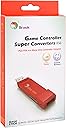

PS3/PS4 to Xbox One Controller Adapter
Product ID: 710314621
desertcart.com: PS3/PS4 to Xbox One Controller Adapter : Everything Else Review: A decent alternative to new controllers, but update first - Update: Added two new sticks. Also the adapter for some reason no longer works with any of my sticks in PS4 mode. Luckily I can still use them in PS3 mode, but just a forewarning. I bought this to convert my PS4 fightstick so I wouldn't have to buy one just for an Xbox One. First thing I did was update the firmware of the stick. So far I tested the adapter with the following: 1. Dualshock 4 2. Hori RAP 4 KAI (both PS4 & PS3) 3. Mad Catz MIDI Pro Adapter for PS3 (all three modes) 4. Qanba Obsidian (PS3 mode) 5. Hori RAP N SOULCALIBUR Edition (PS3 mode) I have not been disappointed by its functionality. The amount of lag produced is so minimal that it's hardly noticeable. My only caveat is that you need to update the converter's firmware, but it's necessary in a world where either Sony or Microsoft can transform any device into a brick just by releasing their own update. And this has happened just recently for the PS4 variants of this converter when firmware 5.50 came out. Another thing I would like to point out is that since the stick is recognized as a Xbox One controller, you can use this on PC as an easy way to play games that require Xinput. The converter is wireless capable, so after pairing feel free to ditch the cable. NOTE: While the number of controllers grows as time passes, not every single controller is supported. Check with the manufacturer’s webpage to find out what is and what isn’t compatible. And if your's isn't listed at all, let them know so that they can test it out. Review: works fine, just be aware of its limitations - I bought this since I was interested in trying arcade sticks / fight sticks for the Xbox one, but there aren't very many options out there for xbox one. I figured it would be more economical to buy a used ps4 fight stick for cheap and then just use it with an xbox one with this converter. The fight stick works fine and I don't notice any lag. I was able to update the firmware successfully by following the instructions on the brook web site. Note that the firmware update needs a ps3/ps4 controller plugged in in order to set the adapter in and out of firmware update mode. The packaging was nice and came with 2 Brook stickers. Some limitations I noticed: 1. The headphone jack on the ps4 controller won't work on the xbox one 2. Brook publishes a list of supported devices on their web site. Make sure your device is supported before buying this. Also make sure your firmware is updated as well. This device costs about as much as a controller for an xbox one (when it's on sale), so I would not recommend buying it just to use a regular ps3/ps4 controller on xbox one. You are better off using an official xbox one controller. I think the xbox one controller was designed very well and don't see any reason to spend so much money to use a ps3/ps4 controller on an xbox one. Also, official xbox one controllers work on Windows 10 PCs without any additional setup needed. I have also tested this with the Mayflash F500 set to DINPUT/PS3 mode and it works.
| ASIN | B08MBKMK4C |
| Best Sellers Rank | #74,476 in Video Games ( See Top 100 in Video Games ) #1,431 in Xbox Accessories |
| Color | red |
| Compatible Devices | PS3 Controller, PS4 Controller, Xbox One |
| Connector Type | Micro USB |
| Customer Reviews | 3.9 3.9 out of 5 stars (849) |
| Number of Ports | 1 |
| Package Quantity | 1 |
| Power Plug Type | No Plug |
K**M
A decent alternative to new controllers, but update first
Update: Added two new sticks. Also the adapter for some reason no longer works with any of my sticks in PS4 mode. Luckily I can still use them in PS3 mode, but just a forewarning. I bought this to convert my PS4 fightstick so I wouldn't have to buy one just for an Xbox One. First thing I did was update the firmware of the stick. So far I tested the adapter with the following: 1. Dualshock 4 2. Hori RAP 4 KAI (both PS4 & PS3) 3. Mad Catz MIDI Pro Adapter for PS3 (all three modes) 4. Qanba Obsidian (PS3 mode) 5. Hori RAP N SOULCALIBUR Edition (PS3 mode) I have not been disappointed by its functionality. The amount of lag produced is so minimal that it's hardly noticeable. My only caveat is that you need to update the converter's firmware, but it's necessary in a world where either Sony or Microsoft can transform any device into a brick just by releasing their own update. And this has happened just recently for the PS4 variants of this converter when firmware 5.50 came out. Another thing I would like to point out is that since the stick is recognized as a Xbox One controller, you can use this on PC as an easy way to play games that require Xinput. The converter is wireless capable, so after pairing feel free to ditch the cable. NOTE: While the number of controllers grows as time passes, not every single controller is supported. Check with the manufacturer’s webpage to find out what is and what isn’t compatible. And if your's isn't listed at all, let them know so that they can test it out.
S**.
works fine, just be aware of its limitations
I bought this since I was interested in trying arcade sticks / fight sticks for the Xbox one, but there aren't very many options out there for xbox one. I figured it would be more economical to buy a used ps4 fight stick for cheap and then just use it with an xbox one with this converter. The fight stick works fine and I don't notice any lag. I was able to update the firmware successfully by following the instructions on the brook web site. Note that the firmware update needs a ps3/ps4 controller plugged in in order to set the adapter in and out of firmware update mode. The packaging was nice and came with 2 Brook stickers. Some limitations I noticed: 1. The headphone jack on the ps4 controller won't work on the xbox one 2. Brook publishes a list of supported devices on their web site. Make sure your device is supported before buying this. Also make sure your firmware is updated as well. This device costs about as much as a controller for an xbox one (when it's on sale), so I would not recommend buying it just to use a regular ps3/ps4 controller on xbox one. You are better off using an official xbox one controller. I think the xbox one controller was designed very well and don't see any reason to spend so much money to use a ps3/ps4 controller on an xbox one. Also, official xbox one controllers work on Windows 10 PCs without any additional setup needed. I have also tested this with the Mayflash F500 set to DINPUT/PS3 mode and it works.
J**T
Very Disappointing. Maybe You'll Have Better Luck or More Patience Than I.
Got this for my arcade stick for my xbox one s. Stopped working after LESS THAN ONE DAY. Followed instructions. Tried to update the firmware using the Brook site support with no luck. Shouldn't be having issues after a day. Worked fine in my Hori Rap 4 Kai for a couple of hours, but $45 isn't worth LESS THAN ONE DAY of USE. Returning this item for a full refund. Better off getting another arcade/fight stick than trying this again. Or, if you're inclined to install a universal pcb in your stick, go for it. Would be more bang for your buck.
N**D
It works, but with a few caveats.
I am submitting this as an edited review. I initially gave this product one star because it simply did not work for my purposes. I attempted to use it with a Hori Pro N PS4 fight stick, and my Xbox One X did not detect the stick. Now that I've read some more reviews, I realize it may have worked if I did a firmware update first. I instead returned the stick and purchased a MadCatz TE2+ (which I'm actually happier with as a stick anyway). This works perfectly with the TE2. Simple plug and play. Now I can play on either console with a high end stick. I noted initially however that this does not seem to work with any headphone jacks. The stock PS4 controller, when plugged into the Xbox One via this adapter, will not send sound to your headset. So if you're using this while in a party or trying to chat in-game, you'll still need to have an extra Xbox One controller beside you with a headset plugged in. If I was using my Hori fight stick with headphone jack, this would have been an issue of course. Since the TE2+ doesn't have a headphone jack, I would have to do this anyway. I can't knock it too much for that, but I really do wish it supported headphone use. Other than that, so far it's now working for my purposes and I suppose that's all that really matters for me. Just be aware that you may need to do a firmware update before using it with some sticks. It doesn't work with the Hori Pro N Hayabusa out of the box, and you won't be able to use headphones with whatever controller you are using.
Q**N
Love this converter
I bought this when I got my hitbox for fighting games. It immediately worked and had no connection issues with use the entire time. Use all my PlayStation controllers on my xbox. I also recently discovered when you connect a wireless controller to it and unplug the cable, it still works great! It is also easy to update when I need to get things done. I have the Xbox to PS version to because I love this thing so much
A**R
IT WORKS FLAWLESSLY EVEN AFTER THE XBOX UPDATE THAT MESSED UP MOST 3RD PARTY CONTROLLERS!!
Plug and play been using it since 2018 and it's works the only bad is that sometimes you have to reconnect it when you first boot up the Xbox but then it lights up and you are good to go worked with wired and wireless controls perfectly and It saved my from buying another fight stick. It's worth buying!! Especially after this whole 3rd party controller debacle.
A**ー
まったく使えない。ハンコンで使おうとしたのだが、認識もしない。 ファームウェアをアップデートしようとしてもできない。 高いゴミでした。
H**.
يشغل يد نينتندو على االاكس بوكس شي جميل
R**.
Funciona perfectamente,tanto en controles de de PS3 y PS4,todos los controles (en mi caso madcatz pro tournament de PS3 y PS4) funcionan sin lag alguno.
T**.
UPDATE 2021.02.02: Refunded the old stick last week and the new one I purchased works perfectly. I'm guessing that the old one I had was defective because this one I have now always turns on when I plug into my Xbox. Gets my 5 star seal of approval. Original review: I will likely be returning this product because it doesn't always turn on when plugged in. I bought this to use my Dualshock 4 controller on Xbox One but 65% of the time, the adapter sits idle and I have to keep restarting my console until the thing wakes up. I've tried both plugging it in before turning on the console and plugging it in after the console is on and I get about the same result either way, with the adapter light not turning on at all. When it does work, it works really well (no input lag), and remapping the buttons is so easy that it makes me hate Microsoft/Sony for how convoluted re-mapping buttons is on console. All in all, I say skip this product and invest in something higher quality because this thing will frustrate you.
M**S
Waste of my money doesn't work at all.
Trustpilot
3 weeks ago
1 week ago