Desertcart purchases this item on your behalf and handles shipping, customs, and support to Denmark.
🖱️ Elevate your workflow—silent, smart, and built to last.
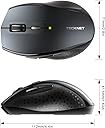
The TECKNET Bluetooth Mouse is a sleek, gray wireless mouse designed for professionals seeking seamless multi-device connectivity, silent operation, and customizable precision with 6 DPI settings. Its ergonomic shape supports medium to large hands comfortably, while a 2-year battery life ensures long-term productivity. Compatible across major operating systems, it’s the perfect blend of efficiency and comfort for modern workspaces.


| ASIN | B000Q7V0W4 |
| Additional Features | Wireless |
| Antenna Location | Laptop |
| Battery Average Life | 36 months |
| Best Sellers Rank | #104 in Computer Mice |
| Brand | TECKNET |
| Button Quantity | 6 |
| Color | Gray |
| Compatible Devices | Laptop, Personal Computer, Tablet |
| Connectivity Technology | Bluetooth |
| Customer Reviews | 4.3 out of 5 stars 20,094 Reviews |
| EU Spare Part Availability Duration | 3 years |
| Embellishment Feature | LED |
| Enclosure Material | Rubber |
| Finish | Glossy |
| Hand Orientation | Right |
| Hardware Platform | Laptop, PC, Tablet |
| Item Dimensions L x W | 2.56"L x 1.63"W |
| Item Weight | 75 g |
| Manufacturer | TECKNET |
| Mfr Part Number | FBA_BM308 |
| Model Name | FBA_BM308 |
| Model Number | EWM01308 |
| Mouse Maximum Sensitivity | 3200 dots_per_inch |
| Movement Detection | Optical |
| Movement Detection Technology | Optical |
| Number of Batteries | 2 AA batteries required. |
| Number of Buttons | 6 |
| Operating System | Windows 11 |
| Power Source | Battery Powered |
| Range | 10.0 meters |
| Special Feature | Wireless |
| Style Name | Modern |
| Theme | Bluetooth/Wireless Mouse |
| Unit Count | 1 Count |
A**R
Wanted to Turn my Note Pro (12.2") into a little more than a toy
The price is what sold me on it, but it was the size I was worried about. I don't have big hands, but I don't have small hands either (they're in that annoying in between stage of bigger than average, but smaller than large for an adult male). This mouse is great, though was a pain to pair with android, and I thought it was busted. I ended up testing it on my Windows 8 PC and it worked just fine, then I later figured out how to get it to work on my Android Tablet without any issue. I'll go into that a little later. Pros: -Not that small, just slightly smaller than my favorite M510 Logitech mouse. It's the large hump near it's rear that makes it decent fit for my hands without having to change my grip to something uncomfortable and unusable. -On windows, all the buttons work and did something, again I'll go into that later. Cons: -None really, the android connection issue is an Android issue that I solved. If I had to pick one, it would be that the printed manual says it has an 8 month battery life as to the 18 that this page claims, kind of a huge difference in time. Android Connection Fix: 1st: Connect the device like you would any other. Go into Settings > Bluetooth > Turn it on > Scan. On initial turn on of the mouse it should go into search mode where it should then be discovered by your tablet/phone. If not press the connect button (top middle) on the underside of the device. 2nd: Notice how janky the cursor is, that seems to happen every time you pair this mouse for the first time. Turn off your bluetooth, and then on again to kill the connection with the mouse. 3rd: When bluetooth is back on, press "Bluetooth 3.0 Mouse" to initiate re-pairing, and on the bottom of the mouse press the connect button to re-establish a link to the tablet. You should notice now that the cursor is smooth and working as it should. Mouse Buttons Functions (Windows): -Orange side buttons = back and forth (top = forward, bottom = back) -Everything else works like it should, right click, scroll wheel/middle click, left click. Works just fine and is very responsive. Mouse Buttons (Android): -Orange (top): seems to not do anything for me -Orange (bottom) and Left Click: acts as an Android "back" button -Right Click: acts like a one finger touch -Scroll Wheel: scrolls between home screens and drawers in launcher, and then normally in apps like Photo Gallery, and Browser -Middle Button: acts like "home" takes you to your launcher, you can also activate the long press "home" feature (which on my Note Pro launches Google Now) Since I'm writing this on my Tablet using/testing a keyboard I don't know if I can upload pictures from Amazon's Android App. I'll do that when I reconnect with my PC and maybe correct any spelling mistakes I might have made but using an external keyboard doesn't pick up. With that said, I can't be more pleased with my purchase, after solving that Android Mouse issue. It's one of those purchases that luckily doesn't cost much and for me is worth the risk. The manual was in proper English and was rather informative.
J**U
Comfortable, practical, and excellent battery life
I purchased this mouse for everyday use at work, and it has been a great addition to my setup. One of the main reasons I chose a wireless mouse is because I absolutely dislike dealing with cables. Having cords around my desk, getting tangled up in them, or dealing with unnecessary clutter tends to stress me out. I prefer simple, practical solutions that keep my workspace organized and make daily tasks easier. This mouse has been perfect for that. It gives me the flexibility and convenience I was looking for without adding extra cables or complications. The size is comfortable, fits well in my hand, and is easy to use for long periods throughout the workday. The buttons are responsive, and it feels reliable for everyday tasks. Another feature I really appreciate is the battery life. It is not rechargeable and uses standard batteries, but the power efficiency is surprisingly good. Even though it runs on batteries, they last a very long time before needing replacement, which has been a pleasant surprise. I've been using it regularly for work, and it has performed consistently without connectivity issues. Overall, this mouse is practical, comfortable, and dependable. If you're someone who values simplicity, flexibility, and a clutter-free workspace, I would definitely recommend it.
J**N
sorry for the novel; I think I addressed all the major topics people wonder about.
IMPORTANT READ THIS: about a week after receiving this mouse I started having connectivity issues. The mouse would stop working and need to be turned off and on again to reconnect. I think this is one of those scenarios where you get what you pay for. I had to turn around and invest another mouse I personally made the switch back over to a wireless mouse that uses a nano USB receiver: The Microsoft Wireless Mobile Mouse 4000. The Microsoft mouse is only a few more dollars and comes with uninstalled software to let you customize the extra buttons. The mouse came in the mail wrapped in multiple layers of bubble wrap: the manufacturers packaging and amazon's shipping packaging. The box it came it was just a simple brown cardboard box, but you can expect a lot of glamour for the price. The mouse was extremely easy too connect to my laptop, its a Toshiba S55-A series that works on windows 8, and the instruction booklet has instructions on how to connect it to laptops with earlier operating systems. all windows though so i can't speak to the Apple side of things. When the single AA battery is put into the mouse the low batter light will blink for a bit then the mouse will look like it doesn't work because the mouse does not have that stereotypical red light on the bottom. I also have not noticed any delay between moving the mouse and the cursor responding, except for on start up of the mouse or laptop, and when either system goes to sleep from no activity, yes it does seem like the mouse goes to sleep after a while but there is no way of knowing if it does sleep. As for the mouse its self. the two orange buttons on the thumb side, for right handed users, don't do anything that I've found except they can be used in place of the forward and back arrows in Google chrome. the scroll wheel has a nice feel but does not tilt, so if your looking for a mouse with a tilting scroll wheel this one does not have it. The right and left click buttons are half the reason this mouse has gotten four stars because it seems like you have to push the button down forever to get it to actually click compared to other mice; this is not a huge deal it is more just a slight annoyance if your replacing a mouse with very sensitive buttons. The other reason that this mouse is only four stars is because the side of the mouse that your ring and pinkie fingers goes on, again for right handed users, is a little small. I either have to crowd fingers together, or have my pinkie slide on the desk with the mouse. I have larger hands though, but unfortunately individual with fatter fingers would probably have the same crowding issue i have. One last thing about this mouse that I just noticed, when i let my pinkie slide on the desk with the mouse it will sometimes get caught under the mouse and that will actually lift the mouse a bit and cause the mouse to not be able to read the surface its on. All around a very solid purchase. Its not the best mouse I've ever used, but its also one of the cheapest and therefore price worthy. I would defiantly recommend this mouse to anyone who just needs a Bluetooth mouse.
V**E
Perfect before turning it on!!
Why did I say perfect before turning it on? FIRST IMPRESSIONS $$$ Well, Superficially its an attractive piece of technology, it fits perfectly in my hand and it's my favorite color. I have small hands and my husbands are XL and he felt like it was made for him so another plus. Looks like I'm buying another one for him for Christmas :) Which leads to the price And the price was right! In a land where technology can name its price I found others selling products that did the same thing for double the price. I'd say that Tecknet hit a home run with this one. BUTTONS MANUAL The buttons are easily accessible and they've used every bit of real estate. There are 6 buttons which include your normal use buttons and they've added a forward button and backward button two of my favorites as I'm on websites a lot. As if that wasn't enough they've added 5 DPI levels for you to adjust the DPI which controls the mouse speed. I am at an age where my eyes don't track like they used to so I was able to slow down the speed. So for you old gizers like me LOL that's a great options for us. We've got gamers in the family who say that it's really there for them and their quick moving games but I beg to differ LOL I've also attached two pictures from the user manual and was quite satisfied with how concise and easy to understate the manual was. BLUETOOTH USE IPS FUNCTION Onto hookup and use... First things first put in 2 AA batteries NOT INCLUDED. I'm not to crazy about using batteries but the mouse has an IPS (Intelligent Power Saving) function. I've attached a picture that explains how it works. I'm using the mouse with a laptop but I would imagine that all devices will be as easy as mine was. It's 2021 folks so it's pretty much turn on BT turn on power button and touch down! I tested it a couple of times to see about sleep mode and it works as stated non activity it sleeps you move it or press a button to wake. This was a no brainer... power on and use..... doesn't get any easier
J**R
Review of TeckNet BM306 Bluetooth Wireless Mouse (Replaced by: New Model BT5.0 Mouse)
For some reason, Technet is still using this same listing on Amazon that used to be for their discontinued BM306 mouse for this fairly new model, the EWM01308 (it will be identified by your computer’s Bluetooth module as “BT5.0 Mouse”). The old BM306 was a good value, this mouse is about the same price but even better. It is a little larger, has better heft because it uses two AA batteries instead of just one, there are six DPI settings instead of three, and the color of the side buttons is an undistracting black instead of red. It tracks smoothly, the buttons are slightly noisy but all work well (fully compatible with my Mac and the BetterTouchTool driver software I use), the scroll wheel is smooth and fairly quiet but has nice tactile stops. I can’t comment on the battery life yet. I especially like that the mouse generates basic Button 3, Button 4 etc. values instead of the buttons being hard-coded for Page Up, Page Down, etc. as are Logitech and many other mice because the basic Button X values make using third-party mouse drivers much easier. This mouse is a great upgrade relative to the old BM306 and at the current price of between $11 and $16 depending on what color you choose and what discounts are currently being offered, it is a fantastic value. If Technet revised this mouse again I hope they add a third thumb button and a tilting scroll wheel but it’s quite nice as it is. Below is my old review of the BM306 from about 6 years ago: ————— ————— ————— Over the last 25 years I've owned a bunch of mice and and similar input devices ranging in quality from the crappy hockey puck that shipped with the first iMacs to some really nice Logitech units. I currently spend most of my time using an Apple Magic Mouse supplemented by an Apple Magic Trackpad and sometimes an Apple Bluetooth Mighty Mouse. Recently I've been playing some games and while the input devices I have were working OK I really wanted a few more buttons and physical buttons rather than just a touch surface over one big button. I gave some thought to pulling out one of my old Logitech MX1000 mice, which are really great, but while wireless they rely on a base station that has to be plugged into AC and a USB port, neither of which I wanted to bother with. I looked at Logitech's current offerings and all the mice I like use a unifying receiver which fits into a USB port and I didn't want to dedicate a USB port for this purpose. Just browsing mice on Amazon I saw this one, the TeckNet BM306. Bluetooth, 5 buttons (left click, right click, scroll wheel/middle click, and a pair of thumb buttons), a scroll wheel, and it seemed to be normal size, i.e. not huge but not made to be especially portable/tiny, either. The price caught my eye, too: Under thirteen bucks. The reviews were mixed but I decided to give it a try. The tracking is smooth and it works on my bare desk, my mouse pad, my thigh, and the arm of my leather lounge chair. I didn't spend time testing it on other surfaces such as mirrors; why would I ever want to use it on a mirror? All the buttons click and register with a good feel but a bit more volume than you might desire if using it in a shared space. The tracking speed, even at the lowest resolution, is faster than my Magic Mouse but tolerable so I don't have to adjust system settings every time I pick up the TeckNet mouse or resort to third-party drivers which allow tracking speed to be set on a device-by-device basis. I'll never use the button on the mouse to change the resolution but for those who find that useful you press that button once and the resolution changes and then the button flashes between one and three times to tell you which resolution setting you just changed to. If this were a function I was going to use I would prefer a slide selector on the bottom of the mouse rather than a button on the top with a flashing light indicator whose meaning has to be memorized. The scroll wheel works very nicely with a perceptible but smooth click as it rotates. Nothing's as good as scrolling with a touch surface but as physical scroll wheels go the one on this mouse is fine. I liked the scroll wheel tilt/left-right scroll/left-right buttons on my Logitech MX1000 mice but if I wanted more buttons I guess I would have looked at some other mouse instead of the BM306. I have a bit of third-party software on my Mac called BetterTouchTool which allows me to assign pretty much whatever functions I like to my mouse buttons. By default, the thumb buttons are back and forward which, in a web browser, will take you to your previous page or the reverse. I prefer to have them work as page down and page up in most applications (although it barely matters since I'm only using this mouse for a few games). Something like USB Overdrive would allow even more customization but BetterTouchTool is good enough for my current purposes and I have it running all the time for other functions, anyway. I wish the thumb buttons were a muted silver or black because the mouse is very professional-looking except for those red buttons on the side. A very minor quibble to be sure but the mouse would look less cheap with a different color choice on these parts. I haven't owned this mouse long enough to verify the claimed battery life but the mouse has three progressive, automatic, and very aggressive sleep modes so I wouldn't be surprised if a single AA battery were to last 15 months. I use rechargeable batteries so it will be a bit shorter for me but as long as it lasts a few weeks I'll be satisfied. In fact, I wish I could disable or at least adjust the mouse's power-saving behavior because while it wakes up with a click and reconnects to my Mac in just a second or three I'd rather that it not go into sleep mode in the time it takes me to walk to the bathroom, do number one, and walk back to my office. This is the only real complaint I have with the mouse and it's a very minor issue. I imagine that it might be more of an issue for users of non-Mac computers which tend to have less reliable communication with Bluetooth devices and I think that's likely the cause of the connection issues reported in most of the low-scoring reviews here. Less aggressive activation of power-saving sleep modes would probably eliminate most of these complaints. At this price I'm quite satisfied with my purchase. The mouse is a great value and if you can live with the infrared rather than a laser, it has enough buttons for your needs, you're right-handed, and you don't have baby or gargantua hands; it's well worth a try especially with Amazon's guarantee backing up your purchase.
O**R
A bluetooth connected mouse that is amazing.
Review Update I've been using it for about a month and still love it. It connects to my laptop instantly after turning it on. It is smooth with tracking and the weight feel great on the hand. I will definitely purchase it again if needed in the future. --------------------------------------------------------------------------- Available USB ports on new laptops have become less and less. I really like the ideal of Bluetooth connectivity for peripherals, especially since it eliminates the need for a dongle when using the device with other computers. There are three additional features I appreciate about this mouse: 1. Reliable connectivity. I'm sorry for those of you who have reported issues with the connection dropping between mouse and computer. I've had mine since March of this year and have experienced zero problems with it, no matter which computer it is used with. After Windows 11 OS launches, a connection is established instantly. 2. Ergononics. The design of the mouse fits in my hand perfectly and feels natural. What I like the best is the weight. To some this mouse may feel on the heavy side. I love that aspect of it. If you bump it accidentaly, it moves ever so slowly. 3. The price. Just over $11 dollars is amazing for how well it works. If for whatever reason it stops working in the next year or so, it will have been well worth the expense.
M**A
Works well
It’s a good one. The only thing is it’s a little bigger than what I wanted for travel. It’s bulky but pairing it with my iPad was easy.
G**E
Who would have thought....
I'm a hard core fan of Logitech mice. My primary mouse is an MX Master 3 and I love it. On my gaming laptop I was using a Targus bluetooth 'travel' mouse, I've had it for many years and its worked well but the clip on back top of the mouse slides back for the batteries access, broke. So I needed a new mouse. Since I wanted an inexpensive mouse that I could use on any of the devices I have that use bluetooth and I wanted it battery powered. How many of you have had a rechargeable device fail when you needed it and then had to wait, sometimes hours, for whatever to recharge when it would have taken seconds to replace the batteries. So I saw this mouse, it was very inexpensive (compared to Logitech or other name brands) and it had a LOT of reviews and had all the things I wanted, so I bought it. So here's the good: - I have large hands and while a little smaller than a full size mouse it's a nice size in my opinion. Not as small as the Targus but not as big as the MX Master 3. - it was very easy to pair with Windows 11 (games only) and my MacBook Pro (mostly work) - the dpi is very easy to adjust and easy to see the effect. - the scroll button work well and is quiet but there is tactile feed back. - the mouse buttons are easy to press and quiet. - the sleep mode works well and I don't know if I'll get 24 months. - 36 month warranty on a $14 mouse. impressive. The maybe not so good: - There is no mouse software for the device. This is good and maybe not so good. I haven't really decided but to be honest I usually don't use it much when it is provided. - The top shell is all one piece and there is a slit cut for the right and left buttons and space for the scroll wheel. I'm not sure if this is good or bad but it is different from every other mouse I have. I guess time will tell. The Bad & the Ugly: - I have not experienced anything that I would label as such. Other observations: - The battery compartment is on the bottom of the mouse. - it had a nice weight. there are no weight adjustments like I've seen on gaming mice but I've never owned a mouse that like that so.... - Its worked well for the Steam games that I've played. - The purple is a nice shade and beats the heck out of yet another dark gray/gray/silver mouse. This is a far far better mouse than I ever expected. I would recommend this to anyone with the caveat that these are initial impressions after only a few hours of use and my opinions, over time, may vary.
B**E
Great Bluetooth mouse for MacBooks
I was looking for a simple Bluetooth mouse for my MacBook Air, and this one has good value and reviews. Mouse size is laptop friendly, the blue tooth set up is very straightforward. Respond of it is also good. Very steable, I had not had to re-Connect my Bluetooth, as soon as I turn it on, my MacBook recognizes it right away, Very happy with the purchase.
M**D
Reliable and Comfortable Mouse for Work and Home Use
I’ve been using the TECKNET Bluetooth Mouse for both my work and home office setup, and it’s been excellent so far. The connection is stable, the mouse feels comfortable in hand even after hours of use, and the build quality is solid. The adjustable DPI is a nice touch for switching between tasks, and I appreciate the long battery life – I haven’t had to change the battery yet. Setup was quick and hassle-free, and I’ve had zero issues with it. If you're looking for a dependable and affordable wireless mouse for everyday productivity, this one is a great choice.
T**D
overall works nicely
The back and forward button only work while browsing internet. These two buttons do not work in Microsoft apps such as word
S**E
Works shockingly well
I didn't want to spend a ton on a new mouse for my home office, this had good reviews so I gave it a go. Very happy with the purchase. Connected instantly via Bluetooth, easy to change the speed and a good feel in your hand. It is a bit heavy with the 2 batteries, but I'm not carrying it around the house, and my wrist is not weak.... so I'm not sure why that's an issue. The only thing is I wish you could customize the side buttons (forward back I don't use) but if that is a deal breaker, spend the cash on a fancier one. For the price? Great mouse.
S**E
A good option
A decent mouse for my MacBook. Able to connect quickly. It seems to have a decent build quality.
Trustpilot
3 days ago
2 months ago