Buy anything from 5,000+ international stores. One checkout price. No surprise fees. Join 2M+ shoppers on Desertcart.
Desertcart purchases this item on your behalf and handles shipping, customs, and support to Denmark.
🚀 Power up your productivity with speed and style!
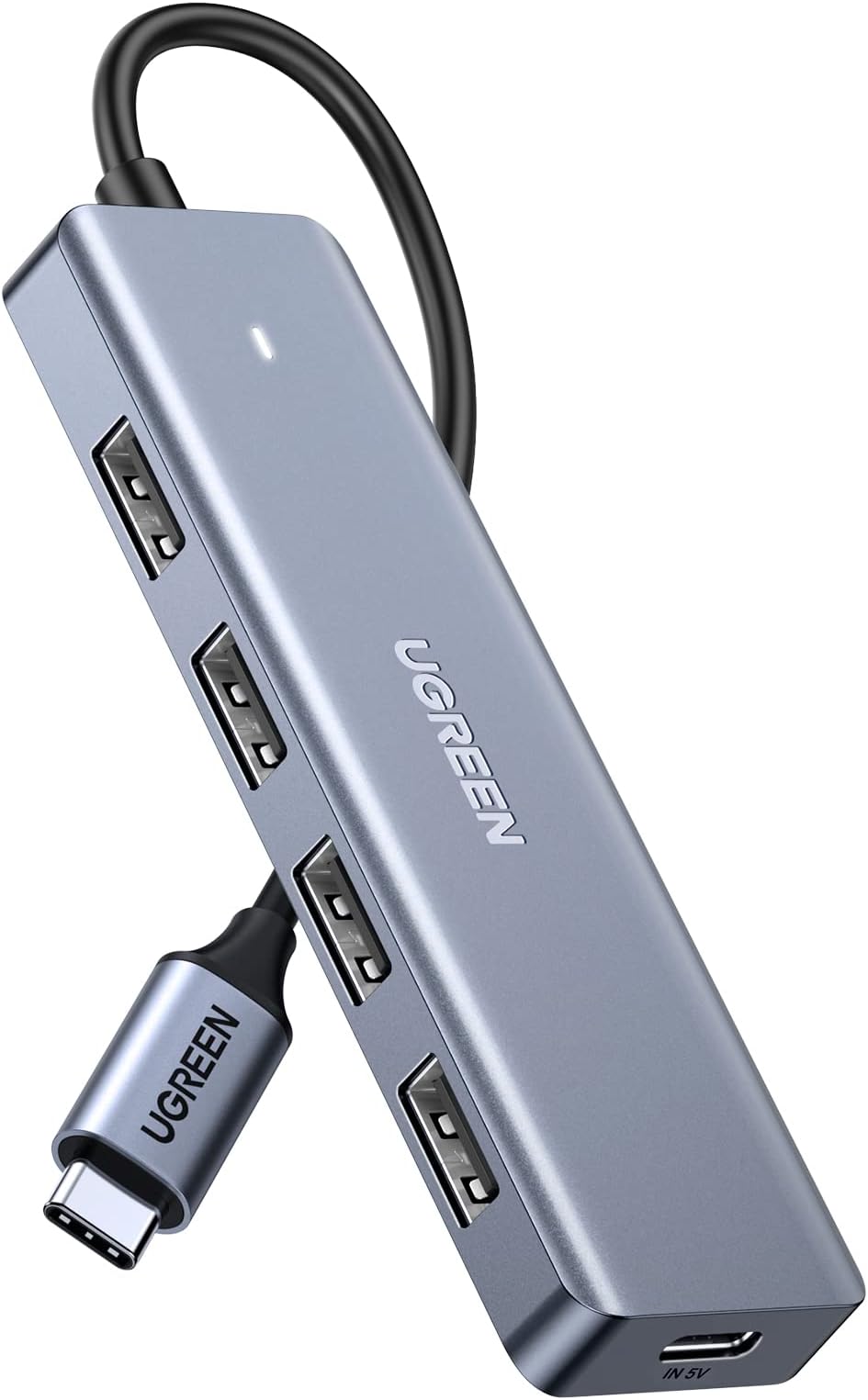
The UGREEN USB C to USB A Hub offers 4 high-speed USB 3.0 ports with up to 5Gbps data transfer, powered by an advanced VL160 chipset for stable, secure connections and smart power management. Compatible with a wide range of USB-C devices including MacBooks, iPads, and Galaxy phones, its slim aluminum design ensures portability without compromising performance.


| ASIN | B07PY87TBD |
| Additional Features | Plug and Play, Powered |
| Best Sellers Rank | #72 in USB Hubs |
| Brand | UGREEN |
| Built-In Media | 1 x 4 Ports USB C Hub 1 x User Manual |
| Color | Silver |
| Compatible Devices | Keyboards, Macbook M5/M4/M3/M2/M1, Mouse, Tablets, USB Flash Drives |
| Customer Reviews | 4.5 out of 5 stars 12,815 Reviews |
| Data Transfer Rate | 5 Gigabits Per Second |
| Enclosure Material | Aluminum |
| Global Trade Identification Number | 06957303873364 |
| Hardware Interface | USB Type C |
| Item Dimensions L x W x H | 6.3"L x 3.58"W x 0.71"H |
| Item Weight | 0.06 Kilograms |
| Manufacturer | Ugreen Group Limited |
| Mfr Part Number | 70336 |
| Minimum Required Operating System Version | ChromeOs 134, Windows 10 |
| Model Number | 70336 |
| Number of Ports | 4 |
| Operating System | Chrome OS, Linux, Mac OS, Windows, iPad OS |
| Special Feature | Plug and Play, Powered |
| Total USB Ports | 4 |
| Total Usb Ports | 4 |
| Unit Count | 1 Count |
| Warranty Description | 24 months |
L**X
For power-hungry USB devices. Correctly handles the power isolation.
If you have power-hungry USB devices but don't want a self‑powered hub with a bulky AC brick, this is the solution. Exactly what I was looking for. Works perfectly with my external disc drive, which would otherwise stop working when connected directly to my PC’s USB port due to insufficient power. By default, the hub uses bus power from the PC. However, when you connect a 5V phone charger to the auxiliary 5V-in port, it seamlessly switches to using external power. Most importantly, it correctly handles the power isolation, meaning your phone charger won't backfeed into your PC motherboard, or vice versa. Here is some experiments I did: 1. Open-circuit voltages: PC USB port = 5.17 V Phone charger = 5.04 V 2. Connected to PC only: 2a) No device on hub: hub port voltage = 5.17 V; PC current draw = 39 mA. 2b) With ~100 mA device on hub: PC current draw = 137 mA. 3. Connected to both PC and phone charger: 3a) No device on hub: hub port voltage = 4.99 V; PC current draw = 2.1 mA. 3b) Connect a device (~100 mA) to the hub: PC current draw = 2.5 mA.
B**Y
Solid, inexpensive solution that actually provides extra USB-A power
I recently purchased (and promptly returned) an 8-port USB-A to USB-C powered hub because it did not properly handing power sequencing. That is, if external power was supplied to the hub prior to system boot up (and subsequent USB-C power), any attached USB-A peripheral would lose connection with the computer. Not so with this product. You can apply external power first, then boot your computer and everything still works. I have another UGREEN product (Revodok Max 208 Thunderbolt 4 Dock) that most people were bashing in their reviews, and I continue to find the UGREEN product exhibiting good quality and good performance. Highly recommended.
C**!
PERFECT
Perfect accessory for adding devices to the Mac Mini. It works perfectly and is sleek and esthetically pleasing to the eye. The unit is compatible with my machine and the price point is a huge plus. It has several ports for my older USB devices which is what I was looking for.
N**W
Good value for a basic powered (but not charging!) USB hub made of plastic
Unlike some of the other USB-C expanders I've got here, this one is just a plastic case, not aluminum like it looks in the picture. The plastic is a tad "creaky" when squeezed but it seems decently built and I don't really expect any problems in practice with it. And as the product description does say and other reviews point out, the USB-C power input on this is just to make it work a bit more like a "powered hub" (e.g. for hard disks and such) and does NOT charge the laptop. So this isn't a premium adapter by any means, but they didn't charge a premium either. It's working well just to give some more ports from a laptop where I'm often running out. I sometimes use laptop stands above the devices I'm programming/troubleshooting on my workbench, and so the option for a bit longer cable is great. Reports as a USB3.1 hub (vendor 0x05e3, product 0x0626) and a USB2.1 hub (same vendor, product 0x0610) and nothing else when plugged into a MBP and so far so good using it.
A**R
Make your laptop into a desktop!
My desktop workstation finally bit the dust and I was scrambling to find a way to be productive with just my laptop. Well, the Falwedi USB-C hub was just the ticket! I was able to connect my 2 older monitors (which only had DVI input) to the USB-C hub using a couple of HDMI to DVI convertors (bought separately). Also hooked up to the hub my RJ45 Ethernet cable, USB external hard drives, USB keyboard, USB mouse, and USB external card reader, external stereo speakers, and everything worked with my laptop seamlessly. The USB-C hub does have a SD card reader build in, but I also use XQD format memory cards, so had to use a separate reader. So now, I can use a dual monitor extended display, or even 3 monitors if I want to utilize my laptop's screen. For all intents and purposes, my laptop took the place of my workhorse desktop - thanks to the USB-C hub. One thing I would recommend is to put the hub on something that'll help it dissipate heat. The device will generate a fair amount of heat, but if you keep it cool it'll functions perfectly. I put mine on a piece of metal to help radiate heat and made sure there was air flow around it (passive cooling, not using a fan). Also, it should be obvious - but to power it, you'll use the USB-C power supply for your laptop into the hub - then plug the hub's USB-C output into your laptop. And of course, your laptop needs to have a USB-C port (most of them do nowadays).
A**R
Great bargain for dual 4k monitors on a laptop
This docking station provides completely solid support for multiple monitors for your modern laptop that has one or two thunderbolt ports and maybe a legacy USB A port. Simply plug your laptop's power brick into the docking station, plug one or two monitors in via the two HDMI ports, plug the USB C cable that comes with the device into a thunderbolt port on your laptop and that's it!! Immediately my 2 4k monitors displayed glorious color!! And this gizmo costs only $37! When I compare this to Plugable, CalDigit etc. for $250 and up, that price is essentially free. In addition my experience with the pricier devices is that reliability of the monitors is sometimes not solid - occasional screen dropouts for a second or two, monitor going offline, etc. I'm still astonished that this thing just worked right out of the box. Easily worth more than 5 stars. Support for other ports is weak. It does have a 1 gb Ethernet port, but no extra USB A or C ports, no sd card reader support, and so on. I bought a USB A hub for my legacy devices and that works well. Other resellers, including Targus, sell this for about $100. I have no idea how Amazon can sell this so cheap. In summary you if you need a docking station that has a zillion ports look elsewhere. If your primary need is dual monitor support this is an amazing bargain.
J**S
It's great as usual Ugreen products, just not very audio devices friendly.
This works great, I'm using a keyboard, controller and a mouse on this hub. I tried using it with my headset, but it seems like even a powered hub isn't enough to share multiple ports with an audio device (mic, headset, speakers). I ended up hooking up the headset to the laptop and the rest of devices to the hub.
T**S
Works for a while and then pfffft
Bought this 2 years ago but only started to use it in the last few months for a pc we use as backup. The two usb A ports did not work for some reason and we probably need a new motherboard. However it has a working usb C port and we needed something that would allow for a few additional things to be connected to it. So, we started using this and all was fine - for a while. Very carefully used but despite that only one of the USB A ports works now. So I didn't use it for a few days but decided to give it another try, to see, as my husband likes to say, if it got better. Well, no it didn't, it got sicker. Now, NONE of the USB A ports work. At this point it's useless. It's not that expensive and a lot cheaper than a new motherboard but I have to say it's rather disappointing for it to conk out after only a short time being used. I'm getting another one of these but this time I'll try another brand.
N**H
ممتازة
ممتازة
C**M
İyi
Kullanışlı
P**Y
GOOD PRODUCT
VERY HANDY AND AT A GOOD PRICE
H**B
Clean, simple hub that works great with my MacBook
Picked this up to add a few extra ports to my MacBook and it’s been super reliable so far. Plugged it in and everything just worked — no setup or weird issues. I’ve been using it for drives, a mouse, and a couple other things at the same time with no problems. Speeds feel quick and consistent, especially when transferring files. It doesn’t get overly warm either which I was a bit concerned about with smaller hubs like this. Build is simple but solid, and it’s small enough to just leave in my bag without thinking about it. Cable length is short but that actually works well for keeping things tidy. Only thing is it’s USB-A ports only, so you’ll still need adapters if you’re using newer accessories. But for expanding ports on a MacBook, it does exactly what I need.
P**R
Great value and has added greater USB functionality to new Mac Mini
This is a great product and well made. Purchased for my Mac Mini M4 that only has USB C ports. Not the quickest transfer rates but this represents functionality and value for money. Can’t go wrong with this.
Trustpilot
1 week ago
1 month ago