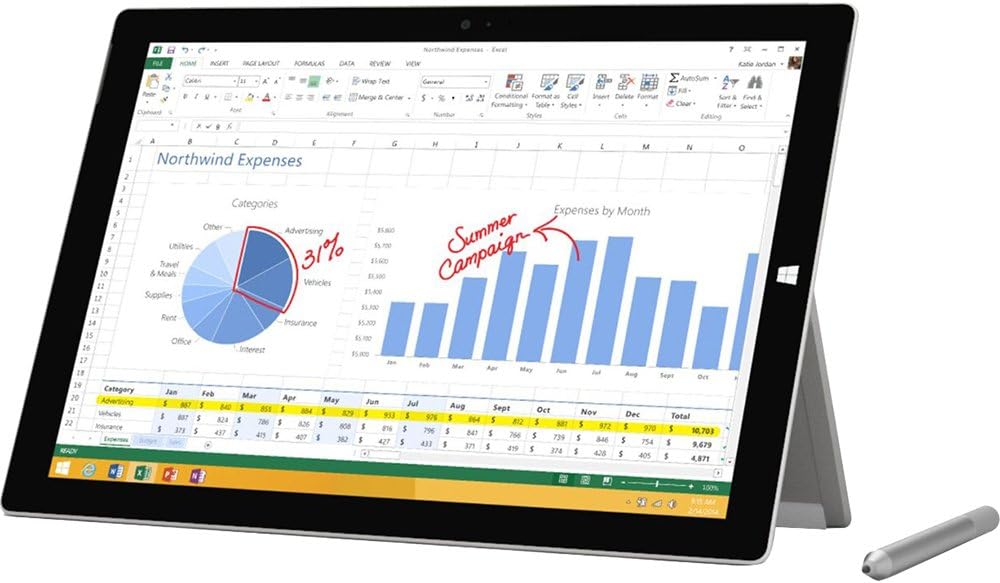
🚀 Elevate your work & play with the Surface Pro 3 — power and portability in perfect harmony!
The Microsoft Surface Pro 3 combines a powerful 4th Gen Intel Core i5 processor with a sharp 12-inch 2160x1440 HD touchscreen, 8GB RAM, and 256GB SSD storage. Designed for professionals on the move, it offers a lightweight form factor, built-in kickstand, and Surface Pen support, making it a versatile 2-in-1 device ideal for productivity, creativity, and entertainment. Windows 8.1 Pro ensures a familiar, robust OS experience, while USB, microSD, and miniHDMI ports provide flexible connectivity options.
| ASIN | B00KHR4ZL6 |
| Age Range Description | Adult |
| Aspect Ratio | Unknown |
| Battery Average Life | 10.0, 9.0 Hours |
| Battery Capacity | 9000 Milliamp Hours |
| Battery Cell Type | Lithium Ion |
| Battery Power | 4.27 Watts |
| Best Sellers Rank | #658,808 in Electronics ( See Top 100 in Electronics ) #6,525 in Computer Tablets |
| Brand | Microsoft |
| Built-In Media | 360 W Power Supply Quick Start Guide, Safety And Warranty Documents, Surface Pen, Surface Pro 3 |
| CPU Model Number | Core i5-4300U |
| Camera Description | Front, Rear |
| Cellular Technology | 4G |
| Color | Silver |
| Compatible Devices | Stylus Pen, Keyboard |
| Compatible Flash Memory Type | microSD |
| Configuration | Intel Core i5, 256 GB |
| Connectivity Technology | Bluetooth, USB, Wi-Fi |
| Customer Reviews | 4.2 out of 5 stars 614 Reviews |
| Display Refresh Rate in Hertz | 60 |
| Display Resolution Maximum | 2160x1440 |
| Display Type | Touchscreen |
| Front Photo Sensor Resolution | 5 MP |
| Generation | 4th Generation |
| Global Trade Identification Number | 00885370758061 |
| Graphics Coprocessor | Intel HD 4400 |
| Graphics Description | Integrated |
| Hard-Drive Size | 256 GB |
| Hardware Interface | MicroSD, Mini-DisplayPort, USB 3.0 |
| Human-Interface Input | Buttons, Keyboard, OCR, Touchscreen, Touchscreen with Stylus Support |
| Item Weight | 1.76 Pounds |
| Lithium-Battery Energy Content | 38.4 Watt Hours |
| Manufacturer | Microsoft |
| Memory Slots Available | 1 |
| Memory Storage Capacity | 256 GB |
| Mfr Part Number | PS2-00001 |
| Model Name | Surface Pro 3 |
| Model Number | PS2-00001 |
| Model Year | 2014 |
| Native Resolution | 1920x1280 |
| Number of Rear Facing Cameras | 1 |
| Operating System | Windows 8.1 Pro |
| Operating System Family | Windows |
| Other Special Features of the Product | Lightweight |
| Photo Sensor Resolution | 5 MP |
| Processor Brand | Intel |
| Processor Description | Intel Atom, Intel Core |
| Processor Speed | 1.9 GHz |
| RAM Memory Installed | 8 GB |
| RAM Size | 8 GB |
| Rear Facing Camera Photo Sensor Resolution | 8 MP |
| Screen Size | 12 Inches |
| Sensor Type | Ambient Light Sensor, Accelerometer |
| Set Name | Surface Pro |
| Size | 12 Inches |
| Speaker Description | Stereo speakers with Dolby audio |
| Specific Uses For Product | personal |
| Style Name | Windows 8.1 |
| Supported Audio Format | MP3 |
| Total Usb Ports | 1 |
| UPC | 885370758061 |
| Unit Count | 1.0 Count |
| Video Capture Resolution | FHD 1080p |
| Video Processor | Intel |
| Warranty Type | Limited |
| Wireless Compability | 802.11b, 802.11g, 802.11n |
| Wireless Technology | Bluetooth, Wi-Fi |
T**L
You'll love it!
Best laptop and tablet I have ever owned. Super versatile, portable, and powerful. The i5 processor works great for casual and business use. Maybe upgrade if you're a big gamer, but it's not necessary for the average household user. I recommend getting at least 8GB of RAM though. Just seems to be a better investment. Add a type keyboard and you'll have everything you need without the hassle of a clunky laptop. It's such a perfect size - I can literally throw this in my purse and take it to meetings without having to deal with an extra laptop bag. But at the same time, the screen is well sized so it doesn't feel like just a little tablet for only playing apps. I wish I had had this in college instead of the giant laptops of the early 2000s! It's like the size of a notebook, maybe even smaller, and would have been so easy to carry around campus and take notes in class using the awesome OneNote program. If you have a child who is a current or future student, buy this for them! It's fantastic for traveling to, as it fits well on a plane tray table, and doesn't take very much space in your carry on bag. You can read books with Nook or Kindle or Overdrive (library) apps. Or watch movies, play games, or get some work done. I've taken it on car trips and both long and short plane rides, and it was fantastic for all three. You'll also love the USB and microSD ports. Very convenient compared to other tablets on the market. You can plug it into an external hard drive, external optical (CD/DVD) drive, or download files. It even has miniHDMI, so you can plug it into your tv. I actually did that for a PowerPoint based game at a baby shower and it was very easy to hook up. Just plug it in, hit (Windows button) + P for projection options, and you're set. You could also use it to project pictures or watch movies. I had a Surface RT previously, and this is a vast improvement. Not only is the processor way better and bigger hard drive, but there are some other features which are much more user friendly. The kickstand is my favorite. It has a super large range of motion that fits just about any sitting or laying position comfortably. I even use it to rest my Surface on the arm of the couch when I need to set it aside for a second. And the best part is that it's built in, so you don't have to buy any extra case or assemble something in order to prop it up, like you would have to with an iPad. Just push out the kickstand and you're set. The power port is also an improvement, and the cord slides in easily with a magnetic grip. But also releases if someone trips over the cord or something.
J**R
Very good windows tablet and laptop computer
I started down this path looking for a "cheap" windows tablet that would be my coffee table computer. I first purchased a very low cost ASUS Transformer Book, thinking wow a tablet windows PC for under $300. Well I had to return not one, but two of those low cost puppies because of build quality problems (power on one and touch pad on second). So then I decided to look at a higher end windows device, since I don't use iProducts and needed a decent tablet/laptop. I soon discovered the Surface Pro 3 and convinced myself that perhaps you do get what you pay for...but I was skeptical about a Microsoft hardware design. After playing with this PC for over two weeks now, I can give it a big thumbs up. Everything about it has exceeded my expectations. It's lightning fast and I'm running some very CPU intensive software (Photoshop, Capture NX2, MediaPro). My need isn't just to web surf or read a book...I need a real computer that can crunch on the bits using real software. Plus the touch screen is incredible...so good that I'm now noticing web pages that have low res graphics that I never noticed before. If you are looking for a windows device that can be both a tablet and a laptop, look no further the Surface Pro 3 is it. It's light, it's fast, it's the perfect size for a coffee table PC that can be either a tablet or a laptop and the battery life is better than any laptop I have owned. If you only need to web browse or check in on social media, this computer is more than you need. And regarding my reluctance to consider a Microsoft hardware design, wow way to go MS! They hit a home run with this device. My only beef about it is that the Pro 3 Type Cover/keyboard is a separate item that has to be purchased separately (a must have for this device). If I was a product mgr at Microsoft I would reconsider that decision...at least initially. They may not make as much profit by throwing in the Cover/Keyboard with the Surface Pro 3, but they just might lure those reluctant iProduct folks back into the PC fold with this new product offer. This is a great PC that has found a new home on my coffee table and has the horse power to get the work done! Plus it looks good to boot. I highly recommend it.
J**N
Microsoft Customer Support (or why to buy Macintosh Computers)
Let me start out by saying I hate giving this product a one star review. The computer itself is a very nice machine (this is for the i5 256GB version in case these reviews get all lumped together). There are a very few design decisions that I question, one definitely being pen storage. Another observation that I have is that if you are going to position this product to compete with a laptop (Macbook Air) you should really sell it with the keyboard bundled. These are thing that I knew when I bought this machine so I can't really complain, I just wanted to make the observations. My complaints are not with the hardware itself but with Microsoft and their horrible customer support. Up front I want to say that I am very impressed with the computer, I am even a bit of a convert to Windows 8 after using it. If you buy it you will probably love it too, just hope you don't have to call Microsoft about it. Here is my experience. I purchase the Surface Pro 3 on January 7th from Amazon. This purchase was and is for business use and we needed it quickly so Amazon was the natural choice. On February 9th we decided that the device was of sufficient quality that we would probably use it for an extended period of time and it would be prudent to purchase the extended support agreement. I contacted Microsoft to buy their Microsoft Complete Service package. It should have been immediately apparent that their customer service was lacking when I had to place 3 separate phone calls to accomplish this simple task. The first two were to the sales department just to purchase the warranty. The first one ended when it was determined that the representative that I was speaking to was completely unable to speak understandable English. The second representative I spoke to gladly accepted payment and sent me an invoice for the purchase. I was then told to contact technical support to assign the warranty to the device in question. I then had to call back to technical support because apparently their telephone transfer system doesn't work. After verifying my email address 3 times (why I don't know) I was told by the tech support rep that everything was hunky dory and in two to three business days the device and warranty would be associated. This whole process took approximately 2 hours. On February 24th having heard nothing back from Microsoft I decided to give them a ring. It turns out that the two were not associated. After another 45 minutes on the phone with technical support during which time I was asked to verify my email twice more and send them a screenshot of the invoice for the warranty and the tablet they determined that I was a business customer and needed to be transferred to that department. This time the transfer system did work but I was still asked to verify my email twice and then send the new rep a copy of the invoices for the device and warranty. I was then told that I would have to wait about a day for them to get everything into their system. Total elapsed time on the phone was another hour and 45 minutes. Later that day I received an email saying that my device had been registered as a business device and that the case was closed. When I replied to the email asking whether or not the warranty had been associated the reply was that I needed to send them a copy of the invoice for the warranty that I had already supplied twice. So I sent another copy over. By this time I had spent enough time dealing with the issue for the day. After waiting two days without a reply I and any inquiries by email being responded to by automatic out of office replies I decided to call again. Again I was asked to supply invoices for the device and warranty after verifying my email address. I hope you are beginning to see the repetitiveness. I supplied the required information again and was assured that it would be dealt with within 24 hours. Only 30 minutes on the phone this time. This was Thursday, February 26th. I did not receive a followup. Over the weekend the power cord for the tablet stopped working. This issue was discovered Saturday, February 28th. Less than two months after the device was purchase. I placed a phone call to business tech support again on the following Monday. This time I was happily informed that my device has the extended warranty in force, so my day is looking up, even though I had never received any positive confirmation from the previous reps I had spoken to. After explaining the power supply issue to the rep (which I have come to understand is a fairly common issue) he happily informs me that after supplying the information he already has on file via email again as well as the product ID of the power supply that shipped with the computer in the first place (you would think that they would have this stuff in the documentation somewhere) they could get me a new one in 5-10 business days. Needless to say I was floored. This is a business device that Microsoft market to business people and I am a business customer. Now I am supposed to go without a main computing resource for almost two weeks. And the kicker is that in the follow up email I received it was indicated that it may take longer to get the power supply if there are inventory issues. Long story short, do not rely on Microsoft customer support.
V**S
Amazing Experience
About me and why I chose Surface: I'm an architect, and I'm constantly getting messed with tons of paper (drawings, notes, documents, plans). Then I have the urge to organize it all and I end up throwing away lots of important information because sometimes you just can't be organized enough. Introduction: Surface Pro 3 came to change that. This pen is just awesome. Build construction is unbelievable. Microsoft has done such a nice job here. It's not ipad-air light, but let's remember: it's not a tablet. It's a full computer. I run Autocad and 3dsmax on it. Keep that in mind. It's not that heavy either: I carry it all day long and it's easy to forget that you're carrying a notebook when there's no weight difference in your backpack! Performance: Blazing fast. Apps open instantly, and desktop software run as smooth as it did on my 4 years old core i7 notebook. Sometimes even faster. Intel's new integrated video cards seem even better than my old GeForce mobile deticated drive. Software: Windows 8 still has its weak points and they annoy me a lot sometimes. If you're coming from Google's Android mobile ecossystem as I do, you'll constantly be struggling with simple tasks as email, contacts and calendar sync. Battery: 9 hours is just too optimistic. With heavy graphics use (I don't do games, just CAD and 3d software) you'll get 5h at last. But it's not a problem since the power adapter is so light, not a burden to carry. Type Cover: Please don't buy surface without it. The extra $130 are worth it: build construction is very nice and the typing experience just delivers everything you'll need for work. Pen: I had a Wacom Intuos Pen&Touch with millions of pressure levels and I never got the chance to love it. It just felt weird. The Surface Pen is awesome. I feel very satisfied with its performance, drawing or writing. Top Pros: - Light - Fast - Pen (amazing) - Type Cover - Mobility (mine has reached another level since I bough the Surface) Top Cons: - Windows 8 - only 1 USB port - Mini DP is always a down - 9 hours of battery use won't do even for a kid
T**R
It's an awesome tablet, and is a replacement for my laptop
Now this is what I have been wanting for quite some time. It's an awesome tablet, and is a replacement for my laptop. I've put video editing software on it, and it performs beautifully. Still getting used to it, and since so many apps tend to 'take over the phone or computer', I don't use an app for a lot of stuff, but rather load it from the desktop, just like my regular computer, and it opens just as fast as if it were an app on the Metro screen. For instance, I hate the way Facebook wants to take over everything. I first loaded it via the app, but after looking at what it wanted to do, plus what it was demanding it have control of, live photo, video libraries, my contacts, etc., plus seeming to run even when it was in sleep mode, I deleted it. Then I went to the desktop mode, and load it by going to the Facebook website and using it as on my regular computer. Put a short cut on my desktop mode, and once I click it, it may take one second longer to load as the log in screen pops us, and I don't click to have it run all the time. When I click to exit, it's gone and not running in the background. Done a few other programs like that too. I can't stand the way apps want to have access to things that make no sense whatever. Perfect tablet and laptop combined. My wife has an iPad Air, and she cannot do nowhere near as much as I can with this Surface. She now wants to sell the iPad Air and get a Surface. Go Microsoft. For some that might think Microsoft is late to the tablet game, they were actually the first to come out with one. Ahead of its time back in 2001. My daughter-in-law had one via her work, but it didn't take off. Even back then the tablet that Microsoft made was good. Not like the ones today of course, but it was ahead of its time. Get this baby, you won't be disappointed, unless you just want a 'toy'.
K**E
Software is great but needs a few band-aids, hardware is phenomenal
The Surface Pro 3 is a fantastic device. Surprisingly thin and light. Off-the-shelf but after automatic updates, the Device Manager contains devices with no drivers, or with driver errors. It seems to get an update every day or so - Microsoft is clearly active in updating the software, and I expect those will be resolved in the coming months. The pen is only moderately good, I would consider it merely "acceptable". There's nothing that upsets the drawing experience, but it isn't impressively accurate, responsive or anything else; it only just meets requirements. If you're a professional artist and can afford to have a dedicated drawing tablet / tablet PC, I'd recommend a Wacom. Otherwise, this tablet will work great for artists on a budget who also need a reasonably powerful computer and great portability. Bluetooth connectivity seems to be problematic, probably due to drivers. - bluetooth speakers often work, but sometimes produce garbled and skipping sound regardless of CPU / bluetooth usage. - my bluetooth mouse refuses to automatically connect and needs to be re-paired every time I use it. Both of these devices work as expected with all other computers. The SD card slot was randomly non-functional (something related to waking from sleep). The problem was solved by replacing the original driver with a generic driver. Microsoft is also pushing out a lot of firmware updates - so far, the touchscreen firmware can't be updated (known issue by Microsoft), but I expect an update will resolve the issues any day now. The device has issues with sleep states too. Hyper-V keeps getting pushed/installed from Microsoft Updates, and I've had to uninstall and reinstall it twice (under "Add/Remove windows features"). Hyper-V, depending on how things go during its automatic installation, can disable the connected sleep state, leaving the tablet to drain itself every time it's unplugged. After fiddling with Hyper-V and power settings a bit, I now have Hyper-V installed and the "Connected Sleep" functionality at the same time. (see "powercfg /a"). No other sleep states are supported, and even power profile states like "High Performance" are missing. According to Google, there is no solution to this - the CPU Performance setting under power profiles is missing, so even hacks to enable the "High Performance" profile are unable to affect CPU Performance. I'm honestly not sure if it even matters - I get good performance, and good battery life during "Connected Sleep", so maybe everything is as intended. Last, this tablet is nearly identical to a Surface Pro 2 with the same stats. The Pro 3 is lighter, thinner and has a larger screen, but with my good vision, I might actually prefer the smaller, less expensive tablet. The Pro 2 can fit in my purse, not the Pro 3. Also, the Surface 3's stand is adjustable to any position, including very shallow angles. The hinge is too stiff, making for a fairly clumsy operation when you've got the Surface Keyboard, the power supply, the pen and a cup of coffee on your desk, while you're trying to yank that stand open without disturbing your workspace. The Pro 2's cover snaps open a lot more smoothly and with less effort, but only supports 2 positions. Despite all of my complaints, the hardware on this is SOLID. It's strong and dense, absolutely nothing about it feels cheap, from the user experience to the physical feel of it. The keyboard always snaps in place correctly, the charging port is robust, the ports are tough. For being a primarily software company, Microsoft really nailed the hardware. Aside from the deeper details of drivers and power management, this tablet runs incredibly smoothly. My first Surface Pro 3 had a defect in the screen - a chip of glass had gotten between the screen and the digitizer, which are permanently bonded to each other. It caused the typical swirly colors that happen when you press on a screen too hard. I sent it back and got a replacement without much issue. Overall - a great purchase. If you're comparing, you only have a few alternatives - a gaming laptop, with better graphics, more power and considerably more weight, a netbook or cheaper tablet with less power for basic web browsing, or a Surface Pro 2 for the same power and build quality but will fit in a smaller carrying case.
A**Y
I use the surface for drawing comics
So far the Surface ha been really great. It's lightweight so I can carry it anywhere and it is pretty powerful. I mainly use my Surface 3 to do art. I primarily use Manga Studio 5 (I've never run Photoshop on here). I do have Blender for some 3D pre-visualization, and it seems to run decently, but I haven't put it through it's paces yet. As for Manga Studio drawing with the pen is actually decent. It may not have the 2048 levels of pressure that a Cintiq offers you, but it does let you do thick and thin lines. Manga Studio 5.0.4 has a tablet mode meaning that it's easier to use on a device like this and I can mostly get away with using the pen and just draw. If I need to do any complex layer maneuvering (i.e. moving multiple layers) I would need a keyboard and the on-screen one isn't good enough for that purpose, but it's fine for naming layers and some simple text work. You'd need a separate keyboard for hotkeys. I use a knock-off apple bluetooth keyboard for that purpose. I intend to use my Surface Pro 3 to do everything you would need in the process of making a digital comic: scriptwriting, storyboarding, pre-vis, illustration, etc. There are some palm rejection issues. Sometimes it can register as a touch and then pan your canvas or you might move a button. I wouldn't say I had a delicate touch, but most of the time I can rest my palm on the surface and draw quickly. The windows button does get in the way if you're a rightie, but you just turn the tablet 180 degrees and it's out of your way. If you must use the kickstand to get an angle, it's doable. So the kickstand can bend pretty much all the way back. If you want the windows key out of your way just turn it 180 so the windows key is on the left and then pull the kickstand out and pull until it feels sturdy -- once you go out of the basic upright position the Surface's kickstand has some friction to it. Just don't draw to hard and you should be fine or use your hand to help support the angled tablet. There is a fan and it's noisy, but when I'm drawing it never comes on -- and I usually have chrome open in the background as well. I heard it most when running video (youtube) or skyping. The latter is more of an issue since the fan sound seems to leak into the microphone and then it gets transmitted and then fedback, so you get to hear the gentle sound of static from it over your conversation. Other than that I've used the tablet for some general web surfing. I also have some games installed on it, but I rarely play games since this is meant to be a work machine for me. It's really light so I bring it everywhere. i got a small 13 in. laptop bag and carry the tablet, the power brick (very small and light) and the pen as well as some other things. it's much nicer than the 15 in. laptop I was carrying before and a lot more inconspicuous. It's pricey, but it's a full on computer. You run full on apps. I mostly ignore the Windows 8 metro stuff.
P**H
Almost amazing, bad customer service
I love my Surface Pro 3. I was looking for a new tablet but needed to replace my laptop as well, and the Surface Pro 3 does both of those things. Microsoft hasn't quite worked out all the kinks yet, though. There are lots of annoying issues that pop up because the device doesn't really know whether it's a laptop or a tablet. For example, every time you enter a text box a virtual keyboard pops onto the screen, even when you have the type cover attached. And there are lots of times when things just lock up making it impossible to select items, etc. and you have to either restart the program or reboot entirely. No big deal, just a pain that I didn't have with either my laptop or my iPad. Also, the device runs "programs" in laptop mode, and "apps" in tablet mode. It's understandable that you would interact with programs differently in tablet mode vs. laptop mode, but the tablet apps are much more limited in what they can do, and then you have to switch into desktop mode to get to real programs. I expected the computer to be more like a regular laptop, but really light and thin with a touchscreen. But it's actually a laptop that's connected to a tablet -- two distinct devices that come in the same tiny package. It's still an awesome computer, but the company hasn't worked out how to make it run smoothly yet. The reason I'm giving it only 2 stars is because of the problems I've had with customer service. After using the device for about a month my Surface Pen stopped working. (The cool OneNote app doesn't really work without the pen. Although you can use the OneNote *program* in desktop mode. But I wanted to use the Surface like a notepad to do handwritten notes.) I replaced the AAA battery and it still didn't work. I went through the online troubleshooting, and tried re-pairing the pen with my device, and it still didn't work. So I called customer service. I got no answer but was able to request a call-back. I got three call-backs, but each time I answered there was no sound. There's also an online customer service chat option, which did work (although I did have to wait in line a while). The tech suggested replacing the 3 tiny cell batteries that are also in the pen (which the troubleshooting guide had told me NOT to do). So I shopped around at a few stores and couldn't find the batteries and finally ordered them online. When I replaced them the pen still didn't work. Then I waited in line for the chat service again, got a tech, and eventually she decided the pen just didn't work and said they would send me a new pen, free of charge. Yay, problem solved! The new pen would arrive in 6-8 days. Two weeks later, having not received the pen, I sat in line for the chat service again. The tech looked up my case and confirmed that they were indeed *planning* to send me a new pen, but there had been a delay due to low inventory (which they hadn't bothered to tell me about). But I should be receiving my new pen "soon". I asked for a tracking number but she couldn't give it to me (suggesting that they still had no pen to send me). It has been another 2 weeks and I'm on the verge of buying myself a new $50 pen because I don't believe the company is ever going to send a pen or even let me know when they think they might have a pen to send me. If they simply had some sort of email update system that would let me know if and when there is a pen available I would be more willing to wait. I really don't feel like sitting at my computer for an hour or so waiting for the chat service to pick up again.
C**N
Estoy conforme con el producto
Estoy conforme con el producto no se han presentado fallas. Llegó bien protegido y en perfectas condiciones físicas pudo iniciar el uso inmediato y eficiente la surface.
Trustpilot
2 weeks ago
1 month ago