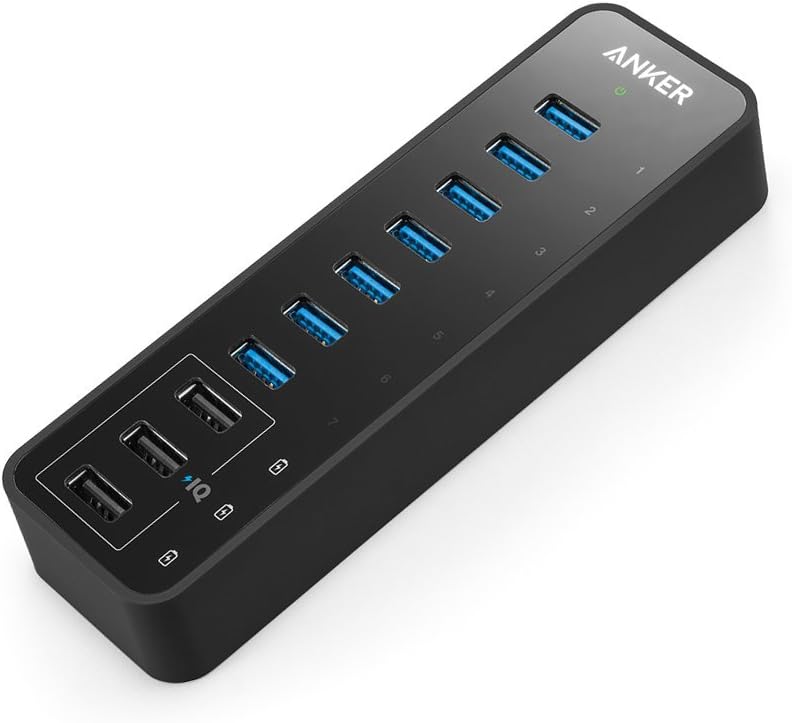


10-in-1 USB 3.0 HUB
Product ID: 14245048
Details
- BrandAnker
- ColorBlack
- Compatible DevicesLaptop
- Hardware InterfaceUSB USB 2.0
- Special FeatureFast Data
⚡60W total power output
🔌3 PowerIQ smart charging ports
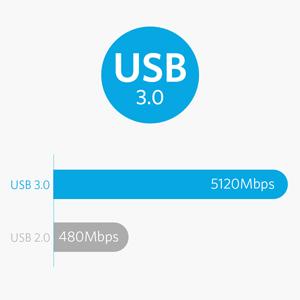
🚀5Gbps ultra-fast data transfer
🔗 Connect More, Wait Less, Power Everything.
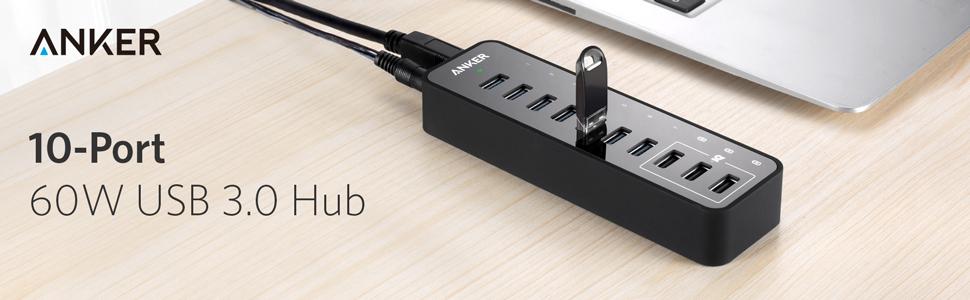
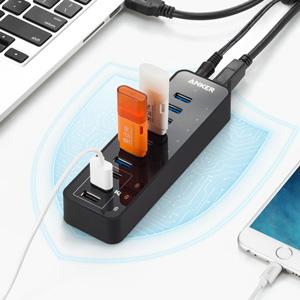
The Anker 10-Port USB 3.0 Hub combines ultra-fast 5Gbps data transfer with 3 smart PowerIQ charging ports delivering up to 2.1A each, all powered by a compact 60W adapter. Compatible with MacBook, iMac, Dell XPS, Surface Pro, and major smartphones, it supports simultaneous data syncing and charging for up to 10 devices. Trusted by over 50 million users worldwide, it offers a sleek, space-saving design with an 18-month warranty for professional-grade reliability.




| ASIN | B00VDVCQ84 |
| Additional Features | Fast Data Transfer, Charging |
| Best Sellers Rank | #418 in USB Hubs |
| Brand | Anker |
| Color | Black |
| Compatible Devices | Laptop,Smartphones |
| Customer Reviews | 4.5 out of 5 stars 5,956 Reviews |
| Data Transfer Rate | 5 gigabits_per_second |
| Enclosure Material | Plastic |
| Global Trade Identification Number | 00848061073492 |
| Hardware Interface | USB, USB 2.0, USB 3.0 |
| Item Dimensions L x W x H | 5.7"L x 1.7"W x 0.9"H |
| Item Weight | 1.1 pounds |
| Manufacturer | Anker |
| Mfr Part Number | AK-848061073492 |
| Minimum Required Operating System Version | Mac OS X 10.0 Cheetah, Windows NT 4.0 Workstation |
| Model Number | AK-A7515111 |
| Number of Items | 1 |
| Number of Ports | 10 |
| Operating System | Mac |
| Special Feature | Fast Data Transfer, Charging |
| Total USB Ports | 10 |
| Total Usb Ports | 10 |
| UPC | 848061073492 |
| Warranty Description | 18-month warranty |
K**.
Fine Unit!
I have been using this item since 2018 and has never failed or suffered loss of transfer or power deficiency. All ports are I use including external hard drives, Blu-Ray player, scanner, Phone charge (iPad and iPhone at the same time), Nikon camera data and charge, Web cam, magic keyboard and track pads charge when needed. The fast charge ports do just that. Handles all this effortlessly running cool with no access heat. Couldn't br more satisfied.
P**.
Inexpensive, compact and long-lasting USB-A USB 3.0 hub with external power
This product is not very exciting, and that's a good thing. It's inexpensive (IMO), compact, and "just works". I actually already owned one of these units, and I've had that one a very long time. Long enough that I was surprised to find the exact same model for sale. This gave me confidence a new one would be reliable and functional. I ordered a second one because I have a relatively large number of USB 3.x SSD external enclosures, and was suffering occasional bus drops under heavy drive utilization. I suspected, but did not have proof, that I was drawing too much power from my motherboard's USB interface. A lot of powered USB hubs that accept USB A connectors are kind of large. Other units also take up space and power for other kinds of ports like HDMI or Ethernet. If you need a docking-station type solution, those are great, but I really just wanted 4-5 USB A ports. And because of where the unit was going be placed, I preferred the ports to be on the top, which is also kind of hard to find. After checking to confirm I couldn't easily find an alterative with a similar form factor that offered more bleeding-edge USB 3.1 or 3.2 speeds, I went with this one. For what I am doing with these drives, USB 3.0's 5 Gbps speed cap is fine. The big deal for me was that these units have their own power supply, provided via an eternal "power brick". It seems that my guess that my issue was power-related was right, as I have not seen my external drives drop off since plugging them into the new Anker unit.
B**T
The Ultimate Powerhouse for Multi-SDR Rigs | Zero Dropouts, Solid Power
The Bottom Line: If you are running a server-side radio setup with multiple RTL-SDR sticks, this is the hub you need. It provides the consistent 60W of overhead required to prevent the random disconnects common with unpowered or underpowered hubs. The "SDR Hub" Stress Test: I integrated this Anker hub into my outdoor demarc box setup with a perfect fit to manage a stack of SDR sticks. Anyone who has tried to run more than two sticks on a Raspberry Pi knows that "low power" warnings and signal dropouts are the norm. Since switching to this powered 60W hub, my system has been 100% stable. Doesn't add any weight to the box, and the solid black color looks like it belongs in there. The included cord was the perfect length. Key Performance Observations: PowerIQ Ports: The three dedicated charging ports are a lifesaver. I use them to power the peripherals in my box (like cooling fans and internal controllers) while leaving the 7 data ports exclusively for the SDR signal chain. Thermal Stability: Even inside an enclosure, the hub handles the 60W load without excessive heat buildup. The build quality is typical Anker—sturdy, professional, and built to last. No Signal Interference: In the world of Radio Frequency (RF), cheap power supplies can bleed "noise" into your signal. I was pleased to find that this hub’s power brick is well-shielded; I haven't seen any increase in the noise floor on my software waterfalls. Connectivity: The USB 3.0 data speeds ensure that even when I’m streaming high-bandwidth IQ data from multiple sticks simultaneously, there is no bottlenecking.
S**N
PLEASE READ THIS and read it entirely
Okay so I'm giving the product a 4 star review because 5 star means I absolutely love it, and I can't say that because there are flaws. But consequently there are pros as well. This is all SPECIFICALLY based on Mac users probably using a Macbook Pro I can't speak for anyone else. Pro: - The device does what it says, the ports are super fast, the device is efficient and if you have a computer with two ports as I do you do need something like this - I'm a photographer and wherever I go I constantly need to charge portable power banks and batteries, so the three ports at the end of this device allows me to have all my stuff in one area and be prepared whenever I have a trip, great plus Cons: - The biggest con is that this device (as said in some other reviews) may or may not shut down your wifi, or at least completely destroy your internet speed to below 1mb/s. Now that's probably not Anker's fault and there are ways to get around it, the concept is called USB 3.0 interference if you want to search it on google. You need proper electromagnetic shielding, super annoying because the point of this product is convenience. You can get a longer extension cable (great, more money) you can move the product in a different location (awesome cause when I want to have a nice neat setup, that's exactly what I don't want to do), or thankfully for me plugging it into the other port on my laptop did the trick (PHEW) some of you may be not as lucky or even luckier. Regardless this is a problem with, rare but real, USB 3.0 devices in general, and when you have so many plugged into a single hub going into one port, this can happen, it shouldn't, but it can. So be mindful of that, but don't let that stop you from buying it because when it is fully functional, it does a damn good job, it's just that when it isn't, your wifi is going to s*** the bed. - A brand like Aukey offers a 7 port system, that also includes a ethernet port, huge plus because you can bring this anywhere and use it as an ethernet adapter with projects, editing, and more stuff on the go. (I figure if you're buying something like this in the first place you're either NOT an average computer user or you're simply an enthusiast) *The most important thing about this review is this following part here: When you read reviews on amazon, take the time to understand what a good review says and what a bad review says rather than just looking at the star ratings. Simply because an idiot could not realize the implications or issues and give it 5 stars in one day, and just the same an ignorant person could not understand how to operate the item or use it properly and give it a low rating because they weren't able to get it to work. Try to find a good descriptive review of anything on amazon and everyone's circumstances are different, so see if it tailors to you and which review is accurate to what you require. And anker in general is an extremely reliable brand with great customer service so try your luck with this product or another and don't let my review turn you off, but for those who do have issues, I wrote this to be informative and help them in the present or in their considerations.
D**Y
My speed test shows identical speed for file transfer, with or without this hub. Yahoo!
Totally great so far. Now let me qualify that statement. First of all, I bought a 7-data-slot hub from Pluggable a couple years ago (USB 3.0 hub that is). That hub has been flakey for me. Actually, the manufacturer was very responsive and gave me a new one during my first month. But that hub, if it was "on", and plugged into a USB 3.0 hub on my laptop, would always prevent my laptop from being able to boot-up. So I had to turn off the power switch (which is on a separate power strip which is powering the hub and nothing but the hub) before booting, and then turn it on once Windows was booted. Additionally, I did some speed tests with that one, and large files transferred way slower through the hub than if the hub weren't there. I forgot the numbers, but the speed difference was like 1/2 the speed if the hub were in place. (Sorry guys, I'm just telling it like it has been for me.) So I decided to try this Anker 7 slot USB 3.0 hub + 3 charging slots. Let me tell, you: good news. For starters the charging slots work great for me. Also, my PC can now boot up normally, even the hub is plugged in and is "on". So I can leave the hub plugged in and I don't have to manually turn it on and off, separate from the PC, like I did with the Pluggable. But most importantly, here is a speed test I did: I copied a directory which has 9.02 Gig of data in it (Drum samples, by the way). 1.) Test 1: copy from C Drive to F Drive (USB 3.0 drive) with the external drive plugged directly into a USB 3.0 port on my PC: The counter showed that the whole thing moved at: 42 MB/sec. The time was: 3 minutes, 37 seconds. 2.) Test 2 - I removed the new directory of files then rebooted, turned off computer, and started over. Everything was the same, except this time the external USB 3.0 Drive was plugged into the Anker USB 3.0 hub. The counter showed that the whole thing moved at: 42 MB/sec. The time was: 3 minutes, 40 seconds. Those are my real-world tests. I am very surprised. This is way better than I expected. I am not a paid reviewer. I did not get a free unit to review or anything like that. I paid for my unit from Amazon just like you did. This tests are objective. I have nothing to prove but the truth. I'll mention that I am using Pro Tools recording software, and because of these tests, I'm going to plug my external USB 3.0 drive into the Anker hub, for now on, instead of directly into the PC ... because there's no net difference. Hallelujah. It's hard to believe. I know this does not line up with some other people's reviews. Fine; you can go and believe them instead. I won't mind. God bless and take care.
M**.
Great USB 3.0 Hub - Cable Is Too Short
UPDATE: April 11, 2024: I purchased a second of these USB Hubs as my first experience continues to be fantastic, but I needed a second one for a second computer. The second unit is performing as I expected thus far! I have not had any issues with compatibility, etc. I continue to recommend this unit. For this second unit, the length of the supplied USB cable was perfect, as it connects to a laptop. -------------------------------------- This product is a great combination of USB 3.0 ports as well as charging ports. I bought this unit to replace an old Belkin USB 2.0 7-port hub; unfortunately, after many wonderful years, that one died. Since I had an unused USB 3.0 port on the back of my computer, and I have been very happy with the Anker products thus far, I thought I would give this a try. I love that it has the USB 3.0/2.0 compatible ports PLUS the three IQ power ports. These latter are great when I want to charge my Bluetooth headset, and NOT want to connect it logically to the computer (it causes other issues). I really cannot speak to the USB 3.0 speeds, as everything I have connected is still USB 2.0 still. But it is rock solid for what I have used it for so far. The only downside to this package that I had was that the USB 3.0 A to B cable was too short (2.6'), and I had to also purchase a separate 6' USB 3.0 A to B cable to fit my needs (I purchased the Amazon Basics one). I have the hub on my desk, while the computer is to the right of my desk. A 4' cable would have been perfect. This was not a big enough of a deal to reduce the stars though, as it was clearly labeled, and I knew to purchase the extra cable at the time I purchased the hub. Another wonderful Anker product.
J**K
When put to the test, this hub gets it done.
Updated Review: Anker responded to my review and sent me a new hub since I am still within their warranty period. The new hub is working perfectly. And I've put it to the test by using the 3 IQ ports to charge and sync multiple iPads at once, and the other 7 ports have portable hard drives connected. Everything I can ask this hub to do it's handling without issue. In fact I've put the new hub to more use than my old one...and again I've had no issues at all. I rarely change my reviews after I post them but when you find a company that not only listens but responds and makes things right, they deserve an updated review. 5 Stars? Absolutely yes. You might find cheaper hubs, but not one backed with a warranty like Anker has. Old review: Not recommended. This USB 3.0 Hub does not hold up well to even light use. I have several USB hubs, some of my USB 2.0 hubs are over 8 years old and are still working just fine. My Anker 10 port USB hub is my first hub where the center blue USB insert in the port itself has actually came out leaving just the 4 pins exposed. I've only had one other unit many years ago that had the center insert come out. And as luck would have it the port that has the issue is one of the IQ charging ports. When I first purchased this unit I loved it and recommended it. But not now. You also have to be very careful what you plug into the IQ ports. This unit destroyed a portable headphone amplifier that I plugged into it to charge. There are limits to how intelligent the IQ charging ports are as I found out the hard way. $30 for my portable headphone amplifier went poof in a small cloud of acrid smoke. In short, while I love Anker's cables (I prefer Anker cables as they hold up very well over time) and their IQ series 12 volt car chargers, I will not purchase one of their USB hubs again unless they make improvements to it. These units should last at least a year without the center part of the port coming out. I don't think that's asking too much from my Anker hub when my older hubs are still going strong with all ports fully functional and intact and they have seen a lot more use.
A**H
My second hub is as great as the first (bought 2)
I utilize a laptop workstation as my main rig which only has 4 USB ports on it. I have about 10 USB accessories (some of which require large chains of bandwidth) + a handful of other charging cables for phones, headphones, wireless devices, etc. I bought 1 of these Anker 10-port's about a couple years ago now and absolutely love it. It works as expected and is exactly what I needed (and hoped I was getting). It feels sturdy/durable/heavy in the hand and even looks good on the desk so I didn't need to hide it. It became such a staple of my laptop setup that I semi-permanently attached it to my desk with 3M tape squares (pretty sure that will rip the finish/paint off my desk if I remove them but if this hub ever stops working, I'm just going to get another one will fit in and cover that up again). There are 7 actual USB ports and the other 3 are charging-only ports. As my USB peripherals increased over the past 2 years, I was running into some bandwidth problems (my audio devices weren't being recognized/working because of the overload I had running through this USB hub which makes sense) because all that data is going through the same channel. Sooooooo I bought another. =) Second one works just as great as the first and is identical. I've also now attached this to my desk on the opposite side. You can't go wrong with this hub and the quality of this product has truly made me consider Anker for other purchases since I've witnessed first-hand their high-quality products.
Y**N
Doesn't come with UK Plug
You'd think paying this price, it would come with a UK plug too - surely that's not an expensive item to include? Haven't been able to use so 1 star it is 🤷♀️
M**S
Very Smartly crafted product
Something I was looking out to procure since a very long time. Really worth to buy
H**R
Great all round!!
Great product and great service from Anker! Sent an enquiry regarding the product to customer service. They replied promptly and were able to answer all my questions. I have 4 non-powered 5 TB hard drives connected to the hub and it works great. Wanted to connect a 5th drive but ended up using it elsewhere. Highly recommend this product and this company!
M**J
BEWARE Orders from USA firms!!!
If you order this excellent item from the Uk WATCH OUT!!! It comes with a USA 2 prong plug! This of course is USELESS in the Uk! I have had to order an adapter for a further £10 in order to make it work! SURELY the ad should make it clear ...NOT in mini print ...that this problem will occur? So watch out folks ! I thought I was getting a bargain... NOT!
S**C
best hub for connecting multiple hdd
I had purchased this for connecting my 4 external hard disc along with my printer. Its working as expected. Earlier I had used anker powered USB hub (7 port) which I had purchased in 2015 and still working without any surprises. I am purchasing this as a upgrade. Don't have second thought to buy it if you are planned to connect multiple hdd.
Trustpilot
3 weeks ago
1 week ago