Buy anything from 5,000+ international stores. One checkout price. No surprise fees. Join 2M+ shoppers on Desertcart.
Desertcart purchases this item on your behalf and handles shipping, customs, and support to Denmark.
๐ต Elevate your workflow with ergonomic wireless freedom โ because your wrists deserve the best.
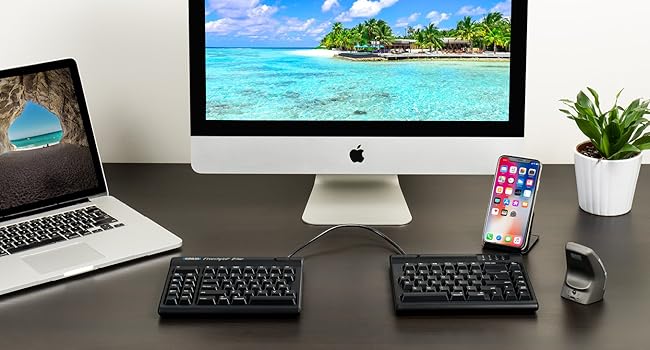
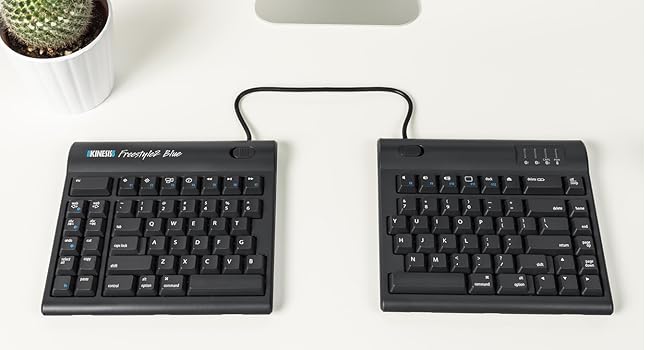
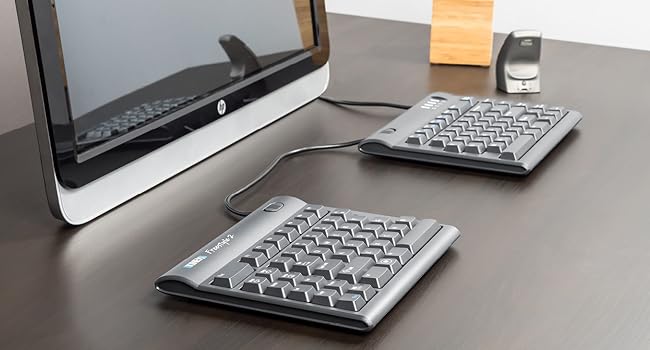
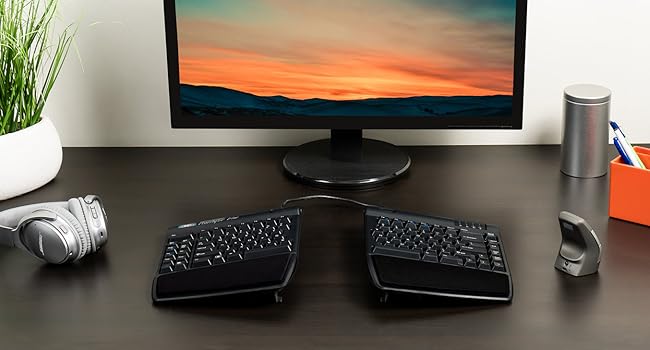
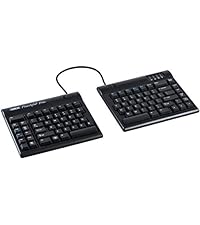
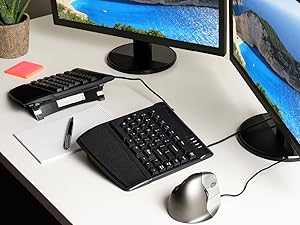
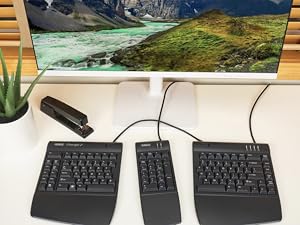
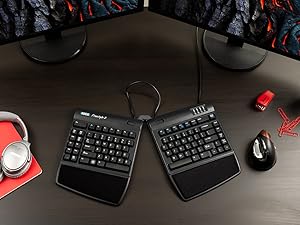
The KINESIS Freestyle2 Blue Wireless Ergonomic Keyboard features a 9-inch adjustable split design to promote natural hand positioning, reducing strain during extended use. It supports multichannel Bluetooth connectivity, allowing seamless switching between three devices, and offers 94 low-force tactile keys for comfortable, precise typing. Compatible across Windows, Linux, and Android platforms, this lightweight, portable keyboard is ideal for professionals seeking ergonomic comfort and versatile wireless functionality.


| ASIN | B00NMVJZ1E |
| Additional Features | Bluetooth, Wireless |
| Antenna Location | Office |
| Best Sellers Rank | #576 in Computer Keyboards |
| Brand | KINESIS |
| Built-In Media | USB Cable |
| Button Quantity | 94 |
| Color | Dark Gray |
| Compatible Devices | PC |
| Compatible Operating System Family | Linux, Windows |
| Connectivity Technology | Bluetooth |
| Customer Reviews | 4.0 out of 5 stars 661 Reviews |
| Enclosure Material | Lightweight plastic or metal |
| Global Trade Identification Number | 00607998800294 |
| Hand Orientation | Ambidextrous |
| Item Dimensions L x W x H | 16.4"L x 9.4"W x 1"H |
| Item Weight | 2 Pounds |
| Keyboard Backlighting Color Support | Single Color |
| Keyboard Description | Multimedia |
| Keyboard Layout | QWERTY |
| Manufacturer | Kinesis |
| Mfr Part Number | KB800PBBT |
| Minimum Required Operating System Version | Windows 7 |
| Model Name | Freestyle2 Blue |
| Model Number | KB800PB-BT |
| Number of Batteries Required | 1 |
| Number of Keys | 94 |
| Number of Sections | 2 |
| Power Source | Battery Powered |
| Recommended Uses For Product | Office |
| Special Feature | Bluetooth, Wireless |
| Style Name | PC Layout |
| Switch Type | Tactile |
| Theme | Ergonomics, Computer Accessories |
| UPC | 607998800294 |
| Unit Count | 1.0 Count |
H**W
Great bluetooth ergonomic keyboard that can switch between multiple devices.
With the tenting accessory it's a great ergonomic keyboard. Native Mac layout and labels, with an additional forward delete key which is a plus for me. I also like the big Esc key after a couple days of adjusting muscle memory. Pressing FN switches between F1-F12 mode and special keys mode (volumes, play/pause etc.) with LED indicator which is also very nice. It does not have numeric key pad thus has smaller size, which is exactly what I want but might be a concern for some people. It connects easily with MacBook and can be used to wake up MacBook and input password. Also works with Windows but with Windows and ALT key in reverse positions. There're lots of ways to remap keys in Windows so if it's an issue it can be easily sovled. All in all, it has none of the different small issues I had with other wireless keyboards and I'm very happy about this. The best part is, it can switch between bluetooth connections with 3 different devices. I recently started using it with a MacBook and a Windows laptop connected with the same monitor. With 2 bluetooth mouses I can switch between two computers relatively easily. It works as well as a USB switch box and without wires the deal with. I used a few USB switch boxes before for keyboard and mouse, and they all had occational issues, but I have not had switching issue with this keyboard so far. It really satisfies all my needs and I feel lucky to find this one.
D**N
Not perfect but getting pretty close...
I already have used the older Freestyle 2 for years and love it. This keyboard has the same strengths -- and most of the same drawbacks. Strengths (apart from the obvious of the split keyboard and the wireless connectivity) include: - it is straightforward to pair this keyboard via Bluetooth (Linux and Windows both work; Linux can be a bit more troublesome) - the ability to switch "on the fly" from one Bluetooth pairing to another is a nice touch (really convenient if you work with two computers side-by-side) - the J and F keys have ridges (finding the correct hand position by touch becomes important given that the two halves of the keyboard can be spaced arbitrarily far apart) - nice LED indicators for 'Caps Lock', etc. - while the keys are not silent, they are not excessively loud either - the connector which can be used to hold/tether the two halves together is easily released using switches on each half - portability: the two halves can be conveniently packed into a backpack or bag Reasons I'd give it a 4.5 instead of a 5 if that were an option: from my perspectives, shortcomings include: 1. the absence of a physical insert key (only accessible using a Fn combination) 2. the size of the keys (the keys are approximately laptop-sized keys, not regular full-sized keys) 3. the keyboard itself is not backlit (I find this especially useful when working in relatively dark conditions) 4. the placement of the 6 key on the left half of the keyboard (this is fine if one uses the LH for 6 but I find myself stabbing into empty space with my right hand... while this can be relearned over time, it is hardly ideal...) 5. the wired USB connection is only for charging (if you're just trying to get something done, Bluetooth pairing can be a hassle -- e.g., this isn't the "go-to" keyboard if you want to plug into a headless server and quickly deal with something) Bottom line: overall, the wireless is well worth the minor price differential between this and the wired Freestyle 2-- well worth the additional money. If you want to take care of your hands and wrists, this keyboard should certainly be on your "short list" of those under consideration.
J**E
Great Keyboard, Get The Wrist Supports And The Tilt Base
I really needed a keyboard that matched my shoulder width a lot better. I type a lot and I am tired of having a typist hump and rolled shoulders. The cable between the halves was not the longer one that they had offered at one time but it was marginally long enough. Brightness: There is no backlight Size: Honestly, I would be much happier if it was bigger because I could use a much bigger return key and a much much bigger shift key on the right side. The dedicated function keys on the right side will be the death of me! Connectivity: Bluetooth works just fine and the battery seems almost infinite. The keyboard works while connected to power so when the battery dies, I will still have a keyboard. Build quality: In terms of general build, this is a normal keyboard, it is not a gaming keyboard with red switches nor an IBM-PC keyboard of yore. However, I am happy with the feel and there is sufficient travel and sound to provide solid feedback. Keyboard functionality: Take away the normal sized return key and the micro shift on the right side and those MORONIC function keys on the right --a larger delete key wouldn't hurt either-- and the keyboard works so well that it has been more or less perfectly transparent. What I need is this keyboard with the large delete, enter, shift, and space (although the spacebars do feel great!) of the original MS "ergo" keyboard. I need a tool, nothing fancy, and, for damned sure, no right side function keys! Noise level: In terms of feedback, this is an excellent keyboard, however, it is quiet enough that I do not know why this is a question at all. WISH LIST: Longer Cable, Much Bigger Delete, Return, Right Side Shift, more room between the keys, more distinctive home row indicators.
S**S
Over designed?
A great idea for a keyboard that suffers from over design. The things that make this a useful product are a great key touch, bluetooth connectivity, and the ability to move the halves of the keyboard around and to elevate them for comfort. If the designers had stopped there everything would be fine. But, succumbing to the "if we can do it we should" philosophy that seems to be all the rage these days, the designers didn't. Instead they decided the the keyboard should talk to three different devices, and they added two columns of keys - 10 in total - down the left hand side of the keyboard, ostensibly useful with Microsoft Office.* This is a Mac KB. I'm using OS 11. Each time I go to use the computer and the monitor has turned off, it takes two to four taps on one of the keys *after the login screen has come up* before the keyboard is actually talking to the computer so I can type my password and unlock the screen. More frustrating is that the keyboard frequently loses its link to the computer and has to be "re-paired" - turn the KB off, turn it back on, press the pairing button, several times, and wait for it to link up again. I suspect that these problems have to do with the fact that the KB is looking for one of the three machines it can talk to, despite the fact that it's only paired with a single machine. The extra keys on the left side of the KB are not to be touched except when one is using MS Office (or whatever they were intended to assist). Doing so will occasionally cause the KB to un-pair. Please note that I have none of these problems with the standard Mac bluetooth KB. * They also stuck the ESC key way off in left field, but that's a personal peeve that probably only affects people like myself who do a lot of work in the terminal.
J**Y
Super great keyboard with horrible fatal flaw
This keyboard is ergonomical, yes. The split shape, good key feels, nice. Bluetooth multiconnect? That's the reason I got it, so I could use it seamlessly with two different computers, switching with the press of a button, and that works too. Except. Use this keyboard for any length of time and it is going to slowly drive you crazy. Every once in a while - say once in a couple of hours - it will randomly pause while you are in the middle of typing, wait two seconds, and then whatever the last key you hit before it paused will repeat a bunch of times. Wait four or five more seconds and it reconnects and you're OK! The other thing it'll do is just randomly lose connection. No pop-up, no light, just suddenly and inxeplicably becomes unresponsive. The only cure for that one is to turn it off and back on again with the power switch on the back. These two annoyances start out as minor and weird, but over time, you will grow to really really hate the damn thing. It was a hundred bucks! This is undoubtedly some flaw in the bluetooth implementation, and if you read through all the poor reviews of this keyboard you'll find others have had the same issues. For YEARS. Obviously Kinesis is not interested in acknowledging or fixing it. I'm about to replace it. It still works exactly as well as it did when it was brand new, but I just can't take it any more.
K**O
Love it
I've been using this keyboard for over 5 months and love it. It feels better for my shoulders and overall posture when my arms are able to be farther apart instead of slanted inward, which they have to be even for most ergonomic keyboards. The Bluetooth works well overall -- I experience an occasional instance of it behaving like a key got stuck and typing a letter several times after a slight delay, but this is only occasional and hasn't been much of a problem for me. It's worth it to have one less cord to deal with, in my opinion. I think I've only charged this keyboard a couple of times in the 5+ months I've had it, and I use it daily for work. I turn the keyboard off overnight and when I'm stepping away from my computer for more than a few minutes. I purchased the accessory kit with the tenting accessory and wrist attachments. No regrets! Not a cheap keyboard when all was said and done, but a good keyboard is something worth investing in if you're doing a lot of typing. The only thing I can think of as a "negative" is that there's no number pad, so you're stuck using the numbers at the top of the keyboard instead of having the option to quickly type out numbers and calculations with one hand, unless you purchase the separate Bluetooth number pad, which I've opted not to do. But this keyboard was still a good purchase regardless.
L**R
Almost there ergonomically, but the bluetooth connectivity makes it a no go
I WANT TO LOVE THIS KEYBOARD. It is the most comfortable I've used, which is important given that I have arthritis that makes typing painful. My only complaint there is that it still takes a lot of force to type. However.... the bluetooth keeps disconnecting. The keys repeat, skip, or are delayed. Anything between my bluetooth antennae and the keyboard- lamps, phone, mouse- impact its function. Switching between devices is laggy enough that I often end up having to reset the connection and reconnect the devices again, which kind of defeats the purpose. I had to moderate a chat for work and had so much lag, skips, and repeated keys that I ultimately had to switch to a travel keyboard to finish the session. And I likely could have returned it, but didn't realize that you can only use the included charging cord. the 'regular' ones that I keep on my desk voided the warranty. I had my eye on the more expensive one, and was 'testing' this one out to see if the brand was worth the risk- at this point, I don't think so. I hope to revisit it as it gets improved, but for now I've broken down and bought another Logitech K860, which seems to be the one I can't find anything to beat.
P**E
I have tried several keyboards now and I tried my hardest to get my workstation comfortable so that it wouldn't hurt my shoulder
OK, I have tried several keyboards now and I tried my hardest to get my workstation comfortable so that it wouldn't hurt my shoulder. This keyboard seems to be the one that works the best. I do not have it with the kit. Some people may prefer the kit. I tried it with the kit but I preferred to have one of the jelly wrist rest and place my hands on the keyboard without them being lifted so my wrists are protected from the jelly wrist rests. I think that the reason that this one is so comfortable for me is because I am able to have my arm straight in front of me and not have to bend them at weird angles to get to a traditional keyboard. It is a lot more money than I was hoping to spend but it is well worth it when I consider that my arms are not taking all the time and I can lift them again. I am not used to a desk Jobs so this has been a significant transition for me. I can tell you my arms used to hurt every morning even during the night because of my work on the computer these days. I wake up without any pain anymore. I have only had this keyboard for a couple of weeks. The pain has been slowly improving but it definitely has been improving. I don't anticipate ever going back to any other keyboard. This has been a lifesaver. Also, I ended up returning the wireless one and went with a wired one. I have my keyboard in a drawer under my desk. The drawer has a flip down front so it is designed to also be my keyboard stand. There were too many glitches with the wireless keyboard with buttons accidentally being pressed or being missed read by the computer and the communication between the computer and the keyboard. I ended up returning it and switching it for this one that is wired. I have had zero problems with this keyboard. I absolutely love it! I just have the wire go up underneath my desk so it doesn't even look like I have a wire. The wire is long enough that even with me opening and closing the drawer it does not pull on the computer or the keyboard. The best benefitโฆ I saved money :-). I highly recommend this keyboard.
S**T
It draws a lot of attention
Everyone I meet likes the design concept. I did not buy the accessories yet and just have the base model. I find it very convenient compared to regular keyboards and keeping my hands further apart does help reduce strain. It works with Windows 10. I liked the concept of multiple bluetooth channels. It did not pair with my Samsung Galaxy 5 and I have yet to try it out with other versions. I have trouble with the placement of delete and backspace which causes me to accidentally swap the operations. I gave it only 4 stars because of the price. I would like to purchase the accessories to test them out buy am unhappy having to pay so much for plastic accessories that may or may not help. I was very happy with the Seller
A**O
Amazing keyboards, needs accessories for purchase
My wrists used to hurt with regular keyboards, but since I bought this keyboard, my wrists have stopped hurting. I like the separation and the tilt. It makes typing really comfortable. I also like how I can seamlessly switch from connecting to my macbook pro to my macbook air to my ipad. I'm very happy with this purchase. The only thing I am slightly unhappy about is how additional accessories need to be purchased. Without the additional accessories, the keyboard is too low and flat.
N**C
I wish I bought this years ago!!! LOVE IT!!
Bought: Mar 2, 2021. Review: June 14, 2021 Use: daily (9-5pm + 7pm-11pm = 12hrs per day, almost every weekday + occasionally on weekends). This is it everyone! I have tried over 10 "ergonomic" keyboards over past few years at various jobs + purchases of my own. I will never go back to a 1 piece keyboard again!! split keyboards are the way of the future and also the way to save your body from the stress of typing all day. the pain I experience in my hands, wrists, arms, shoulders neck and back have dramatically improved. Is it gone completely? no. but I didn't expect this since I have chronic conditions that are likely to be a part of my life ongoing. But this keyboard was a huge help to keep me working and help with pain mitigation/pain management in a non-invasive and also non-pharmaceutical way. I love this thing. the reason I decided to write this review today was because today was the first time I actually had to charge my keyboard after the initital charge required when it arrived the first day. So it has been going strong for just over 3 months. AMAZING! I also absolutely adore the shortcut keys on the left hand side. the Bluetooth connection has lost connectivity to my PC only a few times (2-3), and it is super simple to reconnect. A non-issue for me. DON'T WORRY ABOUT HOW HARD IT WILL BE TO GET USED TO THE SPLIT KEYBOARD!!!I ITS NOT HARD AT ALL!!! You will find you have adapted to it within the first few days, and for me it was a breeze, barely experienced any "culture shock" moving to the split keyboard. I have zero affiliation with this brand. I just want them to succeed! My only wish is for there to be zero cord connecting the two keyboards. Otherwise it is an incredible keyboard which has been a major investment in my health. Absolutely adore it. Will never go back to the others!!
A**R
excelente
execelente
M**R
Kinesis can do better and have done better
Not really up to expectation for Kinesis. The parts are not good quality at all, especially the Pivot Tether. The keys are not as good as the Advantage2 neither is the lay out. howeve, the ability to adjust the distance of the key pad is great. Can feel my body is more at ease when using this keyboard. Still worth the buy, but Kinesis can do better and have done better.
Trustpilot
1 month ago
2 weeks ago