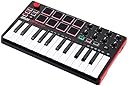
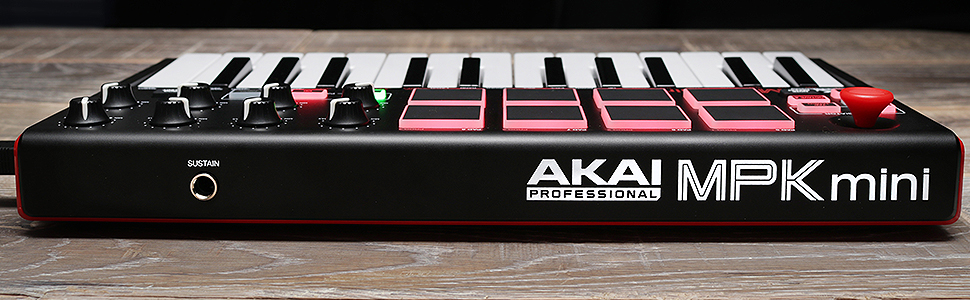
Okay I pulled the trigger on buying Akai's MPK Mini MK2, even though I had resisted the urge to purchase the MK1 (1st gen) model because I also own a first generation M-Audio Axiom 25 M-Audio Axiom 25 25-Key USB MIDI Keyboard Controller with Assignable Control Surface, 2nd Gen and Akai's Original LPD 8 pad controller. When the first MPK Mini came out I was tempted to get it because I thought its size would make it easier to do portable production with my laptop. So anyways was browsing here on Amazon and found that Akai had released an upgraded version of its original this time with a sustain pedal input and a knob controller for pitch bend and modulation. My first thought was that's insane (in a good way), add a midi output port and you could use this thing as a standalone controller to control any of your synth hardware (for those of us who still have some). Akai must've hired some mad scientist engineers to design its newer product lines because its following suggestions that were made back in the hardware only MPC days, my first thought - the plan is working - first upgraded midi controller - then, world domination, muhahaha - okay maybe not in that order. ABOUT THE VIDEO: I wanted to show both the positive and negative aspects of working with the MINI so far, so the first four minutes is intro, and troubleshooting, if you want to skip to the part showing the Editor software and then using the arpeggiator in Cubase that stars around 4:00 Anyway DOWN TO THE DETAILS: 1) Ease of Set Up - 4/5 - the drivers were automatically recognized and downloaded on my Windows 7 laptop, haven't tried on Windows 8 yet, but the basic drivers are plug and play. However it did take a couple of resets in Cubase and a version of Kontakt player that I have before the controller was recognized - ie -being able to play the keys and pads. The controller was listed but wouldn't respond at first, this could be due to the fact that I didn't restart my laptop after installing the drivers so the DAW/ VST software may not have been using the most current file, just my guess anyway but this kind of thing happens with other gear so not really a big deal, but could be an annoyance for someone new to working with MIDI controllers and music software, at least on Windows. 2) Key/ PAD Response and Arpeggiator 3.5/5 - the keys are mini keys and feel plastic but their response and velocity sensitivity is pretty good, if you've played on any synth with minikeys before like a Korg mini, then you may know what to expect, don't expect full expression, but they are good enough to do chords, bass-lines, and some basic riffs. The PADS - ahh the pads, well some reviewers have said that the pads were more responsive than the first gen, can't comment on that but I will say at least so far the pad have the same feel and quality as Akai's LPD 8 Akai Professional LPD8 Ultra-Portable USB Pad Controller for Laptops , they are fairly thick for mini pads and have a nice bouncy feel to them, not like those nightmare cheap pads they put on the earlier MPD models Akai Professional MPD32 USB/Midi MPC Pad Controller l. LAST but no LEAST the Arpeggiator - I have to say this is where I think its a mixed bag, yes the arpegiator works and you can sync it to your DAW by downloading the MPK mini editor software, but its response even when synced to the software seems a little bit delayed, I got better results in Cubase Elements but still may take some practice, not a fast as either a keyboard Arp or built in VST one. To sync it to your DAW software you have to set the clock sync to external using the editor software and then you have to send a Midi Clock signal from your DAW (audio workstation - Cubase, Fruity Loops, Ableton, Logic -etc) software to the MPK Mini by selecting that as the Midi Clock output port - for those who may be wondering. Your DAW software may have slightly different names for these, but the process is the same (except for Reason Essentials which doesn't transmit midi-clock so you can't use this feature). 3) Software - No Rating Yet - Being that I already have a bunch of software-instruments( aka VSTs) from Reason, Cubase, and Kontakt (Native Instruments), I haven't downloaded any of the "included" software yet besides the MPK Mini Editor software which is free (no registration either) from Akai, I am looking forward to using the MPC Essentials software, but just haven't gotten around to doing the whole online register and download thing, which I know is no big deal but just haven't done it yet. However for ANYONE NEW to computer music production this step may be one of the most important and you should realize that A) the MINI DOESN'T COME WITH ANY MUSIC SOFTWARE PRE-LOADED or even on a disc and B) you have to use this as a MIDI-CONTROLLER with music software it DOESN'T HAVE ITS OWN SOUNDS, sorry for the caps but reading some of the reviews I know people who are just starting to get into making music may not realize this, I know this seems like a no brainer for the rest of us but I try to consider every kind of user. The Editor software is pretty good and if you own any of Akai's other software you will probably be familiar with the interface and layout, you can change the control numbers, pad numbers, and even the default octaves for the keys. And you also can set the Arpeggiator to internal or external sync. You get four Programs (or layout groups) which you can store. PROS and Cons vs other devices: I was on the fence between this and the M-Audio Axiom AIR Mini 32 MIDI Controller but the biggest selling point for me on the Akai was the option for a sustain foot pedal, that to me takes the MPK Mini to another level production wise. I also considered Akai's new MPX 16, even though its more a sampler than midi-controller, but all the reports of MIDI problems and sync issues convinced me to stay away from it (at least for now). Anyway like usual sorry for the longer review but just wanted to hit some points that I thought were important when considering buying this device, the pads are cool, the keys are responsive, and the portability is great, work out the issues with the Arpeggiator and this thing kicks a* and takes names! Current SET UP: Windows 7 64 Bit Laptop soundcard: Focusrite Scarlett 2i4 USB Audio Interface DAW: Cubase Elements, Reason Essentials, Ableton Live