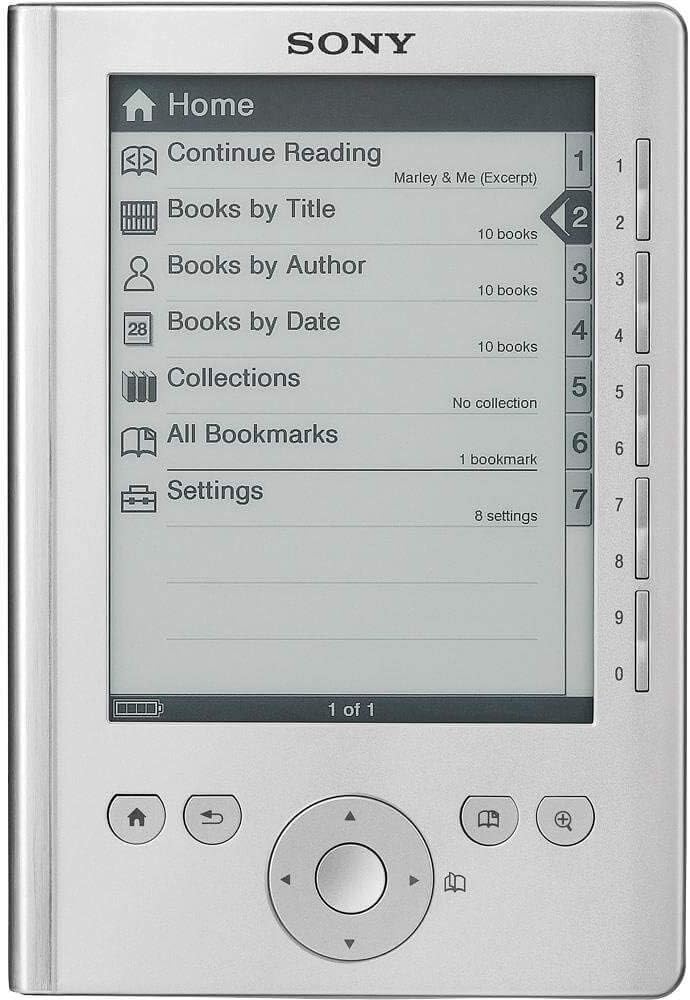

Sony Reader Pocket Edition Silver PRS-300SC
Product ID: 1271279
Details
- BrandSony
- Model NameSony Reader
- Connectivity TechnologyUSB
- Screen Size5 Inches
- Memory Storage Capacity512 MB
- Display resolution800x600
📚350 books
📱5" display
⚖️7.84 oz
📖 Read in Style: Your Library, Anywhere!
The Sony Reader Pocket Edition Silver PRS-300SC combines elegance and functionality, allowing you to carry a vast library of up to 350 books in a lightweight design. With a 5-inch display and adjustable font sizes, it ensures a personalized reading experience. The intuitive eBook library software makes navigation a breeze, while its compatibility with multiple file formats keeps your reading options diverse.
| Item Weight | 7.84 ounces |
| Additional Features | Intuitive eBook Library Software |
| Human-Interface Input | Buttons |
| Bluetooth support? | No |
| Native Resolution | 800x600 |
| Color | Silver |
| File Format | PDF, RTF, EPUB |
| Display Size | 5 Inches |
| Memory Storage Capacity | 512 MB |
I**E
The ideal ebook reader for me
I did a lot of research before I decided to buy the PRS-300. Initially I was set on the PRS-600 due to the extra features, including the touchscreen. After reading lots of reviews and doing some soul searching, I realized that the smaller brother, the PRS-300 is actually the perfect ebook reader for me. I will also mention that this is my first such device and I've been wanting one for a long time. What drove me away from the PRS-600 (which otherwise has a whole bunch of useful extra features) is the fact that the screen isn't as clear as the PRS-300 due to the extra layer for the touchscreen. In fact, the PRS-300 supposedly has the best and most contrasty screen of any reader currently in production. And this is the main reason that finally decided it for me. I want my reading experience to be as close to reading a book as possible. To those who complain that this reader is missing a wireless connection I will say this: you are a bit misguided my friends. In fact, I wouldn't have bought this reader if it had a wireless connection (like the Kindle). A book doesn't have wireless and it works just fine. I don't want to have the surprise to find my books deleted remotely. In fact I love the fact that I can connect my reader to my computer with a cable whenever I want to. Once I load my books on it, a long time will pass before I wish to fiddle with them again. And no, I don't read news on the device. Strictly books. The device itself is very elegant and well built. Even though the back is not metal (only the front is), the construction feels very sturdy and solid. It's a little bit weighty in your hand, but just enough to not feel flimsy. The first time you lay your eyes on it might be a surprise because the PRS-300 is smaller in person than in pictures. Just so you can get an idea, it has the same width as a classic paperback but it is about 1 inch shorter. I find it very easy to hold in one or two hands. The buttons are very satisfying to click and I realized that I prefer to use them rather than a touchscreen that can get grimy from all the touching. The lack of a expansion (SD) slot is not an issue. I've loaded over 22 books on it and I still have over 300 MB left. Those 22 books will probably require 2 years to finish since some of them are over 1000 pages in length. Space is really not an issue here. The screen is very good but it could have been better. More contrast would be nice but the e-ink technology is still young. I don't mind the fact that it is only 5" instead of 6" because the resolution is the same as for the bigger model. One other thing that could have been better is the speed of operation. Page turning is reasonably quick, and even though it's not instant, you will get used to the speed after a while. These days I don't even notice it. What would have been nice though is a slightly speedier processor. Some large books (1000+ pages) take a long time to load the first time but I assume that's because the device is trying to format the book for its screen. Battery life seems adequate, although I haven't reached the claimed 7000-8000 pages with one charge. I've only fully charged the battery once though but on the first charge I must have read about 1000 pages before it gave out. I'm sure battery life will improve after a few charge/discharge cycles. Another big issue with this reader is that the battery is not user-replaceable. Some people have stayed away from this reader due to this particular reason but I decided that the battery won't lose more than half its capacity in the next 2 years, by which time the device will probably be replaced by something modern anyway so it's really not such a big issue for me. All these apparent negatives aren't enough for me to give it less than 5 stars because as I said at the beginning, I had researched the PRS-300 thoroughly before I took the plunge and I knew exactly what its limitations were. 2 more things I want to mention before ending this. 1. I didn't use Sony's software. I used the freeware Calibre instead. It's an awesome piece of software although it seems to have some bugs and it is a bit slow in operation. 2. Although Sony doesn't supply the PRS-300 with a wall charger, you can check around your home for a compatible one with a mini-USB plug. I found out that the charger for my Garmin Nuvi 350 GPS works just fine since it has a compatible voltage which is about 5V. A word of warning here: do this at your discretion; I will not be held responsible if you damage your reader by using a 3rd party charger. What worked for me might not necessarily work for you.
K**S
Nice... until
I've had this product for less than a year, and for the last 8 or so months, I've been completely enamored with my Pocket Edition Sony Reader (Sony PRS-300SC). It was a good price, and Amazon allowed me to purchase it for a low competitive price. I had a few glitches with the software when I first purchased the reader, but I was able to solve the problem with a soft reset. The Sony software created to manage your library was a total joke. I have a Mac, and while I understand the incompatibility Mac software has with Windows based media, there's no excuse on Sony's behalf. They're a multi-million (billion?) dollar business, I'm sure there's SOMEONE out there who can make Mac compatible software. Thankfully one can work around this problem. The Reader is represented as a drive and you simply drag and drop... yada yada... And I would've given it 5 Stars across the board.... And then I stopped reading. I let my reader sit for about two or three weeks. Not a terribly long time, but when I pulled it out of it's cover it was frozen on the "Opening Book" page. I've left it charging for hours, I've attempted a soft reset, a hard reset and every other reset method offered on troubleshooting forums everywhere. But my device wont even turn off, and when I do get a sign of life from it, it only shows that I have 25MB of storage available. The only thing that I have left to try is taking the battery out, and until I can get a small enough screw driver, I'm left with a piece of trash. I paid over a hundred dollars for this product and it's worthless now. Sony is supposed to be a reputable company, and that's one of the reasons that I purchased my Sony Reader. If my last ditch efforts to save my Reader don't work, I'm going to attempt to see if I can utilize my warranty. If that doesn't work... EVEN if it does no more Sony products for me. I have a SEVEN year old iPod that works better then this thing. I'm just disappointed because initially this was such an awesome product and changed the way I read. But now I've got a $100 piece of junk.
K**S
Does what I wanted, with drawbacks
I'm a very happy Kindle owner, but when my local library began offering ebooks I wanted to be able to take advantage. I bought the 300 because it was the least expensive way to get a reader that could handle the epub format. Also, one of my friends has one of these, and I'd seen it "in person". Some things I like about the reader, some I don't - Like: --It will handle the epub format, so I am able to take advantage of my library's offerings. The Sony shows what page of the book you're on; I'm kind of surprised at how much I like to see "page 28 of 350" --While reading a book I can go to a different page in the book by simply inputting the page number using the number keys at the side of the unit. --The unit is very small, but also feels substantial, not cheap at all. --I don't know for sure just how long the battery will go on a charge, but it has been acceptable to me so far. Don't Like: --In order to access the library books I had to download and install both Adobe Digital Editions software, and the Sony Library software. I really dislike things that insist you download some proprietary software in order to run. --The Sony comes only with a cable to connect the reader to a USB port on my computer. This is to be used to load books onto the reader, and to charge the reader's battery. --While the reader is being charged through the computer, it is totally unusable. There's a red light that lights up while it's charging, and when the light goes out supposedly it's fully charged. This was a major issue for me, and I've wound up buying a separate charger that plugs into the wall. Using the wall charger, the reader can be read while charging. I just think it's too bad that Sony doesn't include that with the reader, especially when you consider they do charge a pretty fair amount for the unit. I was able to buy a charger here on Amazon for .88 (with 2.98 shipping) that does a fine job. --In order to get books on the reader they must first be downloaded to my computer, and then loaded from there. --There are only 3 (yes, THREE) font sizes! Each book opens in the smallest font size, which is truly "mice type", and you must then press a little button to cycle from small to medium to large. And believe me, large is not very large at all. So if I open a book and change the font to a readable size, the unit does not remember that choice for the next book. --At the bottom center of the reader is a 4way directional button that you use to navigate through selections, and on the right side of this button is the only place to page forward in your book. I'm finding this to make this unit not much of a one-handed reading experience, because if I hold the book with my left hand my thumb is not long enough to reach across to the right side of the button; I've paged backwards a few times trying to do this. So what I wind up doing is holding with my left hand and using my right hand to turn pages. Holding with my right hand only is not really that comfortable to me. --Contrast on the type is very washed out, I find myself really not wanting to read on this one very much, but for the reason I bought it, it's doing what I wanted.
J**O
Good buy for young kids that like to read!
First of all, the delivery of this product was very prompt! I think we even got it a day or two before expected. Secondly, the Reader is great for kids! This one we bought for our son, and our daughter has had hers for a year. They both work great. These come in very handy when we travel and they only have to pack the Reader with lots of books to read! The Sony Reader site has a good selection of books to buy for kids. And they sell gift cards too that are handy as gifts from the aunts and uncles. There are also some stores that carry the Sony Reader gift cards. (I believe Best Buy and Target are a couple of them.) It is wonderful that we can also go to our online library and borrow books. The nice thing about borrowing the electronic format is that we don't have to physically return them. The electronic copies have expiration dates and you simply can't open them after your borrowing time has expired. Probably the only downside to borrowing from the library is that there is often a long wait list for the good books, but it's like a nice surprise when you finally get the email that your book is ready for you to borrow. The Reader is also very easy for kids to figure out how to use. It doesn't have internet capability, but that is why I bought this one. I would prefer to connect it to my computer and control access to what and how much is bought. Our kids have also downloaded the Hunter's Safety Manual to start studying for the Hunter's Safety exam. This is so much handier than trying to remember where the hardcopy went! Overall, this is a great purchase! If your child enjoys reading, this is perfect for him/her! I've even considered getting one for myself as I am tired of the clutter.
E**4
SONY prs300sc EREADER---a guide for first timers
SONY prs 3000 is a good e reader for the money. im glad i bought it, even though i also bought a nook. I like the sony's ability to change the orentation from portrait to landscape because its easier for me to hold the sony ereader sideways. I like the ability of my sony to delete just one book after i read it, my nook will only delete everything, my nook has no choice of what you delete, you must delete all and start over new; but my nook holds 500 books the my sony only holds 9 books. so, I keep all my books backed up on my computer in case i want to reread them 8 years from now. my sony needs to be recharged through the usb cord to the computer , every 2 weeks. my nook only once every 4 weeks. my sony wont change a page unelse i hit the button ,while my nook does constantly ,weather i want it to or not, when ever my finger touches the screen, which is a bit of a pain in the butt,sometimes. they are both good ereaders and both worth the money, depending on what you want from your ereader. The sony is half the price of the nook & good if you dont have much money to dispose of. I bought the sony to have a cheap ereader in case i rolled over in bed & broke it and the nook to have a ereader with a more white screen that held 500 books & only needed to be recharged once a month, with the susposedly cool touch screen which keeps you constantly trying to find what page you were just on. The nook touch screen is a really cool pain in the butt, Im not sure weather i love it or hate it, but you will learn to use it and its not really a big issue. My big worry,rolling over in bed after i fell asleep reading and breaking my ereader, like i still always break my $1.00 reading glasses, never happened to either the sony or the nook . even though i rolled over on both the sony and the nook many times and both even fell out of bed , but neither of them broke by getting rolled over on or falling out of bed or at all, for that matter. yes i would recommend both the sony and the nook. the sony does not have a wi fi internet connection and the nook does, but i dont use wi fi to pay for books., i get books for free over the internet & download the books onto my computer and then i (side load) the books into either the sony or the nook with the usb2 cable. (SIDELOAD) just means that you plug in the usb2 cord to the ereader and to your computer and download free internet ebooks into your ereader and recharge your ereader batteries at the same time, with the same ubs2 cord that comes with both ereaders. Sony uses [sony reader] software that comes inside the sony ereader & needs to be installed onto your computer. the sony reader software is a pdf and epub reader for your computer and works with sony ereader-prs3000sc nook uses adobe digital reader, which goes onto your computer. both sony & nook work with pdf and epub formats, but epub is much easier to work with than pdf , because epub you turn pages and pdf you scrool up sentences. sony's screen is more gray,like cheap newspaper, but quite useable; as in not really a issue. nooks screen is really brite white, like good quality inkjet paper.
S**N
Simple and Nearly Perfect
Sony really shines in quality electronics. I adore this device, and the 5 inch screen really isn't too small. I've zoomed through several books already, as the screen is easier on my eyes than regular paper. Turning pages is fast, easy. The software is simple click and drag. I have purchased books from multiple sites, sometimes saving several dollars. Sony is honorable that way. The only negative is that landscape mode, which you only need if you are using the largest font really, fades out at the top and bottom. I called customer service, who stated this was not normal and they would send me a new unit. Well, it never arrived, however, I dropped the pursuit since I purchased another identical model for my daughter and hers does the same thing. The easiest and best improvement would be to add a 4th font size to the pocket reader. I discovered different eBooks use different size print. Overall, I still give this item 5 stars. It's durable, yet light and compact, and so easy to use. One additional comment, which can be important to some people. There are certain places, like schools, hospitals, etc. that ban the use of wifi electronics. This device avoids the arguments (well it's turned off) since it doesn't even have it! PLEASE SONY KEEP ONE READER -WITHOUT- WIFI FOR FUTURE VERSIONS!
T**3
Junk
Like so many other reviewers, it's a nice device until... I think too many people review a product during the first days of owning it, when the excitement of a new toy clouds their objective opinion. I bought two of these for my wife and me a year ago. We experienced battery issues similar to other reviews. Within a month the battery on my wife's unit wouldn't hold a charge for more than 15 minutes. Mine is still okay over a year later, although will only charge to about 50% original capacity. Both units were used under similar conditions and duration. However, what really cripples these devices is the software and DRM on the ebooks. We tried to transfer the ebooks from my wife's failing device to mine. No good. To make a long story short, we had to buy all new books at about $10 each. The software is cumbersome and is very much like itunes, which I hate. You can only sync one unit, to one library. It's not all bad. The screen looks really good and you can easily read in direct sunlight, as advertised. You can also view your own files such as MS-Word and PDF. However, PDFs from scanned images can't be resized, so don't think you are scanning in any old paperbacks. In summary, if you are single user and don't plan on sharing ebooks, lucky enough not to get a unit with a bad battery, or not planning on buying a lot of ebooks, this isn't a terrible product...it's just not a very good one.
S**S
Awesome in its simplicity.
I'm confident that before picking up an eReader everyone should ask themselves a question of what it is that they want out of it. Does it need to play music? View pictures? Have WiFi? That will ultimately determine the model you're looking for, and its price. For me it was simple. I have a lot of PDF files on my computer that I wanted to read on the go. This reader is perfect for that. It's extremely simple to use, shows up on the my PC as an external drive and I can just copy and paste files this way. I can also use the Sony software and buy books through the online store. The battery has lasted me a couple of weeks now. The build quality is very impressive with what feels like a steel casing all around. It's got some weight to it and feels very comfortable to hold. The three zoom levels are nice but it seems the middle is always the one to go with; not too small and not too big. It has internal memory for about 300 books, but honestly, why even that big? You read one, maybe two at a time, even if you had 30 more books "just in case" that's plenty to carry around. This reader doesn't highlight, doesn't have a dictionary, and doesn't Facebook either. You put a file on it, and you can read it. It's awesome in its simplicity.
G**R
Wertiges Produkt; ärgerlich: Gebrauchsanweisung !
Na gut, etwas skeptisch war ich zwar: So ein Elektronik-Teil kann definitiv kein schönes neues Hardcover-Buch ersetzen! Aber: Ergänzen! Romane, die vielleicht nicht auf Lebenszeit im Regal stehen müssen, die aber trotzdem mal gerne in den Ferien gelesen werden! Der Pocket Reader an sich ist auch ein sehr ordentlich verarbeitetes Produkt mit relativ einfacher Bedienung. Trotzdem er kleiner ist als sein Vorgänger, lässt sich (selbst die kleinste) Schriftgröße angenehm lesen. E-Books im Internet zu kaufen, ist weiter auch kein Problem. ~~~ ALLERDINGS: Installation der Software sowie Verständlichkeit der Bedienungsanleitung sind MANGELHAFT, da unklar. Ganz so einfach wie beim MP3-Player geht's nun nicht! (Computer autorisieren: wie und wo? Adobe WHAT? ...) (Dass ich zwei von drei downgeloadeten Büchern nun auf den Reader übertragen konnte, scheint mir im Nachhinein eher Zufall gewesen zu sein. Obwohl ich mir einbilde, mich mit solchen Angelegenheiten einigermaßen auszukennen!) Naja, vielleicht liegt's auch an mir ;o( ~~~ Es überwiegen dennoch die positiven Eindrücke und ich denke, der SONY PRS-300 Pocket kann sich zu einem treuen Wegbegleiter entwickeln!
R**G
gut, aber es würde auch besser gehen
Das Gerät erfüllt seinen Zweck, aber die Sonyproduktpolitik ist wie bei anderen Geräten auch nicht wirklich kundenfreundlich. Erklärung der Inbetriebnahme zweitklassig, im Lieferumfang nur ein USB Kabel für den Datenaustausch und das Laden über einen Computer. Das aufladen des Readers erfordert einen laufenden Rechner mit USB. In der heutigen Zeit meiner Meinung nach nicht mehr zeitgemäß. Wenn man einen Stromadapter mit USB Anschluss verwendet, wird das Gerät nicht geladen. Man muss ein extra Netzteil dazukaufen, damit man den Reader im Urlaub oder auch zwischendurch autark an einer Steckdose aufladen kann. Sonst muss man sagen, gutes Display. Ich bin mit den technischen Eigenschaften des Readers mehr wie zufrieden. Aber die Ladegeschichte ist für mich mangelhaft.
B**R
Einfach nur toll
Ich habe mir den E-Book-Reader anlässlich eines bevorstehenden Krankenhausaufenthaltes im März 2012 gekauft. Die Bedienung ist einfach und übersichtlich, die Akkulaufzeit ziemlich lang (habe zusätzlich das System-S Netzteil), die Lesbarkeit '- auch bei Sonneneinstrahlung - super. Der Reader lässt sich gut halten und ist mit dem Metallgehäuse sehr edel und robust. Das Display ist nicht beleuchtet (stört mich nicht, habe noch zusätzliche kleine Leselampe), der Stromverbrauch dadurch geringer. Bin rundum zufrieden.
I**Z
Mein erster eBook-Reader
Gutes Produkt, gekauft für den Urlaub, weil man auf Flugreisen ja immer Gewicht sparen muss und deshalb nicht 47 Bücher mitnehmen will. Den Punktabzug gibt's dafür, dass sich die Aufdrucke auf den Tasten unter den sonnencremeverschmierten Händen aufgelöst haben.
M**L
Super genial... ich bin total zufrieden
Super genial... ich bin total zufrieden, Nach einer längere wartezeit ,kamm mein Reader nach 6 Wochen bei mir an. Der Deutschezoll wollte dann noch 21€ von mir haben,weil mein Reader aus NY kamm. Der Reader ist sofort in betriebnahme gegangen ,und nach 3 mal drücken ,war ich schon voll im Menüe und konnte mich austoben.
Trustpilot
3 weeks ago
2 months ago