๐ท Elevate your vision โ shoot sharp, share fast, and never miss a moment!
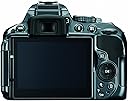
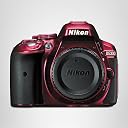
The Nikon D5300 is a professional-grade DSLR featuring a 24.2MP DX-format CMOS sensor without an optical low-pass filter, delivering crisp, high-resolution images. It boasts a 39-point autofocus system with 3D tracking, 5 frames per second continuous shooting, and an expansive ISO range up to 25600 for low-light versatility. The camera includes a 3.2-inch vari-angle LCD for flexible composition, built-in Wi-Fi for instant sharing and remote control, and GPS for precise geotagging. Ideal for both photography and Full HD 1080p video capture, the D5300 combines advanced imaging technology with modern connectivity in a sleek, compact red body.
| ASIN | B00FXYT9DC |
| Age Range Description | All Ages |
| Aperture modes | F2.8-F16 |
| Aspect Ratio | 16:9 |
| Auto Focus Technology | Center, Continuous, Contrast Detection, Face Detection, Live View, Multi-area, Phase Detection, Selective single-point, Single, Tracking |
| Autofocus Points | 39 |
| Best Sellers Rank | #65,920 in Electronics ( See Top 100 in Electronics ) #61 in DSLR Cameras |
| Bit Depth | 8 Bit |
| Brand | Nikon |
| Built-In Media | AN-DC3 Camera Strap, BF-1B Body Cap, BS-1 Accessory Shoe Cover, D5300 DX-format Digital SLR Body (Red), DK-25 Rubber Eyecup, DK-5 Eyepiece Cap, EG-CP16 Audio Video Cable, EN-EL14a Rechargeable Li-ion Battery, MH-24 Quick Charger, Nikon View NX 2 CD-ROM, UC-E17 USB Cable |
| Camera Flash | Built-In |
| Color | Red |
| Compatible Devices | Nikon F (DX), Nikon F (FX) |
| Compatible Flash Memory Type | SDHC, SDXC |
| Compatible Mountings | Nikon F |
| Connectivity Technology | Wi-Fi |
| Continuous Shooting | 5 |
| Crop Mode | 16:9 |
| Customer Reviews | 4.6 out of 5 stars 435 Reviews |
| Digital Scene Transition | False |
| Display Fixture Type | Articulating |
| Display Maximum Resolution | 1,037,000 dots |
| Display Resolution Maximum | 1037000 |
| Display Type | LCD |
| Effective Still Resolution | 24.2 mp |
| Expanded ISO Minimum | 100 |
| Exposure Control | Aperture priority (A), Automatic, Manual, Shutter-priority (S) |
| File Format | JPEG: Fine, Normal, Basic, RAW: 12- or 14-bit, compressed, DPOF compatible, DCF 2.0 compliant |
| Flash Memory Bus Interface Type | SD |
| Flash Memory Speed Class | UHS Speed Class 3 or higher |
| Flash Memory Type | SD/SDHC/SDXC |
| Flash Memory UHS Speed Class | U1 |
| Flash Memory Video Speed Class | UHS Speed Class 3 or higher |
| Flash Modes | Auto, On, Off |
| Flash Sync Speed | 1/200 sec |
| Focal Length Description | [140.0] millimeters (estimated) |
| Focus Features | Autofocus (AF-S, AF-C, AF-A) with predictive focus tracking |
| Focus Mode | Single-Servo AF (AF-S) |
| Focus Type | Manual Focus |
| Form Factor | Compact SLR |
| Generation | 1 |
| HDMI Type | Type C Mini HDMI |
| Image Capture Type | Video |
| Image Stabilization | No |
| Image stabilization | No |
| Item Weight | 1.1 pounds |
| JPEG Quality Level | Basic, Normal |
| Lens Correction Type | Sensor-based Correction |
| Lens Type | Interchangeable |
| Manufacturer | Nikon |
| Manufacturer Part Number | 1520 |
| Maximum Aperture | 2.8 millimeters |
| Maximum Focal Length | 14 centimeters |
| Maximum Image Size | 1920 pixels |
| Maximum Shutter Speed | 1/4000 seconds |
| Metering Methods | Multi, Center-weighted, Spot |
| Minimum Shutter Speed | 30 seconds |
| Model Name | Nikon D5300 |
| Model Number | 1520 |
| Model Series | Consumer DSLR |
| Number of Items | 1 |
| Number of Packs | 1 |
| Optical Zoom | 1 x |
| Photo Sensor Resolution | 24.2 mp |
| Photo Sensor Size | APS-C |
| Photo Sensor Technology | CMOS |
| Screen Size | 3.2 inches |
| Sensor Type | CMOS |
| Series Number | 5300 |
| Shooting Modes | Aperture-Priority (A), Auto, Auto (flash off), Manual (M), Programmed auto with flexible program (P), Shutter-Priority (S) |
| Skill Level | Professional |
| Special Feature | Built-in Wi-Fi, Built-in GPS, Extra-large swiveling Vari-angle LCD |
| Specific Uses For Product | Photography, Videography |
| Supported File Format | JPEG: Fine, Normal, Basic, RAW: 12- or 14-bit, compressed, DPOF compatible, DCF 2.0 compliant |
| Supported Image Format | JPEG |
| Total Still Resolution | 24.2 mp |
| Total USB 2.0 Ports | 1 |
| Total USB 3.0 Ports | 2 |
| Total Video Out Ports | 1 |
| Touch Screen Type | Capacitive |
| UPC | 018208015207 |
| Unit Count | 1 Count |
| Video Output | HDMI |
| Video Resolution | FHD 1080p |
| Viewfinder | Optical |
| Viewfinder Magnification | 0.82x |
| White Balance Settings | Auto, Cloudy, Flash torch, Fluorescent, Incandescent, Shade |
| Wireless Technology | Wi-Fi |
| Write Speed | 5 fps |
| Zoom | Optical Zoom |
K**E
Great Choice
Really impressed so far. I had an SLR years ago in film days, and very much enjoyed using it. It was broken and for years I simply used point & shoots, eventually moving into digital with an HP 1.5 mp. I moved up through point & shoots and started getting back to the context of framing a picture and the art of photography--especially once I started hiking in our beautiful area mountains a few years ago. I had a 4 mp Kodak at the time, great little camera by the way that taught me the value of good glass-I still have it, but found I wanted to move up to newer and better technology. So, after considerable research, I purchased my Nikon L120. Very satisified, and great pictures, but I found in the last several months I wanted the versatility, options and creativity a dSLR would offer. Yeah, Now there's an expense, right? And here was someone who knew not much about them, having forgotten what she knew in the manual, film days. I have friends who will lay their lives on their Canon's and not as many who would for their Nikons (and possibly might offer their Canon friends as sacrifices, too) )-not that they aren't loyal to, and love their Nikon, there's just fewer of them. From earlier research I liked the image quality of Nikons just a bit better, but still when you're spending a chunk of cash, and if you're like me and are far, far from the top 3%, you want to make sure you're getting a good product, and a reasonably user friendly one for your money. So after considerable research, comparisons (to Canon), scrutinizing images for Canon & Nikons D3200, D5100, D5200, D5300, albeit not many with the 5300 since it was relatively new, and reading reviews here on Amazon (one of the best resources in my opinion, and '7's is a wonderful string with loads of interaction and advice) I started leaning towards the D5300 opposed to the other models, and finally due the reviews and 7's advice, I plunged and bought the D5300 with the 18-55 mm lens--the red one, of course. I love it! I was a little frustrated at first with all the menus's and options. It seemed overwhelming, but refer to the manual, buy a book to supplement ( I ended up buying 2), come here and read and just play with it. As you start experimenting with it and changing settings and modes, it gets less confusing and not as complicated as it felt at first. And it has auto modes, so it's not like you can't get great shots from the start while you learn. One of the things I found, is change your picture quality to fine, it will bring an incredible, realistic feel to your photo's. Images of my cat, a tortoise shell are fantastic, capturing the depth, clarity and colors in her eyes and the contrasts in her fur giving a very living feel to the picture--not to mention the disdainful look she's giving the dog is very clear. Photo's I took of my neighbor picked up the green flecks in his blue eyes, the lines, whiskers and age spots in his skin, making them look very lifelike. Captured him exactly, and with a sharper depth than normally in a photo. Some have noted difficulty with action shots. I haven't done much, but shots of my granddaughters jumping & goofing around captured them in mid air and did a nice job freezing the action. I also snapped some shots of my dog and his fur friends running outside, and captured hair and ears flying as they ran in different modes--Sport and pet, and I'm pretty sure some were in auto. I'm excited to take it out this summer to sporting and action events and see what I can get. I'm optimistic--if it can capture a flying, shaggy Shih-tzu, it's looking positive. I've noticed the single focus setting on auto doesn't stay put if you change modes and back, but as far as skewing the image, I'm not really seeing anything discernible or problematic. If you're taking a picture of a moving object, you won't want it fixed anyway. To me the wandering (and by that I mean it isn't fixed to a central single spot, not that it's randomly floating around) focus point is a little distracting when not fixed to a single point, but that's just me being over aware of it at the moment, I'm focusing on not focusing on it. Not a dealbreaker. I'm picky about image quality and I'm very satisfied with what I've gotten, As I become more familiar with various settings, I'm very much enjoying playing with it and look forward to learning more about a DSLR and what you can do with it. This is a perfect camera for it, and I absolutely recommend it to anyone stepping up to the dSLR universe.
T**E
D5300 Continues the Brilliance of Nikon
I upgraded to this camera from a Nikon D40x. I love the D40x. I have had that camera since 2009. I got to where I had an almost Zen-like relationship to it. The only reason I upgraded to the D5300 was I wanted to experiment using some features my D40x did not have. In particular, I wanted to be able to bracket my shots. And, after seeing the pictures I got from a friend whose camera gave 16+ megapixel resolution, I wanted to see how 24+ megapixels resolution helped my photography if at all. My first trip out with my D5300 was a disappointment. The disappointment was not, however, with the camera. It was with me. I did not have the settings defined as I thought I had. This was due in part by the excitement of having a new camera and the fact that the menus on the 5300 are much more involved than those on the D40x. I came home and started taking pictures inside. I watched videos, went back to the camera manual and ran through the camera's menus again. I found some settings that were not where I thought they were and changed them, then started shooting some indoor pictures. This is the same style of photography I used with my D40x. Once I got the settings on my D5300 where I wanted them to be, I was blown away by the images. From a technical standpoint, I found nothing to complain about. Great color. Great resolution. Very good color rendition under different settings. While the D5300 is not as easy to figure out as the D40x, I do not see that as a minus. I have a multitude of new features on this camera that I did not have on the D40x. My only complaint about the camera is that the explanations of some of the menu items are not what they should be. There are still menu items I am not understanding. In time I expect the D5300 will become as much a part of my arm as my D40x feels. It may not be a perfect camera in some people's eyes. But, I did a lot of research into which camera would best suit my needs for the price and the Nikon D5300 won over all the others in contention. I have no regrets in my choice. I hope to be able to return to outdoor shooting soon. I will make sure I am all set up for the adventure this time. And, beyond any doubt, I believe the D5300 will take even more amazing photos than does my D40x, if that is possible. I enjoy photography. Nikon builds cameras that are not only technically brilliant, but fun to use as well. I highly recommend Nikon's D5300 to anyone that is interested in learning the possibilities this camera affords the user. *** Six Month Evaluation *** There are no real technical problems with this camera. However, I have changed my feelings towards it after having used it for six months. Some older reviewers may remember when CDs first came out. While they were amazing from a technological standpoint, the music lacked the warmth of a vinyl album. There was a very definite cold and sterile sound to the music. Even technicians admitted there was something different with a digitized sound versus an analog reproduction. Now, almost anyone realizes that a film photo has more depth and warmth to the image than a digital photograph. Yet, hardly anyone cares. I know I don't. The ease of creating a fine image through digitization is a photographer's siren call. Interestingly, however, as concerns my experience with a comparison of the results from my D40x to my D5300, all digitized images are not the same. With my D40x, with a minimal use of Lightroom, I could manage images that had nuance, warmth and a goodly amount of appeal that comes from that undefinable human connection. From the beginning, I recognized there was something different about the D5300's images. From the aspect of a human connection, there was a major disconnect. I concentrated to make sure I was careful in my settings. I assumed that my images were different because a setting or two was not correct. Goodness knows, the D5300 is all about options of settings. Well, after six months of using the D5300, I now realize that, like the sound of music from a CD, its images lacked the warmth and human appeal that I found so abundant with my D40x. I am a user of Flickr. I belong to the Nikon D5300 group. If one surveys the images posted in that group, it will quite soon become evident that the images are amazingly lacking in true appeal. They may look decent from a technical aspect. But, there is no human emotional presence to be found in the photos. If one doubts that a digital camera can present an emotional presence, go to any group dedicated to the Nikon D90. That camera has a soul that is absolutely amazing. I can look at a photograph and recognize if it was made with a D90 camera. What's my bottom line about this camera now? It lacks soul. It's a machine. Personally speaking, I have not been able to connect with it on anything other than a technical level. Technically it is superb. But, something is missing. And, that missing element becomes very apparent when looking at the images the D5300 makes. I use the term "makes" because it doesn't "take" an image. It "makes" one. There is a difference. Some photographers may not see that there is a difference between making an image and taking an image. Some photographers, alas, are not creative in their approach to photography. I do not always succeed in being creative. But, I do, at least, try. Even under the best of circumstances, my photos rarely connect with others. But, I don't take photos for others. I take them for me. Tragically, the D5300 does not create images to which I feel that human connection. If what I am saying makes sense to anyone, my advice would be to go to a site like Flickr and seriously study the images posted for this camera. Determine for yourself how you relate to the pictures on an emotional level. Then make your decision to either purchase or pass on this camera.
A**S
Great camera... caution: a BIG leap from a simple Point-n-shoot (which is to be expected).
Tip #1: turn OFF the beep on your camera... immediately, no questions, just do it. NOW. It just announces to the world that you just bought it, and don't have a clue what you are doing. This may be true, but why advertise that fact, and annoy everyone around you with the annoying "beep...beep. Click. Beep...click. Beep, beep, beep....click". ;) Moving on: Any DSLR is not for the faint of heart, nor for those unwilling to read the user's manual for any mode other than "auto". Yes, you can leave it in the Green "Automatic mode w/ flash" or the "Auto mode without flash" and you'll do fine for snapshots and some great photographs as those moments present themselves. The "scenes" modes are a quick way to shoot various conditions we all find ourselves in often, without having to slow the fun with deep menu changes, just set it for "party" or "beach" or "candlelight" (etc.) and you'll be shooting very good shots. If you want to shoot huge RAW files, go full manual mode, alter the ISO settings, shoot time-lapse sequences, 1080p/60hz video, it is all there for the semi-professional, too. ISO goes to 12800 if you need it without too much noise. 3200 and 6400 ISO are much less noisy than my D70s model. I have the D70s model from a few years back, and I **REALLY** miss the front sub-control wheel. The D5300 has only one control wheel on the back for your thumb to rotate, and the lack of the second one up front is mind-boggling, forcing the user to hunt-n-peck on the LCD screen or with other buttons to switch up a few settings on the fly. The trade-off for that wheel was the flip-out screen and built in Wifi (vs. the more expensive new cameras with two wheels and more controls, so you don't have to use the LCD menu system). Remember, unless you are blowing up your photos to 30"x40", you can come down on the megapixel size to 6mpx or 12mpx without any drop in on-screen resolution. The files sizes are huge (11MP JPGs), so your hard-drive and uploads to facebook, twitter, etc will take much longer... so just shoot in 6MP "fine" or "normal" and you'll get fantastic pictures, without the bloated file sizes. Remember, MP only count if you do a lot of cropping or print enlargements. Google "Ken Rockwell megapixel myth" to learn more from the best about how "megapixels" are mostly hype. My D70s is a 6MP camera, and the pictures are gloriously beautiful (see the D70s group on Flickr). The battery life is about 200 shots for me, but I've been using the LCD screen alot and playing with settings, menus, etc. If/when I just flip the LCD monitor closed, and shoot through the viewfinder...it will probably shoot 500 photos on one battery. I do like that you can customize the "My Menu" for your most used settings, mine being: ISO, White balance, Set Picture Control, Release mode (timer/remote/continuous), Active-D Lighting, Image Size, Image Quality, Auto Information Display (on/off), Wi-Fi (on/off) Nikon has a great little feature so that when you have highlighted a menu item, you can hit the "?" button, and an on-screen paragraph explains the feature and what it does. Spend the few bucks to get a nice strap, camera bag and by all means the Nikon remote shutter control (under $10)...which is totally the best thing for tripod family shots and be in the picture. You can flip the LCD around to make sure you and everyone else is in the picture, hit the remote, and get a 2sec, 5sec or 10sec time delay to the picture (or instant, but then you can't hide the remote in time!). The WiFi option is pretty cool, and when enabled allows you to hook to the camera via your smartphone, download pictures, or even see what the camera sees (!), and use the phone as a remote shutter release. Once on your phone, hop back on the 4G network or your home wifi, and upload to Facebook, Twitter, Instagram, etc. Pretty sweet. The phone can also act as a temporary backup to your camera memory card. Hope that helps... I'm lovin' it, and still think the flip-out screen is what we needed for selfies and family photos. If you don't need the flip-out screen, need lots of manual controls, and have the budget, move up to a Nikon with dual control wheels. Cheers, Doc Rings
M**H
Great features for the money!
This is my 8-9th Nikon. Bought mostly for the GPS and Wifi functions and kept my D90 also. Can't use with a couple lenses that don't have internal focus motors but I knew that when I bought it so not a complaint, just an FYI. I do miss the top LCD a bit but the large info screen on back is great. But with the info screen, wifi and GPS it can chew through a battery pretty fast (shut off wifi and GPS if not needed and minimize your screen display time). Took some indoor shots with the Nikon 35mm f/1.8 AF-S at a volleyball game and was very pleased with the results. Able to shoot 1/640 or 1/500 at ISO 8000 and shots weren't as grainy as I thought they'd be (vertainly don't look like ISO 100, but respectable to get that shutter speed indoors in a poorly lit gym). The shutter is a little quieter than my D90. Not sure I was getting the full 5fps, but it was close. It's a little smaller and lighter than my D90 and fits well in hand. I have had a few night shots on tripod be slightly blurry even with remote infrared release... may be the tripod head, but not sure yet. There are fewer external buttons so you are into the menu system more often, but to keey the pricepoint low it's understandable. All in all so far (2 mos) I'm very pleased with this camera. I hardly ever use full resolution, but it's nice to have available. Have gotten some great results on early attempts at HDR with it (just got into that recently). A couple last real world notes on GPS and wifi. first GPS: For faster positioning, Nikon puts out a file MONTHLY with satellite data that you should download to an SD and upload into D5300, this enables it to find its own location MUCH FASTER. Also, I've been doing geneology documentation of gravesites and using the GPS and was sorely dissappointed that several sites 700+ miles from home it didn't get the GPS location. Apparently I hadn't let it acclimate long enough before snapping photos. It's their first DSLR with this feature, so I'm sure it'll improve with revisions, but just be aware it takes time to locate and there's no light or indicator that confirms it "knows" where it is (future wish list item NIKON!). In wifi, I downloaded the APP to my iphone and can transfer photos from camera to iphone very quickly! 14mb photos only take a second or two. You can also use the phone as a "remote release" to take shots remotely from the camera. Again, don't leave the wifi or GPS on when not in use... they chew battery FAST. I was out last weekend shooting northern lights and went through 2.5 batteries in 3 hours. GPS was on and wifi I turned on and off a few times. It was a cool night in the 40's. I have the original Nikon battery and bought a 2 pack of Vivitar clone batteries which don't have the same staying power of the Nikon, but more than 1 battery is a must with this camera. So overall very pleased. The picture quality and color presentation is wonderful. If this had 3-4 more external buttons, an LCD on top to avoid using the large read LCD so much and a GPS indicator light to let you know when it was "locked in" it would be perfect, but at it's current pricepoint, I'd say it's a lot of camera for the money and wonderful to have the wifi and GPS.
M**4
Better than expected
I had read great reviews of the d5300, so it was on my short list for my next camera. After some hands on with it, it was clearly the winner! I immediately liked the size and heft compared to others (substantial, but not an arm breaker after carrying it around for an hour or so). I like the button arrangement, not over crowded, plenty of control (some complain about the lack of a second control wheel. I don't find it a problem as the "i" button allows for parameter adjustment quickly, without having to remember what the buttons/wheels are programed for. Image quality is top notch! Shooting with a good sharp lens like the Nikon 85mm F/1.8G, the detail at 100% zoom is amazing! Here's the thing: if you never intend to get some higher end lenses, or primes, you're never going to see how amazing this things 24.1 meg OLPF free sensor really is, so this might not be the right camera for you. Higher ISO shooting is amazingly clean! I've grabbed usable shots at 12800. Video quality is also very good! At the highest setting, it's silky smooth with good color and contrast. The built in mics are pretty good, but kinda thin sounding as one would expect, but it does have an input jack for a better mic if video is your thing. The auto leveling tends to be a little high, but the manual level control works great! The built in wifi is a nice touch. Sending photos to my tablet (or phone) is fast and easy (you can even set the file size). Using the tablet as a large high-def live view remote is pretty cool as well! Many complain about the GPS, not me! Mostly accurate, and as long as I keep it updated, locks reasonably fast. Also, I have not found it to be a battery drainer. I highly recommend this camera, if you have some better lenses (or intend to get them someday). I've yet to find anything that I consider a con.
L**E
As with all new technology.. there are always some glitches.
I decided to add my own review which I will continue to update as I have been commenting on the others here. I received the D5300 on Saturday (got the Grey and have to say I really like the subtle color) and have been taking several test photos with my Sigma 18-250 Macro lens that I purchased only a few weeks ago. I noticed that something wasn't right with the stabilization and the live view (I typically never use live view anyway) but initially thought it was the camera. I may change my review to 5 stars once that issue is resolved and I know exactly what is working correctly. Sigma is doing a firmware update on the lenses so I am going to return mine that does not work once the new ones are released which is supposed to happen in a few days. If you purchased this lens and are not able to return it any longer - contact Sigma and they will have you send it in to update the firmware. As far as picture quality (the lens does work with the exception of the two things mentioned) I have been very happy. I do feel like adding a few steps of sharpness helps the images (custom picture settings are available for user to define), but I am wondering now if that may also be the lens issue. I do like the ability to retouch in the camera (straighten is very useful) but I wish the file that was created from the retouch kept the file name sequence of the original file so that the photos would stay in order that they were taken. I was afraid that after moving from the D90 that I would be missing the dedicated controls on the back of the camera, but I actually find that the menu system is pretty intuitive and easy to manage from the LCD. I am a hobby photographer who takes most of my photos on vacations twice a year besides family events and holidays. I have taken several photography classes and I do use most of the controls on the camera to set my shots. I found that having some of the "scene" modes can be a good refresher when you are trying to remember the correct settings for different situations and can actually be a learning tool if you pay attention to the changes that the camera makes for each situation. The lighter weight and smaller size of the D5300 are certainly a plus for me. I was happy that the function button on the front of the camera can be set to control the ISO and works by holding down the button while dialing the thumb wheel which I am familiar with. There is also a dedicated button on the front of the camera to change to burst mode shooting, timer (10 second delay) and remote settings. This button works by pressing and then selecting from the display screen via arrow keys to select. The other button that I frequently use is the exposure compensation which also has a dedicated button on the top right that works via thumbwheel. The wifi setup was a bit confusing only because the instructions were a bit vague. I searched the app store on my Ipad for the Nikon Wireless Mobile Utility and nothing came up. I did a search through Safari and it did bring it up in the Itunes store (probably because it is really an Iphone app). To connect the camera via wifi - after downloading and installing the app - go to the Menu on the camera and select the Setup Menu - Wifi is on the second page of the menu. Choose to enable the Wifi on the camera and the camera will begin to send out an SSID signal. Go to the Ipad/Iphone into the Settings menu and in your Wireless configuration choose to connect to the Nikon SSID. Then open the app and in the top left corner there is an antennae looking icon that you have to click on to get the camera to connect. I was very happy that the camera worked in this manner as it means that if you are in an area where you have no public wifi that you can still transfer photos to the device through the wifi signal that the camera broadcasts. The transfer rate was good considering these are 24 megapixel images and I had no complaints except that the app is designed for the Iphone and it would be nice to have the app designed for the Ipad for better clarity. The one drawback I had initially was trying to get a program to work with my raw files. I did find a way to update my NX2 software (involved searching the internet to find a download as there were no updates listed in the program) and then I realized that my CS5 software will not work with the new camera raw and I may need to upgrade my Lightroom as they did release a beta version that supports these raw files, and the upgrade costs much less than the CS6 upgrade. Rather irritating of Adobe to not offer updates to older software for raw support in my opinion considering the cost of that program. Lightroom has very similar raw editing though and once the raw files are converted I can always open them in CS5 again. I will add to this once I have the lens change and have had some additional time..
A**R
Looks almost new to me and works very well very happy with my order
I am very happy with my purchase, I highly recommend this seller. Product was as advertised and shipping was quick. No complaints about the quality. Itโs amazing.
R**N
We have come a long way! Great upgrade to the D5100
"Prosumer" cameras have come a long way. I will begin with the end: the D5300 is a superb offering that will do as much as almost all non-professional users will ever need it to do, and has more useful features than most users will ever use. There are many competing cameras at or near this price point. I cannot claim to have researched them all, but the D5300 really does seem to be the leader. This camera is basically a feature-laden prosumer camera -- a camera for the enthusiastic amateur who wants a camera that will do most (but not all) things that a professional camera will do, with as little fuss as possible, and in a smaller package. I am an experienced photographer (amateur) and I demand a lot out of my cameras. I use high quality Nikon lenses. So the issue was whether the D5300, which is not a pro camera, was good enough for my picky needs. Just to show how hard to please I am, I also want a camera that is as small as possible -- I don't like carrying the big professional all-metal Nikons. The pro cameras are fantastic cameras that are deadly expensive, heavy, and built like tanks. Great for pros, but not for me. The short answer is that the D5300 does the job for me. It is light, well-built if you don't plan on shooting in a rainstorm, and nicely designed. The most important attribute of this camera is its ability to produce superb images right out of the camera. And great images start with great exposure. This camera can produce outstanding images that really do not require post-processing. I have been using Nikon digital SLR cameras since the D100 was announced, through the D80 and D200. All have been superb cameras for their days and still are. However, most Nikon DSLRs really benefited (needed, really) a bit of post-processing in order for the images to reach their full potential. In particular, many users have noticed that the auto-contrast settings in Nikon or third-party software programs really brightened up images, giving them better contrast and zip. This camera pretty much does away with that. The D-lighting feature of this camera, combined with an all-around better sensor, exposure algorithm, and exposure system, really do make it possible to produce images right out of the camera that look like they have already been post-processed on the computer. And to make matters even better, the camera allows in-camera editing and post-processing! So if you are on a trip and want to email a few pictures you will not need your computer; the camera will do the post-editing job for you in most cases. And in most cases this is not needed at all. Put simply, the D5300 has about achieved the ideal for digital cameras, whereby it produces a final image right out of the camera that is about perfectly exposed, with contrast and lighting the way you want it. The camera allows for matrix, center-weighted, and spot metering, just like the pro cameras. All are useful at times. I can remember when only professional cameras had all three. We have come a long way. The D5300 continues the Nikon trend of better and better ISO performance, as light amplification technology keeps getting better. ISO roughly corresponds to the exposure ratings of film in days of yore, and basically better ISO performance means that the camera will perform better in low light conditions, making it possible to take clear non-noisy images in dimmer light. My D200, which was one of the very best Nikons in its day, degrades quickly after about ISO 640. This camera will do many multiples of this satisfactorily. For early morning photography, or taking pictures indoors, this is a decisive, tremendous advantage. The result is that, unlike only a few years ago, often you can obtain adequate photos shooting indoors without the use of a flash. This is tremendously important for indoor sports photography, for example. It also helps for early morning wildlife shots. You no longer always need an F2.8 lens to shoot these kinds of shots, although it never hurts. Great images also require fast and accurate focusing. The auto-focusing system on this camera is very well thought out for its market niche. While professional photographers will probably not use this camera to photograph NFL games and the like, this camera features an excellent focusing system that will exceed the expectations of most users. The D5300 features 5 fps continuous shooting for JPEG-only with a 39 point AF system with 9 cross-type AF points and 3D focus tracking. This focusing system is better than even professional cameras of a few years ago and will almost surely meet the needs of anyone. No problem with focusing on fast-moving subjects such as birds, wildlife, or sports. I tested this camera at our local ecological reserve, photographing flying birds. It exceeded my expectations by producing razor-sharp focused shots of these unpredictable subjects time and time again. Even better than my venerable Nikon D200 did back when that camera was near state-of-the-art. Even using the Nikon 18-300VRII lens which is a fine lens but not a pro lens, this camera can produce professional-quality wildlife shots. I cannot ask for more than that from the autofocusing system! Ergonomics. I bought this camera for two main reasons: less size and less weight. The higher-end Nikon cameras sport metal bodies, while this unit is made out of high-impact plastic. Given the fact that even rifles and pistols are mostly made of plastic nowadays, I consider plastic to be a virtue, not a vice. The D5300 features excellent build quality and has every bit of that quality "Nikon feel" that we have all come to expect. While some pros and a few amateurs really may need a weather-sealed metal bodied camera, most of us do not. And every single user will appreciate the very low weight of the D5300. I carried mine all day on a family outing and for once I did not get tired of toting a camera. Further, I often like to use large lenses, such as the Nikon 18-300VRII -- this lens is no lightweight and it is nice to combine it with the lightweight body of the D5300 to lessen the overall weight I am carrying. I found the various buttons and controls to be easy to use and intuitive. Some reviewers have complained about various aspects of the button placements, but honestly, I don't see it. It is true that the camera requires a dedicated ISO button, because its wider ISO capability probably means that users will be varying this setting a lot. Fortunately, the D5300 has a user-assignable Function button. I simply assigned ISO as the function, so my D5300 has a dedicated ISO button (Actually, Nikon defaults this button to ISO--they know that this is what most users will need this button for). I do find myself using it often, as I vary it to high ISO for indoor shots, to low ISO for bright sunny summer days. The menus on the D5300 are the usual Nikon-style menus. Probably the main drawback of the D5300 versus the more expensive Nikon cameras is that you must put a lot of the settings in place using menus rather than buttons or the control dial. For pros this may be important. For me, I am fine with it. Serious users of the D5300 should plan on spending some time in the den with the camera browsing through the menus and getting familiar with them. Fortunately, the camera has a My Menu Settings section where you can place all of the settings that you frequently vary all in one place. This goes a LONG way to taking the complexity out of the menus. And like the D5100-D5200 there is the quick access strip menu that comes up first that actually has most (or even all) of the menu settings that the user is likely to vary. In practice once you are familiar with the D5300 I question the need for more buttons or dials for must users. The color LCD screen on the D5300 opens to the side, and can be rotated 180 degrees. Some reviewers have complained that: a) this means that one cannot put a plastic cover on the LCD to protect it; and b) the swivel arm on the LCD screen may be a mechanical weak link. There may be a little truth to this, but consider. Since the LCD screen folds against the back of the camera, if folded in screen first it is protected during field use, and yet easily accessible by swinging it out if you need to access it for some reason. During field use (hiking, etc.) I rarely need to use the screen, and since it is folded against the camera, it is very well protected. As far as the strength of the swivel arm, well, time will tell. I trust that Nikon knew what it was doing when it designed this component. Hope so. I had a D5100 before this D5300 (still have it, in fact) and I have never had any issues with the swivel design. The D5300 has a larger LCD screen than the D5100, by the way. The LCD screen does multiple duty. It performs the function that the mono LCD screens used to do on other Nikons, i.e. showing exposure mode, picture count, etc. (Many of these things are also displayed in the viewfinder.) It also displays the menu system. And of course you may view and edit the photographs with the LCD. And the LCD also presents live-view, meaning that you get an instant through-the-lens electronic display of the viewfinder; a feature that until a few years ago only point-and-shoot cameras afforded. I was initially skeptical of this feature, but I do find myself using it at times. The viewfinder is bright and crisp, with a pleasing display. The menus are mostly intuitive. I say mostly, because at first I had trouble locating some of the key functions that I wanted. Specifically, the "sharpening" control, which is a critical setting, is buried three layers deep in the menus. Other Nikons place this setting more obviously. This quirk is the exception, and once I understood the logic of the menu setup, I have had no further problems. Most users will adapt quickly to the menu system in this camera. The optical viewfinder features a 95% view of the actual lens picture. Very few users will miss that 5%. The camera allows full shutter, aperture, and programmed mode just like the pro cameras. The camera has other features including "effects," and HDR (high dynamic range) shooting, which combines two shots of an image using different exposures. While many users will never use these features, some will. The HDR feature has real potential for those willing to experiment and put in the time to master it. To keep cost and weight down, the D5300 does not contain an inboard focusing motor. This means that some of the older Nikon lenses do not have autofocus if used with the D5300 since some of these lenses do not have internal focusing motors. This will mainly affect long-time photographers who have some of the older Nikon lenses in the bag. Most newer users will never miss it. Me, I do regret that a couple of my old stand-bys will not autofocus with this camera. I rarely shoot movies, but for those who do, this camera is a very serviceable HD videocamera. Other reviews have no doubt covered this feature adequately. As an upgrade from the D5100, there are a number of advantages. The ISO performance of the camera is better, making it superior for low-light shooting. The image sensor is 24.2MP. The autofocus system is a significant upgrade, with more focus points and an upgraded tracking system. The LCD is larger. There is an on-board GPS (something I never use). The battery life (if not using GPS) is better. The camera has a limited WiFi/hotspot capability that allows it to transfer photos to your Apple or Android device if you download the free App at the App Store. The most important upgrades, to me, are the superior image quality and autofocusing. The WiFi does do away with needed the special Apple cable for the iPad to transfer photos. It is also nice to be able to use the WiFi to upload a photo here and there to Facebook or other social media. At the end of the day it is the images that matter, and the D5300 produces professional-grade images. On trips and other occasions I am often found carrying around a camera, and the light weight and small size of the d5300 make it a joy to use. Highly recommended.
S**N
Extra fast delivery from Japan and verrygood quality
Hi wasn't sure if a refurbished SLR camera was a good idea, but now that I've received it, I'm glad I did. The delivery is extra fast. I received it in about 5โ6 calendar days. It's in perfect condition. I already had lenses for my D3100, and they fit without any problems. I can't wait to use it next summer. I tried it at home and photos look awesome. I liked to thank the buyers who took the time to write long and very informative reviews. They convince me it was a very good camera from someone like my who likes taking pictures while travelling (last destination Mexico City), but his in no way a professional.
Trustpilot
2 months ago
2 months ago