Buy anything from 5,000+ international stores. One checkout price. No surprise fees. Join 2M+ shoppers on Desertcart.
Desertcart purchases this item on your behalf and handles shipping, customs, and support to Denmark.
โก Turbocharge your labeling gameโfast, flawless, and ink-free!
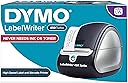
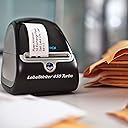
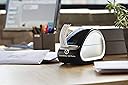
The DYMO LabelWriter 450 Turbo is a high-speed thermal label printer capable of producing up to 71 four-line labels per minute. It uses direct thermal printing technology, eliminating the need for ink or toner, and integrates seamlessly with Microsoft Office and Google Contacts for easy label customization. Compact and USB-powered, it supports labels up to 2.2 inches wide, making it ideal for professional office environments seeking efficient, cost-effective labeling solutions.


| ASIN | B0027JIIKQ |
| Additional Printer Functions | Print Only |
| B&W Pages per Minute | 71 ppm |
| Best Sellers Rank | #28,414 in Office Products ( See Top 100 in Office Products ) #81 in Desktop Label Printers |
| Brand | DYMO |
| Built-In Media | Label Maker |
| Color | Black/Silver |
| Color Depth | 8 bpp |
| Color Pages per Minute | 1 ppm |
| Compatible Devices | PC |
| Connectivity Technology | USB |
| Control Method | App |
| Controller Type | iOS |
| Customer Reviews | 4.4 out of 5 stars 4,804 Reviews |
| Dual-sided printing | No |
| Duplex | |
| Global Trade Identification Number | 00071701056580 |
| Hardware Interface | USB |
| Ink Color | Black |
| Item Dimensions D x W x H | 4.08"D x 7.25"W x 5.75"H |
| Item Type Name | Direct Thermal Printer |
| Item Weight | 1 Kilograms |
| Manufacturer | DYMO |
| Maximum Copy Resolution Black and White | 600 dpi x 300 |
| Maximum Copy Speed Black and White | 71 ppm |
| Maximum Media Size | Paper Roll |
| Maximum Print Resolution Black and White | 600 x 300 |
| Maximum Sheet Capacity | 71 |
| Maximum print Resolution Color | 300 x 300 |
| Model Name | 450 Turbo Machine |
| Model Number | 1752265 |
| Model Series | 450 Turbo |
| Number of Trays | 1 |
| Other Special Features of the Product | black |
| Output sheet capacity | 71 |
| Paper Size | 2 3/10" |
| Print media | Labels |
| Printer Connectivity Type | USB |
| Printer Output Type | Monochrome |
| Printer Type | Thermal |
| Printing Technology | Thermal |
| Processor Count | 1 |
| Resolution | 600 x 300 |
| Scanner Type | Sheetfed |
| Special Feature | black |
| Specific Uses For Product | Office |
| Total USB 2.0 Ports | 1 |
| Total Usb Ports | 1 |
| UPC | 071701056580 300715912989 689407072928 300715917113 369452795590 071701691101 369452795583 |
| Unit Count | 1 Count |
| Warranty Description | 2-year limited warranty |
| Warranty Type | limited warranty |
T**G
Super Good Item
My first experience with this item was using my co-worker's. I was reluctant and didn't see the need for this, until I tried it. Now I couldn't imagine working without one. I bought one (450 regular)for my home, have since retired and just purchased the 450 Turbo. It's easy to load the labels in, and the setup is a breeze. You can also print labels from a Word document by clicking on the Dymo icon on your Word toolbar. It takes different size labels. It's a must have for single address label use or multiple addresses. You can also save your data to the address book. You can insert graphics. It prints in monochrome, not color. There's no ribbon or ink-cartridges to buy or change. The price is an absolute steal. I own the regular Dymo 450 (it prints 51 labels per minute) and it's a God-send. It's still going strong after printing thousands of labels. No more handwritten addresses ever. I also use it to label other items (canisters, power cords, etc). I purchased this because its a super, super good deal and just in case my current Dymo goes toes up. At 71 labels per minute, it's faster and cheaper. UPDATE: (4/28/2013) Moved my old Dymo 450 to my backup computer. Thought I had to install the software for the 450 Turbo and would lose my addresses when I installed the 450 Turbo to my main computer. But I was happily surprised. No need to install the included software, as the Dymo 450 and 450 Turbo software are the same. All I had to do was load the labels and plug it in and I was ready. Loading the labels can be tricky and you need a little patience, but it's doable. Love it. And it's super fast. I don't use it to print postage, so I can't comment on that.
N**E
If you have online Business you have to have this printer!
First of all I never used another brand like Zebra, Brother so I cannot compare Dymo with these printers. But I have total 4 Dymo printers for online business. 2 of 450 turbo and 2 of 4XL DYMO 1755120 LabelWriter 4XL Thermal Label Printer . All printers are working very well. The oldest one is 4 years old but still goes very strong. We print approximately 400-500 shipping labels each day. We get tired of to pay for ink and when the weather is rainy the ink was all messed it up. Scanners couldn't read the barcodes and labels look like somebody touch with dirty hands. After look around we decide to go with Dymo. Our Dymo 450 Turbo was for the shipping labels print from stamps.com, paypal and ebay. The label you should use is 99019. I never used original labels. In my experience this seller DYMO-Compatible 99019 1-Part Internet Postage Labels (2-5/16" x 7-1/2") -- BPA Free! (25 Rolls; 150 Labels per Roll) has the best quality labels. I usually bought 20-30 rolls and they come much more cheaper. Just check his listings. The printer is very cheap and the cost of the generic labels cover the cost of the printer in a few months. After we change to shippingeasy.com and needed 4"x6" label so had to buy 4XL. I still use 450 Turbo for our items labels, barcode and warning labels. In time we found a company who sells generic dymo labels in color and it helped us to design our branded items ( Here is the sample of pink labels http://www.amazon.com/s/ref=nb_sb_noss?url=search-alias%3Doffice-products&field-keywords=dymo+printer+label+pink&rh=n%3A1064954%2Ck%3Adymo+printer+label+pink ) . I strongly advice you to get the cleaning pads DYMO 60622 Cleaning Card for LabelWriter Label Printers, 10-Pack and use time to time. It clears the rollers. I used first time like 2 years later start to use printer. A handful papers, dust came out. I just couldn't believe my eyes. Just be sure how you instal the paper and tighten the label holder. And you're ready for another busy day...
A**W
42,000+ printed labels and still going strong.
We use this little printer, the Dymo LabelWriter 450 Turbo, to print ingredient and name labels for various products, all of which are used in a freezer and go through freeze/thaw cycles. The print quality is great and the off-brand labels I used (Enko) work great on our containers in the freezer. We've printed over 42,000 labels in just six months and it has work perfectly the vast majority of the time. Every so often it jams and it can be a bit of a pain to get fixed, but it only takes a few minutes to get it working again. Also, if you put the labels in the wrong direction then it will 100% jam every time because there isn't a sensor to tell it that they are in incorrectly, so just pay attention as you are installing it. They go in with the sticker facing down, so it is a bit odd initially. We use three different sizes of labels and it takes literally SECONDS to change the label type. It also has a system in place which automatically prevents the labels from printing in the wrong spot. What that means is you will never have to slowly adjust the location of the labels on the spool to get it to print in the correct spot. It prints perfectly center every time. The print quality is great - we can print extremely small font and it is still legible. It is very quick. The small labels we use can print about 2 per second and the largest can take about 1.5 seconds per label due to it having an image (our logo), but prints faster if only text is displayed. The program that comes with it is adequate for printing simple labels and text. It is fairly simple to use and only has a couple of annoying aspects that can be overcome with some patience. For example, if you are typing or copy/pasting in a text box you will have to manually press enter for each line break, otherwise it will continuously write the text on the same line way off the screen. Overall it is a great product. I will probably buy a couple more in case this one breaks, but at the sub $100 price point it is totally worth it, especially considering the volume of labels that have gone through it. Definitely recommended.
D**N
Great label maker
The negative first; this device was a bear to set up on Windows 7. Although Windows thought it was connected, the software (DYMO Label v.8) refused to find it. For whatever reason, I had to uninstall/reinstall twice, AND go to device manager and uninstall the drivers before the thing was finally recognized. Once it was set up, it worked like a charm. No problem entering label information (though importing from a spreadsheet wasn't very helpful - too many corrections needed to the way I like names formatted). You can set up multiple address books in the software, so that you can store labels for future use. The Quickbooks integration doesn't work, as far as I can tell. After installing the software, the DYMO install said I'd be prompted to allow the add-in next time I started Quickbooks - but I wasn't. So I'm having to copy all the label info to the DYMO address book manager. Not a biggie, but a little frustrating. It would be great if the DYMO address books would also allow you store other address info - telephone, email etc. I would love to find one product that could store all my address related info in one place, AND print labels. Sadly, this is not that software. The printer comes with a meager number of 'starter' labels - I'd suggest ordering labels at the same time you buy the printer. Label supplies are pricey - I think like other printer manufacturers, DYMO make their money from the consumables, not the equipment. However, the print speed and quality of the labels is excellent. One thing (common to many manufacturers) is their decision to place the serial number on the bottom, UNDER the cables - making it almost impossible to read without disassembling the cables. Why don't devices have a way of displaying their serial numbers on screen, or at least put them somewhere easily accessible? It turned out I didn't even need the serial number to register the device, although the registration screen said I would. Oh well. On the whole, if you want a fast, simple label printer, this would be the one to go for.
L**Y
Let Me Save You Some Time
Overall this is a very good and solid printer (Model: 450 Turbo). Let me save someone some time. I was on the verge of sending this back because I could not get this thing to print. It comes with a demo roll of labels. I installed the software, loaded up the paper on the spool and executed the printing function. My print tests appeared to be printing, however when I would tear off the label, to my surprise there was no writing or ink on the label. After about 30-45 minutes of troubleshooting and surfing the internet for answers, I came to the conclusion that I was going to send this back to amazon. I had wasted just about the entire roll of demo labels trying to load this thing and print. It turns out that if you look very close at the labels, there is a circular hole on the border of each label. That hole MUST be on the upper left side (left side if your in front of the printer). So, if your loading the paper on the spool, ensure that the whole is positioned on the upper left side. This tiny mistake cost me a headache, but in the end everything turned out fine. I've had this for about 3 months now and it has been GREAT. NOT ONE PROBLEM! We also use one at work for printing visitor badges. Ive been using the one at work for over a year now and NOT ONE PROBLEM! That one is used heavily and still no problems. Overall this product has met my expectation. I would definitely buy a second one if I find the need.
D**E
Fast, efficient, small footprint, great price
I purchased several of these as a refresh to much older models that we'd been using. The price was right and the software we'd been using was clunky and tough to support, so I did some research and decided that DYMO might be the way to go. I ordered one from Amazon to test first before we made our decision. Out of the box I liked the small footprint and look of the unit. The physical set up of the unit is easy enough - 1 USB cable to the PC and 1 power cable. The software installed seamlessly and in 5-10 minutes of unboxing, I was printing labels. The software is great and very easy to understand. You can add little pictures to your labels and it is very versatile to complete a variety of jobs from shipping labels, stamps, file folders, etc. You name it, my users probably print it. After having no issues with my test unit, I decided to order more for my group. A few of my users had a little difficulty at first putting the labels in the unit, but I believe this is a simple learning curve from changing from an older model. The overall feedback has been very positive and everyone is very happy with the added functionality, ease of use, and versatility of the software and labels available. The unit prints fast and we feel it's going to increase efficiency for our label users.
T**E
Just don't.
For starters, don't buy this from warehousedeals or any 3rd party seller. If you do, you will not be eligible for the 2 yr warranty. A repair would cost $75 -- more than the cost of the unit. I finally got it to work, although when I initially tried to get the label spool around it, it sucked it in and clogged. Took a call to support to figure out how to fix. In the meanwhile, there's a black plastic tab that is supposed to move down the roller on the bottom. Well, the tab is very weak and er, was damaged. With the tab damaged, you can't actually fit the faceplate on, so for a while it was operating without the faceplate. Finally got it sorted out by forcing it back into position. Shoddy engineering though to make that lever so weak. As for the value proposition, it's lousy. I got it basically after trying out stamps.com. Stamps.com charges $16/mo to print USPS postage, and so I figured that a one-time investment of $60 would be a winner b/c I could just print out USPS postage from it for no monthly fee. I can sorta do that. I can print out USPS postage for packages up to 13 oz. To do so I need to use special stamp rolls which cost additional, plus I have to pay the full cost of the stamp. So it doesn't really save money. A pack of 200 stamps costs $16, which is pretty high. But I want it to print out package shipping labels for larger packages. To gain this ability, you are charged $9.99 a month. In other words, ZERO savings over Stamps.com And the large labels aren't included in the beginner package. The larger 4x2.5 labels cost $15 for one roll of 300. That's fairly expensive for what is basically a roll of stickers. Shouldn't be more than $5. I thought I had found a way to save time and money for shipping packages. I didn't. I would recommend either stamps.com (which can print postage on the standard printer that you already own) or using paypal's USPS service which has the same prices, only 1) no monthly fee and 2) no "money left on the table" because with paypal you don't have to buy postage in $10 chunks. 1/5 stars. Avoid.
M**G
Very easy to use- works with ebay/paypal shipping (windows) :)
Unlike what many people claimed, it actually does work with ebay & paypal shipping. You just have to make sure your printer is set to any of the Dymo Labelwriter printers (I experimented and tried them all, and they all seemed to work fine with this printer). The one thing you need to buy separately to print shipping labels with ebay/paypal is a roll of 2-5/6x7-1/2" labels (DYMO 99019). This makes shipping things so much easier- no more cutting out labels, fussing with the inkjet printer or having to tape the label on. It also never needs ink refills, so it will eventually pay itself off (compared to the cost of refilling ink for an inkjet over time). I highly recommend this to anyone who ships a lot. EDIT 6/1/2014: Since I updated to Windows 8.1, I have been having a few issues with the software and drivers for the printer. First, when printing a shipping label on paypal or ebay's website, a bunch of annoying java popups come up and I have to repeatedly click allow, ok, accept, run, etc. It used to be more streamlined. This is likely due to the security issues with java, but it's still annoying and adds a lot of steps to printing a shipping label. The other problem I have been having is with the actual Dymo software/driver itself. When I am using Dymo's app to design and print labels, for some reason it prints an extra label each time (meaning that if I printed 10 of 1 label design, it would print 11, or if I told it to print 1, it would print 2). This is a waste of labels and gets annoying. I could always tell it to print one less than I need, but that isn't an option when I only want 1 label. I have found myself switching between label rolls a lot. I print fragile stickers, shipping labels, packing slip (receipts) and sometimes mailing addresses. When I sell something on ebay, I print both a packing slip and a shipping label, so I have to print one and switch the roll and print the other. This isn't a design flaw with the actual product. I am just suggesting that if you sell online or think you'll print lots of different types of labels, maybe consider the 450 twin turbo. If you have any questions, don't hesitate to ask in the comments below. I'll do my best to answer them :)
A**R
Five Stars
nice
P**R
DEFECTIVE DYMO PRINTER
We bought the printer on 30th September and item was delivered 5th October. The machine was used only for a few weeks and unable to print anymore labels. This is disappointing. Unable to contact supplier. Please contact us for a new replacement.
A**H
Very nice reliable
This printer is very easy to use. Its also reliable
B**N
Meets expectations
Seems to be a shortage as we were hoping to stock up on them at least have a back up in case something happens to the one we are using unfortunately the available ones are priced exorbitantly. So will fall back to buying from Staples instead. As with regards to the actual product, it only failed when we were using suspect labels. We were testing a cheaper supplier but ended up jamming a lot. We are back to using Office Label but it also seems they are scarce with supply our last order did not arrive, we did get a refund for that. These devices are hardy, despite not being classified as industrial level, we have worked this one way and beyond. We easily print close to a thousands of labels a week. This has endured and is continuously in service. Highly recommended office machine if you could find the ones appropriately priced.
A**O
exelente producto
exelente impresora, calidad de producto y la rapidez de impresion
Trustpilot
2 weeks ago
3 days ago