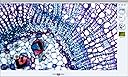
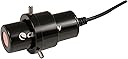
🔍 Elevate your microscope game—capture, share, and impress with every discovery!
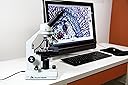
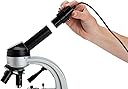
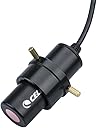
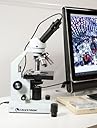
The Celestron Digital Microscope Imager 44421 is a 2MP camera that replaces your microscope’s eyepiece, enabling high-resolution image and video capture directly on your computer via USB 2.0. Compatible with standard 23-30mm eyepiece tubes and major operating systems, it transforms traditional microscopes into digital powerhouses for professional and educational use.




| ASIN | B003DVP7CE |
| Customer Reviews | 3.9 3.9 out of 5 stars (243) |
| Date First Available | March 24, 2010 |
| Department | Mounts |
| Is Discontinued By Manufacturer | No |
| Item Weight | 1 pounds |
| Item model number | 44421 |
| Manufacturer | Celestron |
| Product Dimensions | 6 x 6 x 2 inches |
R**R
Terrific device despite bad software
I use this with an OMAX 40X-2000X Lab LED Binocular Compound Microscope (from Amazon). The Omax is a very good microscope for the price and this Celestron imager has, if anything, even better optics. I've used this on a desktop Windows XP system to show pond microorganisms and cheek cells over a projector to my son's 3rd grade class (they loved it). I also use it at home on Windows 7. The enclosed software would not run on either computer, which was frustrating, but I found you could just plug it into the XP computer, let it install, then double-click on the drive that showed up when you double click "My Computer". This let us view the images in real-time and take snapshot jpegs. It did not, however, allow us to capture and save video. I did not explore XP further. At home, on Windows 7, following the advice of other reviewers, I used the software for my built-in laptop camera as follows: hit the Windows Icon at bottom left of screen--> All Programs --> ArcSoft WebCam --> WebCam Companion 3 (your computer will likely have a different name for the program, of course, but you'll find it). Start the program, go to Settings, choose Celestron as the input device. If you have to, you can disable the computer's own camera, but I didn't need to (right click on Computer,--> Device Manager--> Imaging Devices--> double click Camera--> Driver--> Disable). You can show the images full screen on your computer and you can capture nice still shots and video. The saved photos look just as good as when you are looking through the scope. Some people seem upset that the Celestron eyepiece magnifies differently from your microscope's other eyepiece (if you have a binocular scope). But most microscopes have a 10x or 20x eyepiece: Celestron reasonably compromised by making their eyepiece 15X, so it is not too different from either one. It would be nice if it were the same mag as your other eyepiece, but no big deal. All in all, the optical quality is excellent and the device works great on XP and Windows 7 once you figure out a way around the worthless software. A remarkable product for the price.
G**S
Celestron Digital Microscope Imager 44421 >> Highly recommended!
High quality item at a competitive price: $54.95 at Celestron's website but paid only $34.95 at Amazon.com. Cannot beat it for a 2Mp camera. Performs as expected ... and beyond. I am using it for Microscopy Imaging with a trinocular gemological microscope. With the included adapter fits both standard 23mm and 30mm camera ports. The included software - Digital Microscope Suite 2.0 on CD - is basically fine and appropriate. I have Windows 7 SP1 x86. Can capture pictures (single or programmable burst) and live video, and it is customizable. Take into consideration, though, that the captured image will be cropped from what you see through the stereo eyepieces >>> round vs. rectangular >>> WYSIWYG, which is OK for me. Enjoyable and very useful for, as said, imaging as well for eye relaxation and sharing on computer's screen. Note: Connector is USB 2.0, which is the one my laptop has. I really do not know if can be used with USB 3.0 ports. Thank you for reading and my best regards. ByTano Studios - Las Vegas, NV - U.S.A. Updated October 14, 2013: For a more elaborated software (MICAM version 1.6), please check here >==>> Free download (Author asks for voluntary donations via PayPal): http://science4all.nl/?Microscopy_and_Photography Thank you for reading. ByTano Studios - Las Vegas, NV - U.S.A.
M**P
Totally adequate and a bit more-GREAT VALUE
To give you some background: I am a practicing pathologist in a busy community practice. When our prior camera (which was hard-mounted on one of our microscopes and shared by several pathologists) "crapped the bed", I found myself in rather urgent need of a solution: I had three conferences coming up within the next week for which I needed photomicrographs. I did a quick Amazon search, coming upon the Celestron product and another product (Dino-Eye) that costs about five times as much. I ordered both. I've now been using the Celestron product for about six months. The Celestron imager arrived in two days with expedited shipping. The imager does NOT look like the picture that is currently (May 2011) on the Amazon site. Basically, the imager that I received is a long tube that you shove into one of the ocular ports of your microscope after removing one of the oculars. I rock a new double-headed Olympus clinical microscope, and I have to use the adapter that comes with the imager. What I do is put the imager in one of the spare head oculars of my scope and then plug the imager into a spare USB port on my computer. I then look through my own oculars, get the slide centered, then focus with the imaging software (which puts a real-time miniscreen on my computer monitor). I cannot get parfocality between my oculars and the imager in the spare head, but that's a minor inconvenience to me. The software is VERY easy to use: you literally open the software, find the image you want to take, and click. That's it. The file is saved both in a folder on the imaging software and on a file in your computer hard drive. The software itself is bare-bones...there's no way to edit your images (for example: contrast/brightness). The software also allows you to not only take static images, but also has a "movie" mode. Static images are saved as a JPEG file in a folder on your hard-drive (see below). This is a 2 megapixel imager, so for really hi-res work, I'll assume that it's inadequate. HOWEVER, it's totally adequate for my needs, especially for conference images. I have also used the images for an upcoming journal publication, and they look fine and have been accepted for publication. I also do microscopic image review sessions for second-year medical students, and have used this imager many times to grab an image for later teaching. One other use that I've found is using the image on the computer screen to show clinicians their cases. I practice in a hospital setting, and most of the clinicians prefer to just "look on my tv screen" to view the slide in real time. There are three minor drawbacks that I see with this product: 1. The imager is a 20X magnifier, double that of the usual 10X oculars in the scope. Luckily I have a 2X objective, so I can still grab 40X low-power images. Still, I wish it didn't magnify SO MUCH. 2. The software, the way I have configured it, saves the images automatically in a folder called "Microscope Media" in the "My Documents" portion of my hard drive. It would've made more sense (and would've been less clunky) to put it in the "My Pictures" folder, but I'm sure those of you who are more computer-saavy could fix this. 3. The software is very "bare bones", so there's no ability to manipulate the image (color/contrast/brightness/cropping) using the software that comes with this, and no ability to adjust the imager settings in real time. Sometimes the images are a bit light and don't have enough contrast. I generally grab the images that I need at work, drag them onto my flash drive, bring them home to my laptop, and use the newest version of Power Point to do any adjusting as I build my presentation. HOWEVER, for what I need in an imager, the Celestron imager is more-than-adequate. I use it once or twice a week for conference prep, for teaching images, and whenever a clinician (or group of them with residents/med studs) comes into my office to see slides on their patient. The two main advantages (which totally outweigh the few disadvantages)are: 1. Ease of use- while the software is very simplistic and doesn't allow you to do much, it's EXTREMELY easy to use (get image on screen, focus, "click"). If you want the ability to manipulate the images, then I'm sure you could use a real graphics program like photoshop to do so. As an aside, I found the software which came with the Dino-Eye imager IMPOSSIBLE to use. 2. Cost- Dude, it's fifty bucks! For my day-to-day life as a busy, community hospital-based pathologist, it's all I need! At this price, you just can't go wrong. I've since bought three more for some of my favorite colleagues, and they like them too. In summary, I would recommend this imager to anyone needing a quick-easy method of grabbing static microscopic images. The ease of use and the price make this a worthwhile purchase: one of the best purchases I've ever made, actually! 7/30/12: Just an update....I'm still using this product and am VERY happy with it! HIGHLY RECOMMENDED! 7/24/13: Am still using the imager and very satisfied. Have bought several more for colleagues. 10/08/14: Still using it. It still works and I'm still very happy with it. 4/13/16: Still using it (and it's the same one I bought when I wrote the review). I see that they've updated the picture to show the actual product as well. I just bought another one for a colleague. Still very satisfied. 4/30/2020: I had to buy a new one as my new computer would not work with it (I still don't get the error, but whatever). The new one also works quite well, and while it came with upgraded software, I found that software a but tougher to navigate. Thankfully, it still works with the old software!!!
M**.
L'ho facilmente inserita nella torretta del mio Konus al posto dell'oculare e collegata via usb al pc (puoi usare VLC per vedere e registrare video del preparato sotto osservazione) oppure al tablet (si vede usando l'applicazione fotocamera). La uso a casa e a scuola. La definizione è accettabile. Ha solo un po'di ritardo spostando il campo di osservazione in tempo reale.
K**I
現在高騰しているようですが、購入時には5000円程度でした。取付や設定はとても簡単で、すぐに顕微鏡画像を見ることができました。 難点は、解像度が200万画素しかないため、大きな画像には不向きです。
A**R
Great beginning came for a microscope. if you want decent pictures and ease of use this is great. No software fro a Mac user but use the Photo booth app on you mack and you just plug and play it is only 2 mp but fine if you just need images for a text doc or a powerpoint for lab class
C**N
Putroppo, una volta montata sull’obbiettivo, non registra una immagine nitida, ma molto scura. L’avevo comprata per mostrare in diretta agli alunni della mia classe di scienze alcuni insetti, proiettando l’immagine direttamente sulla LIM. Non soddisfacente come credevo
W**M
Simple to install and use. I would pay more for higher resolution. Good at lower resolutions adequate for my grandson's use.
Trustpilot
2 months ago
1 week ago