

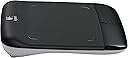

Logitech Wireless Touchpad with Multi-Touch Navigation
Product ID: 1142405
📡Wireless with Unifying receiver
🔄Gesture-based navigation
🖐️5-inch multi-touch surface
Buy anything from 5,000+ international stores. One checkout price. No surprise fees. Join 2M+ shoppers on Desertcart.
Desertcart purchases this item on your behalf and handles shipping, customs, and support to Denmark.
🖱️ Elevate your workflow—touch, swipe, and conquer the web like a pro!
The Logitech Wireless Touchpad offers a spacious 5-inch multi-touch surface with intuitive gesture controls for smooth navigation. Designed for Windows 7, it connects wirelessly via a compact Unifying receiver, delivering clutter-free convenience and precise fingertip control ideal for professionals seeking efficient, modern input solutions.
| Best Sellers Rank | #150 in Computer Touch Pads |
| Customer Reviews | 3.8 out of 5 stars 350 Reviews |
A**R
Pretty Good Trackpad That Makes Browsing And Navigating The Internet More Convenient
Having just an average of 3.5 stars on the Amazon product page, I was at first a bit hesitant in deciding to buy one. Because this Logitech Touchpad was Amazon's Deal of the Day recently, I was able to ask some questions in the comments section while the sale was still live, and was assured by a few participants that it works well. And indeed, this trackpad works beautifully. In navigating my browser (Google Chrome), I no longer have to use the mouse to point and click the navigation buttons. To move the mouse pointer, use 1 finger on the trackpad. To scroll up or down, use 2 fingers. To go to the previous webpage, use 3 fingers to swipe from right to left. And to go to the next page that you have visited before, use 3 fingers to swipe from left to right. Although large left and right mouse buttons are provided in the lower portion of the trackpad, the left-click button is really not necessary, because you can just tap the trackpad and it will register as a left mouse click. This is very convenient. The tap effort required is very light and just right. This wireless touchpad uses two AA batteries for power, and it has a power switch on the backside. You need to plug a tiny Unifying receiver into your computer's USB port. Some reviewers deem the trackpad area too small, when compared to Apple's Magic Trackpad, but I do not find it a problem. It's probably because I do not move my fingers in one continuous stroke but several small strokes. Unlike a mouse, lifting a finger is much easier than grabbing a mouse and lifting it. Overall, the experience is quite good. Update (1-12-12): Originally designed for Windows 7, this touchpad amazingly also works under Mac OS X (Snow Leopard) and Google Chrome OS Lime, although the 3-finger left/right swipes do NOT work. Basic functionality: 1-finger pointer moving, 2-finger vertical scrolling, and tap to left-click all work normally.
L**E
Not bad in Windows 8 but a few improvements would make it a 5 star item
I'm using Windows 8 on an Alienware X51 PC for my media center PC that runs the TV and everything. I've gone through a LOT of input devices, keyboards, mice, etc, looking for a good balance. I've used the Logitech Dinovo Mini for a few years until it started having problems with the A button - and I replaced it with a smaller far cheaper mini keyboard/touchpad combo and love that. But while that works most of the time, sometimes I want or need the full key experience, if I'm going to be typing and such. I've already got the Logitech solar keyboard for this, and had been using a mouse with the single unifying receiver for them, so thought this would be a good thing to try. I prefer touchpads - always have. I've been using laptops since the early 90's and always used touchpads, no mice, no trackpoints. The last 3 1/2 years I've been using Macbook Pros, and I *REALLY* love their touchpad. That's one thing Apple does well is hardware. So I thought a touchpad would work better for this use, since I'm generally sitting on my couch when I'm using the PC on the TV. That means I've been working the mouse on the smaller curved area on the arm of the couch. Definitely the touchpad would be a step up. It arrived, batteries packaged in it already, with a small pull piece of paper that slips out between the battery and the contacts, so they don't discharge in transit. The first downside was that there is no storage for the receiver like most of their products have. If you're adding this to an existing setup that already has a unifying receiver, just means one more tiny thing laying around to get lost or add to the clutter. Got it added with the unifying software, and it was recognized instantly, no problems. I sit about 20 feet from the TV in my great room, the receiver is on the back of the computer in the cabinet, and the signal is fine. Installed the setpoint software for Windows 8, and it too installed fine, recognized the device, no issues. Now after having spent over three years on the touchpad on my various Macbook Pro laptops, there is a very high bar set. This didn't make it over the bar, but at least I hit the bar with my head... The unit is responsive, the settings for acceleration, smart move, even pointer tails works well. It goes where I want it to go. Of course, I'm used to the Mac and my IOS devices that scroll the opposite way that Windows does, but fortunately there's a simple registry edit that lets me make the Windows scrolling match what I'm used to with everything else, and that worked fine with this touchpad - now when I push up, the page content moves up, since my input is on the content, not the scroll bar. Gestures, however, leave something to be desired after all this time with the gestures on the Mac touchpad. They work, for the most part, but they're limited in use. Instead of snapping things to the left or the right, I would've rather had a better app switch option. The minimize / restore works well as does the two finger scrolling up and down, but the scrolling left to right was a bit jumpier. Again, I'm used to the very smooth gestures on the Mac touchpads, and this just doesn't quite match. And what company in their right minds now-a-days would put out ANY multitouch device that doesn't allow for pinch to zoom in and out? Or to rotate? And I really wish you could choose what gestures do what... The feel is good, not as good as the glass surface of the Mac ones, but it's by far the best feeling touchpad I've had, better than any of the PC laptops I've had in the past. Others have complained that there's no different surface to differentiate between the touch area and the border around the touch area, but that doesn't bother me at all as for me it's just intuitive after a couple decades of touchpad use. For my use, the gestures weren't a big factor in deciding to get it, as this is a media center PC, so I have my security camera system running on part of the screen and Windows Media Center on another, both always visible. I don't do email on it, and rarely go on the web except to check for driver updates and such, so for my use the touchpad is working great. But for someone who is using this on a production computer they use for productivity, I don't know that it's going to do a great job of replacing your mouse. But if you're looking for a good touchpad that works great as a touchpad and has optional gestures that may or may not end up being useful, then this is a good option. I got it on a gold box deal for real cheap, not sure I'd feel it was as worthwhile if I paid list price...
L**X
Works perfectly on Vista
I am running Vista 64 bit on a Dell desktop computer. I use the touchpad on my laptop all the time, and wanted to be able use one with the desktop as well. I discovered that there is very little available in the way of touchpads for desktops and what is there is quite expensive. I have a Logitech wireless keyboard and have used the wireless trackman for years, so when Logitech came out with this I was very excited, only to to be disappointed to discover that it is listed for Windows 7 only. After a lot of Googling, I found several posts which indicated that this touchpad would, in fact, work with Vista, but with limited functionality. When Amazon made this a deal of the day, I decided to go ahead and take a chance. I would have been happy if only the basic functions worked. I was astonished when I took this out of the box, plugged it in, and found that ALL of the listed functions worked extremely well on my Vista computer. I already had Setpoint installed for the keyboard and trackman and it immediately recognized the touchpad and allowed me to tweak the settings. After reading all the reviews complaining of the functionality and design of the device, my expectations were low. I have to say that this is the best touchpad I have ever used. It is responsive and dependable and all of the functions work. I've been a touchpad user for many, many years on notebook computers, so I'm very comfortable using one. I've had no trouble adjusting to not overreaching the active area. It's just a non-issue with me. Now, a couple of complaints. There is no middle click button. I had hoped that pressing both buttons at the same time would act as a middle click as it does on my notebook. I use middle click frequently and this is very frustrating. There are no tap zones, so it can't be configured to use a tap zone for middle click or anything else. While it's not perfect, it is exceeding my expectations and I am very happy to have purchased it. I hope that Logitech will come out with an improved driver that will allow tap zones and re-defining keys.
J**S
4 and 1/2 stars!
I'd start off by saying that I've never used the Mac's touchpad, so I have nothing to compare it to, but it doesn't matter, since I use Win7. It'd be comparing an apple and an orange. After I plugged in the usb receiver, it started working right away. I went ahead and went to Logitech website and downloaded their software, installed them, without any glitch. I've noticed a lot of people thought it was just "ok" but after just one day of use, I must say, I'd give better than 4 star rating. Here's why: 1. comfortable (that's the whole point, right?). 2. Wireless, and the receiver is tiny, so I can leave it in the usb, and just forget about it. 3. small enough to fit on my workstation, but much larger than the touch pad my laptop came with (below the space bar on the keyboard). 4. I love the extra functions this touchpad has that my old mouse did not have. Two-finger touch/ scrolling, three finger touch (makes scrolling up and down on a long document much easier), and four finger touch (my favorite! Move four fingers up and all your open windows pop up and just choose the window you want to look at). 5. left and right mouse buttons. The fact that they put these buttons means you can do everything with this device that can be done with a mouse. 6. Price: at $25 (amazon daily sale price), it wasn't a big investment, but I'll be using it everyday at work! Now here's why it didn't get 5 star: 1. The touchpad has margins about an inch on both sides. It can be annoying because your finger might still be moving but once it leaves the "sensitive" part, the cursor also stops. I don't find it that annoying, but I can understand some people's frustrations. 2. Hard to play games with. If you try to play Angry birds with this, it'll take a bit of used to. I don't play game on my computer, so It's not a big deal for me either. 3. speed and consistency: I guess every mouse has a bit of different "acceleration" and sensitivity to movements, and this device is no exception. The cursor moves a bit fast for my touch, but I think I can get used to it. I hope this review helps!
D**N
Good - If you like trackpads
I've been experimenting with different pointing devices off and on for the past few months, looking for the one that's "just right" for me. After using the Logitech Wireless Touchpad, I think I'll probably keep looking. I've used trackpads on various laptop PCs for over ten years. I usually get sick of them and add a mouse to my laptop. So I must be crazy to add a trackpad to my desktop PC, but this one is different. It has a much bigger touch area, which makes it much more useful. It's also free-standing, so I can vary its position a little bit and avoid keeping my mouse hand in the same position all the time. There isn't really anyplace to rest the heel of your hand, so mine got a little sore on my desk when I first started using this. First I put a pad of post-its in front of it and that felt better. Then I gave up and grabbed an old mousepad. That seems to work pretty well. The functionality of the Touchpad is nice. My favorite gesture is the two-fingered drag. This is equivalent to a mouse's wheel for scrolling up and down or side to side. This is amazingly simple. Definitely a time saver. I also like how quiet it is. We all know the angry dude in the office who has the loud mouse and you can hear every frustrated click and every bitter wheel scroll from halfway across the office. The touch area of this device is completely silent. The buttons make a normal *click* sound though. The right-click button is very inconvenient. I'm tempted to change the settings and "swap" the position of the left and right buttons, because tapping the pad is the same as a left-click. The left button is easy to reach with your thumb if you're right-handed, but there's no convenient way to use the right button except for your pinkie or moving your whole hand down there. That's not so good. I have two large displays side-by-side. I had to adjust the settings quite a bit to make it possible to quickly move the pointer from one display to the other. The acceleration setting is pretty good for that. I tried using the "speed" setting, but that really hurts the accuracy of the motion and makes it hard to zero in on small screen elements like check boxes and radio buttons. One other thing that I like is that the USB transmitter (very small) works with more than one Logitech wireless device. After updating the drivers I was able to configure one USB key to operate my old Logitech mouse and this new trackpad. So now I have both of them working on my system and can quickly switch from one to the other. The Touchpad is great for reading and browsing, and I can still use my more accurate mouse for things like image editing in Photoshop.
J**O
It's bigger than you think!
I have a desktop-with-projector setup instead of a TV in my place, so I wanted a wireless mouse that I could use on the couch. I was fed up with optical units that needed flat surfaces to work properly, so I decided to take a financial hit and get one of these guys. Boy am I satisfied with it! It was plug-and-play with linux mint, windows xp, and windows 7. The range is as good as I need (10-15 feet), and the usb dongle is low-profile and compact. It takes two double-A batteries, so there's no charging of an internal battery (unless you choose to use rechargeable double-A batteries!), and the battery life for me -- relatively frequent use -- has been about a month and a half to two months. Now, on to the usability features. I am a low-tech touchpad user. I like to disable all the fancy features from my laptop touchpads, except for the edge scrolling feature. That said, this touchpad may make a believer out of me. It has a two-finger scrolling function (you drag two fingers anywhere on the touchpad and it scrolls in the direction you drag) -- I have grown to love this feature. It's pretty good at detecting when I want to tap (not perfect, but that's likely user error!), and the overall response is excellent. The touchpad is bigger than you might be expecting. Make sure you check out the product features and compare them to your environment so that you know it's a good fit for you. I run a lot of different wireless devices in my home, and this one never conflicts or gets confused with any of them. In short, if you want a slightly large touchpad (perhaps in lieu of a traditional mouse, perhaps just as an alternative to your laptop touchpad, or for any other reason), this is a good product. It has served me well, like most of my Logitech products.
M**H
Review From A Mac Owner's Perspective - Just eh.
So, I've been having issues with my wrist from my mouse and / or keyboard lately, and I noticed at home when I use my Macbook with the magic trackpad it's a lot easier on my wrist. I figured, if that works for me at home surely this device would be similar. Unfortunately that didn't really seem to be the case. I can't say that it doesn't work as advertised, because it does, it just doesn't do it really well. The tracking is fine, it looks pretty slick, and it is a good size. The software works fine, it works well with the universal adapter, etc. The down sides, however, seem to pretty heavily outweigh the upsides, for me anyway. The size of the device would be excellent if the entire surface was used to sense your movements, but it doesn't. The actual size of the functional part of the trackpad isn't great. You can see this area in the picture marked by the little corner marks. And if you're a Mac user and have a habit of trying to use multi-finger gestures, that obviously doesn't work at all. The buttons are pretty difficult to click just due to their placement. All in all, I suppose if I wasn't a full time Mac user at home this product might resonate more with me, but unfortunately I think that a lot of people might buy this as a sort of replacement for the Magic Trackpad for a PC they have to use when their personal computer is a Mac. If this is you, DO NOT buy this. It just doesn't really hold a candle to the look, feel and functionality of the Mac Trackpad. If you're a full time PC user trying to find an alternative to a mouse, check out the other reviews as they will likely be more helpful, but if you're a Mac user, I would stay away. Reviews, Short and Sweet SS
J**.
Gestures are handy on Windows 7, Works Great, But Needs A Few Tweaks.
I really do like this track pad. The gestures for Windows 7 work accurately and consistently for me. It took me a few days to get used to it, but once I did I really enjoy using it and find it highly functional. So much so that I returned the Logitech Touch Mouse (910-002666) I reviewed a few days ago. This Touchpad is cheaper, has a more advanced slew of touch motions and doesn't move around my small work space like the M600 did. That mouse is nice as well, but as of this writing it is twice as much as the Touchpad with only two real gestures. The Touchpad is more dynamic and cost effective. There was a definite difference in feel between the touch motions between the mouse and touch pad: the Touchpad feels more precise when scrolling up and down, and seems to translate the touch commands to the screen slightly better than the M600 did. The device, while being plastic, looks nice and modern. The touch surface is a slightly textured plastic, but my fingers slide across it with no problems at all. By contrast, the M600 had a clear plastic touch surface that, after some usage, built up a sticky feeling to it, causing 'finger drag'. The Touchpad has two large piano-black buttons at the bottom that gather fingerprints quite easily, though I only use the right-click. In between the two buttons is an LED power/low battery light that turns off in just a few seconds of turning the unit on. The touch responses are accurate in the applications I have used them in: I can highlight sections of a paper in Word and move it with ease (two taps, while holding the second tap and dragging the cursor along the text gets the job done). I have learned to make sure that I totally lift my finger up after a single tap before swiping with the same finger because if done too quickly, it thinks you want to highlight something when you don't. In writing that all sounds like it would be a deal breaker, but in practice, it is a very minimal effort to avoid this situation, and you quickly learn to do so unconsciously. The remedy sounds like one would really have to slow their motions down, but that isn't the case. I find I can still navigate quite quickly with the Touhpad. Where it needs to be tweaked is in the software department. I'm no computer expert, but I would think that an update to either SetPoint or the Touchpad firmware would allow for more gestures to be used. I'd really like to see some type of right click enabled on this device; perhaps a tap with two fingers or something. It breaks the flow of things to have to move your hand (or as I do, curl your knuckle under) and tap the right-click button. It works, but seems odd given that most of your time on this is otherwise going to be spent on the track pad portion. Pinch and zoom don't interest me personally, but so many people wish it to be present on the Touchpad, Logitech would be wise to make it happen. Again, I can't imagine that would be a huge deal to give us in an update of some sort, but we'll see what happens down the line. My only real and true grievance with this device is with the lack of delineation between touchable and non-touchable surface area. A mouse/trackball/trackpad should be a fairly unconscious extension of the user's arm. One shouldn't have to glance down to see where their fingers are placed. The experience should be intuitive. And here Logitech made a very, very simple mistake (its kind of mind-boggling actually): There is no difference in texture or level between the active 'usable' portion and the borders. It is all one piece of plastic that is the same texture, color, and level. There are four little 'L'-shaped hash marks where the corners of the touch area are, but even after using this a few days, I still find I run off of the touch area. My 'office' if you can call it that is kind of dark, so I can't even see the marks most of the time. Nor should I even be looking there. It would have been (I assume) simple for Logitech to, perhaps, lower the touch surface so the user would know by tactile feel where he or she was at. But all said, that is truly my biggest gripe with this device. I can perform all functions and gestures with no problems, but it is odd; its like they focused on the big stuff, and ignored the small yet important details. Would I recommend this? Absolutely. I really do like it, and find it exceptionally enjoyable to use. SetPoint doesn't allow too much in terms of customization, but I guess I wasn't looking for it on this device because the default option are useful and helpful to me. You can change your cursor speeds, left or right hand usage, turn off some gestures, etc. Other reviewers have probably said this, but go to Logitech's web site and download their FlowScroll software - it makes scrolling and browsing smoother. I guess those are my feelings on this device. Good luck! P.S.: A day after I wrote this I was messing with various methods of elevating my wrist. The Wireless Touchpad is a joy for me to use, but one's hand is slightly canted at an upward angle at the wrist. I found my old wrist rest, Fellowes Gel Flex Transparent Mini Wrist Rest (Blue Crystal) , and it worked great. Up until now, I hated that rest, thinking it was too hard. But when used with the Logitech Touchpad, there has been a noticeable reduction in wrist fatigue (Although I think I paid $10-$15 for the rest locally!). Update 7/7/12: I was getting tired of running 'out of bounds' with this track pad because of no concrete changes in texture to tell me (without looking) that I had veered too far away. I took two strips of black electrical tape and cut the strips down the middle. I laid the strips in such a way as to link the little 'L'-shaped markings. It certainly doesn't look the prettiest, but it is a simple and effective solution to a situation Logitech should have seen coming a mile away. Update: 12/4/2012: I downgraded the number of stars due to Logitech's unwillingness to support more gestures for Windows 8. It does work in Windows 8, but possess none of the gestures that the new iteration has that would make sense on this pad as well. And, still, no two finger tap for right click.
Trustpilot
1 month ago
1 week ago